Agentic coding workflows
-
@HISEnberg I need to watch out that I don't start like my LLM responding to my input, but "Excellent feedback!" :)
All LLMs are not great with HISEscript still.
The knowledge gap between HiseScript and any other programming language is a temporary one. Sure only the big models somehow are fed with HiseScript and can one-shot you scripts that are (mostly) correct without any guidance, but that is precisely the pre-agent state of the art that I assumed will guard us from the robots taking over.
I think I need to catch you guys a bit up with what I did last week so that you can fully understand the fundamental change this will bring: the key to solving the hallucination problem (again, which I thought is deeply embedded in the very nature of LLMs) is to ensure that the context window of the LLM contains either the full set of API methods, language paradigms and properties (wasteful), or instruct the LLM to always query an existing set of resources before writing a single line of code.
There are multiple ways to achieve that efficiently and I came up with writing a custom MCP server that the agent can query and fetch the correct API method names & signature as well as component properties, LAF obj properties. including description. Then a reference guideline just needs to say: "WHENEVER YOU WRITE LAF CODE, LOOK UP THE FUNCTION NAME AND PROPERTIES!!!!!", give it the source and the LLM will lazily pull whatever it needs into the context window.
https://github.com/christoph-hart/hise_mcp_server
This provides the LLM with the always up to date (because automatically extracted from the source code) property list in a JSON format, eg. here for the LAF properties:
https://github.com/christoph-hart/hise_mcp_server/blob/master/data/laf_style_guide.json
Then whenever the user prompts something blablabla with LAF, it will pull in this style guide:
read it and understand what it can call.
Running Claude Code, editing your scripts in an external IDE while recompiling in HISE is convulted.
The MCP server can talk to HISE via a Rest API and send recompile messages, then get the output back as HTTP response and change the code until it compiles. This is the core development loop that powers that entire thing:
-
The XML/node structure of HISE is ripe for AI collaboration I believe.
Actually, the XML structure is not the best target for this as this is a stale file that doesn't reflect the actual state in the HISE instance. The MCP server can query the entire component tree and fetch the properties, so you can select (!) some buttons in HISE just tell him:
"Move the button row to the top"
The agent will then call
hise_runtime_get_selected_components, which returns a list of JSON objects for each selected component (like the actual selection (!) you did in the interface designer), apply the modification and send it back usinghise_runtime_set_component_properties. then callhise_runtime_get_component_propertiesto fetch the current state again and verify it against it's expected position. This is a trivial example and the verification loop is unnecessary here, but you can imagine how that scales up to be a real workflow boost. -
@Christoph-Hart I find ChatGPT to be surprisingly good at generating HISE scripts, but that might be the accumulation of dozens of prompts and my resulting corrections.
Also, I use Claude in a Cursor project of the full HISE repo. I ask it things like "In HISE script, how would I do XYZ?" and it usually gives a very good answer.
I believe that asking a model that has access to BOTH the full HISE source AND your current project would produce high-quality results.
-
@Christoph-Hart One of the reasons that AI coding works so well with Ruby on Rails web apps is because Rails has a huge amount of convention. It's heavily opinionated, uses standard libraries for lots of stuff and has a clearly defined directory structure.
This means AI spends way less time (and tokens) deciding HOW and WHERE to implement a feature than in something like a vanilla Node project, etc.
HISE has a similarly opinionated and well-defined structure, so I think that can be used to our advantage.
-
I'll also say that although I've seen many horror stories about how much people are spending on AI coding subscriptions, I'm working very happily within a $20/month Cursor plan.
I use Cursor for 2-4 hours a day, pretty much every day, and I haven't hit the plan max since I started paying 18 months ago (Aug 2024).
I do think the fact that I'm mostly using it to work on a Rails app (see post above) helps moderate token usage, and also I keep conversations fairly short, moving to a new chat when the context changes.
Thorough rules files help too, although I'm still fighting to get it to follow certain rules. Seems a bit picky!
HISE dev latest / herdr + Claude Code / Figma + Affinity
Meat Beats: https://meatbeats.com
Klippr Video: https://klippr.video -
@dannytaurus lol I burned through the 100 bucks Claude Max subscription in 3 days.
-
@Christoph-Hart Haha, you're in the honeymoon period!

And I suspect you're diving way deeper with it than most of us are.
-
@Christoph-Hart Woah I am gonna have to try this out

-
@HISEnberg sure I'm holding back about 50-60 commits with that stuff, but as soon as the MVP is solid I'll let you all play with this. The current feature I'm toying around with is the ability to create a list of semantic events that will create a automated mouse interaction:
{
  { type: "click", id: "Button1", delay: 0 }
  { type: "drag", id: "Knob1", delta: [50, 60] , delay: 500 },
  { type: "screenshot", crop: "Knob1" }
}
AI agents sends this list to HISE, HISE opens a new window with an interface, simulates the mouse interaction that clicks on button1 ( had to hack the low-level mouse handling in JUCE to simulate a real input device for that), then drags knob1 and makes a screenshot. Evaluates that the expected screenshot uses the code path of the LAF it has send to HISE previously, then realizes that the path bounds need to be scaled differently and retries it until the screenshot matches its expected outcome. If it just needs to know whether the knob drag updated the reverb parameter, it fetches the module list from HISE and looks at the SimpleReverb's attribute directly - this won't waste context window space for the image analysis.
It's that feedback loop that allows it to autonomously iterate to the "correct" solution (aka ralph loop), so even if it only gets it 90% of the time right, it will approximate to 99.9% after three rounds of this.
-
This was all a big surprise to wake up to.
Altar had quite a bit of vibe-coding involved, specifically on the modular drag-n-drop FX panels, and some of the third-party DSP nodes. I used various models available on Github Copilot (mostly Claude) because it seems to handle multiple files / larger context window better than the standalone models.
That being said, it still required quite a bit of manual fixing up. A common one mentioned above was using var instead of local with inline functions etc, and it would default to using JUCE buffers instead of the templated SNEX methods which I assume comes with a performance hit.
I think a good idea would be to establish some sort of global guiding prompt which includes some of the most important best practices for HISE and appending that to individual case-specific prompts eg:
"Use this
bestPractices.mdto familiarize yourself with the HISE codebase, remember to make use of the existing templated functions in the auto-generated files and only use JUCE methods as a fallback" etc etc -
@iamlamprey said in Agentic coding workflows:
"Use this
bestPractices.mdto familiarize yourself with the HISE codebase, remember to make use of the existing templated functions in the auto-generated files and only use JUCE methods as a fallback" etc etcthis.
Perhaps it might be worth thinking about how this is integrated in to the agents approach for every prompt it gets issued, a little like the MCP server interaction above...
Big warning: Im even more of a noob at this stuff than I think anyone here - I havent used AI for any coding work - so watch out I may be talking bullsh*t
-
I've used Antigravity to get myself up to speed with JUCE. I've built quite a few things outside of HISE using it. To the point where for my own company, I don't think I will need HISE. For freelance work, HISE is still a solid option. But I saw a competitor today show off his AI plugin generator, and it was very impressive.
In terms of HISE specific code I've been doing, certainly not entire namespaces or anything to do with the UI. But methods and functions here and there, that I knew what I wanted to do, but I just wanted AG to write it faster for me.
I've had more success with AG than ChatGPT on this stuff. Although ChatGPT is actually quite good at writing prompts.
And on a tagent slightly, but one of the biggest hurdles to writing complex projects in HISE is just how many languages and approaches you need to take command of. In C++ I can focus on JUCE and C++. In HISE, I need to learn HISEscript, C++, SNEX, simple markdown, and even css. This is a barrier to speed.
-
I played with Hise for a month last year and quickly learned that my brain doesn't have the interest and time to learn everything about scripting and development needed to create the semi complex plugins I'd like to; so I tried using LLMs with moderate success..
The most immediate issue I found has already been described here - the LLMs would continue to make the same basic scripting mistakes, assuming more standard Javascript. It can be reduced to some degree by providing the agents with strict rules and contexts, but they still revert to making an unacceptable number of the same basic mistakes that you've clearly instructed them not to, even when stating specific instructions directly within the prompts.
That's where it's been most obviously unusable for me; if I'm spending half the time reiterating the same basic Hise scripting errors back to the LLM, that's too much time and tokens wasted to achieve anything substantial. It's mostly the frustration of it that kills the motivation to continue, otherwise it has great potential!
I really hope this can be overcome to make plugin development viable for people like myself, who have the interest, but not necessarily the time and programming experience to achieve what we'd like to without the help of LLM agents.
It would be great to see Hise not only survive, but to potential thrive with AI. Hise has more going for it, that if updated with effective LLM scripting capacity would likely be worth the Hise and Juce license fees for me, over other free options.
Whoever implements AI plugin development the most efficient and appealing way will pocket our money at the end of the day.
BTW you can use the 'Recompile On File Change' Hise option along with an external editors Auto Save option to seamlessly auto compile plugins/scripts at the time you change window focus from external editor to Hise.
-
I can see cost being a massive restriction for using agents regularly. I've just burned through my limit with Claude Pro in a couple of hours. Now I have to wait for the lockout to reset in a few hours before I can continue or I have to switch to PAYG, and I'm already 12% through my weekly limit.
-
@David-Healey said in Agentic coding workflows:
I can see cost being a massive restriction for using agents regularly.
Try Google's Antigravity with the Gemini 3 Flash model set to Fast.
It's near the quality of their Pro models but with significantly more free limits.Claude Sonnet models have typically been the best I've experienced, but the gap is small now, even for Google's Gemini 3 Flash model, which people are actually preferring; just be prepared for it to once in a while randomly write 100 lines for a 5 line piece of code.
Claude's pricing is ridiculous.
I would be very hesitant to pay a subscription for any AI model when my input is training it, unless it happens to ultimately demonstrate consistent error free value. -
And on a tagent slightly, but one of the biggest hurdles to writing complex projects in HISE is just how many languages and approaches you need to take command of. In C++ I can focus on JUCE and C++. In HISE, I need to learn HISEscript, C++, SNEX, simple markdown, and even css. This is a barrier to speed.
Yup, I understand that, however nobody forces you to use CSS or markdown :) On the other hand, the LLM has no problem using different languages (assuming that I solve the knowledge gap problem to HiseScript and make the CSS parser a bit more standard conform), so I would say that if you don't understand CSS you can still use it through an LLM.
That's where it's been most obviously unusable for me; if I'm spending half the time reiterating the same basic Hise scripting errors back to the LLM, that's too much time and tokens wasted to achieve anything substantial. It's mostly the frustration of it that kills the motivation to continue, otherwise it has great potential!
Yes that is basically LLM integration 101: remove the friction point that it mixes up HiseScript and Javascript. I'm pretty confident that I'm 80% there with the MCP server and the latest models, but this will be an iterative process that will take some time.
But I agree that if HiseScript turns out to be a burden (hallucinates Javascript) instead of a opportunity (allow a fast & tight feedback loop) for LLMs then there will be smoother workflows from competitors, so this is a key problem for me to solve.
-
@Christoph-Hart When I started using ChatGPT to help me scale and optimize scripts in HISE over 2 years ago, I foresaw the very thing you are describing now as the future of HISE. I never got around to writing a post of my vision.
I didn't come to HISE because i wanted to learn coding. I had to grasp coding in order to make the instruments I wanted to make. Whatever is the most practical approach to archive a goal is the one I use.
I am delighted to hear about this new direction and the progress you are making. The more of a seamless, logical, frictionless, straightforward experience you make for us using HISE, the better the platform is. I'll code what I can when I have to, but I'm not here to code.
Ai has been an indispensable help for me with web stuff as well, helping me troubleshoot, fix, clean and optimize things.
Good on you, Christoph, for moving into this direction.
-
@Christoph-Hart said in Agentic coding workflows:
I'm pretty confident that I'm 80% there with the MCP server and the latest models
Hi Christoph.
Is there something ready to test regarding this?
With simple instruction for use with Google's Antigravity if possible..
-
@Bart yes the MCP server and LSP servers are fully functional, but I‘m only using Opencode with Claude here so I can‘t say how it works with Googles toolkit.
-
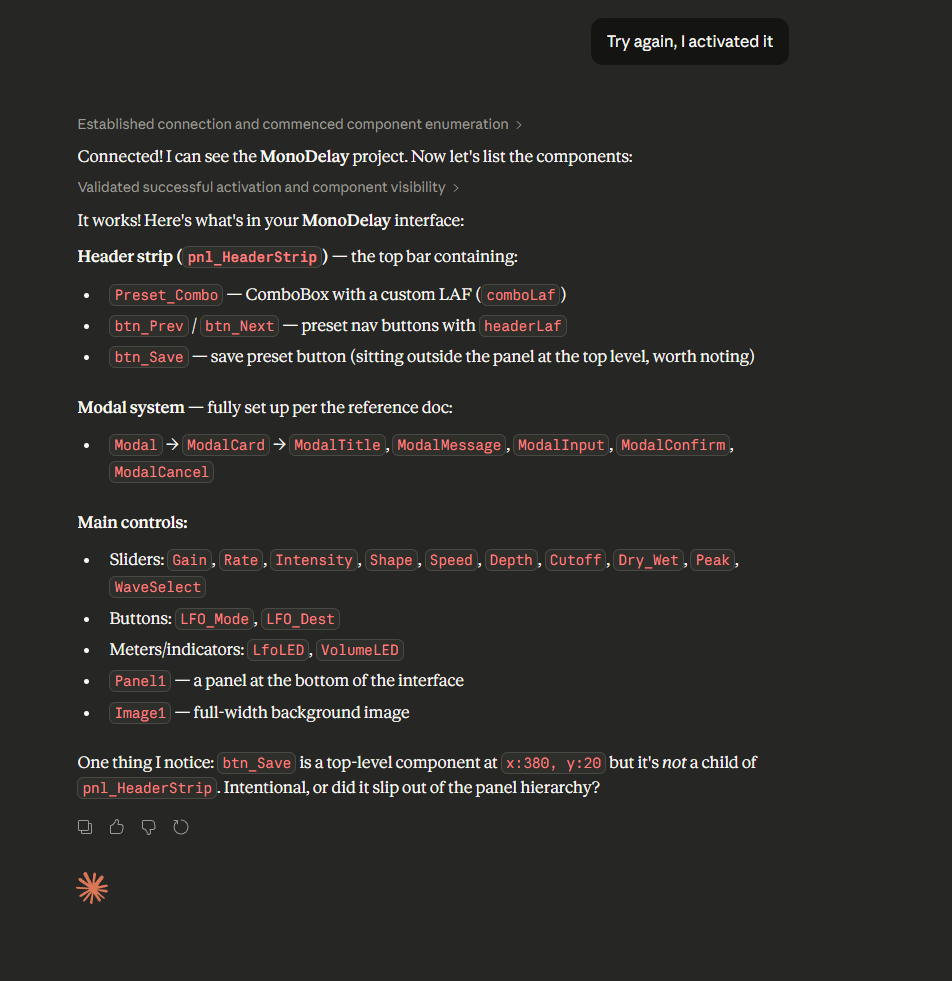
Really nice work man! Gonna play around with it. Its already mouthing me off on button placement