Don't know if this is the done thing really, but I wanted to show off:
https://youtu.be/1kMHloRQLcM

Best posts made by Orvillain
-
I wrote a reverbposted in C++ Development
-
I wrote a bbd delayposted in C++ Development
Again, wasn't sure where to put this. But I created my own node.
Modelled analog bucket brigade delay. I'm starting to build up quite a nice collection of delay and reverb utilities now!
-
RE: I wrote a reverbposted in C++ Development
@Chazrox I might do a video or two on everything I've learned!
-
RE: Third party HISE developersposted in General Questions
I'm actually moving into more JUCE C++ based projects now. But I've spent 18 years in music tech. Used to work for FXpansion, then ROLI, then inMusic until mid last year when I made the transition to developer. I've got a couple of HISE projects on the go right now - more synths and effects than sample libraries at the moment, but I've done sample libraries throughout my career, with a specific focus in drum libraries. I have a few Kontakt ports in the pipeline for this year too.
Eventually will launch my own plugin company as well. That is the goal.
-
Verb Factoryposted in C++ Development
More showoff stuff from me. I've built my own standalone JUCE app that allows me to build effects processors on the fly:
https://youtu.be/ogaE-hkUcsUThis is primarily a dev tool for my own projects. The eventual plan is to have it export c++ code, and maybe even have it spit out a custom HISE node that I can just drop into projects too!!
-
RE: Orv's ScriptNode+SNEX Journeyposted in ScriptNode
Lesson 5 - SNEX code in a bit more detail.
So I'm by no means an expert in C or C++ - in fact I only just recently started learning it. But here's what I've sussed out in regards to the HISE template.... and template is exactly the right word, because the first line is:
template <int NV> struct audio_loaderSomewhere under the hood, HISE must be setup to send in an integer into any SNEX node, that integer corresponding to a voice. NV = new voice perhaps, or number of voices ????
The line above declares a template that takes this NV integer in, and creates a struct called audio_loader for each instance of NV. Indeed we can prove this by running the following code:
template <int NV> struct audio_loader
{
	SNEX_NODE(audio_loader);

	ExternalData data;
	double note = 0.0;

	// Initialise the processing specs here
	void prepare(PrepareSpecs ps)
	{

	}

	// Reset the processing pipeline here
	void reset()
	{

	}

	// Process the signal here
	template <typename ProcessDataType> void process(ProcessDataType& data)
	{

	}

	// Process the signal as frame here
	template <int C> void processFrame(span<float, C>& data)
	{

	}

	// Process the MIDI events here
	void handleHiseEvent(HiseEvent& e)
	{
		double note = e.getNoteNumber();
		Console.print(note);

	}

	// Use this function to setup the external data
	void setExternalData(const ExternalData& d, int index)
	{
		data = d;
	}

	// Set the parameters here
	template <int P> void setParameter(double v)
	{

	}
};
There are only three things happening here:
- We set the ExternalData as in a previous post.
- We establish a variable with the datatype of double called 'note' and we initialise it as 0.0. But this value will never hold because....
- In the handleHiseEvent() method, we use e.getNoteNumber() and we assign this to the note variable. We then print the note variable out inside of the handleHiseEvent() method.
Now when we run this script, any time we play a midi note, the console will show us the note number that we pressed. This is even true if you play chords, or in a scenario where no note off events occur.
That's a long winded way of saying that a SNEX node is run for each active voice; at least when it is within a ScriptNode Synthesiser dsp network.
The next line in the script after the template is established is:
SNEX_NODE(audio_loader);This is pretty straight forward. The text you pass here has to match the name of the script loaded inside your SNEX node - not the name of the SNEX node itself.
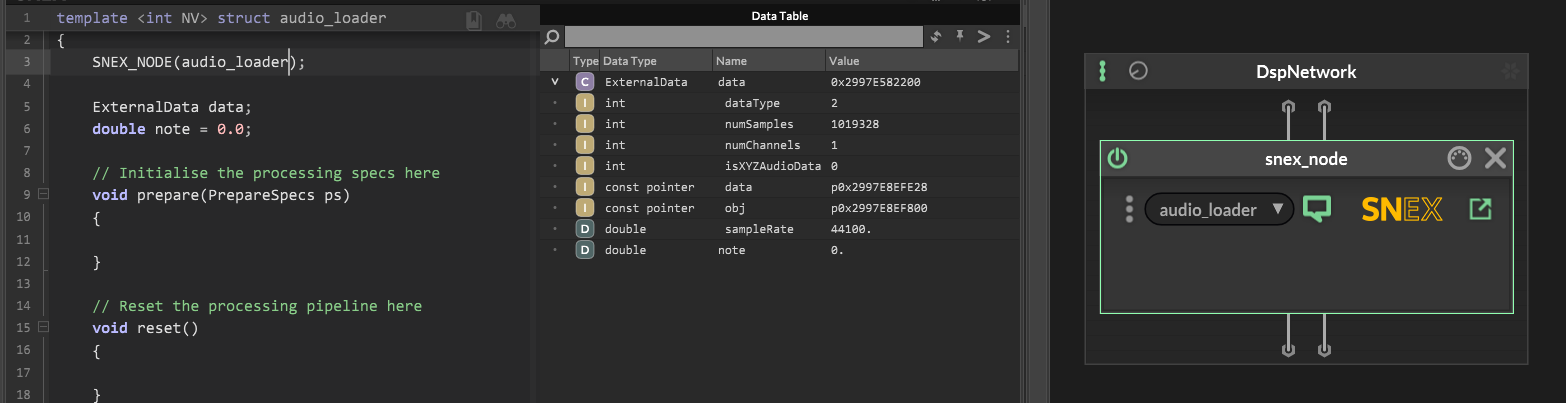
Here you can see my SNEX node is just called: snex_node.
But the script loaded into it is called audio_loader, and so the reference to SNEX_NODE inside the script has to also reference audio_loader.
-
RE: Need filmstrip animationsposted in General Questions
@d-healey I really like that UI. Very simple, accessible, and smooth looking - for lack of a better word!
-
RE: I made a really good sounding JUNO-6 emulation for free, shared it in the KVR forum - this is what happenedposted in General Questions
I've been posting on KvR on and off since I was a teenager. FFS, I'm sooooooo olllldddddd.
But yes ... it has always been a bit of a Wild West type of place. Not for the feint of heart. I had a guy stalking me around the forum recently, commenting on all my posts, telling me how he was going to make sure everyone knew what a POS I was - for the crime of having and then leaving a job I did my best at for 18 odd years!
There's not enough asylum's in the world apparently!
Having said that, there are some easy wins you can do to head it all off at the pass:
- Just have Claude build you a stupid installer. Use Inno on Windows, and MacOS packages; make sure MacOS performs a postscript process to remove the quarantine flag that Apple helpfully decide to add to almost anything you download through a browser these days.
- Have a proper list of features, known issues, known omissions, and "keep it simple, stupid" - don't give them any more ammunition!
- There's a big difference between "I had a crash", "there's a bug" and "I don't like this" - a lot of the time, you can simply ignore the "I don't like this" stuff.
-
RE: Third party HISE developersposted in General Questions
@HISEnberg said in Third party HISE developers:
A bit abashed posting here with so much talent but here it goes!
Wouldn't worry about that, you've been very helpful in getting me up and running in various threads! So thanks! (and to everyone else also!)
-
RE: Transient detection within a loaded sampler - SNEX ????posted in General Questions
@HISEnberg
Yes I wrote a custom transient detector in a c++ node, and made sure it utilised an audio file, which I can load in my UI using the audio waveform floating tile.I implemented spectral flux extraction:
- Take your audio.
- Perform an FFT on it.
- Extract the spectral flux envelope from the FFT.
- Downsample the spectral flux envelope (optional but can help accuracy)
- Perform peak picking on the spectral flux envelope.
I used the stock JUCE FFT processor.
Latest posts made by Orvillain
-
RE: Why I'm not making a Windows installer (nor code-signing)posted in General Questions
@Christoph-Hart said in Why I'm not making a Windows installer (nor code-signing):
@Orvillain you can sign AAX with a self signed bullshit certificate no need to give the mafia any money…
Interesting, I wasn't aware of that. More details would be lovely! Private message if you need to :-)
-
RE: Why I'm not making a Windows installer (nor code-signing)posted in General Questions
@dannytaurus said in Why I'm not making a Windows installer (nor code-signing):
If by alpha testing, you mean on your own machine and a few developer friends, then yes that'll work but it's unlikely to survive contact with the real world.
It does. I have 30 odd testers up and running.
-
RE: Why I'm not making a Windows installer (nor code-signing)posted in General Questions
haha. Wait until you need to support AAX. Now that is a proper headf**k !!!
My current approach is, locally I'm building an inno installer for windows and accepting the smartscreen issue for now. On Mac I'm building a pkg, and my post-install script runs a quarantine flag removal on the installed vst3 file. It seems to be working for some alpha testing.
Eventually I need to jump through all of the hoops to get codesigning up and running and a proper CI system - was thinking Github actions. Then it can all just live in one place, I click a button, and I get a build from whatever branch I choose.
-
RE: Latest develop won't build in VS2022posted in Bug Reports
MSBuild version 18.5.4+cb4e32d21 for .NET Framework

  CopyProtection.cpp
  Plugin.cpp
  PresetData.cpp
  factory.cpp
  RNBO.cpp
  BinaryData.cpp
  include_hi_core.cpp
  include_hi_core_02.cpp
  include_hi_core_03.cpp
  include_hi_core_04.cpp
  include_hi_core_05.cpp
  include_hi_dsp_library_01.cpp
  include_hi_dsp_library_02.cpp
  include_hi_frontend.cpp
  include_hi_lac.cpp
  include_hi_lac_02.cpp
  include_hi_rlottie.cpp
  include_hi_rlottie_1.cpp
  include_hi_rlottie_2.cpp
  include_hi_rlottie_4.cpp
  include_hi_rlottie_5.cpp
  include_hi_rlottie_6.cpp
  include_hi_rlottie_7.cpp
  include_hi_rlottie_8.cpp
  include_hi_rlottie_9.cpp
  include_hi_rlottie_10.cpp
  include_hi_rlottie_11.cpp
  include_hi_rlottie_12.cpp
  include_hi_rlottie_13.cpp
  include_hi_rlottie_14.cpp
  include_hi_rlottie_15.cpp
  include_hi_rlottie_16.cpp
  include_hi_rlottie_17.cpp
  include_hi_rlottie_18.cpp
  include_hi_rlottie_19.cpp
  include_hi_rlottie_20.cpp
  include_hi_rlottie_21.cpp
  include_hi_rlottie_22.cpp
  include_hi_rlottie_23.cpp
  include_hi_rlottie_24.cpp
  include_hi_rlottie_25.cpp
  include_hi_rlottie_26.cpp
  include_hi_rlottie_27.cpp
  include_hi_rlottie_28.cpp
  include_hi_rlottie_29.cpp
  include_hi_rlottie_30.cpp
  include_hi_rlottie_31.cpp
  include_hi_rlottie_32.cpp
  include_hi_rlottie_33.cpp
  include_hi_rlottie_34.cpp
  include_hi_rlottie_35.cpp
  include_hi_scripting_01.cpp
  include_hi_scripting_02.cpp
  include_hi_scripting_03.cpp
  include_hi_scripting_04.cpp
  include_hi_snex.cpp
  include_hi_snex_62.cpp
  include_hi_streaming.cpp
  include_hi_tools_01.cpp
  include_hi_tools_02.cpp
  include_hi_tools_03.cpp
  include_hi_zstd_1.cpp
  include_hi_zstd_2.cpp
  include_hi_zstd_3.cpp
  include_juce_audio_basics.cpp
  include_juce_audio_devices.cpp
  include_juce_audio_formats.cpp
  include_juce_audio_plugin_client_utils.cpp
  include_juce_audio_processors.cpp
  include_juce_audio_processors_headless.cpp
  include_juce_audio_utils.cpp
  include_juce_core.cpp
  include_juce_cryptography.cpp
  include_juce_data_structures.cpp
  include_juce_dsp.cpp
  include_juce_events.cpp
  include_juce_graphics.cpp
  include_juce_gui_extra.cpp
  include_juce_opengl.cpp
  include_juce_osc.cpp
  include_juce_product_unlocking.cpp
  include_melatonin_blur.cpp
!H:\development\HISE\HISE\hi_tools\simple_css\Renderer.h(333,4): error C2872: 'Rectangle': ambiguous symbol [E:\The Audio Programmer\Repositories\cubeatz-hybrid-synth\cubeatz-hybrid-synth-hise-project\Binaries\Builds\VisualStudio2026\cubeatz-hybrid-synth-hise-project_SharedCode.vcxproj]
  (compiling source file '../../../AdditionalSourceCode/nodes/factory.cpp')
      C:\Program Files (x86)\Windows Kits\10\Include\10.0.26100.0\um\wingdi.h(4639,24):
      could be 'BOOL Rectangle(HDC,int,int,int,int)'
      H:\development\HISE\HISE\JUCE\modules\juce_graphics\geometry\juce_Rectangle.h(66,7):
      or       'juce::Rectangle'
      H:\development\HISE\HISE\hi_tools\simple_css\Renderer.h(333,4):
      the template instantiation context (the oldest one first) is
          H:\development\HISE\HISE\hi_tools\simple_css\Renderer.h(365,95):
          see reference to function template instantiation 'juce::Rectangle<float> hise::simple_css::Positioner::slice<hise::simple_css::Positioner::Direction::Top>(const juce::Array<hise::simple_css::Selector,juce::DummyCriticalSection,0> &,float)' being compiled

!H:\development\HISE\HISE\hi_tools\simple_css\Renderer.h(333,14): error C2062: type 'float' unexpected [E:\The Audio Programmer\Repositories\cubeatz-hybrid-synth\cubeatz-hybrid-synth-hise-project\Binaries\Builds\VisualStudio2026\cubeatz-hybrid-synth-hise-project_SharedCode.vcxproj]
  (compiling source file '../../../AdditionalSourceCode/nodes/factory.cpp')

!H:\development\HISE\HISE\hi_tools\simple_css\Renderer.h(336,33): error C2065: 'copy': undeclared identifier [E:\The Audio Programmer\Repositories\cubeatz-hybrid-synth\cubeatz-hybrid-synth-hise-project\Binaries\Builds\VisualStudio2026\cubeatz-hybrid-synth-hise-project_SharedCode.vcxproj]
  (compiling source file '../../../AdditionalSourceCode/nodes/factory.cpp')

!H:\development\HISE\HISE\hi_tools\simple_css\Renderer.h(336,16): error C2530: 'toUse': references must be initialized [E:\The Audio Programmer\Repositories\cubeatz-hybrid-synth\cubeatz-hybrid-synth-hise-project\Binaries\Builds\VisualStudio2026\cubeatz-hybrid-synth-hise-project_SharedCode.vcxproj]
  (compiling source file '../../../AdditionalSourceCode/nodes/factory.cpp')

!H:\development\HISE\HISE\hi_tools\simple_css\Renderer.h(337,37): error C3536: 'toUse': cannot be used before it is initialized [E:\The Audio Programmer\Repositories\cubeatz-hybrid-synth\cubeatz-hybrid-synth-hise-project\Binaries\Builds\VisualStudio2026\cubeatz-hybrid-synth-hise-project_SharedCode.vcxproj]
  (compiling source file '../../../AdditionalSourceCode/nodes/factory.cpp')

!H:\development\HISE\HISE\hi_tools\simple_css\Renderer.h(346,25): error C2672: 'hise::simple_css::Positioner::RemoveHelpers::slice': no matching overloaded function found [E:\The Audio Programmer\Repositories\cubeatz-hybrid-synth\cubeatz-hybrid-synth-hise-project\Binaries\Builds\VisualStudio2026\cubeatz-hybrid-synth-hise-project_SharedCode.vcxproj]
  (compiling source file '../../../AdditionalSourceCode/nodes/factory.cpp')
      H:\development\HISE\HISE\hi_tools\simple_css\Renderer.h(306,50):
      could be 'juce::Rectangle<float> hise::simple_css::Positioner::RemoveHelpers::slice(juce::Rectangle<float> &,float)'
          H:\development\HISE\HISE\hi_tools\simple_css\Renderer.h(346,25):
          Failed to specialize function template 'juce::Rectangle<float> hise::simple_css::Positioner::RemoveHelpers::slice(juce::Rectangle<float> &,float)'
              H:\development\HISE\HISE\hi_tools\simple_css\Renderer.h(346,25):
              With the following template arguments:
                  H:\development\HISE\HISE\hi_tools\simple_css\Renderer.h(346,25):
                  'D=hise::simple_css::Positioner::Direction::Top'
              H:\development\HISE\HISE\hi_tools\simple_css\Renderer.h(306,33):
              'Rectangle': ambiguous symbol
              H:\development\HISE\HISE\hi_tools\simple_css\Renderer.h(306,42):
!              syntax error: missing ';' before '<'

!Compilation error. Check the compiler output.
This, or something similar to it... has come back in the latest develop, sha: 6446c4ab64ba27c189f5d1ad31ecace25d02a292
I've cleaned my build directory, but still get it.
-
RE: [Blog] My Favourite C++ Open Source DSP Referencesposted in Blog Entries
@ustk said in [Blog] My Favourite C++ Open Source DSP References:
@Orvillain Yes that was my first attempt at making a nice reverb too and I learned a lot fro Geraint! I did it first with a network so the efficiency was bad but I've added some really fun stuff to it! But next time I'll obviously go C++...
It's probably a conversational side-quest, but I've stopped using scriptnode tbh, other than for wrapping my custom nodes and attaching parameters so the UI can access them. I don't like the workflow at all really.
-
RE: [Blog] My Favourite C++ Open Source DSP Referencesposted in Blog Entries
Yep! Done a similar thing. The Valhalla links were how I first got into reverb design, as well as the SignalSmith stuff:
https://signalsmith-audio.co.uk/writing/2021/lets-write-a-reverb/ -
RE: Custom filter graph output within a custom node?posted in C++ Development
This thread:
https://forum.hise.audio/topic/9788/hise-filter-display-inconsistencies/20?_=1750768491529And Claude, helped quite a bit. Got it working!
The essential bits I'm calling in my c++ node are:
void setExternalData(const ExternalData& d, int index) override { SNEX_INIT_FILTER(d, index); } // HISE calls this (message thread, on repaint) for each frequency point. // freqNorm is normalised to the sample rate (1.0 == fs); return linear gain. double getPlotValue(int /*getMagnitude*/, double freqNorm) override { return (double) magnitudeLinear((float)(freqNorm * fs)); } // == Parameters ========================================================== template <int P> void setParameter(double v) { if constexpr (P == 0) { pFreq = (float)v; sendCoefficientUpdateMessage(); } else if constexpr (P == 1) { pReso = (float)v; sendCoefficientUpdateMessage(); } else if constexpr (P == 2) { pGain = (float)v; sendCoefficientUpdateMessage(); } else if constexpr (P == 3) { pDrive = (float)v; sendCoefficientUpdateMessage(); } else if constexpr (P == 4) { pType = (float)v; sendCoefficientUpdateMessage(); } else if constexpr (P == 5) { pMode = (float)v; sendCoefficientUpdateMessage(); } } -
Custom filter graph output within a custom node?posted in C++ Development
Does anyone know a good guide or the latest advice on doing a custom filter graph output for a custom node, so that I can have a floating tile or a script panel pick it up and draw it??
-
RE: I made a really good sounding JUNO-6 emulation for free, shared it in the KVR forum - this is what happenedposted in General Questions
@David-Healey said in I made a really good sounding JUNO-6 emulation for free, shared it in the KVR forum - this is what happened:
@Orvillain said in I made a really good sounding JUNO-6 emulation for free, shared it in the KVR forum - this is what happened:
make sure MacOS performs a postscript process to remove the quarantine flag that Apple helpfully decide to add to almost anything you download through a browser these days.
Won't the installer itself have a quarantine flag if it's not codesigned/notarized?
I've made a few this way now and sent them out as test builds to clients, with no problems. They might end up with it, but if you run it on MacOS and it says "open anyway" then that's probably good enough to start with.
-
RE: I made a really good sounding JUNO-6 emulation for free, shared it in the KVR forum - this is what happenedposted in General Questions
I've been posting on KvR on and off since I was a teenager. FFS, I'm sooooooo olllldddddd.
But yes ... it has always been a bit of a Wild West type of place. Not for the feint of heart. I had a guy stalking me around the forum recently, commenting on all my posts, telling me how he was going to make sure everyone knew what a POS I was - for the crime of having and then leaving a job I did my best at for 18 odd years!
There's not enough asylum's in the world apparently!
Having said that, there are some easy wins you can do to head it all off at the pass:
- Just have Claude build you a stupid installer. Use Inno on Windows, and MacOS packages; make sure MacOS performs a postscript process to remove the quarantine flag that Apple helpfully decide to add to almost anything you download through a browser these days.
- Have a proper list of features, known issues, known omissions, and "keep it simple, stupid" - don't give them any more ammunition!
- There's a big difference between "I had a crash", "there's a bug" and "I don't like this" - a lot of the time, you can simply ignore the "I don't like this" stuff.