Forum
    • Categories
    • Register
    • Login
    1. Home
    2. griffinboy
    • Profile
    • Following 9
    • Followers 12
    • Topics 126
    • Posts 1,092
    • Groups 1

    griffinboy

    @griffinboy

    Joshua Griffin (Griffinboy) is an English musician and scientist. He works fulltime to create new software, and spends his spare time making more software.

    613
    Reputation
    341
    Profile views
    1.1k
    Posts
    12
    Followers
    9
    Following
    Joined
    Last Online
    Age 22
    Location UK

    griffinboy Unfollow Follow
    Beta Testers

    Best posts made by griffinboy

    • [Free Dsp] Analog Filter (24dB/oct)

      C++ analog filter node based on this paper:
      https://www.researchgate.net/publication/344876889_Moog_Ladder_Filter_Generalizations_Based_on_State_Variable_Filters

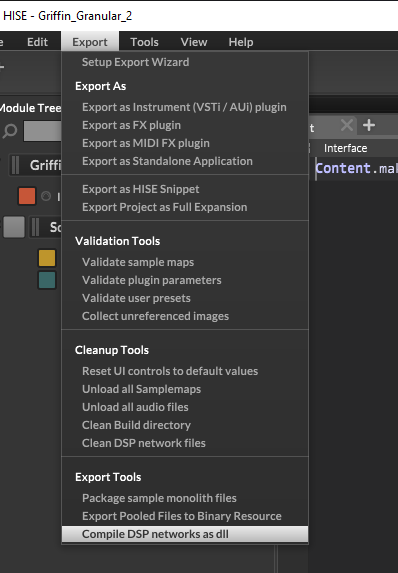
      To use it in a Hise project, open your project folder and place the script file (Griffin_LadderFilter.h) under:
      DspNetworks > ThirdParty

      e42f5f06-2019-435a-b3aa-53af5d916733-image.png

      Then open your Hise project and compile dsp networks as dll

      9cff98b4-dfb6-4981-8446-bb2e2b0deb05-image.png

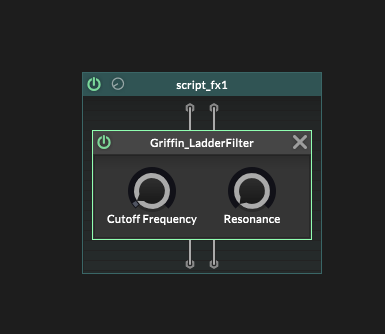
      Now press OK, and you will be able to use the Node:

      566a05d5-188e-438f-9f83-cff680d55493-image.png

      The node should appear under the 'project' category when you open the scripnode node browser.

      Download the script here:

      Polyphonic (stereo):
      https://1drv.ms/u/c/6c19b197e5968b36/EYVQsJa9FlpKldok2ThVUwMBVf3KnemfEeccDyzASGbGJw?e=XNq1PU

      Monophonic (stereo):
      https://1drv.ms/u/c/6c19b197e5968b36/EcGw46UnqYJMk1cu3bH2QZQBSWTXAOL6ggsusNrF-LrtZQ?e=FvMeGr

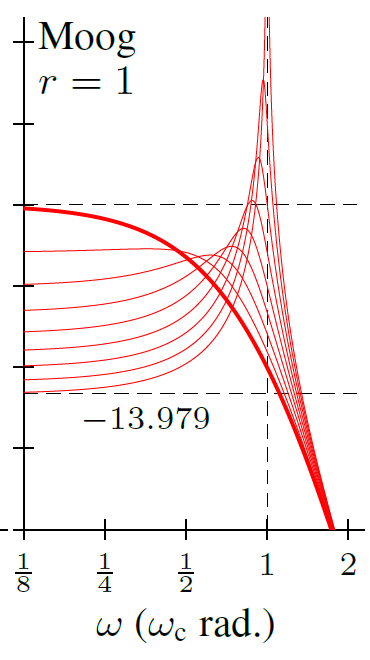
      24dB / Octave Filter Response:

      9537ba2d-197d-435b-b862-998dbf3ae7bd-image.png

      posted in ScriptNode
      griffinboyG
      griffinboy
    • [Tutorial] How to create a c++ custom node

      How to create a custom node, as promised.
      I apologise in advance for the awful quality video (quite dry and boring)! But the good news is that I have some nicer quality ones in the pipeline. However I thought I should get this out as soon as possible since some people were waiting on it.
      Hope it helps.

      Windows only, I'll do a mac tutorial later.

      https://youtu.be/SLQv0Bkte7I

      Template v1.1:

      // ==========================| NodeTemplate v1.0 : by Griffinboy |==========================
      
      #pragma once
      #include <JuceHeader.h>
      
      namespace project
      {
          using namespace juce;
          using namespace hise;
          using namespace scriptnode;
      
          template <int NV>
          // --- Replace with Name 
          struct ExternalNodeTemplate : public data::base
          {   // ------ Replace with Name 
              SNEX_NODE(ExternalNodeTemplate);
      
              struct MetadataClass
              { // --------- Replace with "Name"
                  SN_NODE_ID("ExternalNodeTemplate");
              };
      
              // ==========================| Node Properties |==========================
              static constexpr bool isModNode() { return false; }
              static constexpr bool isPolyphonic() { return NV > 1; }
              static constexpr bool hasTail() { return false; }
              static constexpr bool isSuspendedOnSilence() { return false; }
              static constexpr int getFixChannelAmount() { return 2; }
      
              static constexpr int NumTables = 0;
              static constexpr int NumSliderPacks = 0;
              static constexpr int NumAudioFiles = 0;
              static constexpr int NumFilters = 0;
              static constexpr int NumDisplayBuffers = 0;
      
              // ==========================| Global Variables |==========================
      
              // ==========================| Prepare |==========================
              // Called on init, and when sample rate changes
              void prepare(PrepareSpecs specs)
              {
                  float sampleRate = specs.sampleRate;
                  float numChannels = specs.numChannels;
      
                  leftChannelEffect.prepare(sampleRate, 5.0); // 5ms smoothing on the gain parameter
                  rightChannelEffect.prepare(sampleRate, 5.0);
              }
      
              // ==========================| Reset |==========================
              // Called when the plugin is reloaded
              void reset() {}
      
              // ==========================| Process |==========================
              // Blocks of audio enter the script here
              template <typename ProcessDataType>
              void process(ProcessDataType& data)
              {
                  // Convert the audio data to a fixed-channel format for efficient processing
                  auto& fixData = data.template as<ProcessData<getFixChannelAmount()>>();
      
      			// Get pointers to each channel's audio data
                  // Changes to these variables will now directly modify the original audio buffer
                  auto audioBlock = fixData.toAudioBlock();
                  auto* leftChannelData = audioBlock.getChannelPointer(0);
                  auto* rightChannelData = audioBlock.getChannelPointer(1);
      
                  // Get the number of samples (one channel) for this block
                  int numSamples = data.getNumSamples();
      
                  // Pass each channel's audio to the appropriate AudioEffect class
                  leftChannelEffect.process(leftChannelData, numSamples);
                  rightChannelEffect.process(rightChannelData, numSamples);
              }
      
              // ==========================| AudioEffect Class |==========================
              class AudioEffect
              {
              public:
                  AudioEffect(float initialGain = 1.0f)
                  {
                      smoothGain.set(initialGain); // Initialize sfloat with initial gain
                  }
      
                  void prepare(double sampleRate, double timeInMilliseconds)
                  {
                      smoothGain.prepare(sampleRate, timeInMilliseconds);
                  }
      
                  void process(float* samples, int numSamples)
                  {
                      for (int i = 0; i < numSamples; ++i)
                      {
                          samples[i] *= smoothGain.advance(); // Apply the gain using the smoothed parameter
                      }
                  }
      
                  void updateGain(float newGain)
                  {
                      smoothGain.set(newGain);
                  }
      
              private:
                  sfloat smoothGain; // Declare smoothGain variable, using sfloat type for smoothing
              };
      
              // ==========================| Set Parameter |==========================
              template <int P>
              void setParameter(double v)
              {
                  if (P == 0)
                      leftChannelEffect.updateGain(static_cast<float>(v)); // Update gain for left channel
                  else if (P == 1)
                      rightChannelEffect.updateGain(static_cast<float>(v)); // Update gain for right channel
              }
      
              // ==========================| Create Parameters |==========================
              void createParameters(ParameterDataList& data)
              {
      
                  {   //                             { min, max,  step }                 { id } 
                      parameter::data p("Left Gain", { 0.1, 2.0, 0.01 }); registerCallback<0>(p);
                      p.setDefaultValue(1.0);
                      data.add(std::move(p));
                  }
                  {
                      parameter::data p("Right Gain", { 0.1, 2.0, 0.01 });
                      registerCallback<1>(p);
                      p.setDefaultValue(1.0);
                      data.add(std::move(p));
                  }
              }
      
              // ==========================| External Data |==========================
              void setExternalData(const ExternalData& data, int index) {}
      
              // ==========================| Handle HISE Event |==========================
              void handleHiseEvent(HiseEvent& e) {}
      
              // ==========================| Modulation Slot |==========================
              // ( first enable isModNode() at the top of script ) 
              /*
                  ModValue modValue;
                  int handleModulation(double& value)
                  {
                      return modValue.getChangedValue(value);
                  }
                  // Creates callback so that altering the 'modValue' var elsewhere will now update the mod slot
                  modValue.setModValue(0);
              */
      
              // processFrame: Needed for compiler, does nothing
              template <typename FrameDataType>
              void processFrame(FrameDataType& data) {}
      
          private:
              AudioEffect leftChannelEffect;
              AudioEffect rightChannelEffect;
          };
      }


      14434c25-0fb6-4abd-bcc3-10cdc249cdd1-image.png

      posted in Blog Entries
      griffinboyG
      griffinboy
    • [Free Dsp] Oberheim-8 Analog Filter

      Polyphonic 12db/oct Filter with keytracking.

      Created from a linear (non saturating) analysis of the OB8 lowpass.
      It's not a match for high resonance settings, but it has good intuition at low resonance. You are welcome to tune it further by modifying the code.

      CPU usage: ≈1%

      27f9a3b7-c78b-4610-b029-965bb2b4da1d-image.png

      Instructions for setup included inside the script.
      The "Eigen" header library is required:
      https://github.com/PX4/eigen

      Download the Filter Script here:
      https://1drv.ms/u/c/6c19b197e5968b36/ER8vuJpevI9Htt_WY8Mqs8sBBJ15n8JLf-MJdSNgwjZX5g?e=zXd7gZ

      Raw Code:

      #pragma once
      #include <JuceHeader.h>
      #include <cmath>
      #include "src\eigen-master\Eigen\Dense"
      
      
      /**
       
      ==============| by GriffinBoy (2025) |==============
      
      This node implements an OB8 2-SVF (State-Variable Filter) with global feedback
      using the Delay-Free method as described in DAFx-2020.
      
      Features:
      - Parameter smoothing via Juce's SmoothedValue class
      - Bilinear (TPT) transform implementation
      - Optimized 4x4 matrix inversion using the Eigen library
      - Recalculates matrices only when parameters change (dirty flags)
      - Keytracking support for cutoff frequency
      - (rough) Resonance compensation for frequency shift
      - (rough) Gain compensation for resonance control
      
      Integration Steps for HISE:
      1. Eigen Setup: Download and place the Eigen library under:
         ProjectName/DspNetworks/ThirdParty/src/eigen-master
      2. Create a 3rd party C++ node in HISE named "Griffin_OBFilter"
      3. Compile the initial DLL in HISE using "Compile dsp networks as .dll"
      4. Replace the generated "Griffin_OBFilter.h" (in ProjectName/DspNetworks/ThirdParty)
         with this header file you are reading now
      5. Re-compile the final DLL in HISE using "Compile dsp networks as .dll" 
      
      Continuous-Time System Definition:
        x1'(t) = -2*r*x1 - x2 - kf*x4 + input
        x2'(t) = x1
        x3'(t) = -2*r*x3 - x4 + x2
        x4'(t) = x3
      (Output is taken from state x4)
      
      Bilinear Transform:
        M = I - g*A,   N = I + g*A, where g = 2 * tan(pi * fc / fs)
        (M is inverted using Eigen's optimized fixed-size matrix inversion)
      
      Optimizations:
      - Precomputed reciprocals and constants
      - Eigen fixed-size matrices for 4x4 operations
      - Dirty flags for matrix recalculation only when parameters change
      
      Author: GriffinBoy (2025)
      License: UwU 
      */


      namespace project
      {
          using namespace juce;
          using namespace hise;
          using namespace scriptnode;
      
          template <int NV> // NV = Number of Voices
          struct Griffin_OBFilter : public data::base
          {
              SNEX_NODE(Griffin_OBFilter);
      
              struct MetadataClass { SN_NODE_ID("Griffin_OBFilter"); };
      
              static constexpr bool isModNode() { return false; }
              static constexpr bool isPolyphonic() { return NV > 1; }
              static constexpr bool hasTail() { return false; }
              static constexpr bool isSuspendedOnSilence() { return false; }
              static constexpr int  getFixChannelAmount() { return 2; }
      
              static constexpr int  NumTables = 0;
              static constexpr int  NumSliderPacks = 0;
              static constexpr int  NumAudioFiles = 0;
              static constexpr int  NumFilters = 0;
              static constexpr int  NumDisplayBuffers = 0;
      
              //=========================================================================
              // Parameters (Raw Values)
              //=========================================================================
              float cutoffFrequency = 1000.0f;
              float resonance = 0.0f;    // Range: [0, 35]
              float keytrackAmount = 1.0f;
              float sampleRate = 44100.0f;
      
              //=========================================================================
              // Smoothing Objects for Per-Sample Smoothing
              //=========================================================================
              SmoothedValue<float> cutoffSmooth;
              SmoothedValue<float> resonanceSmooth;
              SmoothedValue<float> keytrackSmooth;
      
              //=========================================================================
              // Prepare Function
              // - Sets up voices and initializes smoothers.
              //=========================================================================
              void prepare(PrepareSpecs specs)
              {
                  sampleRate = specs.sampleRate;
                  filtersLeft.prepare(specs);
                  filtersRight.prepare(specs);
      
                  for (auto& v : filtersLeft)
                      v.prepare(sampleRate);
                  for (auto& v : filtersRight)
                      v.prepare(sampleRate);
      
                  // Set smoothing time (10ms)
                  cutoffSmooth.reset(sampleRate, 0.01);
                  resonanceSmooth.reset(sampleRate, 0.01);
                  keytrackSmooth.reset(sampleRate, 0.01);
      
                  cutoffSmooth.setCurrentAndTargetValue(cutoffFrequency);
                  resonanceSmooth.setCurrentAndTargetValue(resonance);
                  keytrackSmooth.setCurrentAndTargetValue(keytrackAmount);
              }
      
              void reset()
              {
                  for (auto& v : filtersLeft)
                      v.reset();
                  for (auto& v : filtersRight)
                      v.reset();
              }
      
              //=========================================================================
              // Process Audio
              // - Updates parameters per sample using smoothed values.
              //=========================================================================
              template <typename ProcessDataType>
              void process(ProcessDataType& data)
              {
                  auto& fixData = data.template as<ProcessData<getFixChannelAmount()>>();
                  auto audioBlock = fixData.toAudioBlock();
      
                  float* leftCh = audioBlock.getChannelPointer(0);
                  float* rightCh = audioBlock.getChannelPointer(1);
                  int numSamples = static_cast<int>(data.getNumSamples());
      
                  for (int i = 0; i < numSamples; ++i)
                  {
                      // Get per-sample smoothed parameter values
                      float cVal = cutoffSmooth.getNextValue();
                      float rVal = resonanceSmooth.getNextValue();
                      float kVal = keytrackSmooth.getNextValue();
      
                      // Update each voice with new smoothed parameters
                      for (auto& v : filtersLeft)
                      {
                          v.setCutoff(cVal);
                          v.setResonance(rVal);
                          v.setKeytrack(kVal);
                          v.applyChangesIfNeeded();
                      }
                      for (auto& v : filtersRight)
                      {
                          v.setCutoff(cVal);
                          v.setResonance(rVal);
                          v.setKeytrack(kVal);
                          v.applyChangesIfNeeded();
                      }
      
                      // Process sample for each voice in series
                      float outL = leftCh[i];
                      float outR = rightCh[i];
                      for (auto& v : filtersLeft)
                          outL = v.processSample(outL);
                      for (auto& v : filtersRight)
                          outR = v.processSample(outR);
      
                      leftCh[i] = outL;
                      rightCh[i] = outR;
                  }
              }
      
              template <typename FrameDataType>
              void processFrame(FrameDataType& data) {}
      
              //=========================================================================
              // AudioEffect Class: OB8-Style Voice-Level Filter
              // - Implements the filter logic with Eigen optimizations.
              //=========================================================================
              class AudioEffect
              {
              public:
                  AudioEffect() = default;
      
                  inline void prepare(float fs)
                  {
                      sampleRate = fs;
                      baseCutoff = 1000.0f;
                      resonance = 0.0f;
                      rDamping = 3.4f; // Fixed damping value
                      keytrackAmount = 1.0f;
                      storedNote = 60;
                      reset();
                      dirtyFlags = 0;
                      updateAll(); // Initial matrix calculations
                  }
      
                  inline void reset()
                  {
                      x.setZero();
                  }
      
                  //=====================================================================
                  // Parameter Setting Functions
                  //=====================================================================
                  enum Dirty : uint32_t
                  {
                      changedCutoff = 1 << 0,
                      changedResonance = 1 << 1,
                      changedKeytrack = 1 << 2,
                      changedNote = 1 << 3
                  };
      
                  inline void setCutoff(float c)
                  {
                      baseCutoff = c;
                      dirtyFlags |= changedCutoff;
                  }
                  inline void setResonance(float r)
                  {
                      resonance = r;
                      dirtyFlags |= changedResonance;
                  }
                  inline void setKeytrack(float kt)
                  {
                      keytrackAmount = kt;
                      dirtyFlags |= changedKeytrack;
                  }
                  inline void setNoteNumber(int n)
                  {
                      storedNote = n;
                      dirtyFlags |= changedNote;
                  }
                  inline void applyChangesIfNeeded()
                  {
                      if (dirtyFlags != 0)
                          updateAll();
                  }
      
                  //=====================================================================
                  // Process Sample Function
                  // - Processes a single sample and applies the filter.
                  //=====================================================================
                  inline float processSample(float input)
                  {
                      constexpr float noiseFloor = 0.005f;
                      input += noiseFloor * (noiseGen.nextFloat() - 0.5f); // Add slight noise for stability
      
                      // State update and output calculation (Eigen optimized)
                      Eigen::Vector4f temp = N * x + gB * input;
                      Eigen::Vector4f newX = MInv * temp;
                      float out = C.dot(newX) * gainComp;
                      x = newX;
                      return out;
                  }
      
              private:
                  //=====================================================================
                  // Update All Parameters Function
                  // - Recalculates matrices and inversion when parameters change.
                  //=====================================================================
                  inline void updateAll()
                  {
                      // Keytracking calculation
                      float semitones = (static_cast<float>(storedNote) - 60.0f) * keytrackAmount;
                      float noteFactor = std::exp2f(0.0833333f * semitones);
                      float fc = baseCutoff * noteFactor;
      
                      // Cutoff frequency clamping [20 Hz, 20 kHz]
                      if (fc < 20.0f)
                          fc = 20.0f;
                      if (fc > 20000.0f)
                          fc = 20000.0f;
      
                      // Compensation offset for frequency shift (empirical)
                      float compensationOffset = 0.44f * fc - 30.0f;
                      if (compensationOffset < 0.0f)
                          compensationOffset = 0.0f;
      
                      // Resonance compensation
                      fc -= (resonance / 35.0f) * compensationOffset;
      
                      // Re-clamp cutoff after compensation
                      if (fc < 20.0f)
                          fc = 20.0f;
                      if (fc > 20000.0f)
                          fc = 20000.0f;
      
                      // TPT Warped frequency and g parameter
                      const float fsRecip = 1.0f / sampleRate;
                      const float factor = MathConstants<float>::pi * fc * fsRecip;
                      const float warped = std::tan(factor);
                      g = 2.0f * warped;
      
                      // Matrix construction and inversion
                      buildContinuousTimeSystem();
                      buildDiscreteTimeMatrices();
                      MInv = M.inverse();
                      C = Ccont; // Set output vector
      
                      // Gain Compensation (Resonance dependent)
                      if (dirtyFlags & changedResonance)
                      {
                          gainComp = std::pow(10.0f, (std::sqrt(resonance / 35.0f) * 22.0f) / 20.0f);
                      }
      
                      dirtyFlags = 0; // Clear dirty flags
                  }
      
      
                  //=====================================================================
                  // Build Continuous-Time System Function
                  // - Defines the continuous-time state-space matrices (Acont, Bcont, Ccont).
                  //=====================================================================
                  inline void buildContinuousTimeSystem()
                  {
                      const float twoR = 2.0f * rDamping;
                      Acont.setZero();
                      Bcont.setZero();
                      Ccont.setZero();
      
                      // State equations (matrix A)
                      Acont(0, 0) = -twoR;
                      Acont(0, 1) = -1.0f;
                      Acont(0, 3) = -resonance;
                      Acont(1, 0) = 1.0f;
                      Acont(2, 1) = 1.0f;
                      Acont(2, 2) = -twoR;
                      Acont(2, 3) = -1.0f;
                      Acont(3, 2) = 1.0f;
      
                      // Input matrix B (input to x1')
                      Bcont(0) = 1.0f;
      
                      // Output matrix C (output from x4)
                      Ccont(3) = 1.0f;
                  }
      
                  //=====================================================================
                  // Build Discrete-Time Matrices Function
                  // - Discretizes the continuous-time system using TPT transform (M, N, gB).
                  //=====================================================================
                  inline void buildDiscreteTimeMatrices()
                  {
                      Eigen::Matrix4f gA = g * Acont;
                      M = Eigen::Matrix4f::Identity() - gA;
                      N = Eigen::Matrix4f::Identity() + gA;
                      gB = g * Bcont;
                  }
      
                  //=====================================================================
                  // Member Variables (AudioEffect)
                  //=====================================================================
                  float sampleRate = 44100.0f;
                  float baseCutoff = 1000.0f;
                  float resonance = 0.0f;
                  float rDamping = 3.4f;        // Fixed damping parameter
                  float keytrackAmount = 1.0f;
                  int storedNote = 60;
                  float g = 0.0f;             // Warped frequency parameter
      
                  Eigen::Vector4f x = Eigen::Vector4f::Zero();         // State vector
                  Eigen::Matrix4f Acont = Eigen::Matrix4f::Zero();    // Continuous-time A matrix
                  Eigen::Vector4f Bcont = Eigen::Vector4f::Zero();     // Continuous-time B matrix
                  Eigen::Vector4f Ccont = Eigen::Vector4f::Zero();     // Continuous-time C matrix
                  Eigen::Matrix4f M = Eigen::Matrix4f::Zero();         // Discrete-time M matrix
                  Eigen::Matrix4f N = Eigen::Matrix4f::Zero();         // Discrete-time N matrix
                  Eigen::Matrix4f MInv = Eigen::Matrix4f::Zero();      // Inverted M matrix
                  Eigen::Vector4f gB = Eigen::Vector4f::Zero();        // Discrete-time gB matrix
                  Eigen::Vector4f C = Eigen::Vector4f::Zero();         // Discrete-time C matrix (output)
      
                  float gainComp = 1.0f;          // Gain compensation factor
                  uint32_t dirtyFlags = 0;        // Flags to track parameter changes
                  juce::Random noiseGen;          // Random number generator for noise
              };
      
              //=========================================================================
              // Parameter Setting (Per Sample Update)
              //=========================================================================
              template <int P>
              void setParameter(double val)
              {
                  if (P == 0)
                  {
                      cutoffFrequency = static_cast<float>(val);
                      cutoffSmooth.setTargetValue(cutoffFrequency);
                  }
                  else if (P == 1)
                  {
                      resonance = static_cast<float>(val);
                      if (resonance < 0.0f)
                          resonance = 0.0f;
                      if (resonance > 35.0f)
                          resonance = 35.0f;
                      resonanceSmooth.setTargetValue(resonance);
                  }
                  else if (P == 2)
                  {
                      keytrackAmount = static_cast<float>(val);
                      keytrackSmooth.setTargetValue(keytrackAmount);
                  }
              }
      
              void createParameters(ParameterDataList& data)
              {
                  {
                      parameter::data p("Cutoff Frequency", { 100.0, 20000.0, 1.0 });
                      registerCallback<0>(p);
                      p.setDefaultValue(1000.0f);
                      data.add(std::move(p));
                  }
                  {
                      parameter::data p("Resonance", { 0.0, 35.0, 0.01 });
                      registerCallback<1>(p);
                      p.setDefaultValue(0.0f);
                      data.add(std::move(p));
                  }
                  {
                      parameter::data p("Keytrack Amount", { -1.0, 1.0, 0.5 });
                      registerCallback<2>(p);
                      p.setDefaultValue(0.0f);
                      data.add(std::move(p));
                  }
              }
      
              void setExternalData(const ExternalData& data, int index) {}
      
              //=========================================================================
              // Note Handling
              //=========================================================================
              void handleHiseEvent(HiseEvent& e)
              {
                  if (e.isNoteOn())
                  {
                      filtersLeft.get().setNoteNumber(e.getNoteNumber());
                      filtersLeft.get().applyChangesIfNeeded();
      
                      filtersRight.get().setNoteNumber(e.getNoteNumber());
                      filtersRight.get().applyChangesIfNeeded();
                  }
              }
      
          private:
              PolyData<AudioEffect, NV> filtersLeft;
              PolyData<AudioEffect, NV> filtersRight;
          };
      }
      

      *edit: As an extra, I include a resonant ladder filter, which has an extremely wide range for resonance, from ultra soft to spiky. Setup is the same as the OB Filter, this script replaces the same effect. Rename the node if you want to use it separately.

      #pragma once
      #include <JuceHeader.h>
      #include <cmath>
      #include "src\eigen-master\Eigen\Dense"
      
      // Werner Filter
      
      namespace project
      {
          using namespace juce;
          using namespace hise;
          using namespace scriptnode;
      
          template <int NV> // NV = number of voices
          struct Griffin_OBFilter : public data::base
          {
              SNEX_NODE(Griffin_OBFilter);
      
              struct MetadataClass
              {
                  SN_NODE_ID("Griffin_OBFilter");
              };
      
              static constexpr bool isModNode() { return false; }
              static constexpr bool isPolyphonic() { return NV > 1; }
              static constexpr bool hasTail() { return false; }
              static constexpr bool isSuspendedOnSilence() { return false; }
              static constexpr int  getFixChannelAmount() { return 2; }
      
              static constexpr int  NumTables = 0;
              static constexpr int  NumSliderPacks = 0;
              static constexpr int  NumAudioFiles = 0;
              static constexpr int  NumFilters = 0;
              static constexpr int  NumDisplayBuffers = 0;
      
              // Outer-level parameters and smoothing objects
              float cutoffFrequency = 1000.0f;
              // Combined resonance/damping control
              float resonance = 0.0f;
              float keytrackAmount = 1.0f;
              float rDamp = 1.06f;  // SVF damping (r)
              float sampleRate = 44100.0f;
      
              SmoothedValue<float> cutoffSmooth;
              SmoothedValue<float> resonanceSmooth;
              SmoothedValue<float> keytrackSmooth;
              SmoothedValue<float> dampingSmooth;
      
              void prepare(PrepareSpecs specs)
              {
                  sampleRate = specs.sampleRate;
                  // Prepare voice-level filters
                  filtersLeft.prepare(specs);
                  filtersRight.prepare(specs);
      
                  for (auto& fl : filtersLeft)
                      fl.prepare(sampleRate);
                  for (auto& fr : filtersRight)
                      fr.prepare(sampleRate);
      
                  // Initialize per-sample smoothing (10ms ramp time)
                  cutoffSmooth.reset(sampleRate, 0.01);
                  resonanceSmooth.reset(sampleRate, 0.01);
                  keytrackSmooth.reset(sampleRate, 0.01);
                  dampingSmooth.reset(sampleRate, 0.01);
      
                  cutoffSmooth.setCurrentAndTargetValue(cutoffFrequency);
                  resonanceSmooth.setCurrentAndTargetValue(resonance);
                  keytrackSmooth.setCurrentAndTargetValue(keytrackAmount);
                  dampingSmooth.setCurrentAndTargetValue(rDamp);
              }
      
              void reset()
              {
                  for (auto& fl : filtersLeft)
                      fl.reset();
                  for (auto& fr : filtersRight)
                      fr.reset();
              }
      
              // Per-sample processing with parameter smoothing
              template <typename ProcessDataType>
              void process(ProcessDataType& data)
              {
                  auto& fixData = data.template as<ProcessData<getFixChannelAmount()>>();
                  auto audioBlock = fixData.toAudioBlock();
      
                  float* leftChannelData = audioBlock.getChannelPointer(0);
                  float* rightChannelData = audioBlock.getChannelPointer(1);
                  int numSamples = static_cast<int>(data.getNumSamples());
      
                  for (int i = 0; i < numSamples; ++i)
                  {
                      // Get per-sample smoothed parameters
                      float cVal = cutoffSmooth.getNextValue();
                      float rVal = resonanceSmooth.getNextValue();
                      float ktVal = keytrackSmooth.getNextValue();
                      float dVal = dampingSmooth.getNextValue();
      
                      // Update all voices with the current smoothed values
                      for (auto& fl : filtersLeft)
                      {
                          fl.setCutoff(cVal);
                          fl.setResonance(rVal);
                          fl.setKeytrack(ktVal);
                          fl.setDamping(dVal);
                          fl.applyChangesIfNeeded();
                      }
                      for (auto& fr : filtersRight)
                      {
                          fr.setCutoff(cVal);
                          fr.setResonance(rVal);
                          fr.setKeytrack(ktVal);
                          fr.setDamping(dVal);
                          fr.applyChangesIfNeeded();
                      }
      
                      // Process the sample for each voice in series
                      float inL = leftChannelData[i];
                      float inR = rightChannelData[i];
      
                      for (auto& fl : filtersLeft)
                          inL = fl.processSample(inL);
                      for (auto& fr : filtersRight)
                          inR = fr.processSample(inR);
      
                      leftChannelData[i] = inL;
                      rightChannelData[i] = inR;
                  }
              }
      
              template <typename FrameDataType>
              void processFrame(FrameDataType& data) {}
      
              // Voice-level effect: Two 2nd-order SVFs + global feedback, EXACT delay-free method
              class AudioEffect
              {
              public:
                  AudioEffect() = default;
      
                  void prepare(float fs)
                  {
                      sampleRate = fs;
                      baseCutoff = 1000.0f;
                      resonance = 0.0f;
                      rDamping = 1.06f;
                      keytrackAmount = 1.0f;
                      storedNote = 60;
      
                      reset();
                      dirtyFlags = 0;
                      updateAll(); // Build A, B, C, compute g, discretize & invert, etc.
                  }
      
                  void reset()
                  {
                      x = Eigen::Vector4f::Zero();
                  }
      
                  // Dirty flag enum for parameter changes
                  enum Dirty : uint32_t
                  {
                      changedCutoff = 1 << 0,
                      changedResonance = 1 << 1,
                      changedDamping = 1 << 2,
                      changedKeytrack = 1 << 3,
                      changedNote = 1 << 4
                  };
      
                  inline void setCutoff(float c)
                  {
                      baseCutoff = c;
                      dirtyFlags |= changedCutoff;
                  }
                  inline void setResonance(float r)
                  {
                      resonance = r;
                      dirtyFlags |= changedResonance;
                  }
                  inline void setDamping(float d)
                  {
                      rDamping = d;
                      dirtyFlags |= changedDamping;
                  }
                  inline void setKeytrack(float kt)
                  {
                      keytrackAmount = kt;
                      dirtyFlags |= changedKeytrack;
                  }
                  inline void setNoteNumber(int n)
                  {
                      storedNote = n;
                      dirtyFlags |= changedNote;
                  }
                  inline void applyChangesIfNeeded()
                  {
                      if (dirtyFlags != 0)
                          updateAll();
                  }
      
                  // Process a single sample using the discrete-time state update
                  inline float processSample(float input)
                  {
                      Eigen::Vector4f temp = N * x + gB * input;
                      Eigen::Vector4f newX = MInv * temp;
                      float out = C.dot(newX) * gainComp;
                      x = newX;
                      return out;
                  }
      
              private:
                  inline void updateAll()
                  {
                      // Compute effective cutoff with keytracking
                      float semitones = (static_cast<float>(storedNote) - 60.0f) * keytrackAmount;
                      float noteFactor = std::exp2f(0.0833333f * semitones);
                      float fc = baseCutoff * noteFactor;
                      if (fc < 20.0f)
                          fc = 20.0f;
                      float limit = 0.49f * sampleRate;
                      if (fc > limit)
                          fc = limit;
      
                      // Compute TPT warp coefficient: g = 2 * tan(pi * (fc / fs))
                      float norm = fc / sampleRate;
                      float warped = std::tan(MathConstants<float>::pi * norm);
                      g = 2.0f * warped;
      
                      // Build continuous-time state-space (Acont, Bcont, Ccont)
                      buildContinuousTimeSystem();
                      // Build discrete-time matrices via TPT: M = I - g*Acont, N = I + g*Acont, and gB = g*Bcont
                      buildDiscreteTimeMatrices();
                      // Invert M using Eigen's fixed-size matrix inversion
                      MInv = M.inverse();
                      // For output, C (discrete-time) equals Ccont
                      C = Ccont;
      
                      // Apply gain compensation: design so that resonance=3 produces an 11 dB boost.
                      gainComp = std::pow(10.0f, (std::sqrt(resonance / 3.0f) * 11.0f) / 20.0f);
      
                      dirtyFlags = 0;
                  }
      
                  inline void buildContinuousTimeSystem()
                  {
                      // Using damping (rDamping) and feedback gain (resonance)
                      const float r = rDamping;
                      const float kf = resonance;
      
                      Acont << -2.0f * r, -1.0f, 0.0f, -kf,
                          1.0f, 0.0f, 0.0f, 0.0f,
                          0.0f, 1.0f, -2.0f * r, -1.0f,
                          0.0f, 0.0f, 1.0f, 0.0f;
                      Bcont << 1.0f, 0.0f, 0.0f, 0.0f;
                      Ccont << 0.0f, 0.0f, 0.0f, 1.0f;
                  }
      
                  inline void buildDiscreteTimeMatrices()
                  {
                      M = Eigen::Matrix4f::Identity() - g * Acont;
                      N = Eigen::Matrix4f::Identity() + g * Acont;
                      gB = g * Bcont;
                  }
      
                  float sampleRate = 44100.0f;
                  float baseCutoff = 1000.0f;
                  float resonance = 0.0f;
                  float rDamping = 1.06f;
                  float keytrackAmount = 1.0f;
                  int storedNote = 60;
                  float g = 0.0f;
                  float gainComp = 1.0f;
                  uint32_t dirtyFlags = 0;
      
                  Eigen::Matrix4f Acont = Eigen::Matrix4f::Zero();
                  Eigen::Vector4f Bcont = Eigen::Vector4f::Zero();
                  Eigen::Vector4f Ccont = Eigen::Vector4f::Zero();
                  Eigen::Matrix4f M = Eigen::Matrix4f::Zero();
                  Eigen::Matrix4f N = Eigen::Matrix4f::Zero();
                  Eigen::Matrix4f MInv = Eigen::Matrix4f::Zero();
                  Eigen::Vector4f gB = Eigen::Vector4f::Zero();
                  Eigen::Vector4f C = Eigen::Vector4f::Zero();
                  Eigen::Vector4f x = Eigen::Vector4f::Zero();
              };
      
              // External parameter setters with combined resonance/damping control.
              template <int P>
              void setParameter(double val)
              {
                  if (P == 0)
                  {
                      cutoffFrequency = static_cast<float>(val);
                      cutoffSmooth.setTargetValue(cutoffFrequency);
                      for (auto& fl : filtersLeft)
                      {
                          fl.setCutoff(cutoffFrequency);
                          fl.applyChangesIfNeeded();
                      }
                      for (auto& fr : filtersRight)
                      {
                          fr.setCutoff(cutoffFrequency);
                          fr.applyChangesIfNeeded();
                      }
                  }
                  else if (P == 1)
                  {
                      float extRes = static_cast<float>(val);
                      // Using a threshold of 1.0 within the control range [0, 1.3]
                      if (extRes >= 1.0f)
                      {
                          float t = (extRes - 1.0f) / 0.3f; // t in [0,1] for extRes in [1.0,1.3]
                          resonance = t * 2.0f;  // Map from 0 to 2.0
                          rDamp = 0.6f;
                      }
                      else
                      {
                          resonance = 0.0f; // Hold resonance at its lowest value
                          // Map extRes in [0,1] to rDamp in [2.0,0.6]
                          rDamp = 0.6f + ((1.0f - extRes) / 1.0f) * (2.0f - 0.6f);
                      }
                      resonanceSmooth.setTargetValue(resonance);
                      dampingSmooth.setTargetValue(rDamp);
                      for (auto& fl : filtersLeft)
                      {
                          fl.setResonance(resonance);
                          fl.setDamping(rDamp);
                          fl.applyChangesIfNeeded();
                      }
                      for (auto& fr : filtersRight)
                      {
                          fr.setResonance(resonance);
                          fr.setDamping(rDamp);
                          fr.applyChangesIfNeeded();
                      }
                  }
                  else if (P == 2)
                  {
                      keytrackAmount = static_cast<float>(val);
                      keytrackSmooth.setTargetValue(keytrackAmount);
                      for (auto& fl : filtersLeft)
                      {
                          fl.setKeytrack(keytrackAmount);
                          fl.applyChangesIfNeeded();
                      }
                      for (auto& fr : filtersRight)
                      {
                          fr.setKeytrack(keytrackAmount);
                          fr.applyChangesIfNeeded();
                      }
                  }
              }
      
              // Parameter definitions for the UI (SVF Damping removed)
              void createParameters(ParameterDataList& data)
              {
                  {
                      parameter::data p("Cutoff Frequency", { 20.0, 20000.0, 1.0 });
                      registerCallback<0>(p);
                      p.setDefaultValue(1000.0f);
                      data.add(std::move(p));
                  }
                  {
                      parameter::data p("Resonance", { 0.0, 1.2, 0.01 });
                      registerCallback<1>(p);
                      p.setDefaultValue(1.0f);
                      data.add(std::move(p));
                  }
                  {
                      parameter::data p("Keytrack Amount", { -1.0, 1.0, 0.01 });
                      registerCallback<2>(p);
                      p.setDefaultValue(0.0f);
                      data.add(std::move(p));
                  }
              }
      
              void setExternalData(const ExternalData& data, int index) {}
      
              // Handle note on events for keytracking
              void handleHiseEvent(HiseEvent& e)
              {
                  if (e.isNoteOn())
                  {
                      filtersLeft.get().setNoteNumber(e.getNoteNumber());
                      filtersLeft.get().applyChangesIfNeeded();
      
                      filtersRight.get().setNoteNumber(e.getNoteNumber());
                      filtersRight.get().applyChangesIfNeeded();
                  }
              }
      
          private:
              PolyData<AudioEffect, NV> filtersLeft;
              PolyData<AudioEffect, NV> filtersRight;
          };
      }
      
      
      posted in C++ Development
      griffinboyG
      griffinboy
    • [Blog] My Favourite C++ Open Source DSP References

      Back From Hibernation: My Favourite C++ Open Source DSP References

      Hi HISE forum!

      It’s been a while since I’ve made a proper post here. I used to be a lot more active, then work swallowed me whole for what feels like a couple of years.

      In that time I’ve mostly been writing C++ DSP, analog modelling, optimisation, and the little details that make audio code really solid.

      1aa92f1b-56a0-4532-a4df-342cad49319f-image.png

      So for my first post in a while, I thought I’d share something useful:
      some of my favourite DSP references.

      These are the papers, codebases and blogs I keep coming back to.

      Not an ultimate list. Just a few of my favourite resources I personally use and think are worth studying if you’re learning C++ DSP.

      disclaimer: This is all intended for intermediate to advanced DSP coders.


      ResearchGate

      ResearchGate

      This is one of the places I use to find research papers. I use other sites as well, but ResearchGate is my first go-to.

      This site has research from lots of different fields, so not everything will be useful for DSP. You’ll have to search.

      If you find a paper you like, you can click the author's profile and see what else they’ve written.

      Good for: finding papers by topic and discovering the best authors working in that research area.


      DAFX Paper Archive

      DAFX paper archive

      The papers are all relevant to DSP.

      DAFX is one of the main places I check when I want to see what is happening on the cutting edge.

      Virtual analog modelling, Neural Effects and AI, reverbs, advanced physical modelling, new optimization methods. That sort of thing.

      Good for: serious audio DSP research and finding techniques you probably won’t see in open source codebases


      Vital

      Vital GitHub

      This is the older open source version of Vital.
      The later versions of Vital are not open source, but the old version is still on GitHub.

      A really nice resource for seeing how a full wavetable synthesiser codebase is organised. The wavetable oscillator engine is worth studying, and the parameter / modulation systems are written with performance in mind.

      The effect DSP is not the best part of the codebase. I would look elsewhere for more rigorous effect implementations.

      Good for: wavetable synthesis, modulation/parameter systems, full plugin architecture.


      chowdsp_utils

      chowdsp_utils GitHub

      This is one of my favourite open source DSP codebases.

      It contains a lot of practical building blocks for audio effects: buffers, filters, delays, math utilities, and lots of other useful pieces.

      The reason I like it so much is that it is clean, modern, and very performance-aware.
      I look at this repo constantly when I want to check how someone else has approached optimizing the essential basics of DSP.

      Good for: highly efficient DSP, modern C++ style.


      chowdsp_wdf

      chowdsp_wdf GitHub

      WDF circuit simulation framework.

      ...You can tell I like Jatin Chowdhury?

      This library is not a complete “simulate any circuit you can imagine” framework. There are many circuits it will not handle. But it's cleanly written and efficient, and it is a great starting point for understanding realtime WDF circuit simulation.

      If you are interested in analog modelling, this is a good repo to study slowly. WDFs can feel pretty alien at first, but seeing a practical implementation helps a lot.

      Good for: learning WDF structure and getting started with realtime circuit modelling.


      Valhalla Reverb Blogs

      Valhalla DSP blog
      Old Valhalla DSP blog
      Reverb Subculture thread on Gearspace

      Getting started with reverb design?

      There are some great snippets on the Valhalla blogs, and a lot of useful information spread across old forum threads if you are patient enough to dig.

      Reverb design is one of those areas where the useful knowledge is scattered across blogs and forums. It's all a bit secretive.

      Good for: algorithmic reverb design, historical context around classic digital reverbs.


      Laurent de Soras

      Laurent de Soras source code

      High performance implementations of FFT, oversampling, resampling, and digital filters.

      This is excellent material for studying a slightly older style of DSP coding.
      The optimisation strategies are different from chowdsp_utils, so it makes a good contrast.

      I like looking at code like this because it reminds you that modern C++ is not the only way to write optimized audio code. Sometimes older DSP code has a directness that is worth studying.

      All of the implementations are efficient, and scientifically rigorous. If I'm not mistaken, this is the man who wrote the antialiasing algorithm for Xfer "Serum" synth.

      Good for: FFT, oversampling, resampling, digital filters


      libsamplerate

      libsamplerate GitHub

      High quality sample rate conversion.

      This is a well regarded implementation if you are interested in resampling quality. The interesting part is the resampling filter design: how the signal is reconstructed when changing sample rate / pitch / playbackspeed, and how the implementation balances quality against cost.

      Resampling is one of those things that looks simple until you try to do it without artefacts.

      Good for: sample rate conversion, resampling filter quality, and understanding aliasing / artefact tradeoffs.


      RipplerX

      RipplerX GitHub

      Basic physical modelling synth.

      It is not fully optimised, but it is a good starting point because the code is easy to read and follow.

      Sometimes that is exactly what you want. A codebase doesn't need to be the most advanced thing on earth to be useful. Sometimes the best learning resource is one where you can clearly see what is happening inside.

      Good for: simple resonator / exciter structures and basic physical modelling before moving on to more optimised implementations.


      How Do I Study These?

      I usually open the example code or research paper on one monitor, then keep ChatGPT or Codex open on the other, and ask it to explain what I’m looking at.

      Repeat until I understand the whole thing.

      While doing this, I write my own code, compare against the example codebases, read related papers, and look at other implementations of the same idea. Yes, this process takes years!

      There isn’t any particular secret, I’m afraid! Just a lot of time and hard work.

      Once you’ve studied enough papers and codebases, you start seeing extra techniques the original author didn’t use, and that’s where you can improve the accuracy or efficiency, and create a piece of DSP that is better than your reference.

      Nowadays I always benchmark my own work against the next best open source implementations. When I write new DSP, I want to make sure it outperforms the best public examples.
      Fun challenge for yourself ; )

      Anyway, that’s enough from me!
      Hopefully this is interesting to someone out there.

      If there is an area of DSP you’re looking into, feel free to send me a message or comment on this thread! I’d be more than happy to share my favourite resources / chat.

      posted in Blog Entries
      griffinboyG
      griffinboy
    • [Free dsp] C++ FFT

      For @ustk

      Simple FFT implementation using Juce
      (C++ scriptnode)

      https://1drv.ms/u/c/6c19b197e5968b36/EcVjEd7aayFHhItxr2gISeMBUD15DXs-oPHNg9Os9pYXWA?e=EW0gfm

      https://youtu.be/MGGi8EQX_Ws

      By default it's a spectral lowpass filter (silences fft bins above the cutoff).
      It has been implemented into a sampler, and into a real-time effect.

      If you want to fully understand how the scripts work, ask chat gpt to walk through the code.

      Christoph's own Hise FFT implementation is likely better: but this'll be a good starting point if you need a custom implementation. If you want to extend it, I recommend investigating a multi resolution approach (Constant Q). This simple fft uses a han window at one resolution, resulting in the general smearing of content and transients. I'd like to improve this aspect in the future.

      posted in C++ Development
      griffinboyG
      griffinboy
    • [DEVLOG] Pro EQ

      Over the last year, I've been doing heavy R&D to design the perfect EQ.
      My initial goal was to "beat" Fabfilter's ProQ4 product.

      I was successful,
      and I'd like to share some of my findings!


      First of all, what's this all about? Why do I want to make a better EQ than ProQ? What's wrong with ProQ?

      a few things.

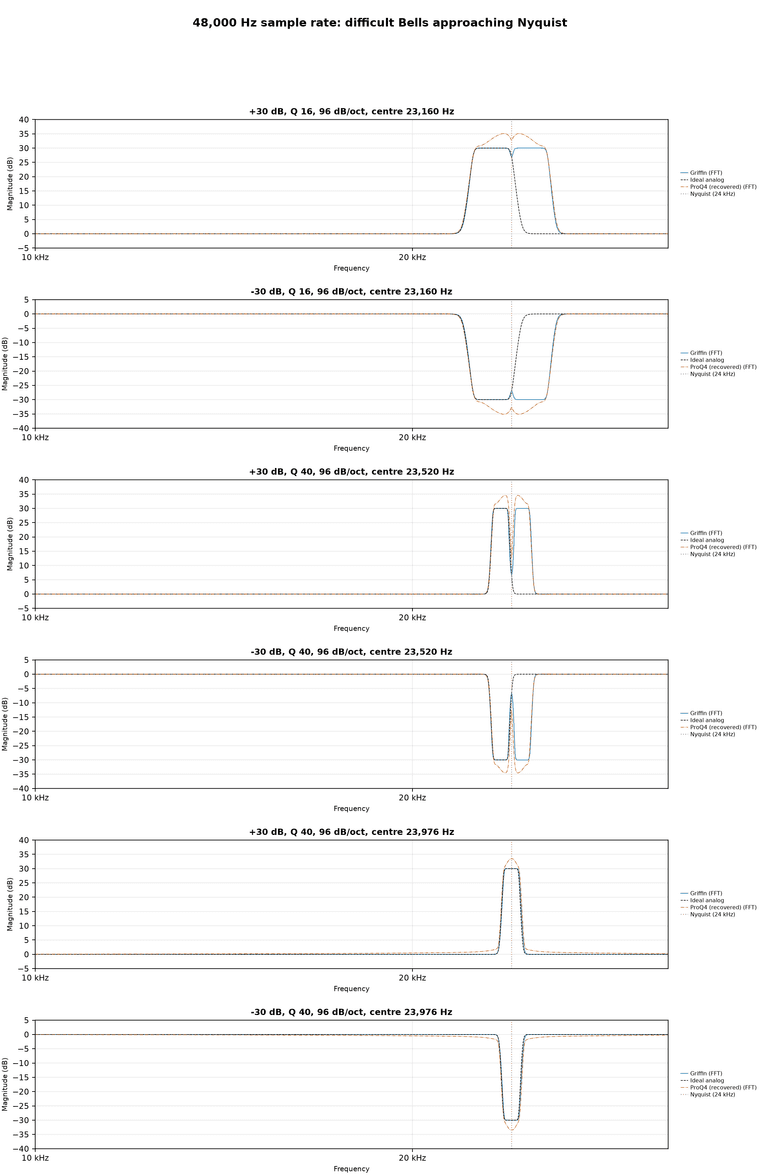
      1. ProQ's frequency response gets warped near nyquist (high frequencies)
      2. ProQ cannot be modulated for synthesis (the modulation is full of artefacts)

      But before correcting these issues,
      I wanted to first create an EQ that at least matches with ProQ.
      After I've achieved that, then I can create the technology to improve upon it. Right?

      Well, I was not expecting this first step to be so difficult!

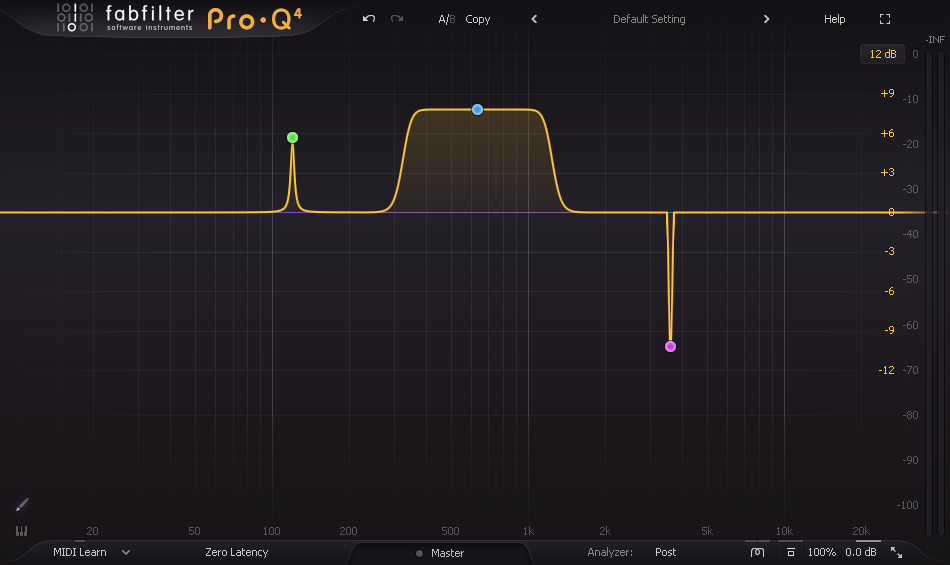
      The first thing I did was analyze the ProQ shapes (minimum phase mode) and I discovered instantly that none of them are "standard" EQ shapes. They are all custom shapes, even the normal bell shapes are not what we call "cookbook" shapes. They are all unique shapes that Fabfilter invented. So right off the bat, we can cross off using normal EQ filter shapes that can be found on the internet.

      It makes sense that ProQ would be using custom shapes though.
      If you look at ProQ, the shapes can get super wild. No normal EQ is capable of such high Q!

      freaking steep!

      7af99685-8ecd-4f22-bb9c-79d96e0a3f94-image.png

      And so the first thing I tried was stacking multiple minimum phase filters in series, to try and get the same shapes. Basically I created a cascade of bells, slopes, etc.
      And this paid off, I managed to create a decent "sloped bell" shape and other steep shapes, by combining filters in series.

      However - as soon as I moved the cutoff of all these filters together, we got artefacts. Little inconsistencies would appear, and it turned out that cascading minimum phase filters is actually a little bit delicate. The shape gets warped subtly at different cutoffs, and so the overall filter ended up having weird spikes and nasty shape issues at different cutoffs...!

      ProQ actually does have this issue too - but to a smaller degree compared to my filter cascade.

      The solution was a little devious. This is how I believe ProQ works:


      The EQ is essentially an "analog-prototype digitizer".
      When a Bell is created, the DSP constructs what is called an "Analog Prototype".
      This is an "ideal frequency response" target. In other words it imagines the shape it
      wants to create.

      It then digitizes each part of the shape separately so that we get a cascade of filters
      that match the target when ran in series (same as my initial idea).
      But the important part is that it gives extra weight to "perceptually important points"
      on the filter frequency response target. The solver that creates the matching filters, makes sure
      that the filters will pass through the most important points. This prevents wobble and weird spikes.
      Basically, every time you move the cutoff, the DSP recalculates the entire shape, it creates the
      Analog Prototype frequency response target, and creates the fitted filters that match that shape as close as possible.

      Basically it's adjusting the cascade of filters every time you touch a parameter. Self-correcting itself every time to try and match the "target" frequency response.

      An amazing advantage of this technique is that you can then reduce the amount that you fit to "impossible" parts of the target frequency response. For example doing filtering near nyquist (the top end of the sample rate) you can reduce the amount that you weight towards those parts (trying to fit a filter to ultrasonic frequencies will cause the rest of the filter response to warp and bend) meaning we fit only to the important audible parts and keep the filter response stable.

      The side effect of this, is that you can't really do true modulation. Because you're recalculating the filters every time. So ProQ does crossfades instead, when it recalculates the filters it crossfades from the old ones to the new ones.


      After doing the above, my own EQ filter could match with ProQ4:

      0a2d532f-017e-41eb-a247-015a3c1734bb-image.png

      That was much more complex than I'd imagined!
      They are definitely worthy of the name "Fabfilter" with this kind of effort.

      But...
      🎵I want to be the very best, like noone ever was 🎵

      So I set out on my year long journey to invent a better EQ.
      The final solution involved creating a solver that can be modulated at audio rate, doesn't ever use crossfades, and matches the analog response target as closely as possible. Making the realtime solver smooth so that changing frequency didn't create inconsistencies was the hardest challenge. I present the end result of my research:


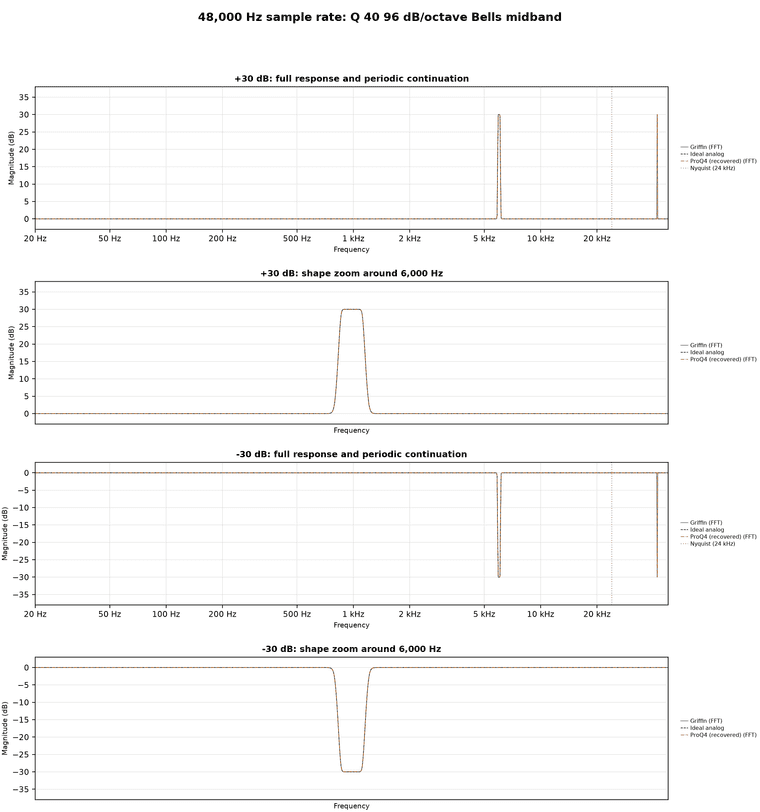
      GriffinFilter matches Fabfilter for all the "easy" shapes:

      e2d9b2bd-9a42-4f92-b277-7d3f6199932c-figure.png


      Where Fabfilter warps, GriffinFilter does not:

      91df47a5-cc72-4c9d-bd90-b6be75b6eddd-image.png

      --

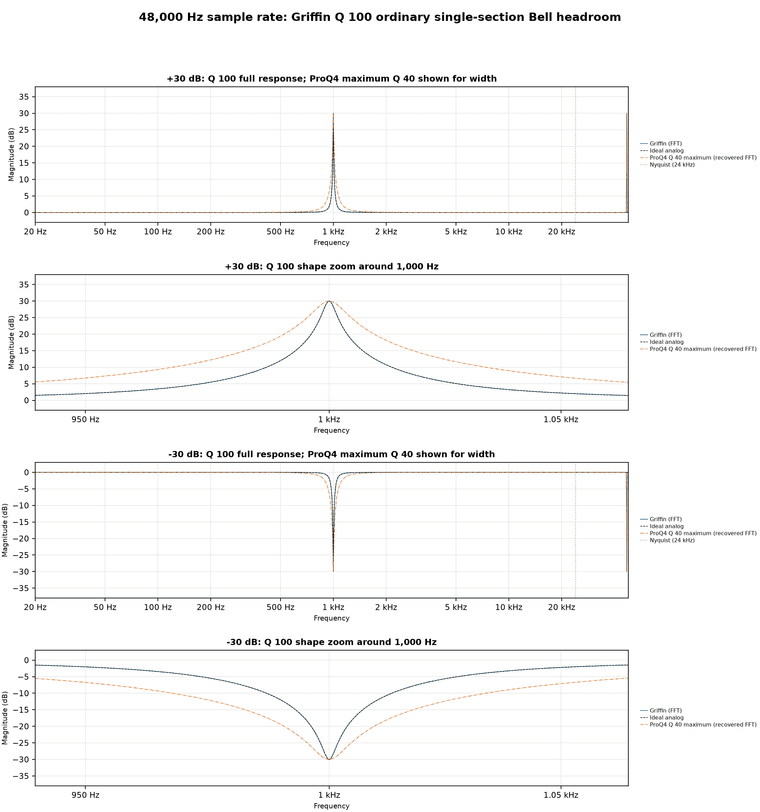
      100Q anyone?
      That's twice as steep Q as Fabfilter can manage.

      3a30032f-03f1-4eeb-a36f-00df84fa100d-figure.png

      --

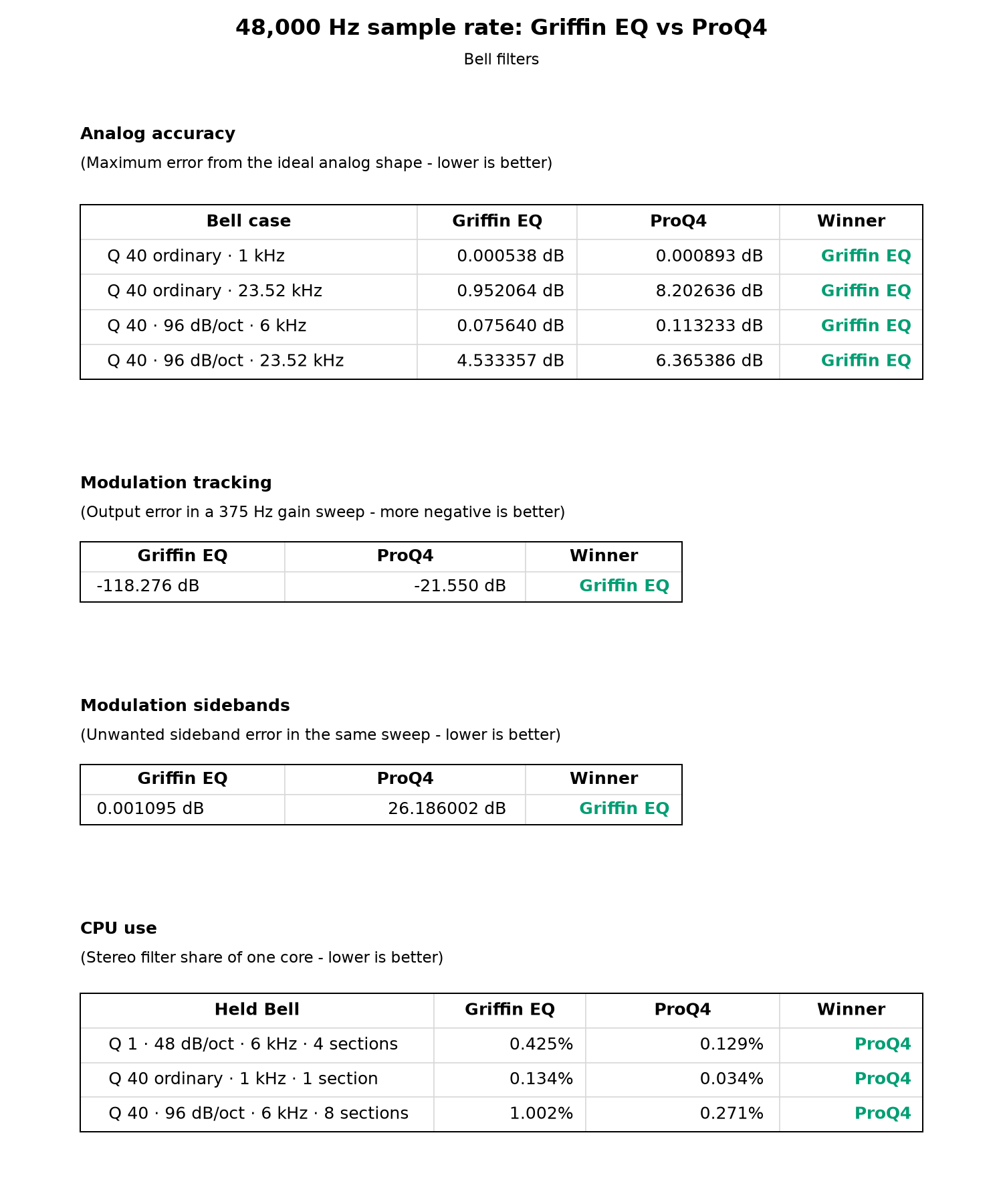
      And we can modulate cleanly, at audio rate
      Here's the printed specs:

      aeaff815-ae79-498b-a6fa-2a468e06d68a-image.png

      CPU usage is currently higher for GriffinEQ.
      But the good news is that the GriffinEQ project is still under development!
      This is the next obstacle for me to tackle. The aim is to get GriffinEQ performance matched with ProQ4.


      And now, for the all important question:
      Q: Do these EQ improvements really matter?
      A: In some ways, no, not really!

      Musicians already use multiple EQ bands. They stack whatever number of bands they want, to get the sound that they want.
      You mix with your ears, not with your eyes.
      And for ordinary EQ situations ProQ4 matches the ideal shape really closely. It only gets warped at the highest frequencies, which are practically inaudible.

      So why go through this enormous effort to improve it?
      The answer is synthesis.
      I love using EQ to create new sounds. And I commonly stack lots of EQ bands ontop of each other and modulate them around like crazy to make wild phasing effects!
      And so the limits of ProQ started to matter to me. I wanted something that was as precise as ProQ, capable of those really steep filter shapes, but I also needed it to modulate smooth and consistent, so that I can do big modulated sweeps that reach right up into the high frequencies! Without unintentional weird spikes or warping. Which is an issue that ProQ still suffers from.

      In scientific terms it's better, and in musical terms it's different.

      Maybe it doesn't hurt to have just one more EQ to choose from? : )


      I plan to make this DSP available in the upcoming Hise Asset Store for free.

      a2bea007-b44f-44a0-9e3f-9b7ba26926f8-image.png

      posted in C++ Development
      griffinboyG
      griffinboy
    • [Free Dsp] Lookahead Limiter (true peak)

      Lookahead Limiter designed for low distortion.
      It's not as fancy as Pro-L but it does the trick.
      Oversample it for True Peak limiting.

      Stereo Only
      CPU: (0.2%)

      *Important warning: DAW latency correction!
      The latency changes depending on attack time in this script, but in hise it's common to report a single latency value to the host. The solution to this is to either report the max latency to the host (measure from the max attack time), or to leave the attack time fixed, so that you can report a single latency value that won't change. You should be fine leaving it at 1 - 10 ms. A bit of attack (lookahead) is needed for smooth limiting.

      Download the script here:

      https://1drv.ms/u/c/6c19b197e5968b36/EQFgIcgl83VJviZoznFZWnEBleCXFfAD-KejdhTV9Q6IwQ?e=EyH8fM

      Setup tutorial:

      1. Create a 3rd party C++ node in HISE named "Griffin_Limiter"
      2. Compile the initial DLL in HISE using "Compile dsp networks as .dll"
      3. Replace the generated "Griffin_Limiter.h" (located in ProjectName/DspNetworks/ThirdParty) with my limiter header file
      4. Re-compile the final DLL in HISE using "Compile dsp networks as .dll"
      

      https://youtu.be/wnUICEij4Rs

      Ignore the audio artefacts in the video. My encoder is being a fool. The sound quality of the dsp is fine.

      You can read the script here:
      Griffin_Limiter.h:

      #pragma once
      #include <JuceHeader.h>
      #include <cstdint>
      #include <cmath>
      #include <vector>
      #include <algorithm>
      #include <limits>
      #include <cstring>
      
      /**
      
      ==============| by GriffinBoy (2025) |==============
      
      This node implements a Lookahead Stereo Limiter
      
      Features:
      - ExpSmootherCascade: Four-stage exponential smoothing with separate attack and release coefficients.
      - PeakHoldCascade: Eight-stage peak detection cascade for accurate envelope following.
      - Integrated lookahead
      - Parameter smoothing 
      
      Integration Steps for HISE:
      1. Create a 3rd party C++ node in HISE named " Griffin_Limiter "
      2. Compile the initial DLL in HISE using "Compile dsp networks as .dll"
      3. Replace the generated "Griffin_Limiter.h" (located in ProjectName/DspNetworks/ThirdParty) with this header file you are reading now
      4. Re-compile the final DLL in HISE using "Compile dsp networks as .dll"
      
      Author: GriffinBoy (2025)
      License: UwU
      
      Based on the following paper:
      Sanfilippo, D. (2022).Envelope following via cascaded exponential smoothers for low - distortion peak limiting and maximisation.In Proceedings of the International Faust Conference, Saint - Étienne, France.
      
      */
      
      
      namespace project
      {
      
      #ifndef M_PI
      #define M_PI 3.14159265358979323846
      #endif
      
          using namespace juce;
          using namespace hise;
          using namespace scriptnode;
      
          namespace FunctionsClasses {
      
              //------------------------------------------------------------------------------
              // DelaySmooth: A delay line with smooth crossfading between two integer delay
              // lines to produce a click-free, Doppler-free delay variation.
              // Fixed types: head = uint16_t and sample type = float.
              class DelaySmooth {
              private:
                  const size_t bufferLen = 2ul << (8 * sizeof(uint16_t) - 1); 
                  size_t delay = 0;
                  size_t interpolationTime = 1024;
                  size_t lowerDelay = 0;
                  size_t upperDelay = 0;
                  float interpolation = 0.0f;
                  float interpolationStep = 1.0f / float(interpolationTime);
                  float increment = interpolationStep;
                  uint16_t lowerReadPtr = 0;
                  uint16_t upperReadPtr = 0;
                  uint16_t writePtr = 0;
                  std::vector<float> bufferLeft;
                  std::vector<float> bufferRight;
              public:
                  void SetDelay(size_t _delay) { delay = _delay; }
                  void SetInterpolationTime(size_t _interpTime) {
                      interpolationTime = std::max<size_t>(1, _interpTime);
                      interpolationStep = 1.0f / float(interpolationTime);
                  }
                  void Reset() {
                      std::fill(bufferLeft.begin(), bufferLeft.end(), 0.0f);
                      std::fill(bufferRight.begin(), bufferRight.end(), 0.0f);
                  }
                  void Process(float** xVec, float** yVec, size_t vecLen) {
                      float* xLeft = xVec[0];
                      float* xRight = xVec[1];
                      float* yLeft = yVec[0];
                      float* yRight = yVec[1];
                      for (size_t n = 0; n < vecLen; n++) {
                          bufferLeft[writePtr] = xLeft[n];
                          bufferRight[writePtr] = xRight[n];
                          bool lowerReach = (interpolation == 0.0f);
                          bool upperReach = (interpolation == 1.0f);
                          bool lowerDelayChanged = (delay != lowerDelay);
                          bool upperDelayChanged = (delay != upperDelay);
                          bool startDownwardInterp = (upperReach && upperDelayChanged);
                          bool startUpwardInterp = (lowerReach && lowerDelayChanged);
                          float incrementPathsUp[2] = { increment, interpolationStep };
                          float incrementPathsDown[2] = { incrementPathsUp[startUpwardInterp], -interpolationStep };
                          increment = incrementPathsDown[startDownwardInterp];
                          size_t lowerDelayPaths[2] = { lowerDelay, delay };
                          size_t upperDelayPaths[2] = { upperDelay, delay };
                          lowerDelay = lowerDelayPaths[upperReach];
                          upperDelay = upperDelayPaths[lowerReach];
                          // Use explicit bitwise AND for modulo (bufferLen = 65536)
                          lowerReadPtr = static_cast<uint16_t>(writePtr - lowerDelay) & 0xFFFF;
                          upperReadPtr = static_cast<uint16_t>(writePtr - upperDelay) & 0xFFFF;
                          writePtr++;
                          interpolation = std::max(0.0f, std::min(1.0f, interpolation + increment));
                          yLeft[n] = interpolation * (bufferLeft[upperReadPtr] - bufferLeft[lowerReadPtr]) + bufferLeft[lowerReadPtr];
                          yRight[n] = interpolation * (bufferRight[upperReadPtr] - bufferRight[lowerReadPtr]) + bufferRight[lowerReadPtr];
                      }
                  }
                  DelaySmooth() {
                      bufferLeft.resize(bufferLen);
                      bufferRight.resize(bufferLen);
                  }
                  DelaySmooth(size_t _delay, size_t _interpTime) {
                      bufferLeft.resize(bufferLen);
                      bufferRight.resize(bufferLen);
                      delay = _delay;
                      interpolationTime = std::max<size_t>(1, _interpTime);
                      interpolationStep = 1.0f / float(interpolationTime);
                  }
              };
      
              //------------------------------------------------------------------------------
              // ExpSmootherCascade: Cascaded one-pole exponential smoothers (4 stages)
              // with separate attack and release coefficients.
              class ExpSmootherCascade {
              private:
                  static constexpr size_t stages = 4;
                  const float coeffCorrection = 1.0f / std::sqrt(std::pow(2.0f, 1.0f / float(stages)) - 1.0f);
                  const float epsilon = std::numeric_limits<float>::epsilon();
                  float SR = 48000.0f;
                  float T = 1.0f / SR;
                  const float twoPiC = 2.0f * static_cast<float>(M_PI) * coeffCorrection;
                  float twoPiCT = twoPiC * T;
                  float attTime = 0.001f;
                  float relTime = 0.01f;
                  float attCoeff = std::exp(-twoPiCT / attTime);
                  float relCoeff = std::exp(-twoPiCT / relTime);
                  float coeff[2] = { relCoeff, attCoeff };
                  float output[stages] = { 0.0f, 0.0f, 0.0f, 0.0f };
              public:
                  void SetSR(float _SR) {
                      SR = std::max(_SR, 1.0f);
                      T = 1.0f / SR;
                      twoPiCT = twoPiC * T;
                  }
                  void SetAttTime(float _attTime) {
                      attTime = std::max(epsilon, _attTime);
                      attCoeff = std::exp(-twoPiCT / attTime);
                      coeff[1] = attCoeff;
                  }
                  void SetRelTime(float _relTime) {
                      relTime = std::max(epsilon, _relTime);
                      relCoeff = std::exp(-twoPiCT / relTime);
                      coeff[0] = relCoeff;
                  }
                  void Reset() { std::memset(output, 0, sizeof(output)); }
                  void Process(float* xVec, float* yVec, size_t vecLen) {
                      for (size_t n = 0; n < vecLen; n++) {
                          float input = xVec[n];
                          // Unrolled stage 0
                          bool isAttackPhase = (input > output[0]);
                          float coeffVal = isAttackPhase ? attCoeff : relCoeff;
                          output[0] = input + coeffVal * (output[0] - input);
                          input = output[0];
                          // Unrolled stage 1
                          isAttackPhase = (input > output[1]);
                          coeffVal = isAttackPhase ? attCoeff : relCoeff;
                          output[1] = input + coeffVal * (output[1] - input);
                          input = output[1];
                          // Unrolled stage 2
                          isAttackPhase = (input > output[2]);
                          coeffVal = isAttackPhase ? attCoeff : relCoeff;
                          output[2] = input + coeffVal * (output[2] - input);
                          input = output[2];
                          // Unrolled stage 3
                          isAttackPhase = (input > output[3]);
                          coeffVal = isAttackPhase ? attCoeff : relCoeff;
                          output[3] = input + coeffVal * (output[3] - input);
                          yVec[n] = output[3];
                      }
                  }
                  ExpSmootherCascade() {}
                  ExpSmootherCascade(float _SR, float _attTime, float _relTime) {
                      SR = std::max(_SR, 1.0f);
                      T = 1.0f / SR;
                      twoPiCT = twoPiC * T;
                      attTime = std::max(epsilon, _attTime);
                      relTime = std::max(epsilon, _relTime);
                      attCoeff = std::exp(-twoPiCT / attTime);
                      relCoeff = std::exp(-twoPiCT / relTime);
                      coeff[0] = relCoeff;
                      coeff[1] = attCoeff;
                  }
              };
      
              //------------------------------------------------------------------------------
              // PeakHoldCascade: Cascaded peak-holders (8 stages fixed) to approximate a max filter.
              // The cascade splits the hold time to detect secondary peaks.
              class PeakHoldCascade {
              private:
                  static constexpr size_t stages = 8;
                  float SR = 48000.0f;
                  float holdTime = 0.001f;
                  const float oneOverStages = 1.0f / float(stages);
                  size_t holdTimeSamples = std::rint(holdTime * oneOverStages * SR);
                  size_t timer[stages];
                  float output[stages];
              public:
                  void SetSR(float _SR) {
                      SR = std::max(_SR, 1.0f);
                      holdTimeSamples = std::rint(holdTime * oneOverStages * SR);
                  }
                  void SetHoldTime(float _holdTime) {
                      holdTime = std::max(0.0f, _holdTime);
                      holdTimeSamples = std::rint(holdTime * oneOverStages * SR);
                  }
                  void Reset() {
                      std::memset(timer, 0, sizeof(timer));
                      std::memset(output, 0, sizeof(output));
                  }
                  void Process(float* xVec, float* yVec, size_t vecLen) {
                      for (size_t n = 0; n < vecLen; n++) {
                          float input = std::fabs(xVec[n]);
                          bool release;
                          // Unrolled stage 0
                          release = (input >= output[0]) || (timer[0] >= holdTimeSamples);
                          timer[0] = release ? 0 : (timer[0] + 1);
                          output[0] = release ? input : output[0];
                          input = output[0];
                          // Unrolled stage 1
                          release = (input >= output[1]) || (timer[1] >= holdTimeSamples);
                          timer[1] = release ? 0 : (timer[1] + 1);
                          output[1] = release ? input : output[1];
                          input = output[1];
                          // Unrolled stage 2
                          release = (input >= output[2]) || (timer[2] >= holdTimeSamples);
                          timer[2] = release ? 0 : (timer[2] + 1);
                          output[2] = release ? input : output[2];
                          input = output[2];
                          // Unrolled stage 3
                          release = (input >= output[3]) || (timer[3] >= holdTimeSamples);
                          timer[3] = release ? 0 : (timer[3] + 1);
                          output[3] = release ? input : output[3];
                          input = output[3];
                          // Unrolled stage 4
                          release = (input >= output[4]) || (timer[4] >= holdTimeSamples);
                          timer[4] = release ? 0 : (timer[4] + 1);
                          output[4] = release ? input : output[4];
                          input = output[4];
                          // Unrolled stage 5
                          release = (input >= output[5]) || (timer[5] >= holdTimeSamples);
                          timer[5] = release ? 0 : (timer[5] + 1);
                          output[5] = release ? input : output[5];
                          input = output[5];
                          // Unrolled stage 6
                          release = (input >= output[6]) || (timer[6] >= holdTimeSamples);
                          timer[6] = release ? 0 : (timer[6] + 1);
                          output[6] = release ? input : output[6];
                          input = output[6];
                          // Unrolled stage 7
                          release = (input >= output[7]) || (timer[7] >= holdTimeSamples);
                          timer[7] = release ? 0 : (timer[7] + 1);
                          output[7] = release ? input : output[7];
                          yVec[n] = output[7];
                      }
                  }
                  PeakHoldCascade() { Reset(); }
                  PeakHoldCascade(float _SR, float _holdTime) {
                      SR = std::max(_SR, 1.0f);
                      holdTime = _holdTime;
                      holdTimeSamples = std::rint(holdTime * oneOverStages * SR);
                      Reset();
                  }
              };
      
              //------------------------------------------------------------------------------
              // Limiter: Lookahead peak-limiter combining DelaySmooth, PeakHoldCascade, and
              // ExpSmootherCascade. Computes a stereo envelope and applies a gain to keep
              // signal peaks below a given threshold.
              template<typename real>
              class Limiter {
              private:
                  float SR = 48000.0f;
                  float T = 1.0f / SR;
                  const float twoPi = 2.0f * static_cast<float>(M_PI);
                  const float epsilon = std::numeric_limits<float>::epsilon();
                  const float smoothParamCutoff = 20.0f;
                  float attack = 0.01f;
                  float hold = 0.0f;
                  float release = 0.05f;
                  float dBThreshold = -6.0f;
                  float linThreshold = std::pow(10.0f, dBThreshold * 0.05f);
                  float dBPreGain = 0.0f;
                  float linPreGain = 1.0f;
                  float smoothPreGain = 0.0f;
                  float smoothThreshold = 0.0f;
                  float smoothParamCoeff = std::exp(-twoPi * smoothParamCutoff * T);
                  size_t lookaheadDelay = 0;
                  DelaySmooth delay;
                  static constexpr size_t numberOfPeakHoldSections = 8;
                  static constexpr size_t numberOfSmoothSections = 4;
                  const float oneOverPeakSections = 1.0f / float(numberOfPeakHoldSections);
                  PeakHoldCascade peakHolder;
                  ExpSmootherCascade expSmoother;
              public:
                  void SetSR(float _SR) {
                      SR = std::max(_SR, 1.0f);
                      T = 1.0f / SR;
                      smoothParamCoeff = std::exp(-twoPi * smoothParamCutoff * T);
                      peakHolder.SetSR(SR);
                      expSmoother.SetSR(SR);
                  }
                  void SetAttTime(float _attack) {
                      attack = std::max(epsilon, _attack);
                      lookaheadDelay = std::rint(attack * oneOverPeakSections * SR) * numberOfPeakHoldSections;
                      delay.SetDelay(lookaheadDelay);
                      delay.SetInterpolationTime(lookaheadDelay);
                      expSmoother.SetAttTime(attack);
                      peakHolder.SetHoldTime(attack + hold);
                  }
                  void SetHoldTime(float _hold) {
                      hold = std::max(0.0f, _hold);
                      peakHolder.SetHoldTime(attack + hold);
                  }
                  void SetRelTime(float _release) {
                      release = std::max(epsilon, _release);
                      expSmoother.SetRelTime(release);
                  }
                  void SetThreshold(float _threshold) {
                      dBThreshold = std::max(-120.0f, _threshold);
                      linThreshold = std::pow(10.0f, dBThreshold * 0.05f);
                  }
                  void SetPreGain(float _preGain) {
                      dBPreGain = _preGain;
                      linPreGain = std::pow(10.0f, dBPreGain * 0.05f);
                  }
                  void Reset() {
                      delay.Reset();
                      peakHolder.Reset();
                      expSmoother.Reset();
                  }
                  // Process takes separate input and output stereo buffers.
                  // The design uses an in-place delay so the input buffer is overwritten.
                  void Process(float** xVec, float** yVec, size_t vecLen) {
                      // Get channel pointers once outside loops.
                      float* xLeft = xVec[0];
                      float* xRight = xVec[1];
                      float* yLeft = yVec[0];
                      float* yRight = yVec[1];
                      // Merge pre-gain smoothing and envelope computation.
                      for (size_t n = 0; n < vecLen; n++) {
                          smoothPreGain = linPreGain + smoothParamCoeff * (smoothPreGain - linPreGain);
                          xLeft[n] *= smoothPreGain;
                          xRight[n] *= smoothPreGain;
                          yLeft[n] = std::max(std::fabs(xLeft[n]), std::fabs(xRight[n]));
                      }
                      // Process envelope with peak-hold cascade.
                      peakHolder.Process(yLeft, yLeft, vecLen);
                      // Smooth and clip envelope to threshold.
                      for (size_t n = 0; n < vecLen; n++) {
                          smoothThreshold = linThreshold + smoothParamCoeff * (smoothThreshold - linThreshold);
                          yLeft[n] = std::max(yLeft[n], smoothThreshold);
                          yRight[n] = smoothThreshold;
                      }
                      // Smooth envelope with exponential cascade.
                      expSmoother.Process(yLeft, yLeft, vecLen);
                      // Apply lookahead delay (in-place).
                      delay.Process(xVec, xVec, vecLen);
                      // Compute attenuation gain and apply to delayed signal in one loop.
                      for (size_t n = 0; n < vecLen; n++) {
                          float gain = yRight[n] / yLeft[n];
                          yLeft[n] = gain * xLeft[n];
                          yRight[n] = gain * xRight[n];
                      }
                  }
                  Limiter() {}
                  Limiter(float _SR, float _dBPreGain, float _attack, float _hold, float _release, float _dBThreshold) {
                      SR = std::max(_SR, 1.0f);
                      dBPreGain = _dBPreGain;
                      attack = std::max(epsilon, _attack);
                      hold = std::max(0.0f, _hold);
                      release = std::max(epsilon, _release);
                      dBThreshold = std::max(-120.0f, _dBThreshold);
                  }
              };
      
          } // end namespace FunctionsClasses
      
          //------------------------------------------------------------------------------
          // SNEX Node - Stereo Limiter Node Implementation
          //------------------------------------------------------------------------------
          template <int NV>
          struct Griffin_Limiter : public data::base
          {
              SNEX_NODE(Griffin_Limiter);
      
              struct MetadataClass
              {
                  SN_NODE_ID("Griffin_Limiter");
              };
      
              // Node Properties 
              static constexpr bool isModNode() { return false; }
              static constexpr bool isPolyphonic() { return NV > 1; }
              static constexpr bool hasTail() { return false; }
              static constexpr bool isSuspendedOnSilence() { return false; }
              static constexpr int getFixChannelAmount() { return 2; }
      
              static constexpr int NumTables = 0;
              static constexpr int NumSliderPacks = 0;
              static constexpr int NumAudioFiles = 0;
              static constexpr int NumFilters = 0;
              static constexpr int NumDisplayBuffers = 0;
      
              // Create an instance of our DSP Limiter 
              FunctionsClasses::Limiter<float> limiter;
      
              // Scratch buffers to avoid per-block allocation.
          private:
              std::vector<float> scratchInLeft, scratchInRight;
              std::vector<float> scratchOutLeft, scratchOutRight;
          public:
              //--------------------------------------------------------------------------
              // Main Processing Functions
              //--------------------------------------------------------------------------
              void prepare(PrepareSpecs specs)
              {
                  float sampleRate = specs.sampleRate;
                  limiter.SetSR(sampleRate);
                  limiter.Reset();
                  // Preallocate scratch buffers (use maximum BlockSize if available, otherwise default to 512).
                  int blockSize = (specs.blockSize > 0) ? specs.blockSize : 512;
                  scratchInLeft.resize(blockSize);
                  scratchInRight.resize(blockSize);
                  scratchOutLeft.resize(blockSize);
                  scratchOutRight.resize(blockSize);
              }
      
              void reset() {}
      
              template <typename ProcessDataType>
              inline void process(ProcessDataType& data)
              {
                  auto& fixData = data.template as<ProcessData<getFixChannelAmount()>>();
                  auto audioBlock = fixData.toAudioBlock();
                  float* leftChannelData = audioBlock.getChannelPointer(0);
                  float* rightChannelData = audioBlock.getChannelPointer(1);
                  int numSamples = data.getNumSamples();
      
                  juce::FloatVectorOperations::copy(scratchInLeft.data(), leftChannelData, numSamples);
                  juce::FloatVectorOperations::copy(scratchInRight.data(), rightChannelData, numSamples);
      
                  float* inBuffers[2] = { scratchInLeft.data(), scratchInRight.data() };
                  float* outBuffers[2] = { scratchOutLeft.data(), scratchOutRight.data() };
      
                  limiter.Process(inBuffers, outBuffers, numSamples);
      
                  juce::FloatVectorOperations::copy(leftChannelData, scratchOutLeft.data(), numSamples);
                  juce::FloatVectorOperations::copy(rightChannelData, scratchOutRight.data(), numSamples);
              }
      
              //--------------------------------------------------------------------------
              // Parameter Handling
              //--------------------------------------------------------------------------
              template <int P>
              void setParameter(double v)
              {
                  if (P == 0) {
                      limiter.SetPreGain(static_cast<float>(v));
                  }
                  else if (P == 1) {
                      // Convert from ms to seconds.
                      limiter.SetAttTime(static_cast<float>(v * 0.001));
                  }
                  else if (P == 2) {
                      limiter.SetHoldTime(static_cast<float>(v * 0.001));
                  }
                  else if (P == 3) {
                      limiter.SetRelTime(static_cast<float>(v * 0.001));
                  }
                  else if (P == 4) {
                      limiter.SetThreshold(static_cast<float>(v));
                  }
              }
      
              void createParameters(ParameterDataList& data)
              {
                  {
                      parameter::data p("PreGain (dB)", { -24.0, 24.0, 0.1 });
                      registerCallback<0>(p);
                      p.setDefaultValue(0.0);
                      data.add(std::move(p));
                  }
                  {
                      parameter::data p("Attack (ms)", { 1.0, 500.0, 1.0 });
                      registerCallback<1>(p);
                      p.setDefaultValue(10.0);
                      p.setSkewForCentre(80.0f);
                      data.add(std::move(p));
                  }
                  {
                      parameter::data p("Hold (ms)", { 0.0, 100.0, 1.0 });
                      registerCallback<2>(p);
                      p.setDefaultValue(5.0);
                      p.setSkewForCentre(30.0f);
                      data.add(std::move(p));
                  }
                  {
                      parameter::data p("Release (ms)", { 1.0, 2500.0, 1.0 });
                      registerCallback<3>(p);
                      p.setDefaultValue(80.0);
                      p.setSkewForCentre(800.0f);
                      data.add(std::move(p));
                  }
                  {
                      parameter::data p("Ceiling (dB)", { -60.0, 0.0, 0.1 });
                      registerCallback<4>(p);
                      p.setDefaultValue(-6.0);
                      data.add(std::move(p));
                  }
              }
      
              void setExternalData(const ExternalData& ed, int index)
              {
                  // Not needed.
              }
      
              void handleHiseEvent(HiseEvent& e)
              {
                  // Not needed.
              }
      
              template <typename FrameDataType>
              void processFrame(FrameDataType& data)
              {
                  // Not needed.
              }
          };
      
      } // end namespace project
      
      posted in C++ Development
      griffinboyG
      griffinboy
    • [Tutorial] How to Multiband in Scriptnode (without artefacts!)

      I’ve seen a few people try to build multiband chains in ScriptNode and run into the same problem:

      The filters look like they are splitting bands correctly,
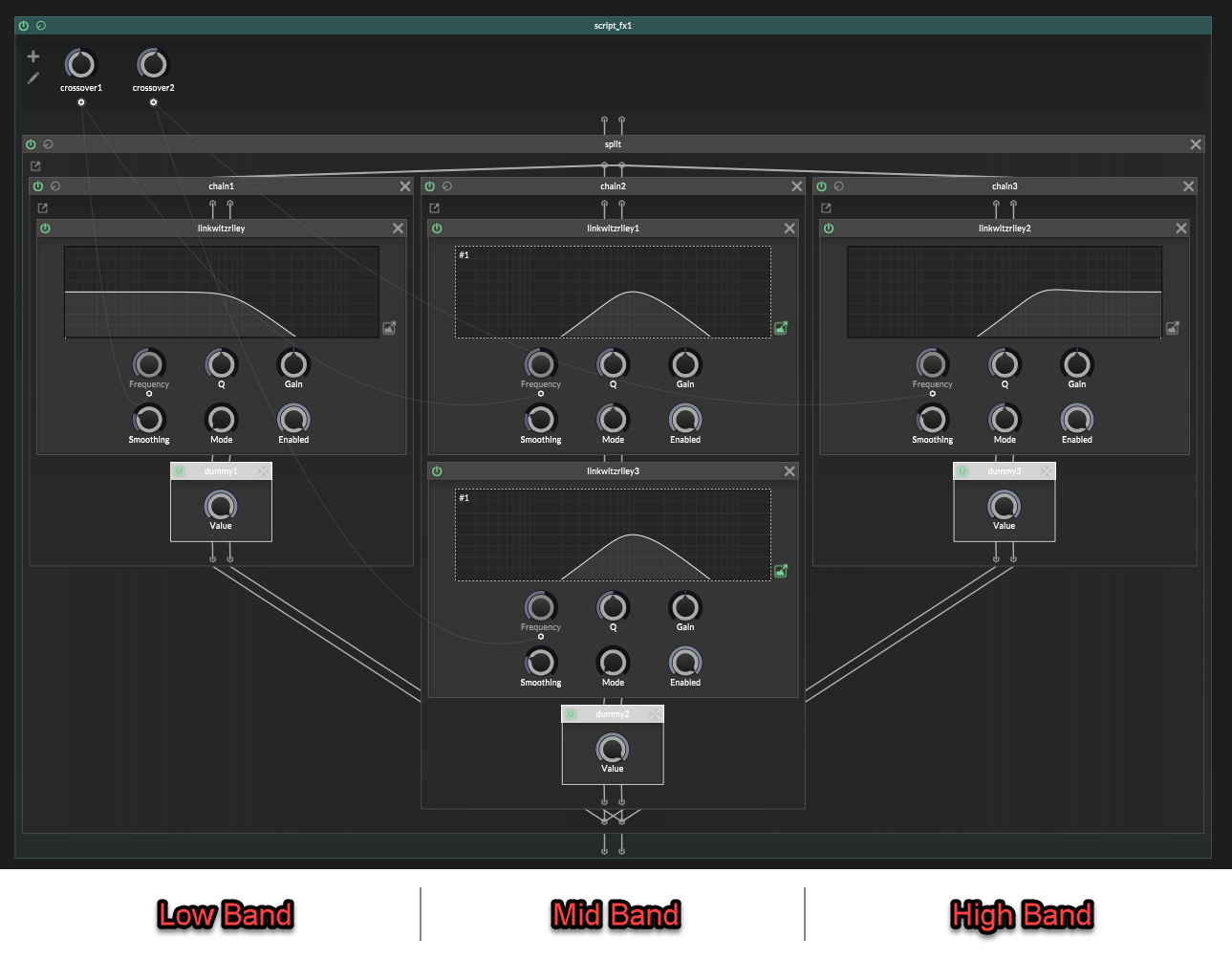
      6cbc85b5-008e-40b1-9d56-eb3419dda181-image.png
      (image note: the middle band filters are a highpass node followed by a lowpass node, they share a linked filter display which is why they both look like a bandpass on the display. That's a drawing of the combined response, but it's actually a separate lowpass and highpass node)


      but when you sum them back together the sound gets hollow.
      The spectrum has a dip!

      It is phase cancellation.
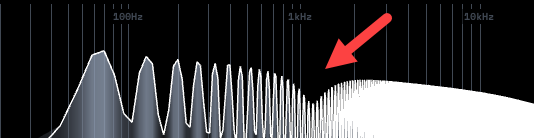
      d31af9ae-ca53-4fc8-9e17-9b6b8327fe4a-image.png

      I actually do have my own custom multiband node for this, that handles everything automatically, with higher quality filters that can be modulated without glitches. And I’ll be releasing that to the forum for free in the future.

      But until then:
      It's actually possible to make a basic splitter in Hise using stock effects.
      So without further ado, lets begin : )

      The mistake

      A multiband splitter does not work if you just:

      • lowpass for the low band
      • bandpass for the middle band
      • highpass for the high band
      • then sum everything back together

      That looks logical, but the filters are not only changing volume.

      They are also changing phase.

      So when the bands recombine, your signals are out of phase with each other and don't add together properly. Part of the signal cancels out and you get a frequency dip.

      That is the hole.


      Building a perfect multiband in ScriptNode
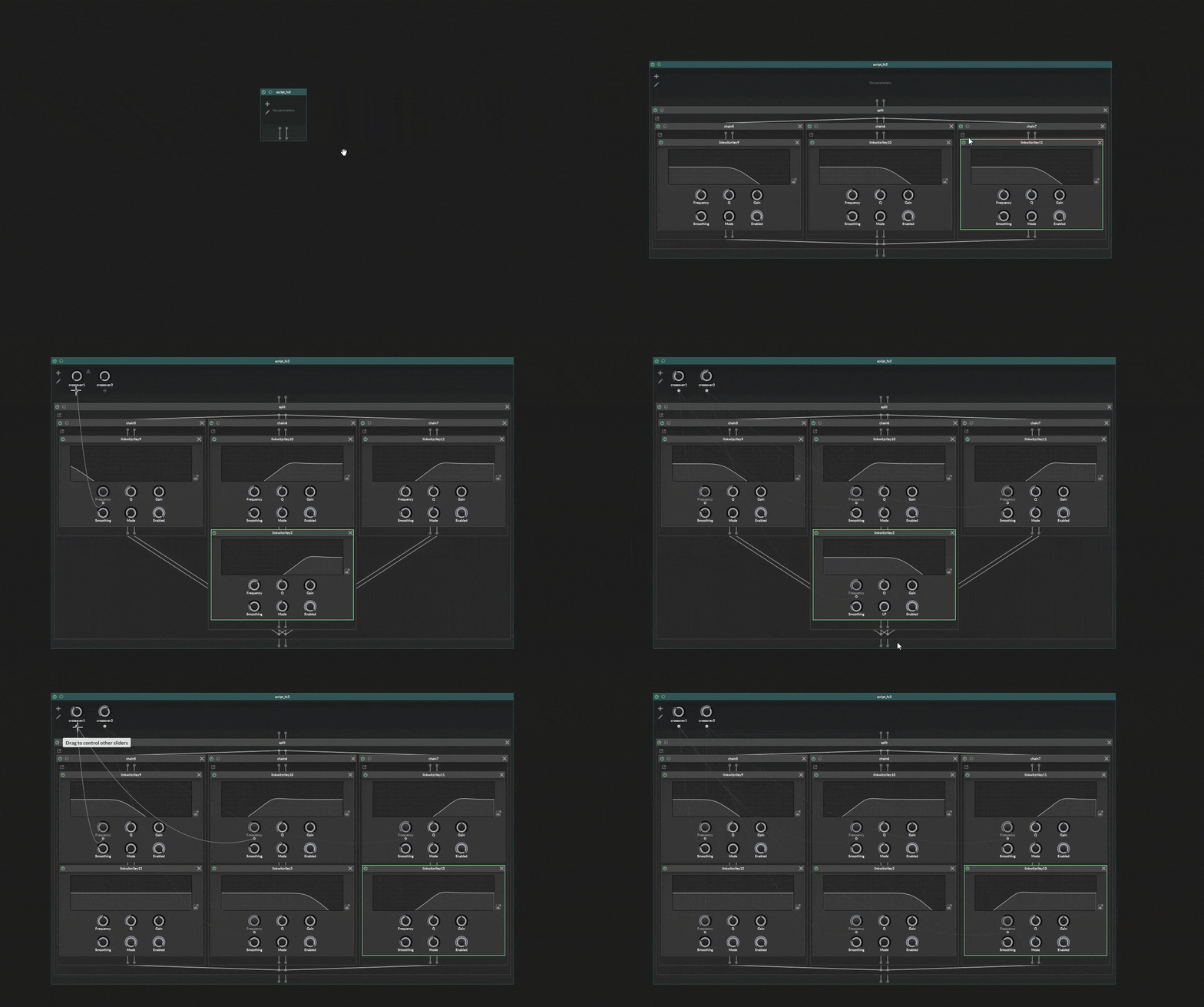

      e735ee21-55b7-4a84-9b63-cc03d0947cab-ezgif-141257e24d046bf1.gif

      Use Linkwitz-Riley filters for the crossover split. In HISE, that means jdsp.jlinkwitzriley.

      In Linkwitz-Riley the LP and HP modes are designed to add back together cleanly when they use the same crossover frequency.

      For 2 bands, it's easy.
      For more than 2 bands, you also need AP mode.
      That is where the annoying part begins.


      The simple case: 2 bands

      A 2-band splitter is just one matched crossover.
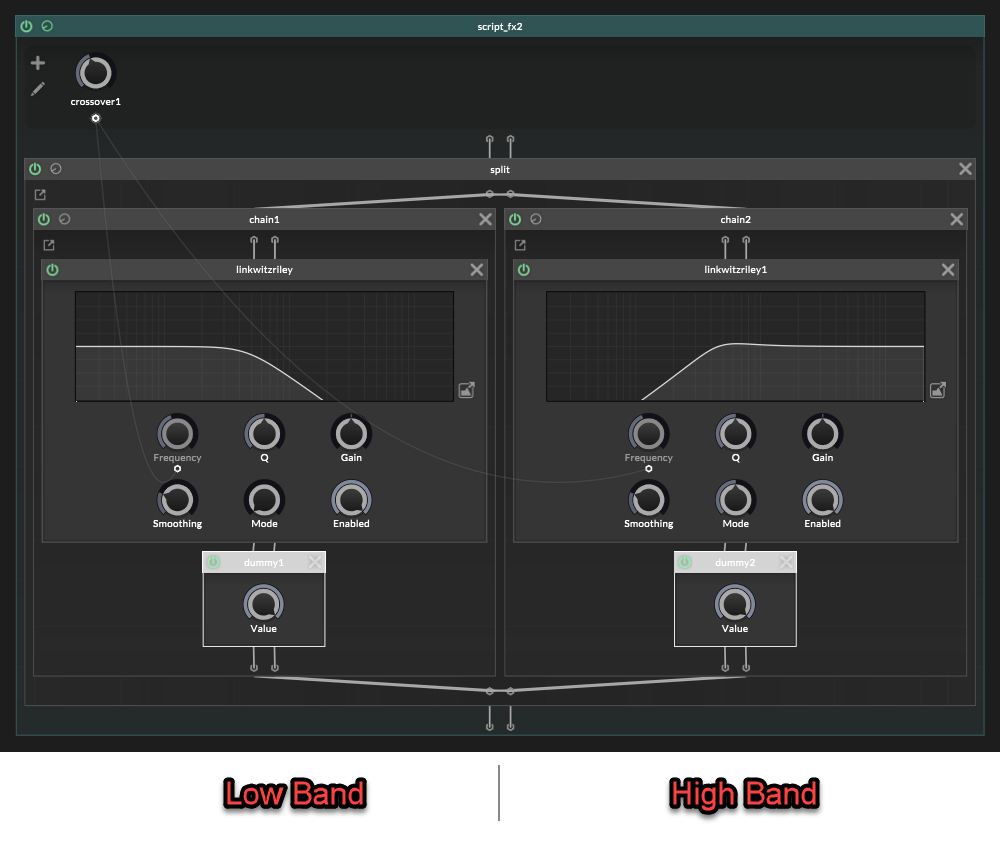
      02afbf8f-5c8b-44b2-a7a8-3dc1dfe75b07-image.png

      That gives you:

      Low:
      LP 1
      
      High:
      HP 1
      

      Both filters use the same crossover frequency.

      Nice and clean. No phase artefacts yet.


      The hard case: more than 2 bands

      The 2-band split is easy because there is only one crossover.
      (One side gets LP 1, the other side gets HP 1, and they are a matched pair).

      With 3 bands or more, it's different.
      This is where the simple setup breaks.

      Lets use 3 bands as an example.
      With 3 bands there are two crossovers:
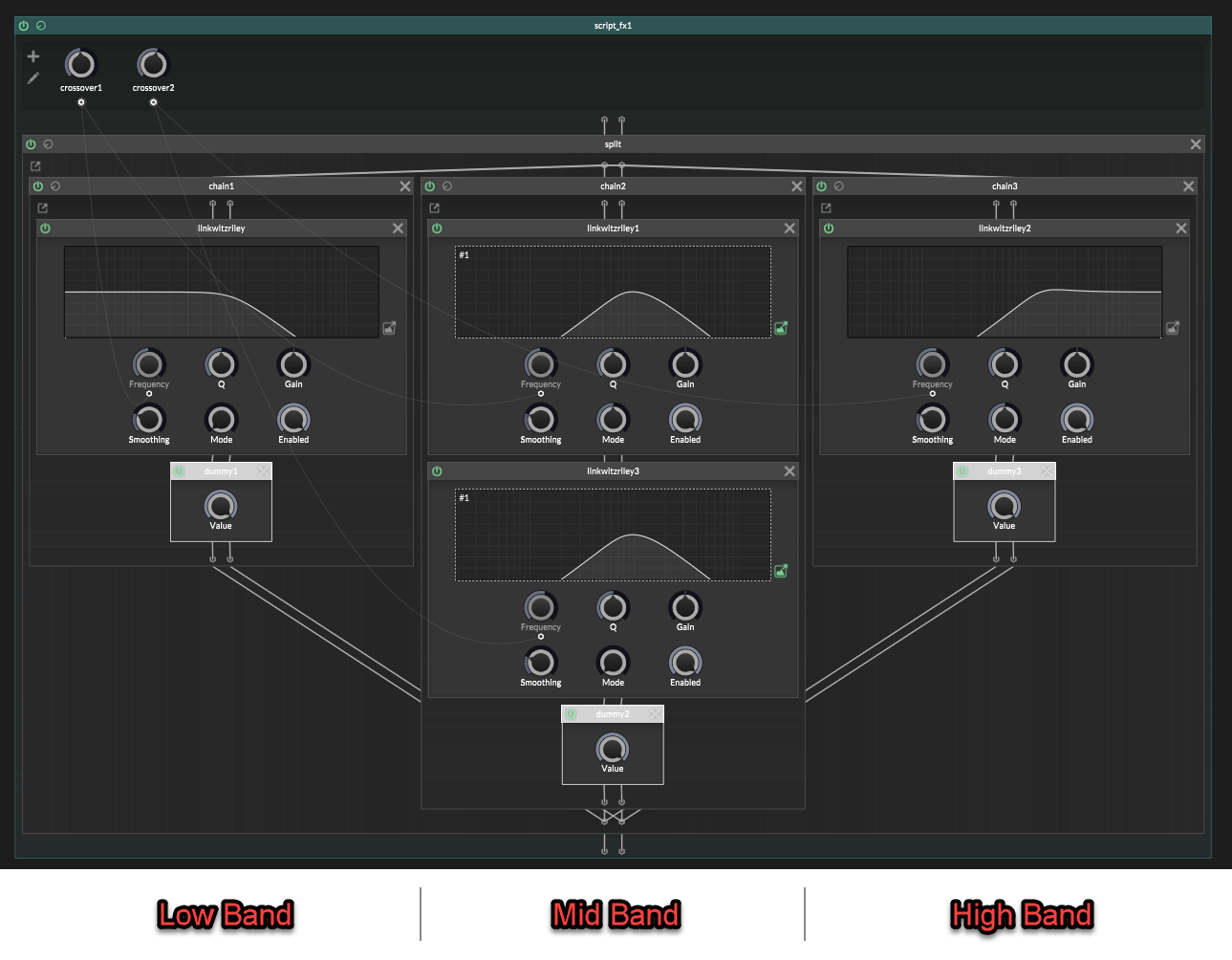
      faec4798-a139-4051-8a68-d7413c9f0e36-image.png

      It is tempting to think this is correct:

      Low:
      LP 1
      
      Mid:
      HP 1 -> LP 2
      
      High:
      HP 2
      

      That looks reasonable at first glance.

      Low is lowpassed.
      Mid is between the two crossovers.
      High is highpassed.

      But the paths are not phase equivalent anymore.

      Filters affect phase, so if one band gets shifted differently from the others, the bands will not line up properly when summed:

      In a 3 band multiband split, we have two crossovers.
      The mid band has already gone through two crossover filter stages:

      Mid:
      HP 1 -> LP 2
      

      But the low and high bands have only gone through one crossover filter stage each.
      That is the mismatch.

      The mid band has been shaped by crossover filter 1 and crossover filter 2, so its phase has moved through both filter stages.

      But In the naïve version, the high band is only:

      High:
      HP 2
      

      That skips crossover 1 completely.

      We need both crossovers to be represented.

      So the high band should be:

      High:
      HP 1 -> HP 2
      

      Not because we want to “highpass it twice” for the sound, but because the high band still needs the phase from crossover 1 and well as crossover 2.

      The low band has the opposite problem.

      It has crossover 1 already:

      Low:
      LP 1
      

      But it does not have crossover 2 at all.

      We do not want to filter the low band with LP 2 or HP 2, because that would change the low band itself.

      We only want it to carry the phase movement from crossover 2.

      That is what an allpass is for in this situation:

      Low:
      LP 1 -> AP 2
      

      Now the full 3-band layout is:

      Low:
      LP 1 -> AP 2
      
      Mid:
      HP 1 -> LP 2
      
      High:
      HP 1 -> HP 2
      

      This is the correct layout to copy.
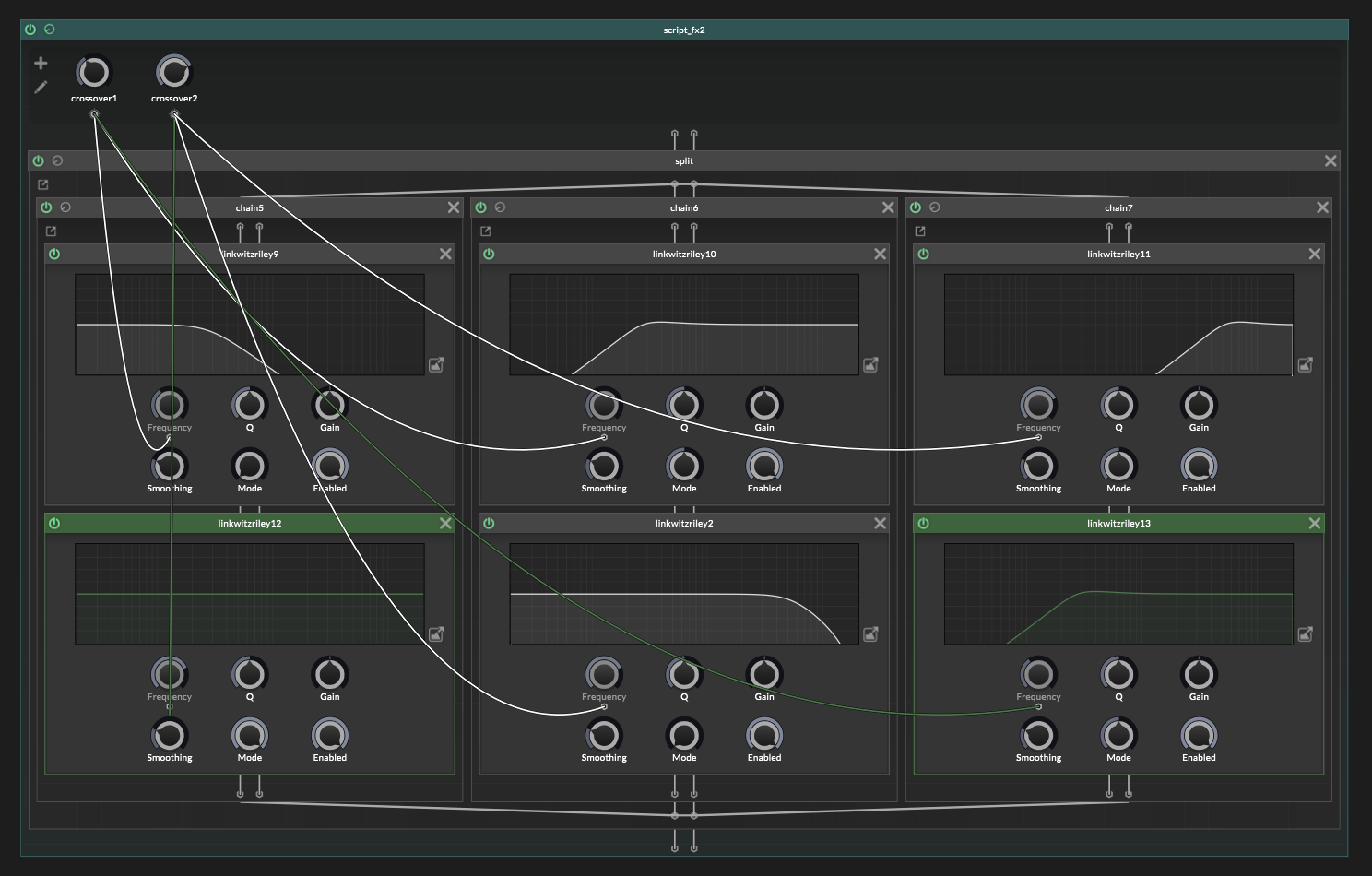
      a4fd7eb8-0227-4640-b851-5e5d7b01fecc-image.png

      The allpass is not changing the frequency balance. It is just giving the low path the same phase movement from crossover 2, so everything adds back together properly.

      No more frequency dip! : )
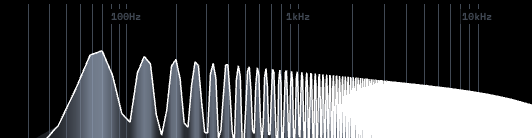
      895d9d21-f183-4d91-bebc-b6c0bd9e3a01-image.png


      Add your effects after the splitter

      Once the splitter is correct, add whatever effects you wanted to apply to each band, after the crossover nodes.
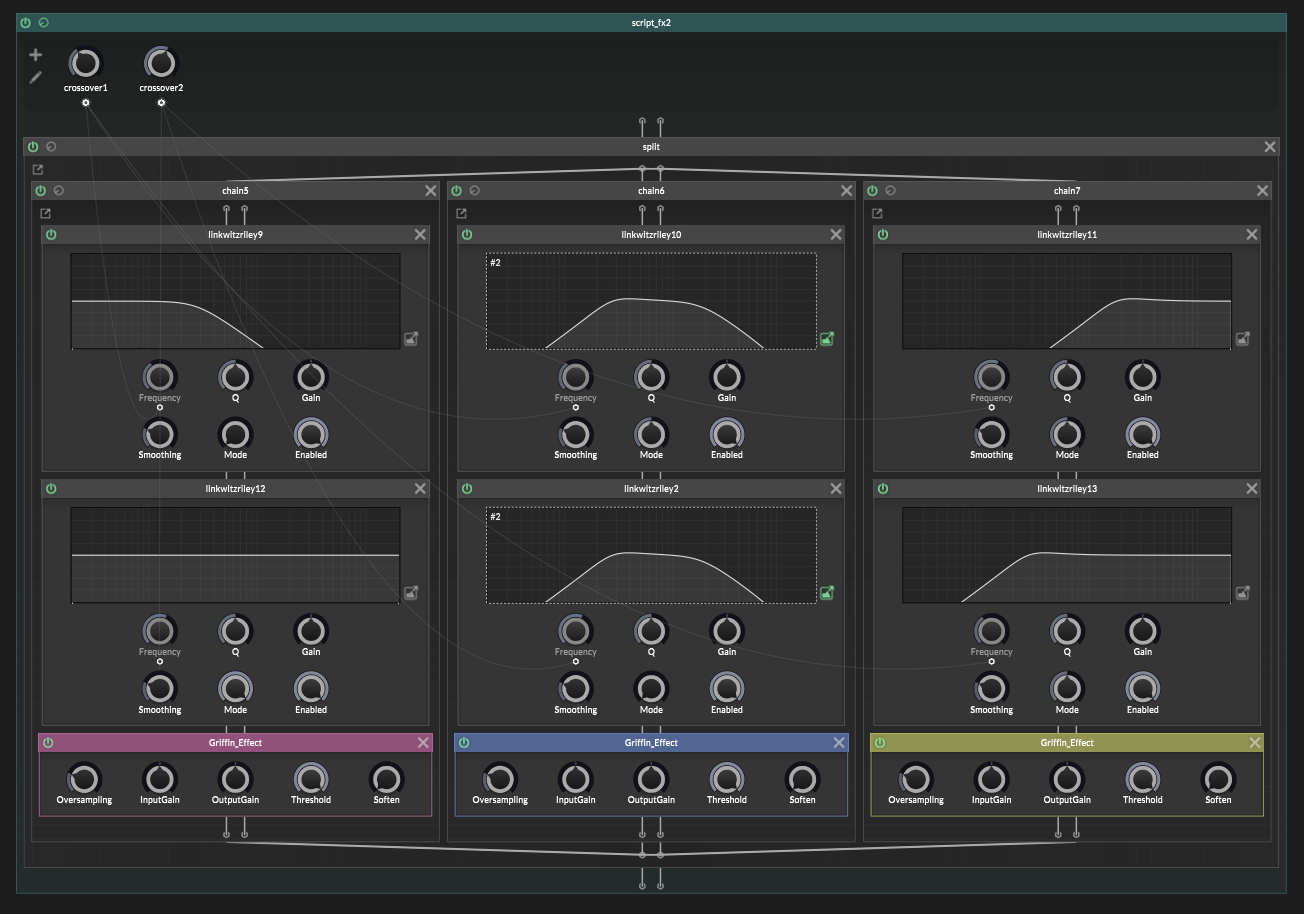
      4f2f6c13-3f38-4da1-aaa6-42b86812ee36-image.png


      The generic recipe

      Once you understand the 3-band version, the bigger versions are just more of the same.

      The practical way to do this is to work band by band.

      Each band is one branch in your container.split.

      For each band, you need as many jdsp.jlinkwitzriley filters as crossover frequencies.

      So if you want 6 bands, that means you'll have 5 crossovers, and so each branch should have 5 Linkwitz-Riley filters placed inside it.

      The filter modes change depending on which band you are making.

      For Band "X":

      • add HP filters for every crossover before Band "X"
      • add LP for the crossover at the top of Band "X"
      • add AP filters for every crossover above Band "X"

      The top band is the only exception.

      It has no top cutoff, so it is just HP for every crossover.

      Lets do an example with a 6-band splitter.
      A 6 band splitter has 5 crossovers, so needs 5 filters on each band:

      Band 1:
      LP 1 -> AP 2 -> AP 3 -> AP 4 -> AP 5
      
      Band 2:
      HP 1 -> LP 2 -> AP 3 -> AP 4 -> AP 5
      
      Band 3:
      HP 1 -> HP 2 -> LP 3 -> AP 4 -> AP 5
      
      Band 4:
      HP 1 -> HP 2 -> HP 3 -> LP 4 -> AP 5
      
      Band 5:
      HP 1 -> HP 2 -> HP 3 -> HP 4 -> LP 5
      
      Band 6:
      HP 1 -> HP 2 -> HP 3 -> HP 4 -> HP 5
      

      The HP filters get set to the frequency of the band above the lower crossovers.

      The LP filter gets set to the frequency of the top edge of that band.

      The AP filters are only phase compensation for the higher crossovers and so need those frequencies.

      The rule is not hard.
      But the bookkeeping is a bit fiddly.


      One last trap

      A Linkwitz-Riley multiband split does sum back flat, but it is not phase-identical to the untouched dry signal.

      So be careful with global dry/wet mixing:

      untouched dry signal
      +
      recombined multiband signal
      

      That can create a new cancellation problem after you already fixed the splitter.

      For parallel multiband effects, either mix dry/wet inside the bands, or send the dry path through the same crossover phase path.


      And that's it!
      A native ScriptNode multiband splitter, without the giant spectral bite taken out of it.

      Viola : )


      Extra note: HISE actually has some built-in templates for splitting, but they are set up wrong with mistakes, and so they don't sum together properly!
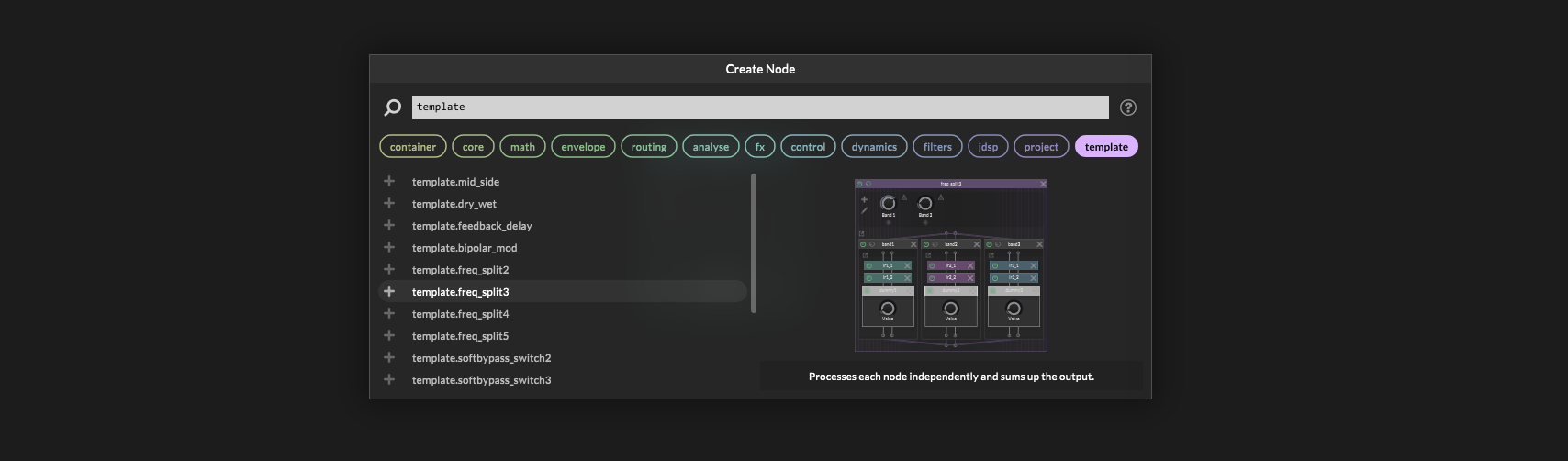
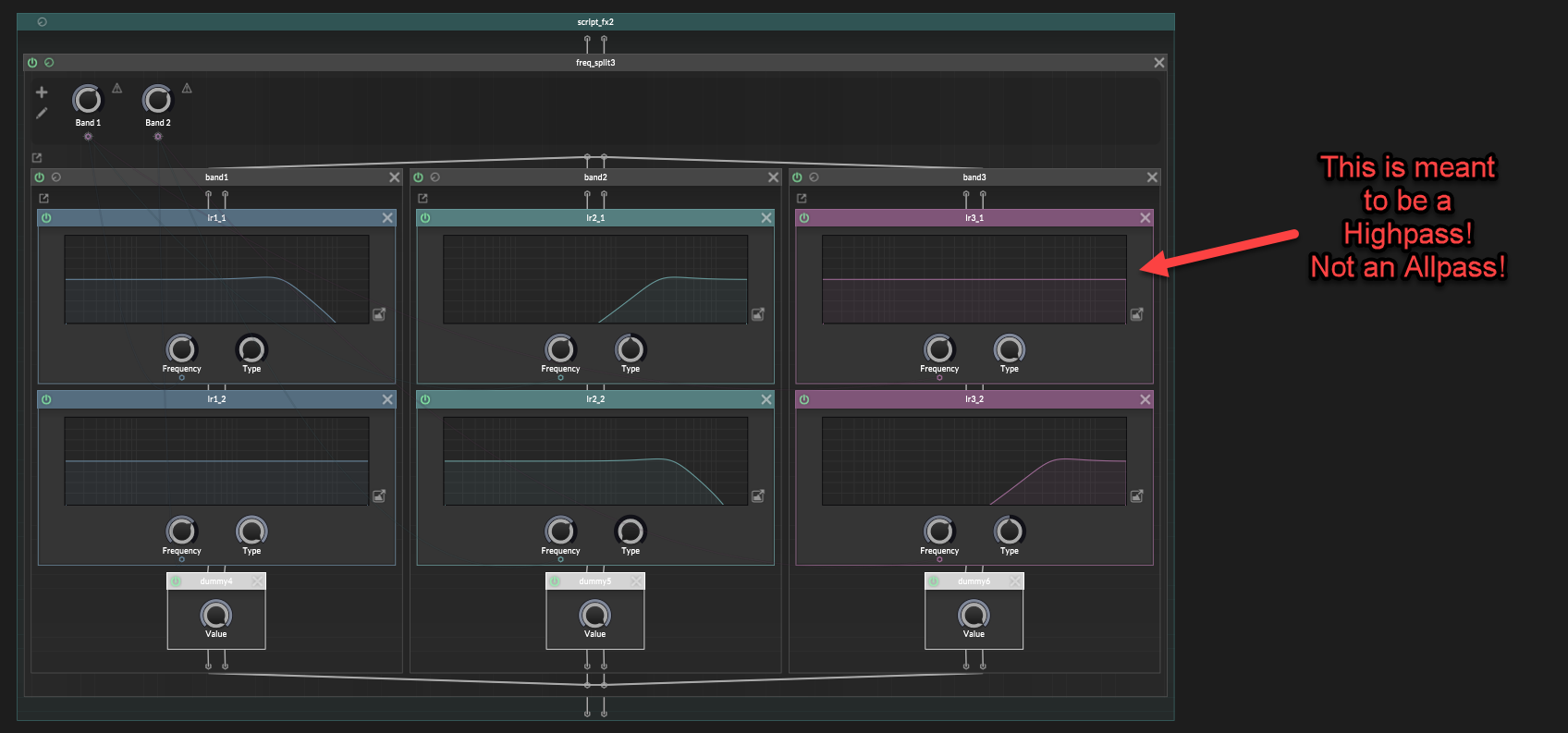
      2ede47c8-58d6-4162-a37d-8a249a996f03-image.png

      6a49b5be-e575-4699-a2b4-03f96533cc47-image.png

      Also, Hise's Linkwitz-Riley filters aren't using modulation safe designs.
      So if you modulate the crossovers you'll get some pretty bad pops and clicks. This isn't due to parameters needing smoothing. This is to do with the way the filters are written internally.

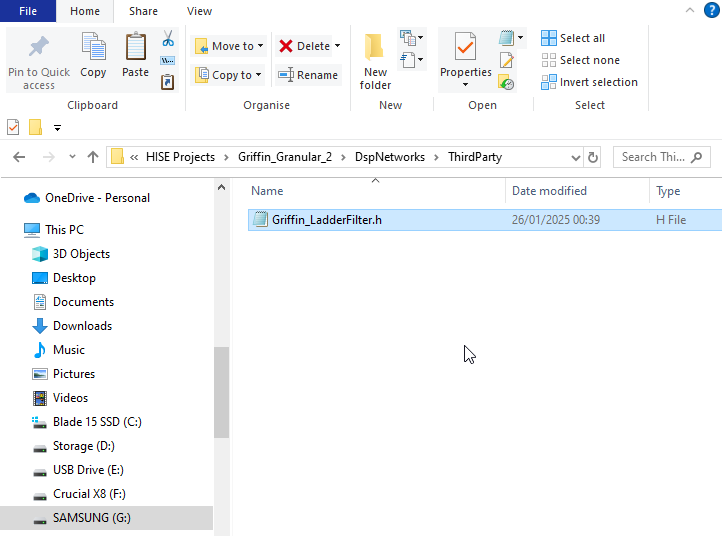
      posted in Blog Entries
      griffinboyG
      griffinboy
    • [BLOG] How does DSP work? [Part 3]

      Part 1
      Part 2

      How does DSP work? [Part 3]

      This time, we're going to look at distortion.

      In Part 1, I briefly described distortion as "bending the waveform" by changing the sample values.
      Now let's unpack what that actually means.

      Distorting a waveform

      To "distort" something means to change its shape.

      A distortion effect does exactly that to a waveform:

      88b1a706-e7d2-401e-8b68-854c0c78a4df-distortion-shape.png

      We talked previously about how in a gain/volume effect, every sample is multiplied by the same amount.
      The waveform becomes taller or shorter, but it keeps the same shape.

      A distortion effect changes sample heights by different amounts.
      That is what allows the waveform to bend shape.

      Clipping

      The simplest example of distortion is clipping.

      For example, a clipper that only allows sample values between -1.0 and +1.0.

      (fact: Most audio file formats will clip at this value)

      Values inside that range are left alone.
      Anything above +1.0 or below -1.0 is clamped.

      Watch what happens as the waveform gets louder:

      62a3a3c9-0cde-49d6-b4ff-55b81cf7b7a9-clipping-drive.gif

      At first, the waveform simply gets taller.

      Once the peaks reach the limits, they cannot get any taller.
      That's how a clipper works. This is a distortion.

      Let's zoom in and look at a few of the sample values:

      585f2c9d-f85f-433e-bd11-bcb730cc0210-clipping-samples.png

      Only the sample values that exceed the limits are changed.
      The extra height is cut off, leaving the waveform with flat edges.

      In pseudocode, the whole effect could be written like this:

      for each sample in the buffer:
          sample = clamp(sample, -1.0, 1.0)
      

      In other words:
      if the sample value is less than -1.0, it gets set to -1.0.
      if the sample value is greater than 1.0, it gets set to 1.0.

      Waveshaping

      This kind of distortion is called a Waveshaper.
      Hardclipping is just the straightforward clamp.

      9bcd1f2d-c637-45bc-850e-ff1a41ad3482-function-one-value.png

      But we can use other rules/functions to create different waveshapers.

      You can create waveshapers by defining a function that maps input values to output values.

      174ff98f-2991-4840-8d7f-c14e30f8cde7-mapping-pairs.png

      In other words:
      If the original sample value is equal to -0.75 we set it to -0.88.
      If the original sample value is equal to -0.50 we set it to -0.67,
      and so on.

      This is called mapping.
      One value is mapped to another value.

      And the table is called a lookup table.

      Drawing the table

      The input and output mapping can also be drawn as points on a graph.
      You've probably seen this kind of thing before:

      aab8ad25-cb34-43a8-bfd2-3e89c5bef259-mapping-curve.png

      It's an easy way to visualize the waveshaper.

      Input values run along the bottom.
      Output values run up the right side.

      To look up an input of 0.50, start at 0.50 along the bottom, move up until the line is reached, then move right to read the output:

      db05a93e-37b5-4e34-bf1c-026ffa55ce31-curve-lookup.gif

      The result is 0.67.

      This plot is called a transfer curve or waveshaper curve.

      bc282e62-4fae-4ad5-b594-ef945a0d6966-identity-and-shaper.png

      Bending the line means we are mapping the samples to different output values.

      A waveshaper

      Here is a waveshaper processing a waveform:

      4fa77841-29c4-448a-bd75-340360a71ff0-waveshaper-samples.gif

      For each sample of the original wave, we look up the input value on the transfer curve,
      and replace it with the corresponding output value.

      The same process on a more dense smooth waveform looks like this:

      89c81430-ee51-4fca-94af-020254731854-waveshaper-waveform.png

      The Math

      The input and output mappings do not have to be stored in a lookup table.
      Some waveshaper distortions use a table, but some use a formula instead.

      Here is the most common "soft-clipping" formula:

      output = tanh(input * drive)
      

      input is the current sample value.
      tanh is a math function that returns the new sample value.

      The function is simply another way of providing an input-to-output map.

      (You could also use sin, cos, or any other function that takes an input value and gives you an output value!)

      The drive multiplication in my code makes the original sample value larger (increases gain) before tanh waveshapes the output.
      Tanh has more of a shape at the extreme edges, so increasing the volume of our waveform means we get mapped with all those strong parts of the curve.
      And get a more warped (distorted) waveform.

      bcdc3b56-7673-49dc-aba6-bc153a4f23b7-waveshaper-drive.gif

      Basically we get more distortion when we go into the waveshaper with a louder signal.

      The algorithm is still very simple:

      for each sample in the buffer:
          sample = tanh(sample * drive)
      

      In HISE-style C++:

      b1aa719a-7b52-4613-abb3-cb385b65a8d1-hise-waveshaper-cpp.png

      HISE's math.expr node does exactly this kind of thing, and it lets you type in your own waveshaping formula!

      85d91bf7-130f-483c-b0d7-a486664dd23f-image.png

      What distortion sounds like

      Different shaped waveforms sound different (well duh).

      A sine wave sounds smooth and pure.
      A square wave sounds harsh and loud.

      When we apply waveshaping, we are bending the waveform to make new waveforms.

      37ec97d5-de58-43d0-af8c-a7215c506e4c-distortion-harmonics.png

      More bending changes the shape more (and creates all kinds of harmonics)!

      You can use a lot of different kinds of formulas to bend waveforms in weird ways.
      Different transfer curves create different effects!

      ea20e5d9-6987-4cfe-b677-6fb11a2d830f-distortion-family.png

      To Recap

      A distortion effect changes the shape of a waveform by altering the sample values.

      A clipper does this by limiting/clamping sample values.

      Waveshapers use a function to map each input sample value to a new output value.
      You can visualise this mapping nicely as a transfer curve.

      Apply the mapping to every sample in the buffer, and the new sample heights you get, form a distorted waveform.

      That is how a waveshaper works.

      posted in C++ Development
      griffinboyG
      griffinboy
    • [Devlog] Blog

      It has been a while since I've posted any tutorial content.

      I had a brief moment where I released (a single?) guide for making c++ nodes in HISE.
      Some of you probably gave up hope that I'd make another tutorial on the topic.
      But I had always intended to do a full deep dive into C++ DSP, and I've been biding my time waiting for the opportune moment where I would have enough free time to make the content.

      Well, the time is upon us, and I'm finally making the content - in the form of HISE blogs.

      I'm still in the process of designing the blog posts,
      but once I've built enough graphics and animations, I should be able to pump out regular posts that explore different areas of audio coding and science.

      The posts will likely start out quite simple,
      but I plan to dive into some of the advanced modern topics as well, not limited to: neural effects, analog circuit simulation that nulls against hardware, and other topics that I've been writing research papers about.

      Looking forward to discussing with you all soon!

      [work in progress, HISE blogpost development]

      2026-07-01_00-53-59.gif

      [project: analog filter model, new simulation method]

      d99c99e7-a72b-42b9-b320-3bf4d61a5aed-image.png

      Yes... this is a blog post about devloping a blog post.

      posted in C++ Development
      griffinboyG
      griffinboy

    Latest posts made by griffinboy

    • RE: [DEVLOG] Pro EQ

      @ustk
      @lalalandsynth
      @Chazrox
      @dannytaurus

      Thanks for your kind comments!
      I've done some optimization today and the EQ now uses 1.5x the CPU of ProQ4.
      Happy progress.

      -You'll have to wait for the Hise Asset store, for me to release this for free, but consider this my gift to all of you fantastic people in the Hise Community. My humble beginnings took place on this platform and forum, and now I code DSP fulltime as my living.

      posted in C++ Development
      griffinboyG
      griffinboy
    • [DEVLOG] Pro EQ

      Over the last year, I've been doing heavy R&D to design the perfect EQ.
      My initial goal was to "beat" Fabfilter's ProQ4 product.

      I was successful,
      and I'd like to share some of my findings!


      First of all, what's this all about? Why do I want to make a better EQ than ProQ? What's wrong with ProQ?

      a few things.

      1. ProQ's frequency response gets warped near nyquist (high frequencies)
      2. ProQ cannot be modulated for synthesis (the modulation is full of artefacts)

      But before correcting these issues,
      I wanted to first create an EQ that at least matches with ProQ.
      After I've achieved that, then I can create the technology to improve upon it. Right?

      Well, I was not expecting this first step to be so difficult!

      The first thing I did was analyze the ProQ shapes (minimum phase mode) and I discovered instantly that none of them are "standard" EQ shapes. They are all custom shapes, even the normal bell shapes are not what we call "cookbook" shapes. They are all unique shapes that Fabfilter invented. So right off the bat, we can cross off using normal EQ filter shapes that can be found on the internet.

      It makes sense that ProQ would be using custom shapes though.
      If you look at ProQ, the shapes can get super wild. No normal EQ is capable of such high Q!

      freaking steep!

      7af99685-8ecd-4f22-bb9c-79d96e0a3f94-image.png

      And so the first thing I tried was stacking multiple minimum phase filters in series, to try and get the same shapes. Basically I created a cascade of bells, slopes, etc.
      And this paid off, I managed to create a decent "sloped bell" shape and other steep shapes, by combining filters in series.

      However - as soon as I moved the cutoff of all these filters together, we got artefacts. Little inconsistencies would appear, and it turned out that cascading minimum phase filters is actually a little bit delicate. The shape gets warped subtly at different cutoffs, and so the overall filter ended up having weird spikes and nasty shape issues at different cutoffs...!

      ProQ actually does have this issue too - but to a smaller degree compared to my filter cascade.

      The solution was a little devious. This is how I believe ProQ works:


      The EQ is essentially an "analog-prototype digitizer".
      When a Bell is created, the DSP constructs what is called an "Analog Prototype".
      This is an "ideal frequency response" target. In other words it imagines the shape it
      wants to create.

      It then digitizes each part of the shape separately so that we get a cascade of filters
      that match the target when ran in series (same as my initial idea).
      But the important part is that it gives extra weight to "perceptually important points"
      on the filter frequency response target. The solver that creates the matching filters, makes sure
      that the filters will pass through the most important points. This prevents wobble and weird spikes.
      Basically, every time you move the cutoff, the DSP recalculates the entire shape, it creates the
      Analog Prototype frequency response target, and creates the fitted filters that match that shape as close as possible.

      Basically it's adjusting the cascade of filters every time you touch a parameter. Self-correcting itself every time to try and match the "target" frequency response.

      An amazing advantage of this technique is that you can then reduce the amount that you fit to "impossible" parts of the target frequency response. For example doing filtering near nyquist (the top end of the sample rate) you can reduce the amount that you weight towards those parts (trying to fit a filter to ultrasonic frequencies will cause the rest of the filter response to warp and bend) meaning we fit only to the important audible parts and keep the filter response stable.

      The side effect of this, is that you can't really do true modulation. Because you're recalculating the filters every time. So ProQ does crossfades instead, when it recalculates the filters it crossfades from the old ones to the new ones.


      After doing the above, my own EQ filter could match with ProQ4:

      0a2d532f-017e-41eb-a247-015a3c1734bb-image.png

      That was much more complex than I'd imagined!
      They are definitely worthy of the name "Fabfilter" with this kind of effort.

      But...
      🎵I want to be the very best, like noone ever was 🎵
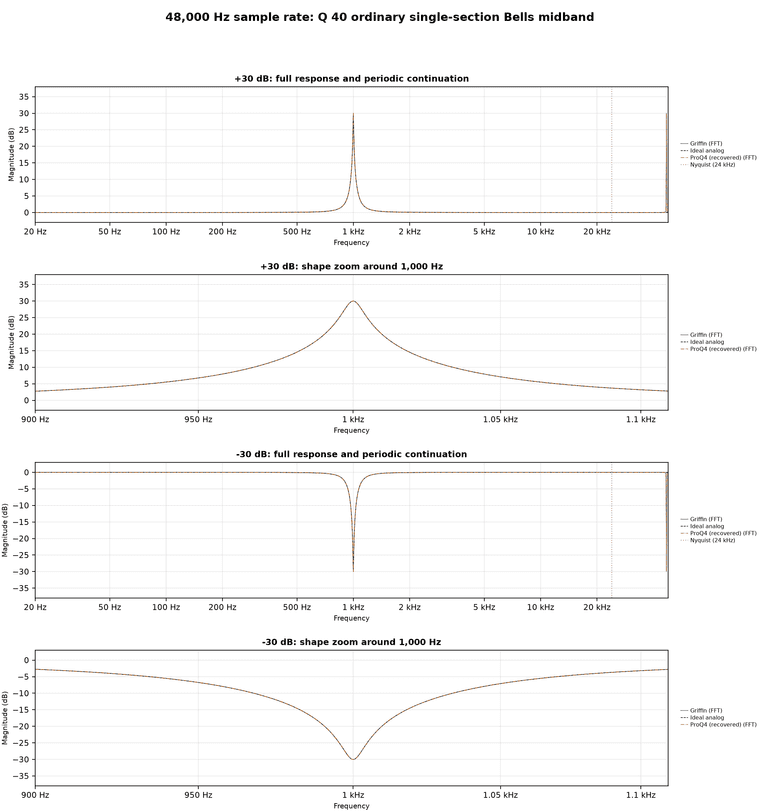
      So I set out on my year long journey to invent a better EQ.
      The final solution involved creating a solver that can be modulated at audio rate, doesn't ever use crossfades, and matches the analog response target as closely as possible. Making the realtime solver smooth so that changing frequency didn't create inconsistencies was the hardest challenge. I present the end result of my research:


      GriffinFilter matches Fabfilter for all the "easy" shapes:

      e2d9b2bd-9a42-4f92-b277-7d3f6199932c-figure.png


      Where Fabfilter warps, GriffinFilter does not:

      91df47a5-cc72-4c9d-bd90-b6be75b6eddd-image.png

      --

      100Q anyone?
      That's twice as steep Q as Fabfilter can manage.

      3a30032f-03f1-4eeb-a36f-00df84fa100d-figure.png

      --

      And we can modulate cleanly, at audio rate
      Here's the printed specs:

      aeaff815-ae79-498b-a6fa-2a468e06d68a-image.png

      CPU usage is currently higher for GriffinEQ.
      But the good news is that the GriffinEQ project is still under development!
      This is the next obstacle for me to tackle. The aim is to get GriffinEQ performance matched with ProQ4.


      And now, for the all important question:
      Q: Do these EQ improvements really matter?
      A: In some ways, no, not really!

      Musicians already use multiple EQ bands. They stack whatever number of bands they want, to get the sound that they want.
      You mix with your ears, not with your eyes.
      And for ordinary EQ situations ProQ4 matches the ideal shape really closely. It only gets warped at the highest frequencies, which are practically inaudible.

      So why go through this enormous effort to improve it?
      The answer is synthesis.
      I love using EQ to create new sounds. And I commonly stack lots of EQ bands ontop of each other and modulate them around like crazy to make wild phasing effects!
      And so the limits of ProQ started to matter to me. I wanted something that was as precise as ProQ, capable of those really steep filter shapes, but I also needed it to modulate smooth and consistent, so that I can do big modulated sweeps that reach right up into the high frequencies! Without unintentional weird spikes or warping. Which is an issue that ProQ still suffers from.

      In scientific terms it's better, and in musical terms it's different.

      Maybe it doesn't hurt to have just one more EQ to choose from? : )


      I plan to make this DSP available in the upcoming Hise Asset Store for free.

      a2bea007-b44f-44a0-9e3f-9b7ba26926f8-image.png

      posted in C++ Development
      griffinboyG
      griffinboy
    • [BLOG] How does DSP work? [Part 3]

      Part 1
      Part 2

      How does DSP work? [Part 3]

      This time, we're going to look at distortion.

      In Part 1, I briefly described distortion as "bending the waveform" by changing the sample values.
      Now let's unpack what that actually means.

      Distorting a waveform

      To "distort" something means to change its shape.

      A distortion effect does exactly that to a waveform:

      88b1a706-e7d2-401e-8b68-854c0c78a4df-distortion-shape.png

      We talked previously about how in a gain/volume effect, every sample is multiplied by the same amount.
      The waveform becomes taller or shorter, but it keeps the same shape.

      A distortion effect changes sample heights by different amounts.
      That is what allows the waveform to bend shape.

      Clipping

      The simplest example of distortion is clipping.

      For example, a clipper that only allows sample values between -1.0 and +1.0.

      (fact: Most audio file formats will clip at this value)

      Values inside that range are left alone.
      Anything above +1.0 or below -1.0 is clamped.

      Watch what happens as the waveform gets louder:

      62a3a3c9-0cde-49d6-b4ff-55b81cf7b7a9-clipping-drive.gif

      At first, the waveform simply gets taller.

      Once the peaks reach the limits, they cannot get any taller.
      That's how a clipper works. This is a distortion.

      Let's zoom in and look at a few of the sample values:

      585f2c9d-f85f-433e-bd11-bcb730cc0210-clipping-samples.png

      Only the sample values that exceed the limits are changed.
      The extra height is cut off, leaving the waveform with flat edges.

      In pseudocode, the whole effect could be written like this:

      for each sample in the buffer:
          sample = clamp(sample, -1.0, 1.0)
      

      In other words:
      if the sample value is less than -1.0, it gets set to -1.0.
      if the sample value is greater than 1.0, it gets set to 1.0.

      Waveshaping

      This kind of distortion is called a Waveshaper.
      Hardclipping is just the straightforward clamp.

      9bcd1f2d-c637-45bc-850e-ff1a41ad3482-function-one-value.png

      But we can use other rules/functions to create different waveshapers.

      You can create waveshapers by defining a function that maps input values to output values.

      174ff98f-2991-4840-8d7f-c14e30f8cde7-mapping-pairs.png

      In other words:
      If the original sample value is equal to -0.75 we set it to -0.88.
      If the original sample value is equal to -0.50 we set it to -0.67,
      and so on.

      This is called mapping.
      One value is mapped to another value.

      And the table is called a lookup table.

      Drawing the table

      The input and output mapping can also be drawn as points on a graph.
      You've probably seen this kind of thing before:

      aab8ad25-cb34-43a8-bfd2-3e89c5bef259-mapping-curve.png

      It's an easy way to visualize the waveshaper.

      Input values run along the bottom.
      Output values run up the right side.

      To look up an input of 0.50, start at 0.50 along the bottom, move up until the line is reached, then move right to read the output:

      db05a93e-37b5-4e34-bf1c-026ffa55ce31-curve-lookup.gif

      The result is 0.67.

      This plot is called a transfer curve or waveshaper curve.

      bc282e62-4fae-4ad5-b594-ef945a0d6966-identity-and-shaper.png

      Bending the line means we are mapping the samples to different output values.

      A waveshaper

      Here is a waveshaper processing a waveform:

      4fa77841-29c4-448a-bd75-340360a71ff0-waveshaper-samples.gif

      For each sample of the original wave, we look up the input value on the transfer curve,
      and replace it with the corresponding output value.

      The same process on a more dense smooth waveform looks like this:

      89c81430-ee51-4fca-94af-020254731854-waveshaper-waveform.png

      The Math

      The input and output mappings do not have to be stored in a lookup table.
      Some waveshaper distortions use a table, but some use a formula instead.

      Here is the most common "soft-clipping" formula:

      output = tanh(input * drive)
      

      input is the current sample value.
      tanh is a math function that returns the new sample value.

      The function is simply another way of providing an input-to-output map.

      (You could also use sin, cos, or any other function that takes an input value and gives you an output value!)

      The drive multiplication in my code makes the original sample value larger (increases gain) before tanh waveshapes the output.
      Tanh has more of a shape at the extreme edges, so increasing the volume of our waveform means we get mapped with all those strong parts of the curve.
      And get a more warped (distorted) waveform.

      bcdc3b56-7673-49dc-aba6-bc153a4f23b7-waveshaper-drive.gif

      Basically we get more distortion when we go into the waveshaper with a louder signal.

      The algorithm is still very simple:

      for each sample in the buffer:
          sample = tanh(sample * drive)
      

      In HISE-style C++:

      b1aa719a-7b52-4613-abb3-cb385b65a8d1-hise-waveshaper-cpp.png

      HISE's math.expr node does exactly this kind of thing, and it lets you type in your own waveshaping formula!

      85d91bf7-130f-483c-b0d7-a486664dd23f-image.png

      What distortion sounds like

      Different shaped waveforms sound different (well duh).

      A sine wave sounds smooth and pure.
      A square wave sounds harsh and loud.

      When we apply waveshaping, we are bending the waveform to make new waveforms.

      37ec97d5-de58-43d0-af8c-a7215c506e4c-distortion-harmonics.png

      More bending changes the shape more (and creates all kinds of harmonics)!

      You can use a lot of different kinds of formulas to bend waveforms in weird ways.
      Different transfer curves create different effects!

      ea20e5d9-6987-4cfe-b677-6fb11a2d830f-distortion-family.png

      To Recap

      A distortion effect changes the shape of a waveform by altering the sample values.

      A clipper does this by limiting/clamping sample values.

      Waveshapers use a function to map each input sample value to a new output value.
      You can visualise this mapping nicely as a transfer curve.

      Apply the mapping to every sample in the buffer, and the new sample heights you get, form a distorted waveform.

      That is how a waveshaper works.

      posted in C++ Development
      griffinboyG
      griffinboy
    • RE: Made a thing: Roland JX-8P/JC-10/MKS-70 emulation in HISE

      @Morphoice

      Great work, it's amazing to see how far you've come in what feels like such a short span of time!
      So cool

      posted in General Questions
      griffinboyG
      griffinboy
    • [BLOG] How does DSP work? [Part 2]

      How does DSP work? [Part 2]

      Welcome back!

      In the previous part, we saw that audio effects work by changing sample values.
      And we saw that a volume effect is just multiplication.

      Next you might be wondering: how does something like a filter work?
      That's the question we are going to answer today.

      We're going to start with the simplest example of a filter: a smoother.

      A smoother is a low pass filter in its simplest form.
      The reason will become clear as we build one.

      Low pass filter

      You probably already know that a low-pass filter removes high frequencies.

      But inside a DSP effect, the audio waveform is just a block of sample values:

      [0.14,  0.21,  0.08,  0.29,  -0.04,  -0.18,  -0.11,  -0.32,  ...]
      

      Those numbers are the waveform.
      So how are we supposed to alter these sample values to remove high frequencies?
      let me explain:


      You probably already know that frequency is how fast a waveform is.

      8900b400-06e0-4b63-942f-936a68c8cbf1-frequency-comparison.png

      And of course, a waveform can contain many frequencies at once.
      For example, if we add two waves together:

      60fcc656-77ef-4b7b-9e50-79ae592e50f8-frequency-addition.png

      We get a wave that contains high and low frequencies.

      So how do we remove the high frequencies from this kind of wave?

      Let's demonstrate with a complex wave.
      Here is a waveform with plenty of high-frequency content:

      ac0533dd-f6de-4cfc-855e-f0eda1543b8b-high-frequency-input.png

      The broad sine-like shape is low frequency.
      The fine, noisy-looking details are higher frequencies.

      Now watch what happens when we low-pass the sound:

      3133c6e5-070d-44ce-bc48-d498e94b7a77-smoother-audio-stream.gif

      The noisy detail is removed, while the broad low-frequency shape remains.

      The waveform looks smoothed! A smoothing algorithm can remove the high frequencies!

      A Smoother

      So let's look at how a smoother works.

      [My explanation may be a little hard to follow - bear with me please! I will try and explain it in a few different ways]

      There are many ways to write a smoother.
      The version we're going to use generates a new, smoothed waveform in place of the original one.

      The algorithm works like this:
      Every sample, look at the original waveform sample, and move our new waveform sample (the smoothed waveform) towards it.
      But only move it a small amount each sample.

      Here is an animation that shows the algorithm in action:

      34f5e99b-bba3-44c0-9959-e66609a7855c-smoother-homing.gif

      Green is the original waveform sample value.
      Blue is our smoothed waveform we are creating.

      We use the green as a "target", and our smoothed value will move towards it over time.

      Notice how the original (Green) instantly moves to the new sample value, while our smoothed (Blue) value takes a while to catch up.

      Basically, it's incapable of moving fast!
      In other words... it can't be high frequency. Only low frequency!

      Here is the same process running from sample to sample, on a (very zoomed in) waveform:

      678ed904-48b5-406b-970d-dcfdf6e74f0f-smoother-sample-by-sample.gif

      At the right edge, green is the current sample of the original waveform, and blue is our smoothed value.

      The smoothing algorithm works by starting from the previous blue value, and then moving towards the green target sample value.

      The resulting smoothed waveform is basically a slow, tired version of the original wave.
      It can follow the broad movements, but it can't keep up with quick details

      The algorithm looks like this:

      var green;
      
      for each sample in the chunk:
          move the green value partway towards the current sample
          output the green value
      

      The Math

      Now let's write the smoothing algorithm as pseudocode:

      amount = 0.1
      smoothedValue = 0.0
      
      for each sample in the chunk:
          smoothedValue = lerp(smoothedValue, sample, amount)
          sample = smoothedValue
      

      smoothedValue is the current height of the blue waveform.
      It starts at 0.0, and it is kept after each sample so that the next calculation can continue from the same height.

      For each sample, lerp moves smoothedValue towards the height of the original waveform.
      The amount controls how far it is allowed to move.

      An amount of 1.0 reaches the original sample value immediately.
      An amount of 0.1 only moves one tenth of the distance.

      lerp is short for a linear interpolation function.
      In this case, it calculates a new sample value (height) between the current smoothedValue and the original sample.

      The calculation inside lerp is:

      smoothedValue += (sample - smoothedValue) * amount
      

      sample - smoothedValue measures the distance between the blue value and the green target.
      Multiplying that distance by amount chooses how much of the distance to travel.
      Adding the result to smoothedValue moves the blue value towards the green one.

      Finally, we output the smoothedValue.

      Because every calculation continues from the value calculated for the previous sample, repeating this process across the waveform for every sample in the buffer, produces exponential smoothing.

      In HISE-Style C++

      The same calculation in C++ looks like this:

      d73cd8ed-bac2-49f3-b048-37d8fd090538-hise-smoother-cpp.png

      Some trivia:
      That stored value is called the filter's state.
      Because each result depends on the result from the sample before it, this is a recursive filter, also called an IIR filter.
      With one stored value per channel, this particular algorithm is called a one-pole low-pass filter.

      Cutoff Frequency

      Our example code uses a fixed amount of 0.1.

      If we set amount to 1.0, the smoothed value reaches every sample immediately.
      Nothing is smoothed.

      With a smaller amount, the smoothed value takes longer to reach each sample:
      The smoothed value changes more slowly, so more high-frequency detail is flattened.

      When this calculation is used in an audio filter effect, the control is normally presented as a cutoff frequency in Hz.
      This is done using some extra conversion math.
      The cutoff frequency and Daw sample rate are then converted into the amount used by the code.

      0a10c413-0615-417a-addf-7e62f0c8db05-smoother-filter-curve.gif

      ^ The smoother with changing amount (cutoff):

      At a low cutoff, the blue waveform loses most of its fine detail.
      As the cutoff rises, the blue waveform follows more of the detail.

      Other Audio Filters

      The smoother I showed you is a real one-pole low-pass filter.
      Its slope is a gentle 6 dB per octave!

      But audio filters can also have steeper slopes, resonance, and completely different shapes:

      3ea5832f-160a-4b28-8900-2aff4a699c90-hise-filter-node.png

      Different filter calculations produce different frequency responses:

      1d75aa82-d3b5-45c0-ae69-8e10ef6e9b2a-filter-response-family.png

      More advanced filters store more values, and combine them in different ways.

      Two useful names to look for are state-variable filters and biquad filters.
      You can find the algorithms for these online, and they are also implemented in HISE's Filter node.

      HISE provides a state-variable filter node.
      MusicDSP's Chamberlin state-variable filter provides a compact explanation and working algorithms for SVF filters.
      The Audio EQ Cookbook contains the standard equations for many familiar EQ filter shapes.

      To Recap

      Inside a DSP effect, the audio waveform is made up of chunks of sample values.

      For a one-pole smoother, each sample we calculate a new value partway between its previous result and the incoming sample.

      This adds resistance to fast changes, and suppresses the fine detail in the waveform.

      That "fast detail" contains high-frequency content, so the high frequencies become quieter when we do this.

      posted in C++ Development
      griffinboyG
      griffinboy
    • RE: [BLOG] How does DSP work? [Part 1]

      @David-Healey
      Thank you!
      Maybe with some refinement :)

      It's far from perfect.

      This explanation is just my own attempt to boil down the theory into a simple form.
      ...and it still ended up a bit of a ramble!

      I think it's quite a tricky subject to teach, because in real life there are so many implications and exceptions to every rule.
      Even simple DSP can look a bit monstrous when you layer ontop all of the common optimizations and C++ tricks.

      posted in C++ Development
      griffinboyG
      griffinboy
    • [BLOG] How does DSP work? [Part 1]

      Welcome to the first part of my new blog series!

      To be clear, this is not a series about how to write DSP code in HISE (That tutorial series is coming later).
      Rather, this is a beginner focused, theory-heavy guide on "How does DSP work".

      Understanding this theory, will make it much easier to write your own DSP later.
      So without further ado, let's begin the first part!

      How does DSP work? [Part 1]

      Audio programming does not look like audio.

      c5313d73-44fb-4b88-9622-2f597f65f9ee-dsp-math-sketch.png

      It looks like values and numbers.

      And that's exactly what makes DSP possible.
      Once sound is represented by numbers, code can manipulate it!

      Without further ado, let me explain how audio gets represented as data, and how changing that data changes what you hear.

      Audio as Data

      A speaker makes sound by moving.

      400e18a1-9d5c-4313-bfe2-03ea50b775fe-speaker-waveform.gif

      The line at the top is a waveform.

      For now, think of it as the shape the speaker is following.

      When the waveform moves up, the cone moves one way.
      When the waveform moves down, the cone moves the other way.

      That movement pushes air, and we hear it as sound.


      Real audio is generally faster and messier, but the idea does not change:
      a speaker is following a changing value over time.

      So, if we want to create a sound,
      we need to create a waveform.

      The waveform as numbers

      In digital audio, a waveform is stored as numbers.
      A tiny piece of a waveform might look like this:

      [0.00,  0.70,  0.82,  0.27,  -0.51,  -0.86,  -0.51,  0.27]
      

      So, what is this?

      Well, digital audio does not store a "picture" of a waveform.
      It stores the height over time.

      Plot those heights from left to right, and the waveform appears.

      1e87fe4d-41b8-4f27-a13b-4c8f12a555f8-sample-array-to-plot.png

      These height numbers are called samples.
      Because each number is one tiny "sample" of the waveform height at one moment in time.

      The order matters because the order is time:

      73a0dd64-1d05-42a1-9db1-893ecfa99eec-sample-table-playback.gif

      The array of data is the digital waveform. The drawing is the same data made easier to see.

      Lots of samples

      The example I showed you above, is tiny on purpose.
      Real audio has far more samples than this.

      I'm sure you've heard of "Sample rate".

      44.1k, 48k. 96k, etc.
      With 48k being a common DAW sample rate.

      Well, running a program at 48 kHz means that one second of mono audio contains 48,000 sample values.

      That's the kind of high resolution that produces smooth waves.
      The simple drawings in this article are just a readable version.
      But real audio is the same thing packed more tightly in time.

      5719a9b4-2c59-4ce5-ab1a-b71224c0bb95-dense-sample-waveform.png

      (^ That's just something to be aware of. You don't have to worry about it for now, since I'll be continuing to use small pieces of audio for the sake of this article).


      So far we have looked at audio as one long strip of sample values.
      But we have not talked about how a plugin generates this big stream of audio.

      So let's talk about chunks / buffers.

      Chunks (Buffers)

      Real time DSP does not work on a big, long, sound in one go.
      - It processes chunks of audio.

      9c4096e2-3694-4ded-9d60-66cffae5cc0f-waveform-buffer-split.png

      A DSP effect takes a short chunk of audio, processes it, then moves on to the next chunk.

      An effect is like this:

      A chunk comes in.
      The effect changes the numbers inside it.
      The chunk goes out.
      Then the next chunk comes in.

      This is the basic shape of a normal audio effect.

      da8e66ea-dfc9-4e57-a281-63b38c6b8106-buffer-through-dsp.gif

      (The reason we process in small chunks of sound is efficiency related. But it's also practical:
      It's quite useful to have access to a whole portion of audio at a time)

      A simple example: volume

      Let's look at a real-life example.
      Volume is a good example because it's easy to see.

      cfe8b407-2b25-4c75-82df-5d5077c169cc-hise-gain-node.png

      You probably already know:
      Volume is the height of the waveform.

      Making a waveform less tall means the speaker isn't moving as much.
      In other words, height affects volume.

      de975f42-89a3-4f64-877b-554074d41d3c-waveform-volume-scale.gif

      ...And earlier we saw that we store waveforms as height values.

      (you can see where I'm going with this).

      If we want to make the waveform quieter,
      all we need to do is make the sample values smaller.

      For example if we multiply every sample by 0.5 (half):

      The shape is the same.
      The height is half as large.

      9388e6dc-9e8b-4ee8-9422-5066a1096341-sample-gain-comparison.png

      We've made the waveform half as loud.

      The algorithm for a volume effect then boils down to:

      f837f20d-a86c-4c31-a30c-97ae75417488-hise-gain-node-code.png

      In pseudocode form:

      receive buffer
      
      for each sample in the buffer
      {
          sample = sample * gain;
      }
      
      ^ do the above for every buffer we receive
      

      So:

      If gain is 1.0, the sample values stay the same.
      If gain is 0.5, the waveform is half as tall.
      If gain is 2.0, the waveform is twice as loud/tall.
      If gain is 0.0, every sample becomes zero, which is silence.

      In actual C++ DSP:

      0ab2a9dd-9b10-4a29-b1ee-36186842477b-hise-gain-node-cpp-code.png

      (^ I bet you understand this now!)

      The main part of the effect is a function that receives a buffer of samples (a chunk) and processes them using math.
      That's what DSP code looks like!

      The real HISE gain node has some extra controls and parameter smoothing, but the core audio operation is still this simple multiplication.

      The Lesson

      Honestly that's pretty much it.
      DSP is not very complicated.

      Most Audio effects work by:

      Take a buffer of sample values,
      change those values,
      and pass the buffer onward

      A Gain effect multiplies the samples.
      
      A Distortion bends the waveform shape by changing the samples.
      
      A Delay stores samples and plays them back later.
      

      Oscillators are a slightly different case. They create new sample values rather than affecting incoming ones.

      0409a709-0ce4-4805-84c9-c680373dfdf4-oscillator-block-factory.gif

      ^ And I'm if being 100% honest, this isn't quite the whole picture.

      If we zoom out a little, you'll see that there is actually a bigger loop going on.
      Where something is sending us a buffer, and asking our DSP to process or fill it.
      Then it takes that buffer back and sends it to the next place.

      (in our case, that "something" is HISE / JUCE).

      f79a05e7-920f-44c5-96e3-bcb2cc2b72f7-plugin-chain-routing.gif

      For an effect, something is going to send us a chunk and say "please process this" and we do that.

      For an oscillator, we might be given an empty chunk and we just need to write a waveform into the chunk and send that back.

      To Recap

      1. The table, the waveform, the buffer.
      They are different visualizations of the same thing:
      sample values over time.

      9ae6b3ad-0c76-440b-9247-d89d85dac4cf-recap-signal-views.png

      2. Audio plugins work by processing chunks of samples. These chunks are passed around between different oscillators and effects.

      f79a05e7-920f-44c5-96e3-bcb2cc2b72f7-plugin-chain-routing.gif

      3. Down the line, part of the program will mix the chunks and send them to the speaker and we will hear the waveform (we don't usually have to worry about that part, Hise or Juce will take care of those parts for us).

      a62c0ed0-1d53-4476-89d3-bc2628f0ba84-output-stream-to-speaker.gif

      Next: filters and other effects

      I know what you're thinking:
      Gain makes sense, but how do we create filters and other kinds of effects? What kind of maths causes those?

      Look forward to [Part 2].

      posted in C++ Development
      griffinboyG
      griffinboy
    • RE: Hi! 👋🏻🙌🏻

      @gonzalo
      Great to have you here!

      posted in Blog Entries
      griffinboyG
      griffinboy
    • RE: Which modulation routing method would you recommend for my project?

      @David-Healey Really? He's talking about block and frame sizes though? DSP usually reads parameter values at the start of each block. Using larger blocks means you might not be reading the parameters / LFO modulation as frequently. (assuming the modulation / parameter callbacks are also being called fast enough by the modulator)

      posted in General Questions
      griffinboyG
      griffinboy
    • RE: Which modulation routing method would you recommend for my project?

      @David-Healey

      He means the rate at which the LFO actually updates the DSP it's connected to, I assume.

      This does vary in HISE and affects the sound of High Rate modulation.
      I haven't measured every path myself so I cannot give a breakdown here.

      But it's definately possible to do a sweep with a good AI agent, or use the REST system to probe all the Hise processing paths and get the exact numbers for all the different scenarios.

      I started to do this myself, but I haven't covered all of them and I'm using lots of custom nodes, where HISE allows you to set the rate of modulation yourself and so this isn't so unknown.

      What I do know is that HISE doesn't seem to go faster than updating DSP every 8 samples.
      I might be wrong on that point but that's what I've observed for C++ nodes anyhow. Maybe it's different for native DSP.

      posted in General Questions
      griffinboyG
      griffinboy