@dannytaurus thank you so much my friend! 


Posts
-
Automatization!posted in General Questions
I have my vst running on ableton, everything works fine, the only thing is that I can’t automate the effect. It’s a reverb FX and I can’t automate the wet knob for example, actually none of them. How do I solve this in HISE ?
-
RE: How do I complete the jucer part in export setup wizard?posted in Newbie League
@39oririn go to + and add VS2022 and then check the path of vs22 in "modules"
-
RE: How do I complete the jucer part in export setup wizard?posted in Newbie League
@gonzalo and also don't forget to select "visual studio 2022" in projucer, when you export
-
RE: How do I complete the jucer part in export setup wizard?posted in Newbie League
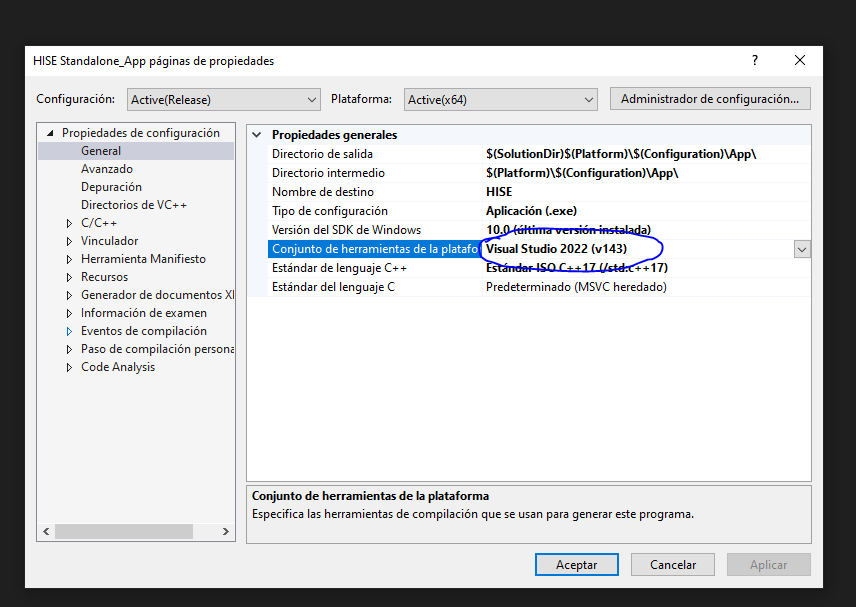
@39oririn are you using the VS 2022 version don't you? do this. when you open the file in visual studio do right click in the properties of file and select v143.
-
RE: How do I complete the jucer part in export setup wizard?posted in Newbie League
@DeanyMan94 check the wizard setup if you have "MS build" with the check mark
-
RE: How do I complete the jucer part in export setup wizard?posted in Newbie League
@39oririn check the david healey videos, "hise bootcamp". he explains everything but you have to compile it in VS 'cause it's not gonna work if you don't.
-
RE: Hi!

 posted in Blog Entries
@griffinboy @lalalandsynth @Chazrox @ulrik @Oli-Ullmann @scottmire thanks everyone!


-
RE: How do I complete the jucer part in export setup wizard?posted in Newbie League
@DeanyMan94 said in How do I complete the jucer part in export setup wizard?:
hise settings only offers 2017 and 20
did you check the compiler settings in hise? settings>development>visual studio version ?
-
RE: How do I complete the jucer part in export setup wizard?posted in Newbie League
@39oririn did you compile it in visual studio?
-
RE: How do I complete the jucer part in export setup wizard?posted in Newbie League
Hi, make sure you have the latest version of the source code of HISE, then go to: HISE>tools>SDK and extract the sdk file inside that folder, then go to: HISE>JUCE>projucer and copy all the files inside "projucer" folder into: HISE>tools>projucer. that's all, now you should have the green check mark in both of them.
-
Hi!
posted in Blog Entries
Hello everyone I’m new here and I made my first VST plugin FX with HISE. I’m learning about this world of audio programming but in the meantime if you need help with anything I’m here so If I could be helpful, I will.
I’m a musician and music producer, I live in Córdoba, Argentina btw.
 🫶
🫶