Forum
    • Categories
    • Register
    • Login

    How do I complete the jucer part in export setup wizard?

    Scheduled Pinned Locked Moved Newbie League
    15 Posts 3 Posters 37 Views
    Loading More Posts
    • Oldest to Newest
    • Newest to Oldest
    • Most Votes
    Reply
    • Reply as topic
    Log in to reply
    This topic has been deleted. Only users with topic management privileges can see it.
    • 3
      39oririn @gonzalo
      last edited by 39oririn

      Thank you! That fixed the check mark. Now I'm having problem while compiling
      When I try to export, it says the source code has different commit hash than HISE
      and I got this very long error message
      error message.txt

      gonzaloG 1 Reply Last reply Reply Quote 0
      • D
        DeanyMan94 @gonzalo
        last edited by

        @gonzalo and how to the same for visual studio 26? The drop down in hise settings only offers 2017 and 2022

        gonzaloG 1 Reply Last reply Reply Quote 0
        • gonzaloG
          gonzalo @39oririn
          last edited by

          @39oririn did you compile it in visual studio?

          3 1 Reply Last reply Reply Quote 0
          • gonzaloG
            gonzalo @DeanyMan94
            last edited by

            @DeanyMan94 said in How do I complete the jucer part in export setup wizard?:

            hise settings only offers 2017 and 20

            did you check the compiler settings in hise? settings>development>visual studio version ?

            D 1 Reply Last reply Reply Quote 0
            • 3
              39oririn @gonzalo
              last edited by

              @gonzalo
              I'm using the "Export as Instrument" in HISE.
              Not sure how to use VS

              gonzaloG 1 Reply Last reply Reply Quote 0
              • D
                DeanyMan94 @gonzalo
                last edited by

                @gonzalo yes, specifically. im just gonna rebuild again. seemed to integrate better the first time

                gonzaloG 1 Reply Last reply Reply Quote 0
                • gonzaloG
                  gonzalo @39oririn
                  last edited by

                  @39oririn check the david healey videos, "hise bootcamp". he explains everything but you have to compile it in VS 'cause it's not gonna work if you don't.

                  3 1 Reply Last reply Reply Quote 0
                  • gonzaloG
                    gonzalo @DeanyMan94
                    last edited by

                    @DeanyMan94 check the wizard setup if you have "MS build" with the check mark

                    1 Reply Last reply Reply Quote 0
                    • 3
                      39oririn @gonzalo
                      last edited by

                      @gonzalo

                      The build tools for v145 (Platform Toolset = 'v145') cannot be found. To build using the v145 build tools, please install v145 build tools.
                      Alternatively, you may upgrade to the current Visual Studio tools by selecting the Project menu or right-click the solution, and then selecting "Retarget solution".
                      

                      I tried changing it to v143 on VS 2022, got like a thousand errors.
                      I tried that on VS 2026, got more error.

                      gonzaloG 1 Reply Last reply Reply Quote 0
                      • gonzaloG
                        gonzalo @39oririn
                        last edited by

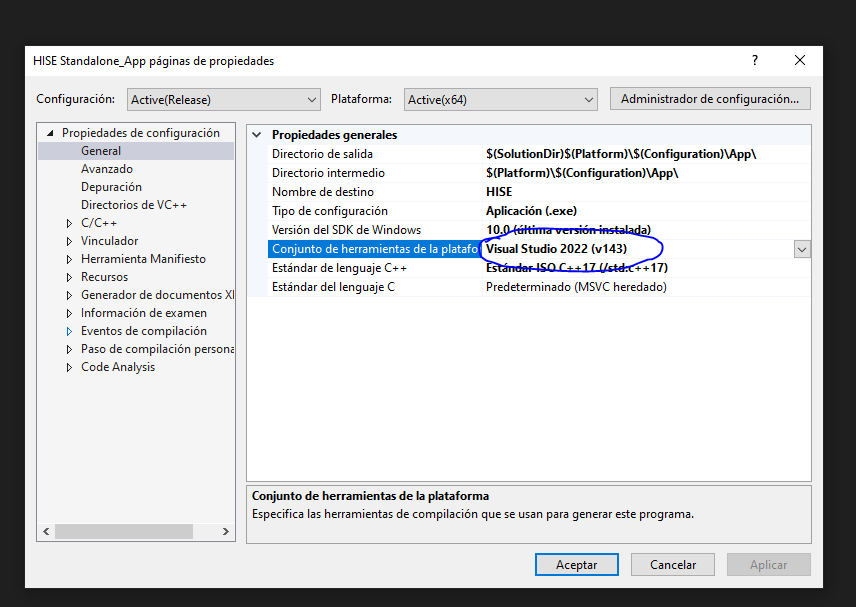
                        @39oririn are you using the VS 2022 version don't you? do this. when you open the file in visual studio do right click in the properties of file and select v143.Captura.PNG

                        3 gonzaloG 2 Replies Last reply Reply Quote 0
                        • 3
                          39oririn @gonzalo
                          last edited by

                          @gonzalo yes, I used VS 2022 and changed that setting to v143 but it still didn't work for me

                          gonzaloG 1 Reply Last reply Reply Quote 0
                          • gonzaloG
                            gonzalo @gonzalo
                            last edited by

                            @gonzalo and also don't forget to select "visual studio 2022" in projucer, when you export

                            1 Reply Last reply Reply Quote 0
                            • gonzaloG
                              gonzalo @39oririn
                              last edited by gonzalo

                              @39oririn go to + and add VS2022 and then check the path of vs22 in "modules"

                              1 Reply Last reply Reply Quote 0
                              • First post
                                Last post

                              19

                              Online

                              2.4k

                              Users

                              13.9k

                              Topics

                              120.9k

                              Posts