HISE Bootcamp - Full Course for Beginners
-
@dannytaurus said in HISE Bootcamp - Full Course for Beginners:
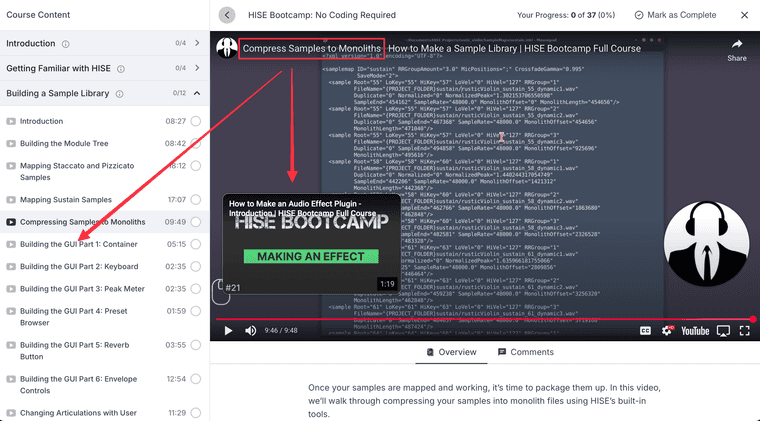
When watching on YouTube, several of the videos have incorrect 'next video' links (see below), which confused the hell out of me for a minute!
 I'm sure you can fix these easily.
Just checking this now. Which links are you referring to? I thought you meant the end-screen popups but they seem to be correct.
Free HISE Bootcamp Full Course for beginners.
YouTube Channel - HISE tutorials
My Patreon - More HISE tutorials -
@d-healey Yeah the end screen popups. The first one I mentioned is indeed now correct. Maybe just a YouTube brain fart?
But the second two are still wrong:
- "Compress to Monolith" goes to "Build audio effect" instead of "Build GUI 1"
- "Articulation Switching" goes to "Build Module Tree" instead of "Build audio effect"
Example:
HISE dev latest / herdr + Claude Code / Figma + Affinity
Meat Beats: https://meatbeats.com
Klippr Video: https://klippr.video -
@d-healey said in HISE Bootcamp - Full Course for Beginners:
Can't mark videos as complete in the UI - assuming that's what the checkbox inputs are for?
Top right corner above the video - someone reported that this button was showing as white text on a white background so I fixed it this morning.
Ah, gotcha. I assumed the checkbox inputs next to the video names were where we're supposed to make them as complete.
Might be cool if they're marked as complete automatically, as the videos are watched.
-
@dannytaurus said in HISE Bootcamp - Full Course for Beginners:
"Compress to Monolith" goes to "Build audio effect" instead of "Build GUI 1"
"Articulation Switching" goes to "Build Module Tree" instead of "Build audio effect"Thanks, fixed these two now.
@dannytaurus said in HISE Bootcamp - Full Course for Beginners:
I assumed the checkbox inputs next to the video names were where we're supposed to make them as complete.
I did too, bad UX ;)
@dannytaurus said in HISE Bootcamp - Full Course for Beginners:
Might be cool if they're marked as complete automatically, as the videos are watched.
I can enable this, but then the system will wrap the YouTube video in its own player and we lose access to the subtitles annoyingly. So for now I'm valuing subtitles over convenience.
Free HISE Bootcamp Full Course for beginners.
YouTube Channel - HISE tutorials
My Patreon - More HISE tutorials -
@d-healey said in HISE Bootcamp - Full Course for Beginners:
I can enable this, but then the system will wrap the YouTube video in its own player and we lose access to the subtitles annoyingly. So for now I'm valuing subtitles over convenience.
Good call

I like to 1.5x pretty much everything on YouTube so I'm watching them outside of the course page anyway for now. I'm sure when the content gets more in-depth I'll want to properly track where I'm at.
Kudos on doing all the fixes so quickly!

BTW, respect for putting this out for free. I would've happily paid £50 for this bootcamp course. I can't wait for the next lot of videos. CHARGE FOR THEM!

-
@Christoph-Hart I made a little recording but it's mostly just 20 minutes of me mumbling away to myself, you sure you want to watch it?
I could just summarize it for you, better yet I can get an AI to do it :p
Things you found good

    New help text and step-by-step prompts made the complex group manager much easier to navigate.

    Auto-assignment of samples using filename tokens worked well.

    Keyswitch setup was straightforward and functional.

    Full articulation switching without writing code.

    Filtering in the table view made it easier to manage samples in a large pool.

    Ability to stack multiple layers (e.g., keyswitching + crossfading) for powerful combinations.

Things you found bad

    No apparent way to revert to the simple group editor after enabling the complex one.

    Purge feature didn’t seem to work as expected.

    Small screen layout caused UI elements to be cramped.

    Workflow felt odd compared to the old system, as all samples appear in one big pool rather than in pre-defined groups.

Things that confused you or you couldn’t work out

    Exact purpose and use of the batch processor.

    How multiple layers interact with each other in practice.

    When or why to disable the cacheable or purgeable flags.

    Purpose of the ignore flag beyond possibly scripting control.

    How to control crossfade via the GUI without scripting.

    Why crossfade layers affected articulations that weren’t meant to be crossfaded.
Free HISE Bootcamp Full Course for beginners.
YouTube Channel - HISE tutorials
My Patreon - More HISE tutorials -
Nice, yeah feel free to send it to me, these are good points, but I think I can get a few more hints from just seeing you use it that you might even not realize (as I don't too when implementing it).
Let's continue this discussion to the old topic so that we don't spam your bootcamp thread any further.
-
 I It_Used referenced this topic on
-
350 students now!
And thank you Christoph for your totally non-biased review

-
@Christoph-Hart @Dominik-Mayer I noticed the videos of mine on the HISE homepage are quite out of date. It might be a good idea to use a few from the Bootcamp instead.
-
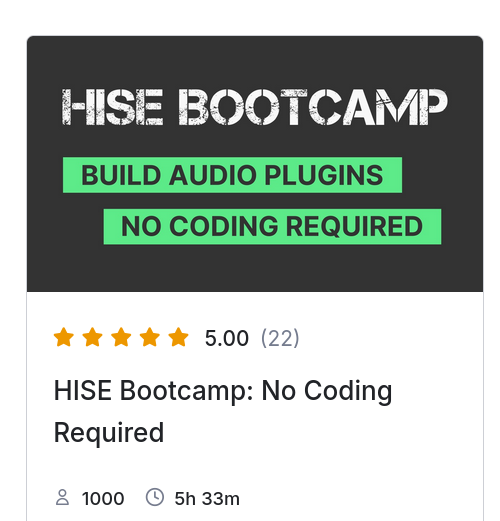
Wooo! 1000 Students, thanks so much!
Free HISE Bootcamp Full Course for beginners.
YouTube Channel - HISE tutorials
My Patreon - More HISE tutorials -
@David-Healey Congrats!
-
@David-Healey Congrats!

-
@David-Healey
Great! :-)
Congrats! -
@David-Healey Well done mate, long may your success continue
-
@David-Healey Nice! And thank you for putting these resources together, they are an incredible source of info and help for beginners like me, and the wider HISE community.
-
The how to compile HISE videos of the Bootcamp have now all been updated to cover the recent changes to the HISE source code structure. I've also updated the cheat sheets.






