Forum
    • Categories
    • Register
    • Login

    Stock Table Upgrade?

    Scheduled Pinned Locked Moved General Questions
    44 Posts 9 Posters 2.3k Views
    Loading More Posts
    • Oldest to Newest
    • Newest to Oldest
    • Most Votes
    Reply
    • Reply as topic
    Log in to reply
    This topic has been deleted. Only users with topic management privileges can see it.
    • DanHD
      DanH @Christoph Hart
      last edited by

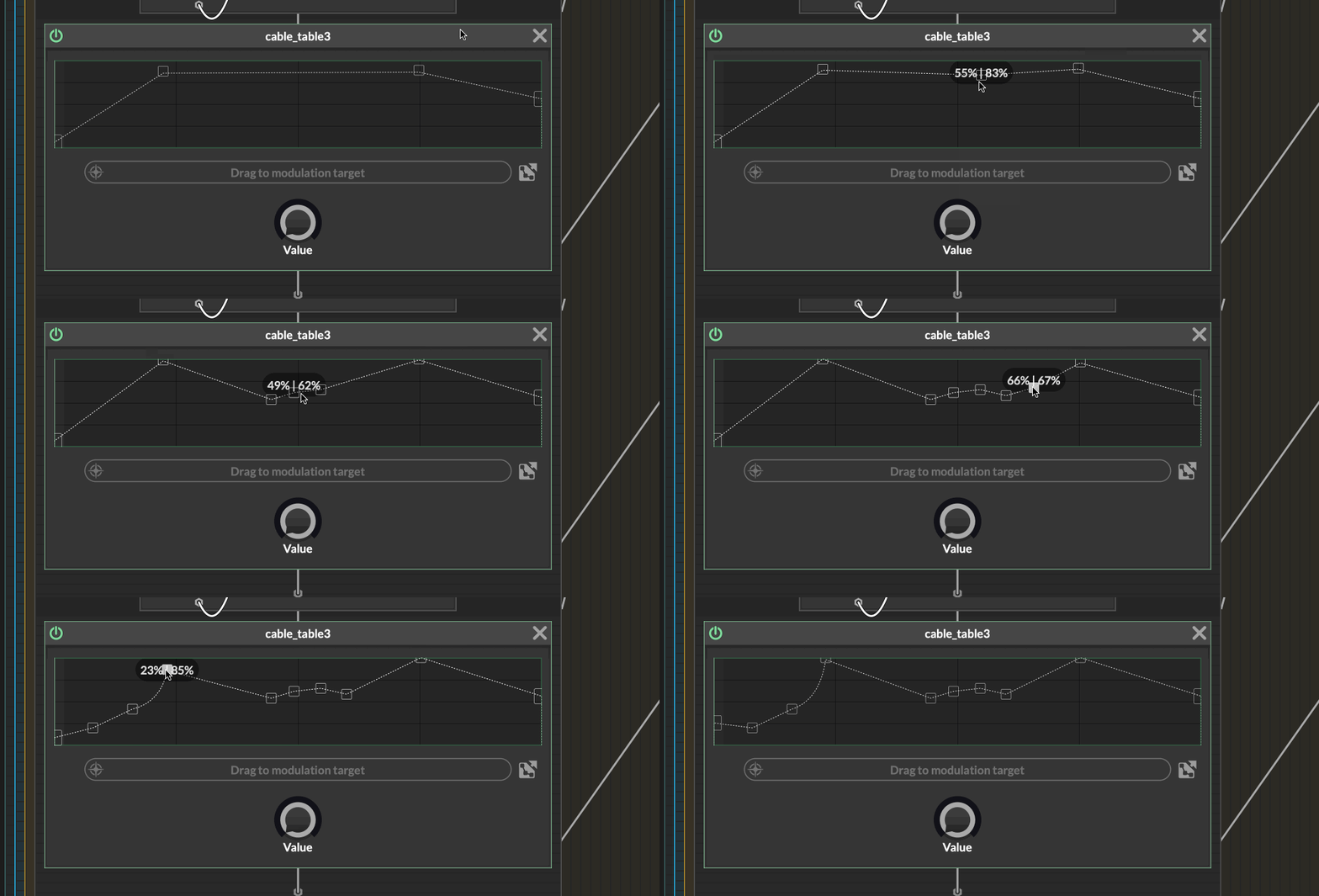
      @Christoph-Hart are those curve nodes in the example image?

      DHPlugins / DC Breaks | Artist / Producer / DJ / Developer
      https://dhplugins.com/ | https://dcbreaks.com/
      London, UK

      Christoph HartC 1 Reply Last reply Reply Quote 0
      • Christoph HartC
        Christoph Hart @DanH
        last edited by

        @DanH the circle ones, yes, just like with the flex envelope. You can enable them by setting the midPointSize property to anything > 0.

        DanHD ustkU 2 Replies Last reply Reply Quote 0
        • DanHD
          DanH @Christoph Hart
          last edited by

          @Christoph-Hart ah cool, sorry I missed that on my phone!

          DHPlugins / DC Breaks | Artist / Producer / DJ / Developer
          https://dhplugins.com/ | https://dcbreaks.com/
          London, UK

          1 Reply Last reply Reply Quote 0
          • ustkU
            ustk @Christoph Hart
            last edited by

            @Christoph-Hart is there a way to reset a curve to exactly 0.5?

            Hise made me an F5 dude, browser just suffers...

            Christoph HartC 1 Reply Last reply Reply Quote 0
            • DanHD
              DanH @Christoph Hart
              last edited by

              @Christoph-Hart any extra dragging resolution?! 😀

              And can the ruler move more smoothly too?

              DHPlugins / DC Breaks | Artist / Producer / DJ / Developer
              https://dhplugins.com/ | https://dcbreaks.com/
              London, UK

              1 Reply Last reply Reply Quote 0
              • HISEnbergH
                HISEnberg @Christoph Hart
                last edited by

                @Christoph-Hart My only comment is regarding beat/grid-syncing. It seems rather common that you can adjust and create a (wave)shape based on a fixed grid/timeline.

                I imagine Shaper Box by Cableguys is the best example of this but there are plenty of plugins that have a similar feature.

                Half of this can be done in HiseScript I am sure, but I am picturing the best system for sending the data in this scenario (multiple Tables with a menu of fixed shapes or just one table with fixed shapes to select from)?

                Personally I would need to brush up on the Table API because I've always hated it (except that disgusting green box) and haven't used it in ages. Last I remember is it saves the coordinates in a huge array (presumably JSON) and recalls that?

                ... As I wrote this I realize I am an idiot since you already included a numSteps and snapWidth , features which should cover the basics of this. The rest about "stored shapes" can be handled on the HISE side.

                Sonic Architect && Software Mercenary

                1 Reply Last reply Reply Quote 0
                • David HealeyD
                  David Healey @Christoph Hart
                  last edited by David Healey

                  This post is deleted!
                  1 Reply Last reply Reply Quote 0
                  • Christoph HartC
                    Christoph Hart @ustk
                    last edited by

                    @ustk said in Stock Table Upgrade?:

                    is there a way to reset a curve to exactly 0.5?

                    double click on the mid point node resets it to 0.5

                    And can the ruler move more smoothly too?

                    the ruler is already a float position, but the update rate might be only 30Hz, need to check.

                    any extra dragging resolution?!

                    nope.

                    ustkU 1 Reply Last reply Reply Quote 0
                    • griffinboyG
                      griffinboy @Christoph Hart
                      last edited by

                      @Christoph-Hart

                      Nice work

                      1 Reply Last reply Reply Quote 0
                      • ustkU
                        ustk
                        last edited by

                        Next, being able to choose the spline function among 20 different... per section! 🚀

                        alt text

                        Hise made me an F5 dude, browser just suffers...

                        1 Reply Last reply Reply Quote 0
                        • It_UsedI
                          It_Used @Christoph Hart
                          last edited by

                          @Christoph-Hart I searched for as long as I could, but I couldn't find how to reset the points, their position, and/or the tension between them. It would be nice to be able to set a modifier key if this is not the case.

                          Oli UllmannO 1 Reply Last reply Reply Quote 0
                          • Oli UllmannO
                            Oli Ullmann @It_Used
                            last edited by

                            @It_Used
                            I am not in front of my computer but there is a .reset() function.

                            It_UsedI 1 Reply Last reply Reply Quote 0
                            • It_UsedI
                              It_Used @Oli Ullmann
                              last edited by

                              @Oli-Ullmann Thanks

                              1 Reply Last reply Reply Quote 0
                              • ustkU
                                ustk @Christoph Hart
                                last edited by ustk

                                @Christoph-Hart The tables really, really need an update

                                All value currently set above 85% are shifting up at each mouse click ! 😱

                                zrg.gif

                                And setting the value is so rough, often jumping by 2% with no possibilities to get more precision.

                                This is making me think

                                1. What about the possibility of opening all current point in an array/table like popup so we can edit the point numerically?

                                2. Or expand the area for more precision?

                                3. would there be possible to show the values with a custom range (even if 0-1 behind the scene) so we would be able for instance to set frequencies or gains precisely?

                                A table for the real guys 💪

                                Of course all of that can be made from the UI, but when you design a network, you might not have/need a connection. And I can't imagine making a connection, dropping the table because you make another design choice, put back a table because, well, wasn't so bad... In short network design is no time for creating a UI connection + script just for testing things...

                                Hise made me an F5 dude, browser just suffers...

                                1 Reply Last reply Reply Quote 1
                                • First post
                                  Last post

                                25

                                Online

                                2.1k

                                Users

                                13.1k

                                Topics

                                113.6k

                                Posts