
Just wanted to wish everyone a happy, productive and prosperous new year!

Just wanted to wish everyone a happy, productive and prosperous new year!
Payment providers for plugin sellers compared: fees on real sales, plus features
WARNING: long post!
I use Gumroad and although I'm fairly happy with it, I feel like it's time to move. I've spent the last few weeks looking at other services. I ended up going through eight options in more detail than I planned, so here is the write-up in case it saves someone else the time.
What the numbers are. I took several thousand of my real 2026 sales (price, VAT / sales tax, buyer country, card or PayPal, affiliate or not) and replayed each one through every provider's published fee schedule.
To keep my own revenue out of it, everything below is expressed as fees per $1,000 of pre-tax sales, with every one of those real buyers "buying" a $10, $50 or $100 product instead of what they actually bought.
Note: fee pages were checked in August and September 2026. They can change over time. I am in the UK, which matters for a few rows (noted below). Absolutely none of this is tax advice, of course.
TL;DR
Costs
Fees on $1,000 of pre-tax sales, made up four different ways. The 'mixed basket' is 30 x $10 + 8 x $50 + 3 x $100.
| Provider | 100 x $10 | 20 x $50 | 10 x $100 | Mixed basket | Not in the figure |
|---|---|---|---|---|---|
| Gumroad (direct sales) | $226 | $155 | $146 | $174 | Discover sales cost a flat 30% instead |
| Moonbase, one GBP price | $218 | $125 | $114 | $150 | €5 per payout |
| Moonbase, GBP + EUR + USD prices | $200 | $108 | $96 | $132 | €5 per payout |
| Moonbase, one USD price | $196 | $103 | $91 | $127 | €5 per payout |
| Moonbase, one EUR price | $184 | $91 | $80 | $116 | €5 per payout |
| SoundSync | $100 | $100 | $100 | $100 | $10/month minimum, $9.99 minimum price |
| Lemon Squeezy | $127 | $87 | $82 | $98 | 1% of every payout to a non-US bank (about $9 more) |
| Payhip Free | $114 | $89 | $86 | $96 | currency conversion, see below |
| Polar Starter | $120 | $80 | $75 | $91 | Stripe payout + conversion fees outside the US (about $14 more) |
| Stripe Managed Payments | $94 | $72 | $70 | $78 | possibly up to $87, see below |
| Fungies | $107 | $67 | $62 | $77 | possibly Stripe's 2% conversion on payout (about $15 more), unconfirmed |
| Polar Pro | $97 | $65 | $61 | $73 | + $20/month |
| Payhip Plus | $84 | $59 | $56 | $66 | + $29/month |
| Payhip Pro | $64 | $39 | $36 | $46 | + $99/month |
| Stripe on its own, no merchant of record | $59 | $37 | $35 | $43 | you register, collect and file the tax yourself |
The same figures as a percentage of pre-tax sales. The "not in the figure" notes above apply here too, and monthly plan fees are still on top. "My savings" is how much of the Gumroad fee bill each option would cut on the mixed basket, with Gumroad's fees as 100%.
| Provider | 100 x $10 | 20 x $50 | 10 x $100 | Mixed basket | My savings |
|---|---|---|---|---|---|
| Gumroad (direct sales) | 22.6% | 15.5% | 14.6% | 17.4% | baseline |
| Moonbase, one GBP price | 21.8% | 12.5% | 11.4% | 15.0% | 14% |
| Moonbase, GBP + EUR + USD prices | 20.0% | 10.8% | 9.6% | 13.2% | 24% |
| Moonbase, one USD price | 19.6% | 10.3% | 9.1% | 12.7% | 27% |
| Moonbase, one EUR price | 18.4% | 9.1% | 8.0% | 11.6% | 33% |
| SoundSync | 10.0% | 10.0% | 10.0% | 10.0% | 43% |
| Lemon Squeezy | 12.7% | 8.7% | 8.2% | 9.8% | 44% |
| Payhip Free | 11.4% | 8.9% | 8.6% | 9.6% | 45% |
| Polar Starter | 12.0% | 8.0% | 7.5% | 9.1% | 48% |
| Stripe Managed Payments | 9.4% | 7.2% | 7.0% | 7.8% | 55% |
| Fungies | 10.7% | 6.7% | 6.2% | 7.7% | 56% |
| Polar Pro | 9.7% | 6.5% | 6.1% | 7.3% | 58% |
| Payhip Plus | 8.4% | 5.9% | 5.6% | 6.6% | 62% |
| Payhip Pro | 6.4% | 3.9% | 3.6% | 4.6% | 74% |
| Stripe on its own, no merchant of record | 5.9% | 3.7% | 3.5% | 4.3% | 75% |
How to read it:
Published fees, for reference
| Provider | Headline | Surcharges |
|---|---|---|
| Gumroad | 10% + 50¢ + card processing (2.9% + 30¢) | 30% flat on Discover sales |
| Moonbase | 5% + €1, on the tax-inclusive total | +1% non-European card, +1.5% PayPal, +1% USD / +3% other non-EUR currency, +3% affiliate sale, +€5 per payout |
| Stripe Managed Payments | 3.5% on the tax-inclusive total, on top of normal Stripe processing | none (no currency fee with Adaptive Pricing on) |
| Polar | Starter 5% + 50¢, Pro $20/month, 3.8% + 40¢ | +1.5% on every non-US card, Stripe payout fees |
| Fungies | 5% + 50¢ | none published |
| Lemon Squeezy | 5% + 50¢, on the tax-inclusive total | +1.5% non-US buyer, +1.5% PayPal, +3% affiliate sale, 1% payout to a non-US bank |
| Payhip | Free 5%, Plus $29/month + 2%, Pro $99/month + 0%, on the pre-tax price | your own Stripe and PayPal fees on top |
| SoundSync | 10% of the pre-tax price, processing included | $10/month minimum |
What about losing PayPal?
Stripe Managed Payments and Polar do not take PayPal, and SoundSync doesn't mention it either. A third of my buyers use it. I happen to have a natural experiment: Gumroad inexplicably switched PayPal off for four months in late 2024, when it was well over 40% of my sales. Revenue in those months, leaving out December, was about 4% below the four months before, which is inside my normal month-to-month noise. PayPal buyers mostly paid by card instead. This was just me, so treat it as a data point and not a law, but the cost was a lot smaller than I expected.
Features
| Provider | Merchant of record | PayPal | Licence keys | File delivery | Affiliates | Free / pay-what-you-want | Email marketing |
|---|---|---|---|---|---|---|---|
| Gumroad | Yes | Yes | Basic (key + verify API) | Yes | Native | Yes / yes | Built in |
| Moonbase | Yes | Yes (+1.5%) | Full licensing: online and offline activation, JUCE module, works alongside iLok | Yes, no size limit | Native (+3%) | Yes, no fee / no | No; syncs to Klaviyo, Mailchimp, MailerLite, Brevo, Mailjet |
| Stripe Managed Payments | Yes | No | No | No | No | Not a store | No |
| Polar | Yes | No ("planned") | Yes: activation limit, expiry, activate / validate API | Yes, 10 GB per file | Third-party only | Yes / yes | No |
| Fungies | Yes | Yes, no surcharge | Pre-generated key lists only, no activation | Yes, 50 GB | Separate paid product | Yes / only through the API | No ("coming soon") |
| Lemon Squeezy | Yes | Yes (+1.5%) | Yes: activation limit, activate / validate / deactivate API | Yes, 5 GB per product | Native (+3%) | Yes / yes | Built in, free to 500 subscribers |
| Payhip | No (see below) | Yes, your own account | Key + verify + usage counter, no enforced activation limit | Yes, 5 GB per file | Native and free, but you pay affiliates by hand | Yes / yes | Built in, plus sync to Mailchimp, Kit, MailerLite, Klaviyo |
| SoundSync | Stated, but the docs hedge | Not documented | Serial activation, login, offline grace, deactivation; HISE and JUCE integrations | Yes | By approval | Yes / no, and paid products start at $9.99 | Built in, 1,000 sends/month included |
Money / Currencies / Payouts
| Provider | Currencies | Where your money sits | Checkout on your own site | Import from Gumroad |
|---|---|---|---|---|
| Moonbase | 100+, with fixed prices per currency | With Moonbase, paid monthly (biweekly on request), €50 minimum + €5 fee | Embedded | Yes, assisted migration incl. licences |
| Stripe Managed Payments | Local currency via Adaptive Pricing | Your Stripe balance, normal payouts | Hosted Stripe Checkout only, no custom domain, buyer sees "Sold through Link" | n/a |
| Polar | 130+, fixed price per currency, tax-inclusive by region | With Polar in USD, 7-day settlement, manual withdrawals | Embedded or hosted | No |
| Fungies | One currency per offer | With Fungies; daily payouts to a Stripe Express account, PayPal weekly | Embedded, overlay or hosted | No |
| Lemon Squeezy | One display currency, every charge in USD | With Lemon Squeezy in USD; paid twice a month after a 13-day hold | Overlay, or hosted on a custom domain | Yes, done by their support from a CSV |
| Payhip | One currency per store | In your own Stripe / PayPal from the moment of sale | Embed button or direct link; custom domain | No |
| SoundSync | USD; others not documented | Stripe Connect transfers, schedule not stated | Embed or hosted storefront on a custom domain | Mentioned, no procedure documented |
Payhip and tax. Payhip is not a merchant of record and does not claim to be. It acts as reseller for EU and UK VAT, as marketplace facilitator for US and Canadian sales tax (since July 2026), and does nothing for the rest of the world, which was 15% of my sales across 48 countries. Refunds and disputes are yours. If you are a UK seller, ask an accountant how the reseller arrangement with a UK company affects your own VAT position before going near it. I have not had that answer yet.
Who is behind each one
Trustpilot figures are as of September 2026. Review sites over-sample angry people, but with a merchant of record the provider holds your money, so held payouts and silent support are exactly what I was looking for.
Things I couldn't pin down
Where I've landed
Not decided, but it has come down to three rather than eight:
User experience
The next step for me is to examine the user-facing side of each of these. The Moonbase system I know quite well after buying plugins from Jungle Audio and ZAK Sound. I need to see SoundSync in real use and figure out what my own user system would look like if I went with Stripe Managed Payments.
What do I want to build?
Here's the thing: Moonbase, SoundSync and some of the others have all the features I want, but at varying cost above the basic Stripe Managed Payments fees. So how much work am I willing to do (with AI, of course) to build my own cart, checkout, fulfilment, licensing, user accounts, discounts, refunds and email marketing?
Basically: do I want to build web app and marketing tech, or do I want to build plugins?
By the way, email marketing is an important factor. Gumroad includes it in the fee, and so do a couple of the others, but some don't and for large lists it can get expensive using Mailchimp, Klavyio, etc.
Merchant of Record
I definitely want to go with a Merchant of Record system, because no amount of time invested or AI-assistance is better than having someone else taking care of all the sales tax for me.
Parting thought
If Moonbase added support for GBP-holding, halved the fixed per-sale fee, the €5 payout fee and consolidated some of the other fees, they would be a no-brainer.
Corrections welcome, especially from anyone actually selling through one of these.
Until you spend hours debugging an inaudible filter node because Claude set the smoothing to 20 seconds instead of 20ms! 
@David-Healey In a conversation with ChatGPT today, it said to me
Your mockup surprised me—I expected to dislike it. I don't.
AI is getting cheekier!

Anyone care to share their overall plans and goals for the coming year?
My main goal is to start releasing HISE plugins. I've been learning HISE for a while and it's time to start exporting my efforts!
A series of 4 free synth plugins, first one Sublime posted here for design feedback, and another 3, each based around one simple preset concept. Sublime is all about bass.
Then I have 2 collaborations I want to work on, both with UK house music producers. One is a multi-output drum plugin based on a series of expansions, the other is a chord synth with some interesting features.
I also have a lot of vintage reverb impulses recorded and processed, which I'd like to turn into a suite of free reverbs.
My user base is mostly house music producers & related genres - rave, techno, classic house, etc. I've built a decent brand and I think my customers will love the move from Maize-based ROMpler plugins to way more fully-featured HISE-based plugins.
What are your goals?
I like using overlay images to ensure my Figma design is translated properly to HISE. Currently, the only way I know to toggle the image visibility is to select/unselect the image, or quickly slide the alpha slider, which is difficult because of the 'invert' half of the slider.
This PR adds a toggle button between the image dropdown and the alpha slider. It uses an existing image icon for the button and respects the alpha slider value.
This allows me to toggle the image without taking my eyes off the interface, making it easier to spot changes.
PR here: https://github.com/christophhart/HISE/pull/825
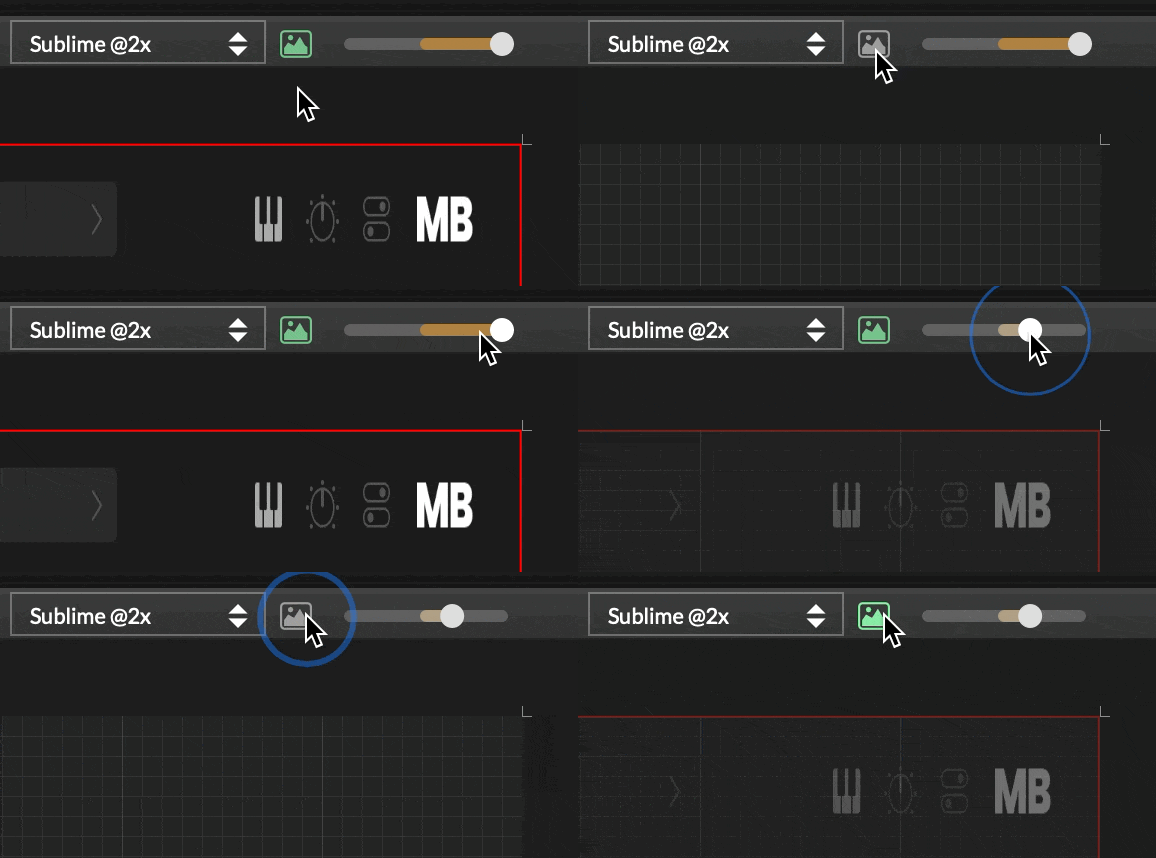
@David-Healey I just had a go at fixing this. Is that what you mean?
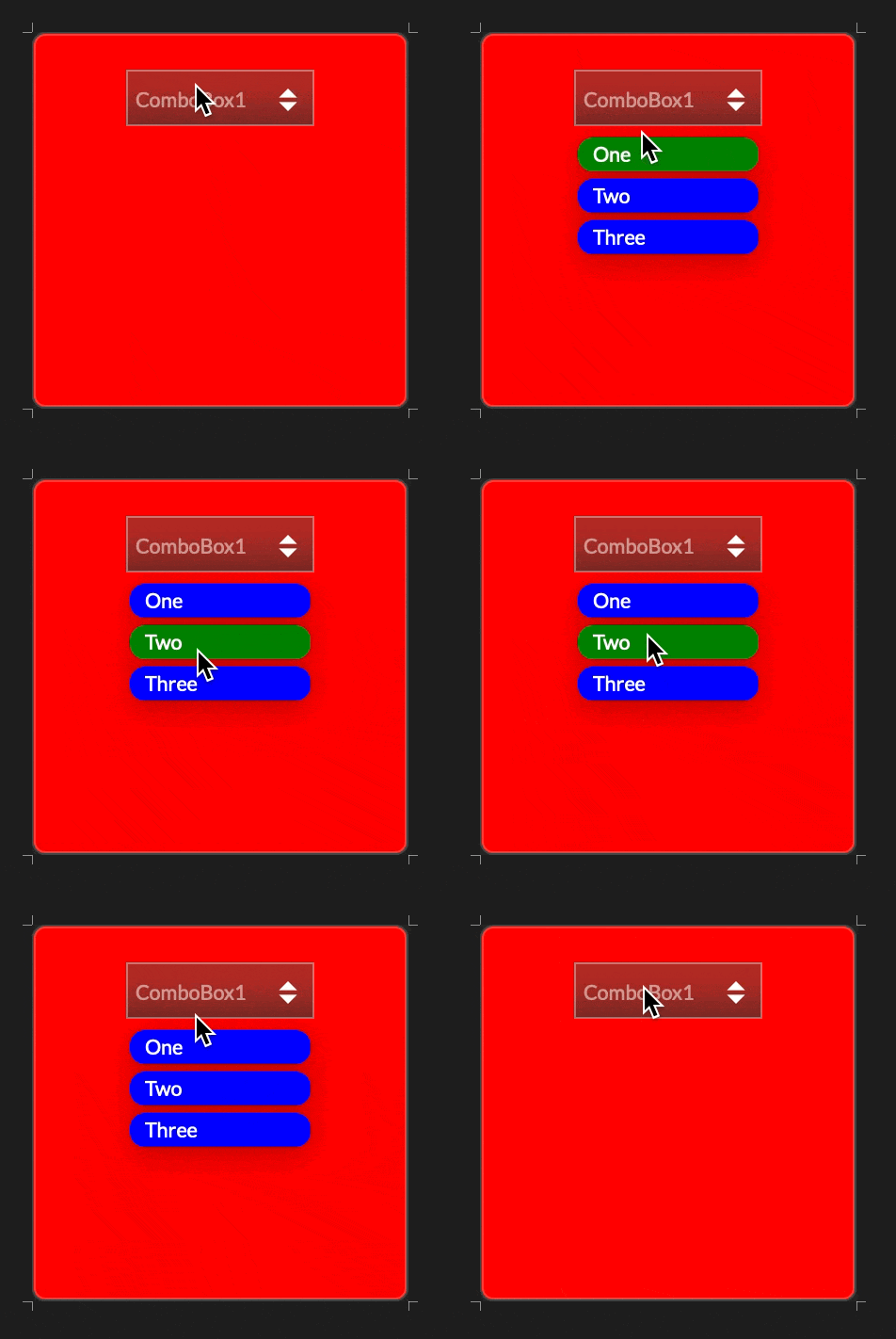
HiseSnippet 1112.3ocsVs2aaaCDmJIJKwacqEne.H7e4roYH+pIcACMO8pwxCi4rhMDDTPKcxhKRjFRTMwXneH12z8MH6ndXKO6klZfI.av6Eue2wi2w9QRGHNVFQLpb0jw.w3qLGLQn7O1mwEjdmPL9ZyyYwJHhlw5nIiYwwfKwvX8eRyvX6MHoe+8aNhEvDNvLVDx6jbG3LdHWMia+C9YdPPWlKbEOrj1sOnmiTbrLPlf3YcSaxXlysrQvELsZqYRdKK1mX7sl1scX60zqSqVu9061wcH330.FtqCytCyqCC41l0tSi1DiMO0kqjQCTLEDia5QR2IC7k2Ixbv63w7gAflnAY.54L1ji84At8KRNwDhwF8mkpVOKU8Ryy4t7o7mkxddp.5LKJmzLV6wfTiOCHYTBRajAoWXNvIhOVMShFOeoYOAdB5wvylxPISWxZ+05lGKQMDp5gragtQHwTKp0z11hh+sy9UpfmOwJZ.yi9izBSbh.LRNS5vBNSJu8PgaW.BpoUGUrdDLhqqe5lHbTbonVU2H1c8kiSFeNHRNBOhGEISDtUsndE5LxhJG9G6T4OqPwuQ0iAUVcQsp12am+UEcQlXOrd5W.GUsqssrsz.F+cCJ9iOQTzSAg+29+CrHJCiXjUcFFs3dVvdLy8PjCJ7Z1012P+NZSKJ65FSW07F52SaqW0Jc0M6uPHo2Vd7a4i7CveJvk9FZln35ih.PP+gozCCRf4CacpCb0QOSLJ.pkiHK5d6TBmJ3dUAPy0HCt6YUDCHnmsNE1Md0LFstYIHu.U24yUyfEJuKVaTq5IfGKIPgI1FsqaOUtNyeHFpBv8JDVowuFeVSQoEsZ.3opVbBlU1crLbn7H48MJU7MRikvwRAnc3TMzVNkPCnEJOwhhc1u37lJEWHUvkhZ5i7sq7wJz+sHOukJSiiHYP.DsTw5FbQOlg0DIgCgHK7PRexVnHdgd9tDa9z5R3jkVJonTzSvUWNFxo6JCb0290qWrmBIOup6tjiPTUUZukmm2aoHuR3t5VKSSyjzPnbyexu16DlhUrY39h9ZLDo35Px3D3C3vgrFWaadBDeqRNF6yO8.kXrUlqeVQaMl.BR86VloqaPturCmTl.KICKFlr8lDxCOLO2lkYeG2U4OyZ9A9f9tXYNjR35KdhoDDclFMyPlowKwEgrTdqunO+8CzXCSLei4kBnxU2IqbkOd8GGXtPedbBizMIfoleridfbt.rJatd8594hXtZR4A1eFyhrezYQOUH9By9bki+xw3ZKAiXsy+GXLeB9yLO0yC6bNCfaX182V0w0eB2icpUbwnyYpHttF3hjvAXYnCfdWf0xw55h0z2Ayns0z5Lv.P3lR7.9kKrgl1HWXiBgX0kSj78NY2b0uQXqTNHlDougZa7wbHMcIWVCwmr7dGm42pELr4pZXqU0v1qpgcVUCe0pZ3tqpg68oMT+hxCSTxvrqMDx48OMs4pgwoBFVAlVsR9GztgJYG
Content.makeFrontInterface(200, 200);

const laf = Content.createLocalLookAndFeel();

laf.registerFunction("drawPopupMenuBackground", function(g, obj)
{
    g.setColour("0x00000000"); // any transparent colour
    g.fillRect([0,0,200,200]);
});

laf.registerFunction("drawPopupMenuItem", function(g, obj)
{
    var a = obj.area;

    var padArea = [a[0] + 2, a[1] + 2, a[2] - 4, a[3] - 4];
    g.setColour(obj.isHighlighted ? Colours.green : Colours.blue);
    g.fillRoundedRectangle(padArea, 8);

    var textArea = [padArea[0] + 8, padArea[1], padArea[2] - 16, padArea[3]];
    g.setColour(Colours.white);
    g.setFont("Default", 14.0);
    g.drawAlignedText(obj.text, textArea, "left");
});

const ComboBox1 = Content.getComponent("ComboBox1");
ComboBox1.setLocalLookAndFeel(laf);
The drawPopupMenuBackground object should probably include an area, and the popup menu items still have a subtle drop shadow. But they're both fixes for another day.
PR here, if it's useful: https://github.com/christophhart/HISE/pull/805
@bendurso Today I learned that right-clicking a module in edit mode shows a different context menu to right-clicking not in edit mode. 
Posting this in case it helps anyone else. I just banged my head against a brick wall for too long before I realised how simple this was!
When using a Floating Tile with content type Waveform (to display the waveform of Sine Wave Generator or Waveform Generator, for example) the default waveform path is a filled shape.
You can override this with LAF function drawAnalyserPath and draw a line path instead of a filled path:
laf.registerFunction("drawAnalyserPath", function(g, obj)
{
	g.setColour(Colours.white);
	g.drawPath(obj.path, obj.area, 5);
});
However, this means that the path is clipped at the bounds of the floating tile, especially at wider line thicknesses:

To prevent the clipping, I fudged around with it for longer than I want to admit before I realised the answer is to simply reduce the area that the path is drawn in, by half the thickness of the path:
laf.registerFunction("drawAnalyserPath", function(g, obj)
{
	g.setColour(Colours.white);
	g.drawPath(obj.path, obj.area.reduced(2.5), 5);
});
Voila! No more clipped paths!  Top row is using
 obj.area, bottom row is using area reduced by half line thickness:

You might want the left/right of the path to bleed out of bounds, in which case change the reduction from all-round to y-only:
obj.area.reduced(5) 👈 all-round
obj.area.reduced(0, 5) 👈 y-only
Note: you might need to compile with HISE_USE_SCRIPT_RECTANGLE_OBJECT=1 for the reduced and other Rectangle helper functions, as per the docs: https://docs.hise.dev/scripting/scripting-api/rectangle/index.html. Not sure if it's still the same, or if it's built-in to all new builds.
@Chazrox said in MEDIA BROWSER PLUGIN [NOT A HISE PLUGIN - but may be useful]:
The forum has definitely been less active since everyone has found their agentic work flows.
I noticed that too. Bit sad really. Maybe we should all start sharing more wins we have with AI?
Rewind a couple of years ago and I had no idea what I was doing with any of this. I was pasting HISE scripts into a ChatGPT window, getting back something 80% right, pasting it into HISE, pasting the error back, and so on. It worked, sort of, but it was slow and the model never really knew what my project looked like. Later I moved to Cursor, so the model could at least see all my code. But since then I've moved to doing everything in the terminal instead of a full IDE.
This post is the setup I've ended up with for building Sublime, the plugin I released this month. And it's the setup I use for all other coding tasks too - building static websites, writing Ruby on Rails web applications, making Mac apps, etc.
This post is based on Claude Code because that is what I use, but pretty much everything here has an equivalent in the other tools. If you already run an agent locally you won't learn much here. If you're very new to AI, or still in a Claude/Codex/Gemini browser tab, read on.
As with all setup posts like this, your mileage may (very likely will) vary.
The single most confusing thing when you start is that "AI"  is at least four separate things stacked on top of each other, and people use the names interchangeably.
The models and their overlords
The model is the thing that actually thinks. Each overlord company makes their own model(s). Anthropic (company) makes Claude models (Opus, Sonnet, Haiku, and now the Fable/Mythos tier), OpenAI (company) makes GPT (model), Google makes Gemini. The model is just text generator, lovingly known in some circles as a 'bullshit generator'  . It takes text in and gives text out - that's it.
Christoph's rule of thumb in the agentic thread was that Opus 4.6 or an equivalent was the floor for HISE work, and anything smaller is a false economy. I agree, but that was a while ago, so adjust your baseline accordingly. For my work, I only ever use the best model available from the provider I use. Right now, that's Anthropic's Fable 5.1.
The harness
The harness (also called the agent, or the CLI) makes the model feel conversational and personal. It reads your files, runs shell commands, edits code, calls tools, and loops until the job is done. It's really only passing text to and from the model but it's also adding all the context needed for a continual, useful conversation.
Claude Code is Anthropic's agent/harness. Codex is OpenAI's. opencode is the open-source one Christoph uses. Cursor, Zed, VS Code with Copilot, and Google's Antigravity are editors with a harness built in. The harness is a choice independent of the model: opencode and Cursor can run Claude and other models, Claude Code can only run Claude.
I've been very happy with Claude Code in the terminal for many months now, only tweaking the actual terminal app that I use - currently using herdr.
The context files
These files are plain markdown you leave in your folders for the harness to read at the start of every session. Claude Code reads CLAUDE.md; most of the others read AGENTS.md, and the two are converging (Christoph said his hise-cli templates will be agents.md). This is the layer that turns a clever generalist into something that knows YOUR project. Most of this post is about these.
The tools
The things the agent/harness can call out to beyond the shell: MCP servers (a protocol for plugging a tool into any harness), language servers, and plain command-line programs. For HISE this means Christoph's HISE MCP server, hise-cli, and the HISE REST server inside the editor.
Show me the money!
A subscription (Claude Pro or Max, ChatGPT Plus, a Cursor plan) gives you a monthly allowance with rate limits. An API key is pay per token, no ceiling, but it's usually more expensive for a comparable amount of access. Beginners should start with a subscription so a runaway loop just means you run out of tokens rather than facing a massive API bill at the end of the month.
I'm currently on the Claude Max plan at £90/mo I was on the Pro plan at £20/mo for quite a while, but when I stepped up production I started running out of tokens too early. I do get close to the token limit now, on £90/mo, so the next step up for me is £180/mo. But in terms of productivity gains, and compared to how much human help you could hire for £180/mo, the cost is tiny.
Usage on Claude is rate-limited by 5-hour and weekly windows. Supposedly so the overlords can manage bandwidth of their mega-cloud-thinking-machines, but the relaity is usually fine for regular work.
The highest-end Claude Fable model has its own rate limit because it uses a lot more resources than the lower Opus/Sonnet models. As I write this on a Saturday afternoon, I'm at 95% Fable usage for the week, which resets on Tuesday, so I'll definitely hit the limit before then.
The browser chat is the model with limited abilites and environment.
In a regular AI chat session, you play the agent. You copy files in, copy answers out, run the code and report back. Every round trip loses detail, and the model only ever sees the fragments you chose to paste.
In a Claude Code browser session at least you can connect to your project repo on GitHub. But you're still working in an isolated environment. The model can only see your repo code. You migth think that's all you need, but the real power in agentic coding comes from all the things and actions around the project repo.
Running the agent in the project folder changes the job completely:
project_info.xml, samples, untracked files, everything.~/Code/HISE is on the same local disk. When the docs are vague about a LookAndFeel obj field or what setIntensity expects, the agent opens the .cpp and reads the implementation. This is the single biggest quality jump I've had. The majority of the "HiseScript hallucination" problem goes away when the model can check the HISE source.git, node checkers, sox for audio analysis, the build. It can write a script to migrate 125 presets and then run it, instead of giving me a script to run.ai/ folder below) instead of staying isolated in a chat tab.One correction to something I wrote in Christoph's thread back in March: I said terminal agents lose the chat history when you close the window. I since learned that Claude Code keeps every session and the /resume command lets you pick an old one up with its full context. Cursor's tabbed history is still friendlier, but the capability is there. And at the end of the day, this is all just text files on your machine. They're shuffled away in hidden Claude folders, but they're there. You can back them up, make a searchable archive of all your agent sessions from day one (I just did that), and move them between machines.
This is the heart of the setup. The harness reads context files from several places and stacks them, so each file can hold the rules that belong at that level. I have three, plus one import.
NOTE: If you don't use Claude, your file name and location will be different, for example ~/.codex/AGENTS.md for Codex. Also, any paths mentioned are Mac - adjust for Windows/Linux.
~/.claude/CLAUDE.mdRules about ME and this MACHINE, which apply to every project. Nothing about HISE lives here, and nothing about inidividual projects. Examples from mine:
sox.Notice these are mostly "never do X without asking". Each one was added the day the agent did X. That is how the file grows, not by sitting down and writing all the rules at the start, but by writing one line each time something bites.
Take the MERGE_HEAD issue I had recently. When that was resolved I asked Claude to add a note to ~/.claude/CLAUDE.md so that every new coding session is aware of the problem and the solution.
my-project/CLAUDE.md and my-project/HISE.mdThis is a separate CLAUDE.md file with specific context for this project.
The HISE knowledge lives in a second file, HISE.md, pulled in with one line at the top of CLAUDE.md:
@HISE.md
HISE.md is about HOW TO WORK ON A HISE-BASED PROJECT in general (not how to work on the HISE source code itself - that's below). What the MCP server is for and when to use it, where the HISE source is and which directories answer which questions, the audio-thread timer pattern, the HiseScript gotchas I've hit (inline locals shadowing namespace members, getModulator being onInit-only, scriptnode Smoothing being in seconds whatever the display says). Nothing in it names the plugin, so I can copy it into the next plugin repo unchanged.
CLAUDE.md itself is about THIS plugin and the decisions that are not derivable from the code: the naming convention for component ids and plugin parameters, why the top-bar panel is declared after the main sections (VST3 parameter order), which switches are fronts for hidden sliders, which features are hidden for 1.0 and how to ship them later, the pre-release checklist, how the two XML files stay in sync. It is long (7500 words) and every paragraph has a date and a reason, because "why" is what the agent cannot reconstruct from the code.
The split matters. If you mix the HISE mechanics in with the project decisions you cannot reuse them. Keeping them in their own file means the next plugin starts with everything I've learned so far.
~/Code/HISE/CLAUDE.mdA third file, for when I am working ON the HISE source rather than WITH it in a project. It says which branch is mine, which tracks upstream, that builds are mine to run, that the agent may commit only when asked. Then the C++ conventions (unity builds, tabs, Allman braces, the USE_BACKEND / USE_FRONTEND split, the lock-free threading rules), and a pointer to the guidelines/ folder Christoph added for exactly this purpose.
The reason this is a separate file and not a section of the plugin repo's file is that a session started in the plugin repo reads the plugin rules and a session started in the HISE clone reads the HISE rules. Each one gets its own proper set of rules.
By default the agent/harness works in the folder you started it in and asks before reading outside it. For HISE work you want it to reach:
~/Code/HISE). The agent greps hi_scripting/scripting/api/ for the real signature of a scripting call, hi_core/.../floating_layout/ for the FloatingTile content types, and so on. My repo file tells it which directory answers which question so it doesn't repeatedly search the whole thing.hise_mcp_server, cloned and built with npm run build). Registered in the repo's .mcp.json so any harness that opens the folder gets it. The docs tools are always available and are much cheaper in tokens than fetching the HISE docs website; the runtime tools (recompile, screenshot, read/set component properties) work when HISE is open with Tools > Enable REST Server.hise-cli, which is absorbing the MCP server's runtime side. Compile over REST works from the CLI since 0.8.6 / HISE 4.9.3.In Claude Code the permission for an outside path goes in the project's .claude/settings.local.json (or claude --add-dir ~/Code/HISE at launch). Mine has the AppData folder and the MCP tools allow-listed; the HISE clone itself I just approve when asked, which in practice is once per session. Other harnesses have the same idea under a different name.
Two habits worth adopting:
project_info.xml says it too. I shipped three months of linear filter modulation that was logarithmic in the editor before I learned this. My repo file now has a paragraph on it, and the agent catches it for me.ai/ folderThis is just a folder of markdown files in the repo, committed like code.
ai/ holds durable write-ups of things that took real digging. Why plugin parameters appear in the order they do across five DAWs, what the 1.0 preset format froze and how to add controls after it, experiments that were tried and dropped (with the reasons), extensive guides for setting up and using test machines. Each file is one topic, dated, with the decision AND the mechanical reason. ai/README.md indexes them in one line each.
The HISE clone has the same folder with its own conventions: specs/ for how a subsystem works anchored to file:line, discovery/ for things found out that are not in the docs, todo/ for diagnosed bugs with a proposed diff that has not landed yet.
The agent reads these when a question touches the topic, and it writes them when we finish an investigation. Two rules I enforce: the notes are the agent's wording, not my feelings, so they are quoted as "the note says", never as "you decided"; and when a note contradicts what I say now, I win and the note gets fixed.
Claude Code also has a per-project memory of its own (short files it writes for itself about how I like to work: "never commit unasked", "flag anything that breaks saved DAW sessions"). That's a harness feature and the files live outside the repo. Don't allow the agent to rely too much on this 'memory'. It's useful day to day, but the repo ai/ folder is the one that survives switching tools.
Everything between "the project is done" and "there is a working installer" is scripts I had the agent write and I never have to think about. A pre-release checker (version bumped in all three required places, no TEMP code left, UI XML and project XML in sync, factory preset count matches the user guide, etc.), the export via HISE's batch compile, pluginval with strictness setting, codesign and notarise the exported plugin, build the pkg, render the user guide PDF, upload it to file storage. One command. The Windows build has a twin script that runs the same checks.
None of that is HISE knowledge. It is the kind of tedious shell work the models are genuinely excellent at, and it is a good first project if you are nervous about letting an agent near your script code - let it automate your build first.
Planning. When chatting with the agent, I use phrasing like "Let's discuss how to ..." or "Let's plan a new feature called XYZ". This not only prevents the agent from writing code right away, it also frames the task as discovery/discussion rather than unplanned action.
Code IDE. You may notice I haven't mentioned using an IDE. That's because I don't use one anymore.  I read the code written by Claude right in the terminal, either with
 git diff or in the chat output. On the rare occassion that I want to hand edit code I open that single file in CotEditor, a basic free code editor on Mac. I do regularly edit the plan files and feature specs - they're plain Markdown and form the contracts between me and the agent. But editing code, hardly ever these days.
.mcp.json.CLAUDE.md (or AGENTS.md) in the project. Include what the plugin is, where HISE is, "look up every API call before writing it", and your two or three personal rules. Add a line every time it does something you did not want.Happy to answer questions, and I would love to hear how other people have arranged theirs, especially the opencode and Zed crowd. @iamlamprey's custom harness setup sound cool too.
@David-Healey Excellent title edit. Shame the title formatter doesn't do strikethrough.
Try these:
W̶h̶e̶r̶e̶'̶s̶ ̶C̶h̶r̶i̶s̶t̶o̶p̶h̶?̶
W̷h̷e̷r̷e̷'̷s̷ ̷C̷h̷r̷i̷s̷t̷o̷p̷h̷?̷
Seems like Godwin's Law needs updating to AI instead of Hitler
@iamlamprey said in Where's Christoph? We found him and now we talk about AI:
getting it to form coherent sentences for the first time was cool to see :D
Yeah, I bet! 
Have you tried headroom with your setup? Might make it even cheaper. Or have you got that kind of functionality built in?
@David-Healey Given how it sounds like you use Claude, might not be too different.
If you only use Claude to propose/write/update code that you then read and edit, doing it in the browser works fine.
But working in a browser means your agent is running just in the repo, on an isolated cloud instance.
Using the desktop app (or the CLI as I prefer) is all local, so Claude can:
@Lindon said in Where's Christoph?:
yeah thats what everyone says..so we all end up with nothing. Which is WORSE than out of date
Well, since you asked so nicely  I'll write something up to post later.
@iamlamprey said in Where's Christoph?:
Caveat in case someone thinks I'm stealing their .ch1 files with my "ch1 extractor" - I'm building out an MVP to see if I can convert my existing sample libraries into a synth and I can't be bothered downloading the original sample files lol
Don't worry - code and digital asset privacy is a thing of the past too.
It's always been possible to do all the reverse engineering that's all the rage now - the decompile libraries have been around for years. It's just that now LLMs bring us two things we didn't have before: speed and accuracy, and both at a much lower cost than hiring a human.
@iamlamprey said in Where's Christoph?:
I use Deepseek Flash and the combination works as well or better than any standard Claude / Codex setups at 1/100th the price.
Is that a subscription or API calls?
You can't really compare DeepSeek API costs with the token usage you get bundled in a Claude or Codex subscription, especially if you're driving it hard.
Comparing directly to Claude/Codex API isn't fair either, since the vast majority of heavy Claude/Codex users are on a subscription and wouldn't dream of paying API prices for those models/harnesses.
@Lindon said in Where's Christoph?:
I recall there was some stuff mentioned a few months back but Im pretty sure its out of date now...
That's why I'm hesitant to post anything along the lines of guide or instructions.
Things are moving so fast that anyone reading after a few weeks will be out of date.
But yes, a high-level config/setup would be good. Things like CLAUDE.md files, memory, etc. have always been around and will likely remain in place until the next big shift.
@David-Healey said in Where's Christoph?:
I find that the more examples I give it by editing its output the more it "learns" what I consider good code.
100% and a massively important aspect of the whole experience. AI seems like magic but it very much needs our input.
But left to a none-developer I wouldn't expect the final code quality to be acceptable.
Agreed. It believe it still takes a developer-brain to write a good spec and monitor the output.
Your CLAUDE.md files are crucial too. Don't let your model keep too much stuff in memory. Project/session memory is transient and I find it can rot. Hardcode behaviour into your CLAUDE.md files - one per repo and one high-level one in your Claude profile (~/.claude/CLAUDE.md on Mac, you'll know where to find it on Windows). And read/edit those files, don't let Claude be the only one who knows the content.
Regarding your iterations to get it understanding your repeat/don't repeat needs - just imagine describing it to a complete non-developer. Do it like that, by defining a lot context, and it might go better. And like I said above, READ the rules it writes for itself. Any failings are right int here, in plain text that you can change.
Finally, make sure you're using the best model you can. Even if that means you run out of tokens early. Fable is better than Opus for code, and I wouldn't consider ever letting Sonnet or lower models loose on code. Not even tests or docs.
Going from £20/mo Pro to £90/mo Max gives you a huge amount of headroom. Saying that, I've approached my weekly limit on Max several times lately. But there's a setting in your Usage page that occasionally allows you to reset your limit before the end of the week. When the Anthropic gods deign to offer it.

@Christoph-Hart said in Where's Christoph?:
Could this be a "skill issue" in the sense that I would have to use a better prompt / harness / multi-agent orchestrator, whatever?
Definitely a "skill issue" but not in an insulting way. Detailed prompts and interview sessions can pin down specs much better than 'shoot and hope' prompts. Not that I'm saying that's what you did.
Also, multi/sub-agent stuff has come on leaps and bounds in the last weeks/months.
Maybe, but I find it much more enjoyable working out the code myself.
I love that people feel this way, and will continue to for a long time. I'm just not one of them.
I would think of myself more of a product person than a developer. Coding is a means to an end for me, not the main enjoyable activity in itself. When coding becomes faster and more accessible I'm all for it. But I salute those who still want to hand write code line by line.
the hise-cli app is fully vibecoded and I haven't looked at the code a single time
Wow, I'm shocked! But also not surprised, given the circumstances.