Forum
    • Categories
    • Register
    • Login
    1. Home
    2. WannaBeGUD
    3. Posts
    W
    • Profile
    • Following 2
    • Followers 0
    • Topics 2
    • Posts 10
    • Groups 0

    Posts

    Recent Best Controversial
    • RE: Module tree container UI/UX

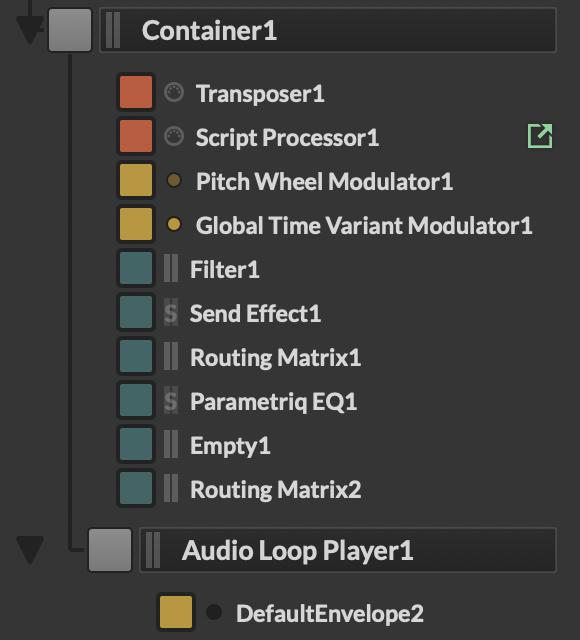
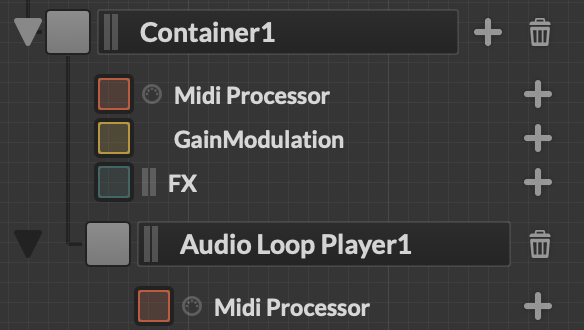
      @dannytaurus What if that container has many items just for it, this would mean if I wanted to see the "Audio Loop Player" in this case, I have no way to minimise just container 1, and keep that one open. Or we could just make the "Container" just that and do exactly what you have in the loop you made. Just containers do that function, others still work the other way around. - Seems odd to have a processor called 'Container' but it's more than that.

      I agree with the 'disappearing' arrow, so you could add a 'placeholder' such as (No processors) or even a cta for "+ Add processor", sorry if I'm getting processors and modules the whole way round.
      Screenshot 2026-01-06 at 13.22.33.png

      posted in Feature Requests
      W
      WannaBeGUD
    • RE: Module tree container UI/UX

      @dannytaurus Yes the ongoing issue with things appearing and disappearing. I believe removing it with no children is a more accurate quick fix, as having a button that does nothing and looks like something else is much worse.

      Realistically there is probably a even better solution but that will need more time and deep diving.

      posted in Feature Requests
      W
      WannaBeGUD
    • RE: Module tree container UI/UX

      @David-Healey

      There is a slight conundrum with this. In edit mode, that arrow does close and open possible items of that container to add. If none are set then outside of edit mode this arrow then does nothing.

      This means the arrow is a signifier in UX terms, but in some cases, looses it's purpose and further to your question now looks like another feature.

      So solution? If the processor (Container1 in this case) has no children, do not show the arrow. The Arrow itself implies there is something inside - if there is nothing inside then the arrow should be removed.

      TL;DR - Remove button when container is empty

      Screenshot 2026-01-06 at 12.48.42.png

      posted in Feature Requests
      W
      WannaBeGUD
    • RE: AudioWaveform visuals

      @rglides Thanks for these, all really useful! The snippet and zoom examples help a ton.

      posted in General Questions
      W
      WannaBeGUD
    • RE: Audiowaveform CSS crash instantly on windows 11 (Latest Commit and before)

      I'm having the same issue still, also wondering how I can solve this.

      posted in Bug Reports
      W
      WannaBeGUD
    • RE: AudioWaveform visuals

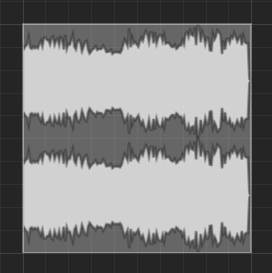
      @rglides Thank you for posting this, is there any docs on what values I can change/effect with LAF? I can't find any anything referencing the audiowaveform that would help me say render just 1 wave line instead of the 2. - I realise I can just hide the 2nd channel with a panel, not sure if it's efficient too.

      a24e5f66-b3fc-4241-9109-c47796ba5fd5-image.png

      I also found this good snippet for getting started in LAF for audiowaveforms;

      HiseSnippet 1391.3oc4W8taaTDDeu3bUXSAQKEo7wUQDIWv33yIkFDBQbRrasHo0JNDPJJpZycqsWx5cOs25Dag56Bek2FdT3MHL6d19tKboXLz9A3TTr2YmYueye1ey3NJoOMJRpPNEOYRHE4be2tSD5A6OfvDn1Gfb9P2iHQZpBGKZuIgjnHZ.xwovyLBbJtJx976e6dDNQ3SSDgPmJY9zCYCY5Doc186XbdKR.8D1vTZu8ts8kh8kb4H.OEbqgBI9WR5SeAwn1JtHm60LfokptZhlFgbVcOYvjtCjWKh0+TVD6BN0rvC0ENnXwsj7.ChMeGs+.FOnyL+NBgbb6jDEJDGEdj6Qr.1b4IQiOxtANwhzwCmUxBuBYfm2cAubfjSJHsZLjdfaWeEKTmriAOuuaaAjb5QfvdZnDqKZkesf69RPCgt5PxkzVJXwbKJucsZUv0qU6wecoRPnORiuhnvbRO72faJ5yDzp9JJ3LOiKufviOzCkxKaHBZQo7xFCA0qpn8YlhjViD9ZlTTd8.E45SFLZ3EBBieLQzmtdEbuYa2uBVdwO8X7OWpXIL7zuZOnjnAmW1fEb7i8SCfFCvATuZnLhYLG+Y1kD.ZmU+b.BwGQDUGW7Tt13VspWm.UXSOs9UM34PvgJOtBF9qVkjiXqyqf8pUs1bcydPwOK7AU8ISUMmCqWuacXvlsfLR40OkpBHBBDi7pmBIlWVCNqufFbBcLnGTZoz3N50qb1X7mCv1Bh5w4Q30uNm1Sudr8kdsI8rPInND8fEL+LtVZ+yjdHSSOlXPJG6YJR.CJ7ZAVV9LaJ4q1Yqc7pfImYfJ4LO3+F46Dr8S2IvHotU9VmedlHfAcksE.vWRh2URh0w36NzaVEkMdLyEwRwKjZ5KEkebIiW95R3auUud4tm49jRx4TUtaa3zTuICKKffNUUAhc7Qz4JBWzyxdbuEi8vO95cJEkh1Bl9kgzoqSn+7xgqAMkevv5LEgv6Va4b9jobNMFEvj+.4JZOoZHhEX3AyHyCYclzL+ADMA4rs6lGxtPQTS1zZvlMBC4TLvgDFE+8Mq4geNKD+bY3lM7pdM4JjxPWXqzAxYGygYkzTDXWO5gHz229.y4OEy.7AWJjpzLSjy4.5UPamXdyhtGPitTKCs5NLTJLNqy8+a6giS2oZR5EgyBmsCLsNr1YcQbGNYBU4ghHCAWssHfNNNqcMKPOv3MC.+a.k0ef0W+E37zvE8YMAKduat4F6agooCSjt1ZqYkFAYc390zNjNEtnehNarwFwl9m6k.cwjAi3Dc1Val94S2.pXyzOwzyP.ruSR2u+186V8tqXqka63bqGWP39.2NLs+f7w6J4fWnX4sMdmN8vG31rWOpuNArq515GeiiJ7uNT93YPwVMZJFowSLja84cOU2usnS0EtvS0ACX5CoMZ5RIat7DELuGSzO8qx.ylBBDKBRK9XoTaHoSOUYW6kLKuAb7YzldEUEk8DRt1rTbTCMAoXxogjwy3k3fMYHt3V3Om2xovBm1Sywm8hYJ8yYzwUeaMM66za2+yIiJrXv8uX36hyvXWlo3po3JJGtJYw3CgNK8Hi35YRydO5HoPFNPJX9YKE0JV+9TUZrmqC0PqgqCIRdztGS4TRTpZ9OcWyjnD0suM8V8Ghja9ZM2X3hMW9w+2nIRg+e1D4X4HMPBeDAJTMDauXzvt.2sOEPhPP4QFxrULCNFut1LtttTQfcALyxMS2zyr1Y5ldy17cx6XHwWIeke7HslZ42yJA7agk1un6Ql034yt55B+HPfXOf8JeeS39K7Pn7so9RXyVKgMauD17jkvlubIr4oKgM67FswzLpwHsbX7UQPPml1w7cblOBfSAzePGgCDL
      

      Still not sure where any documentation for this is however.

      posted in General Questions
      W
      WannaBeGUD
    • AudioWaveform visuals

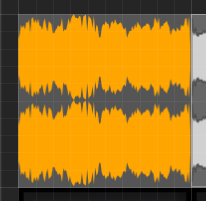
      How can I better define the visuals of the audio waveform? - Sorry if i've missed anything obvious but I can't find how to change the AudioWaveform into something nice.

      de9b2397-7292-4475-ab90-6ae28c97ca8c-image.png

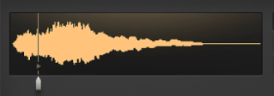
      My main issues are the 2 waves for 1 sound and the resolution. Feel free to let me know if I've just take the wrong approach using the AudioWaveform. For the type of output I'm after, whilst not exact is something like;
      28db2dd1-926f-480b-89f0-70f3384c946e-image.png

      Thanks for any help 😊

      posted in General Questions
      W
      WannaBeGUD
    • RE: Timestretching sounds robtic/metalic

      @griffinboy Thanks for the information. I'll continue finishing my plugin without it for now then, and look into zynaptiq in case. Otherwise, might just have an informational snippet on saying use FL or the DAW built in stretching.

      posted in Scripting
      W
      WannaBeGUD
    • RE: Timestretching sounds robtic/metalic

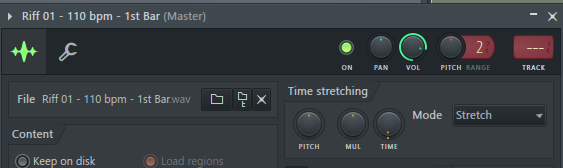
      For the FL example and a quality benchmark, here is an exported mp3 of it stretched to 160bpm using their stretch mode.

      160bpm example.mp3

      2524c915-c372-4394-ace7-a8479d7156e5-image.png

      posted in Scripting
      W
      WannaBeGUD
    • Timestretching sounds robtic/metalic

      Hello,

      I have these 4 bars of a heavy riff .wav files that make up a sample map that I wanted to add timestretching too which I'm doing via scripting;

      obj.SkipLatency = false;
      obj.Mode = "TempoSynced";
      obj.Tonality = 0.0;
      obj.NumQuarters = 0.0;
      

      I've played around with the tonality and numquarters a lot to no change, the outcome is a very strange result when going from 110bpm -> 120bpm, then a very noticeable bad sound at 130bpm. Also at 160bpm it interestingly slows down not speeds up. Comparing this to the likes of FL stretching (I understand it's different), FL doesn't add the strange artifacts, you can even go to 160bpm on FL without sounding terrible.

      Anyone had similar issues and found fixes using HISE built-in timestretching? I've included the zip with 4 bars you can load into a sample map and play around with the stretching, it might just be really hard on distorted guitar sounds.

      Any help is much appreciated 🙏

      4bars.zip

      posted in Scripting
      W
      WannaBeGUD