@d-healey You were right, it was the bundle identifier.

Best posts made by soundsync
-
RE: AU Compiles but not visibleposted in General Questions
-
RE: Soundsync: HISE Ecosystem | UPDATE: WE ARE LIVE!posted in General Questions
Hey Gang,
Quick update on SoundSync & the HISE integration I've been working on.
SoundSync is now LIVE!
This means you have two integration paths available from the developer dashboard:
1. HISE Script Package
This is the simpler drop-in version for developers who want the fastest setup inside a regular HISE project.The include is intentionally simple:
include("SoundSync/Runtime/SoundSyncRuntime.js");This package handles the branded activation UI, login activation, serial activation, machine validation, deactivation, Store, My Products, and customer product access using HISE Script + WebView.
2. Native C++ HISE Package
This version is for developers who are comfortable building HISE from source. It moves the more sensitive licensing/runtime layer into native C++ and keeps the HISE Script side as small as possible.The HISE Script side is only a lightweight gate:
include("SoundSync/Scripts/SoundSyncNativeGate.js");
ssSoundSyncNativeGateStart();
The Native package includes the C++ source, HISE source patch/tools, setup instructions, and the same product/developer branding flow as the HISE Script package.
The goal with the C++ version is to make the licensing layer harder to inspect or tamper with than a script-only package, while still keeping the HISE-side integration simple.
Current package features include:
- Activation by customer login or serial + email
- Product-specific machine activation, validation, and deactivation
- Server-side activation counts and serial status updates
- Offline grace period and cached local license state
- Branded activation UI with developer logo, product image, Brand Manager colors, and light/dark logo background handling
- In-plugin Store with catalog browsing and single product pages
- My Products panel with current product serial, activation info, copy serial, deactivate this machine, and owned-product access
- Branded storefront/account link handoff with SoundSync fallback links
- Test Connection flow for checking package/API setup
- Product-scoped generated config for each developer/product
- HISE Script package and Native C++ source-build package options
Both versions are generated from the SoundSync developer dashboard and are product-scoped, so developers can export a package with their own product info, branding, activation settings, storefront links, customer product access, and machine/license behavior already configured. They both include simple instructions for integration as well.
The HISE Script version is the fastest route for most developers.
The Native C++ version is the better option if you are already maintaining a custom HISE source build and want a stronger licensing boundary.SoundSync for HISE is live now, and both package options are available from the developer product dashboard.
If you are building commercial HISE instruments or effects, you can now generate a product-scoped HISE package with activation, validation, Store, My Products, branding, and customer access already wired in.
JUCE packages are also offered for direct JUCE connection.
Feedback from the HISE community is always welcome as we keep improving the developer & customer experience.
Best,
Aaron
-
Soundsync: HISE Ecosystem | UPDATE: WE ARE LIVE!posted in General Questions
Hey Gang,
I wanted to start a cleaner updated thread for SoundSync and keep this one focused specifically on the HISE ecosystem/workflow we’ve been building around it.
SoundSync started as a platform to help audio/plugin developers handle the pieces around releasing a product: licensing, customer accounts, serial activation, product delivery, storefronts, checkout, and customer libraries.
The HISE side has now grown into a much bigger part of the platform, so I want to use this thread to share walkthroughs, updates, screenshots, and short examples of how the HISE workflow is coming together.
The goal is not to replace anything inside HISE.
The goal is to help with everything around releasing, selling, activating, supporting, and managing a HISE-built product.
Some of the HISE-focused pieces currently being tested or polished:
Product setup and delivery files
Storefront and checkout testing
Customer library / download access
Serial generation and activation
Plugin-side validation
Offline grace handling
Suspend / deactivate / reactivate flows
Reseller, imported, and unassigned serial activation workflows
Branded activation UI
WebView-based in-plugin storefront
“My Products” customer view inside the plugin
Developer support links/pages
Customer/product ownership checks
Basic customer and purchase managementRight now the platform is still in test/beta mode. Stripe checkout is in test mode, so no real payments are processed.
For checkout testing, Stripe’s test card is:
4242 4242 4242 4242
Any future expiration date and any CVC should work.
What I’m mainly looking for from HISE developers:
Does the setup flow make sense?
Is the HISE package/drop-in workflow clear enough?
Does the activation/licensing flow feel reliable?
Does the WebView storefront/customer area feel useful inside a plugin?
Are the customer/product/storefront tools helpful or too much?
What would make this safer, clearer, or easier before real launch?
What support/docs/walkthroughs would make the HISE side easier to trust?This is still not meant to be a polished public launch thread. I’m mostly looking for a few HISE developers willing to test the workflow, create a demo product, run a fake checkout, generate/activate a serial, and give blunt feedback.
If you’re actively building or selling HISE plugins and want to test it, you can sign up here: https://soundsyncsolutions.biz/developer
You can also schedule a meeting with me here for any questions, walk-throughs, etc: https://www.soundsyncsolutions.biz/demo
I’ll keep posting HISE-specific walkthroughs and updates in this thread as the package gets cleaned up.
Best,
Aaron -
RE: Taking my Mailing list seriously, so a first question....posted in General Questions
@Lindon My subscriber list for my Plugins are roughly the same as yours (around 18k). Ill be as open and honest about what Ive done, results, etc since beginning my current plugin company 1 year ago.
My main focus for marketing is collecting emails. I do this in various channels (resellers, free giveaways, exclusive blog discounts, affiliates, etc).
Whenever I have a new release, my email subscribers get it first. Whenever I have a deal/bundle/sale, my email subscribers hear about it first and/or get a special/addional discount.
Any purchase recieves a thank you along with he downloads.
Some amount of time later, usually 5-7 days, i automate an email checking in on how they like the product and if they would leave a review. Leaving a review gets you a small discount/gift card to be used in the store.
As far as campaigns, it depends on what Im aiming for. A new release will get "hype" emails, 1-2/week, for a couple weeks. Then the actual launch and deal will recive 2 emails/week. The final 48 hours receive 2 emails as well for urgency purposes.
Bundles, deals and sale may get a similar treatment just less "hype".
My audience is pretty used to my email format and layout. Im usually pretty straight to the point with a bit of sarcasm. I think being yourself and not bullshitting is pretty important.
I typically can make $2000-$4000 from my email list each release/deal. These deals are usually 2 week periods.
Hopefully something in this ramble while im rocking my daughter to sleep s helpful.
-
RE: Apple altool vs notarytoolposted in General Questions
For anyone doing it it manually, here is the code.
Thanks @d-healey as always!
Codesigning Plugin
codesign --remove-signature "MacHD/User/Desktop/PluginName.vst3"
codesign --remove-signature "MacHD/User/Desktop/PluginName.component"
codesign -s "Developer ID Application: YOURTEAMID" "MacHD/User/Desktop/PluginName.vst3" --timestamp
codesign -s "Developer ID Application: YOURTEAMID" "MacHD/User/Desktop/PluginName.component" --timestampBuild Installer
Sign Installer
productsign --sign "Developer ID Installer: YOURTEAMID" "MacHD/User/Desktop/PluginName.pkg" "MacHD/User/Desktop/Signed/PluginName.pkg"Notarize Installer
xcrun notarytool submit --apple-id "YOURAPPLEID" --password "App-Specific-Password" --team-id "YOURTEAMID" "MacHD/User/Desktop/Signed/PluginName.pkg"Wait For Upload To Complete
Staple Installer
xcrun stapler staple "MacHD/User/Desktop/Signed/PluginName.pkg"Check Status (Accepted)
spctl --assess -vvv --type install "MacHD/User/Desktop/Signed/PluginName.pkg"FYI: Just a tip coming from the altool manual notarizing. I used to have to enter my TEAMID including my name like "My Name (GD78YHD87G)" but with the notarytool, it seems you just need the actual TEAMID Number, not the name as well.
Also, I dont think this way sends the Notarization Email Confirmation. I did a fairly small upload a while ago and have yet to receive it. I've had it take hours before, but for a much larger file. Typically it sent the email within 10 or so minutes with altool. (it does not send the email. Once the upload is complete, youre good to go).
-
RE: control.Timer crashing plugin in DAWposted in ScriptNode
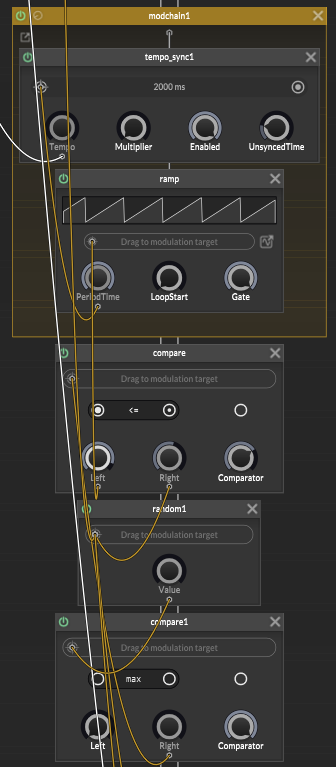
@trillbilly If anyone hits the same problem, I got around it by using a tempo-synced ramp and a couple compare nodes to simulate the timers engagement.
Simple and works.
-
RE: Preset Crashes DAWposted in General Questions
@Lindon @d-healey @Dan-Korneff @Matt_SF @DanH I did another rebuild and managed to get things saving correctly (so it seems). I messed with a few settings and properties so Im not 100% sure what it was but it's working so thats that. I appreciate all the help and input fellers!
-
RE: Making a Simple Rompler?posted in General Questions
@daniel89ep Ya, @d-healey videos are great. I think this is with a Sound Generator but essentially you do the same with the Sampler.
-
RE: Sample Editor Functions + UI Controlposted in General Questions
I dug the forum again and found a little trick about naming the Sampler for instances of 2 const var calls.
Im horrible with scripting and new to this so excuse the shitty code, but hey, it did the job! Here is the code if anybody wants to try it out. It allows you to control the editing functions of the sampler (Loop Enable, Reverse, Loop Start/Stop, etc).
HISE SNIPPET:
HiseSnippet 2171.3oc4Z0sbaabEFPRPIj1owIStn2jYvvoWPkQVgT1wtM+TSQJoLbhjLCorSlwMSxRfkjvFbWLKVpeZGOSeD56Pauu8MvOB8t9Z365ktm8G.rfBjBRwIwSKuQd28bN624Cm8bNXg6wnd33XJyxtxwmGgsruoyfyI7IclfBHVc20xtpyQ3Sc6P8wVsOOBEGi8srsW8KEqaWYMK4uW9f1nPDwCmMkk0ioAd3CBlFvylsWquJHLbejO93foFRe2Vc8njNzP5L.Kq5zvJB48LzX7QHgXq3XYu9d9AbJa.GwwwV1q0l5e9fIzSIJ4ebPbvvPrXPSqAfgTSuOMzWfXwrVclDD52Kwmisrrc5kw.qpXfOv4v.+fz4yXhaIWvMSCS9vdk7va0bvqoI7ZX.uBfjsAjVSAo2yYfGKHhmsh.O2voKgiYiPd4eznj0Zk+dUmNTPBBeqonmg2mACR0ndysazXS262nwFeV0pe7GOXmC6cvd8ca5t+iNpywce3QCpVEdjDycOAwbGflFEhYMc+BWY7wViwb8b0qkrXMsoTCAScasdt.qv3teEgNrZ.ILffcGMi3wCnDWJQIiTDAdYzv5dzoQTBf7MgcObFdip+optvuQTV8X2.RJd1xigABe.NDKMW8Za8Q01XCovJUD+BodnP2P.7QHVLFHg5wBOnt1Lao96dD+M.WHQq3shufHRTpAk6G4FpE+4UeN35IrMX4NINPB6HUr1FBSpcxNnvvgPPd8hXfExj.FWNOBB7FOKBhjwgau8u6N2+dklHAcWNMlQ.WjDOfRiVdvnPhKMTrhfAQWWFjYxfnKmAQ4XvT.lwfrRPdopsHxadGeAj2Rh+Dq+lczmFgWsyuZkVFucogbeqnh2x3Mo.ugybRLd04NoZKi8L88EF0gfhm9tsmw4TR0EPhpUuzCt+xPgM0QeRG4pyhJeaYzXNuWvi.QJDws1oPk+w0RbYQXj9eeHJJtfh74pxKaPQN5BE5ikCml2HwoVVXEM8j1s.L+AAw75JC.OhFRGROykP43O00a5PPGBzwmKcjaxhW.fwJ4VVQBgHBPlMR9nnV.GOMt1lFfbqmRCfG5+AfZUX5HITR3pL3nmYg0cEaxRC8RiCBoH+T1ndFTdhT1a276.fbYUAUN3xJCZfGgiYfWgG9PRcInp97ptyuznQEtl1XhN9JZYQ+7rkoXcxroCwLSJQHHzja9NmcVbmylM16oXGCAojtj.9CivjE0tuklRgtrqnQEHJW1i8uR2i8fv.eLyJ.Zk9cbLZLyRBay2uwpDl3FNo0Uyaf+8e8EOnLFnhit.y7p+udP42eYF1R3.2RafNhidsomIMwMcxBnl2FubwfPkNRZg20oO9DLj2TOW4YxbF4gDL7zl+iwH2zIKS4UvWxQnoo5Kv.Op6tHNR7Rb5HMH5KBy3Ah.a6cwm.uQr5U5p3rKN9YbZD7F1omtgf+RFLdV111s04oC9yOtEGeFWZ.i27RvMkXKLCVWvF7hg5MPwjEX90KQnblwew3hLdUmjdMs7wiPyB4OtfmUk1iTg+KviZ8z7djR3BL+ke3vXGNxXGrtaKYcGK62xoMh7TZNqeCt9VGTVeen5.OfL93.HkmJt2bpllahkkA2wZoC4TwWuqSOFFJOzlQOMFXigiStbkJqCh+eD5HPU1r+yW8WdU9Y2VKr7mLvdkudEGQWQ0DocGfNQeht1m5xYyvalrxdmEgHwP1+3chASMapPhQnv3LQj2KCqX0EUghufFhpDJ4iMUHaZnvE3vvZMajpzN99EuG8whB6Eu1tPyf7Er19nSnLfhDWWk4ZZj0EbaebaJCbtbdvQylpXBA3aJmRM9aB74S5COfovBOQ1KXistyb+17JNOL82I2CQyV6.c3lxM5cXyh9SpVJj0mdZOjuOD4UV8FfQLuIsQr1zYDegm9D0BIrlhkLVs5ysNUP.voL6+lsk0Dbv3Ihyb1qYak6bxaU5xKYmP9gyLyM9D8A8JIxaEkzaPWeQRmjNzrfl7gfCNVOuVb+b3oRoqTsH770sztdx44enUh6mLymmlPDLoqvlkCyURfvxx7un5hK.uV+dMXVWJbIS5aVu7LyjtETzJIY5xS7ewqG8VNGR8mEh34usVwUTqW.REk6JREWCJbRketokm+JbWqbWg6xug4xB22yoW.2aRw3ckBvKzjwO03Ueg3uiydiFAucbFXWyY+uco298qcn7gJn79NC3P1roPNIcfu9aTjdL30v2nHpzeiBnDq7k4B9iFh8hVsmA7EK+r+iVxsZmoPtub6kF48wQXD+PwmYIcw2tU+9eIiNKZdsd4CjAKGyfW3CnByERN2a3icXz33Qf6HsUr4R8lwFK3prYRy0YLmn10DDgfCEudlsHw7ihEMhxC7NDwYA45IQtKMNFIeduhiZby4Fu8biuybiu6bi+j4Feu4Fe+rwouZsHxHoiq4eIyJk6kLAqzCA9sgjsCFmtCpYLihS4ZIdL97TeCzrzHJapgkFf4h15hMlpfOGz5+T8Ep9YM81O9rwud9fZURv3f.UUoSfSvvLBL99vqjIq4jLa9rIGRIznITRfW9yKP7+3wXlI1Kzg1gygiqYy7As5C8YhhMNv+aZcP.A5gJeZfqDWz7J+wEK740u1QAWWQJP2+2nJ5p+eeUzkQcyciAuY+b9lNxr9tx2U+WHn1mNSj9No.nCTkb.zYfG1rV4Jh5upwMDiE.Z.l3KG7J3mdwlIEVEK1LYQKuDSA9l9eKeOb6UwpOjfn4vPnjcnYHcLz+g.RPwveVP4TjGi98dpKOSf02VNCfRh7+8FUbNTL1sYxMl43zXqFVSgZUeumm3fvsAFtXc19ZnyctF5b2qgNex0Pm6cMz49WCc9sKUGQaB6LiSmpRRBSzaOUfk8doAVqZ8eY0VljDSCRIPT:
Content.makeFrontInterface(1200, 700);

//SAMPLER 1 FUNCTIONS

const var Sampler1 = Synth.getSampler("Sampler1");

//Sampler 1 - Sample Start Knob
inline function onSampleStartControl(component, value)
{
    for(s in Sampler1.createSelection(".*"))
    {
        local l = parseInt(s.get(Sampler.SampleEnd));
        s.set(Sampler.SampleStart, value * l);
    }
};

Content.getComponent("SampleStart").setControlCallback(onSampleStartControl);

//Sampler 1 - Sample End Knob
inline function onSampleEndControl(component, value)
{
    for(s in Sampler1.createSelection(".*"))
    {
        local l = parseInt(s.get(Sampler.SampleEnd));
        s.set(Sampler.SampleEnd, value * 229376);
    }
};

Content.getComponent("SampleEnd").setControlCallback(onSampleEndControl);

//Sampler 1 - Loop Start Knob
inline function onLoopStartControl(component, value)
{
	for(a in Sampler1.createSelection(".*"))
    {
        local r = parseInt(a.get(Sampler.SampleEnd));
        a.set(Sampler.LoopStart, value * r);
    }
};

Content.getComponent("LoopStart").setControlCallback(onLoopStartControl);

//Sampler 1 - Loop End Knob
inline function onLoopEndControl(component, value)
{
    for(s in Sampler1.createSelection(".*"))
    {
        local l = parseInt(s.get(Sampler.SampleEnd));
        s.set(Sampler.LoopEnd, value * l);
    }
};

Content.getComponent("LoopEnd").setControlCallback(onLoopEndControl);

//Sampler 1 - Loop XFade Knob
inline function onLoopXFadeControl(component, value)
{
    for(s in Sampler1.createSelection(".*"))
    {
        local l = parseInt(s.get(Sampler.SampleEnd));
        s.set(Sampler.LoopXFade, value * l);
    }
};

Content.getComponent("LoopXFade").setControlCallback(onLoopXFadeControl);

//Sampler 1 - Loop Enabled Button

inline function onLoopButtonControl(component, value)
{
	for(s in Sampler1.createSelection(".*"))
    {
        local l = parseInt(s.get(Sampler.SampleEnd));
        s.set(Sampler1.LoopEnabled, value * l);
    }
};

Content.getComponent("LoopButton").setControlCallback(onLoopButtonControl);


//Call "wrong" Sampler for SampleMaps
const var Sampler11 = Synth.getChildSynth("Sampler1");

//samplemaps
const var sampleMaps = Sampler.getSampleMapList();

//combobox note: cmb = name of combobox
const var Samplescmb = Content.getComponent("Samplescmb");
Samplescmb.set("items", sampleMaps.join("\n"));

//Note: Sampler = name of Sampler
inline function onSamplescmbControl(component, value)
{
	Sampler1.loadSampleMap(sampleMaps[value-1]);
};

Content.getComponent("Samplescmb").setControlCallback(onSamplescmbControl);
Latest posts made by soundsync
-
RE: Payment providers comparedposted in General Questions
Hey Gang,
Quick update: SoundSync’s previous 10% pricing has been replaced.
3% SoundSync fee on discounted sales, excluding tax, plus actual payment-processing fees.
$20 monthly minimum on sales fees only—not $20 plus 3%.
Marketing emails: 1,000 free/month, then $0.50 per started 1,000.
Free/external redemptions: 10,000 free/month, then $0.005 each. License validations and activations don’t count.
Developer payouts through Stripe or PayPal, with applicable payout/FX fees deducted and displayed. Estimates reconcile to actual charges.
Using your own checkout? Licensing + Hosting remains $20/month, or Licensing only $10/month, plus applicable usage, with no percentage on external sales.
The old figures in my earlier posts/PDF are outdated.
-
Email Marketing, Audiences, and Growth Flowsposted in General Questions
Hey Gang,
I’ve talked a little about Growth Flows already, but wanted to show some actual screens and give a quick look at the rest of the email marketing tools in SoundSync.
It’s a fairly big section, so I’ll touch on the main parts here and leave the more detailed walkthroughs for anything people want to see.
Email campaigns
You can put together product updates, launch emails, offers, or newsletters using the visual email builder. Start blank or from a template, then add text, artwork, buttons, product sections, and other blocks.
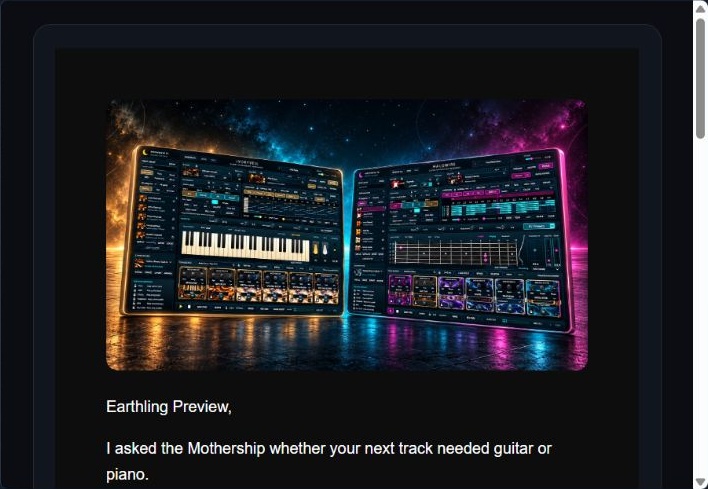
A preview of my recent Halowire / Ivoryveil campaign, with a dark background and large artwork.
You can preview the email, check the mobile view, send a test, and choose when it goes out. There’s also a cart-link tool for putting a product selection behind an email button; the customer reviews the cart before checkout.
Contacts and segments
Contacts can be imported from a CSV, and you can filter or save segments using things like product ownership, purchase dates, and recorded email activity. The audience estimate helps you check who is eligible before sending. Unsubscribes, complaints, bounces, and suppressions are respected.
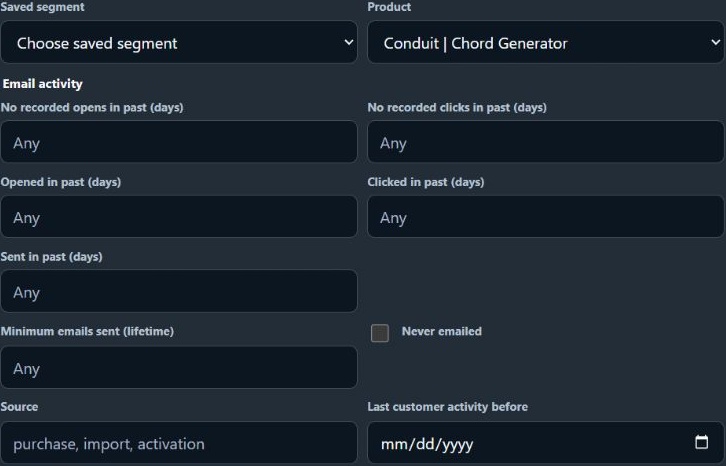
Filter by a catalog product and recorded email activity, then reuse the rules as a segment.
Growth Flows
These handle follow-ups around a customer event or a selected audience. The templates cover onboarding, cart recovery, review requests, cross-sell / upsell, promotion follow-ups, winback, product updates, new releases, and special promotions.
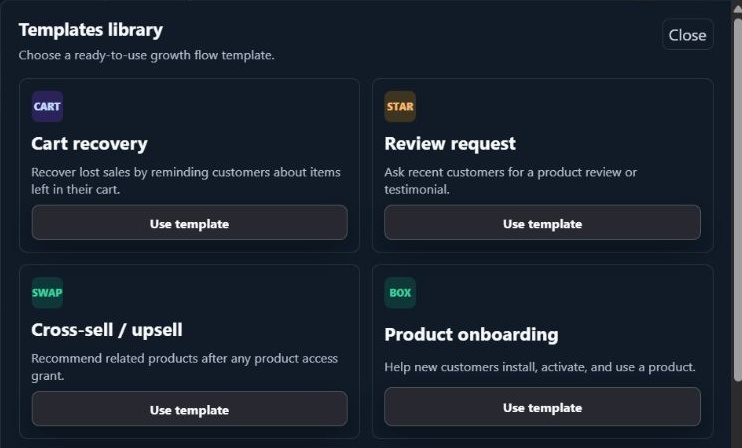
A few of the available starting templates, including onboarding, recovery, reviews, and cross-sell.
You choose the emails and the delays between them. For example, a flow could introduce related products seven days after someone receives access, then follow up a week later. Cross-sell can respond to supported purchases, free claims, serial redemptions, and access grants, and recommends products the customer doesn’t already own.
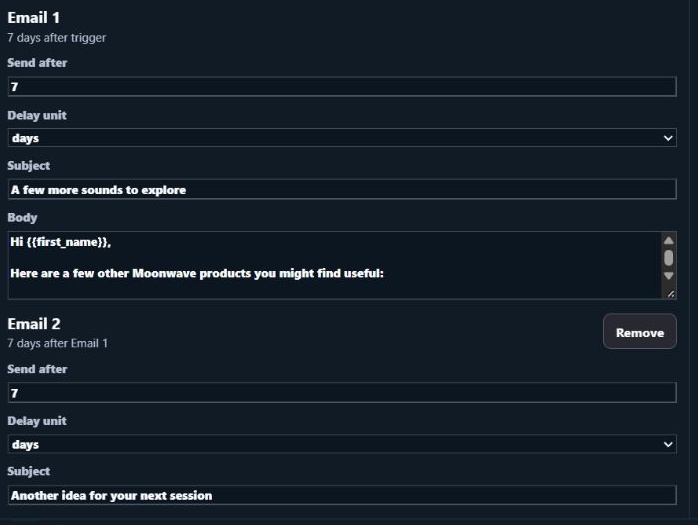
An example sequence: Email 1 waits seven days after the trigger; Email 2 waits seven more days after Email 1.
Optional rewards
Supported flows can include a promo code or a reward tied to a qualifying action. A review flow, for example, can send a separate coupon email after an eligible review is approved. A review incentive should welcome honest feedback regardless of the rating.
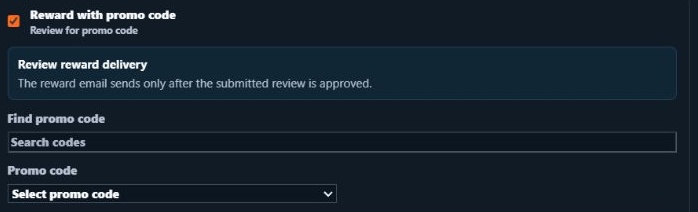
Review reward controls show the approval condition and coupon selection.
Reports and sending setup
Reports separate sent and delivered messages, opens, clicks, unsubscribes, bounces, and complaints, with attributed orders and revenue where available. Growth Flows also show queue status and recipient history so you can check what happened with a particular follow-up.
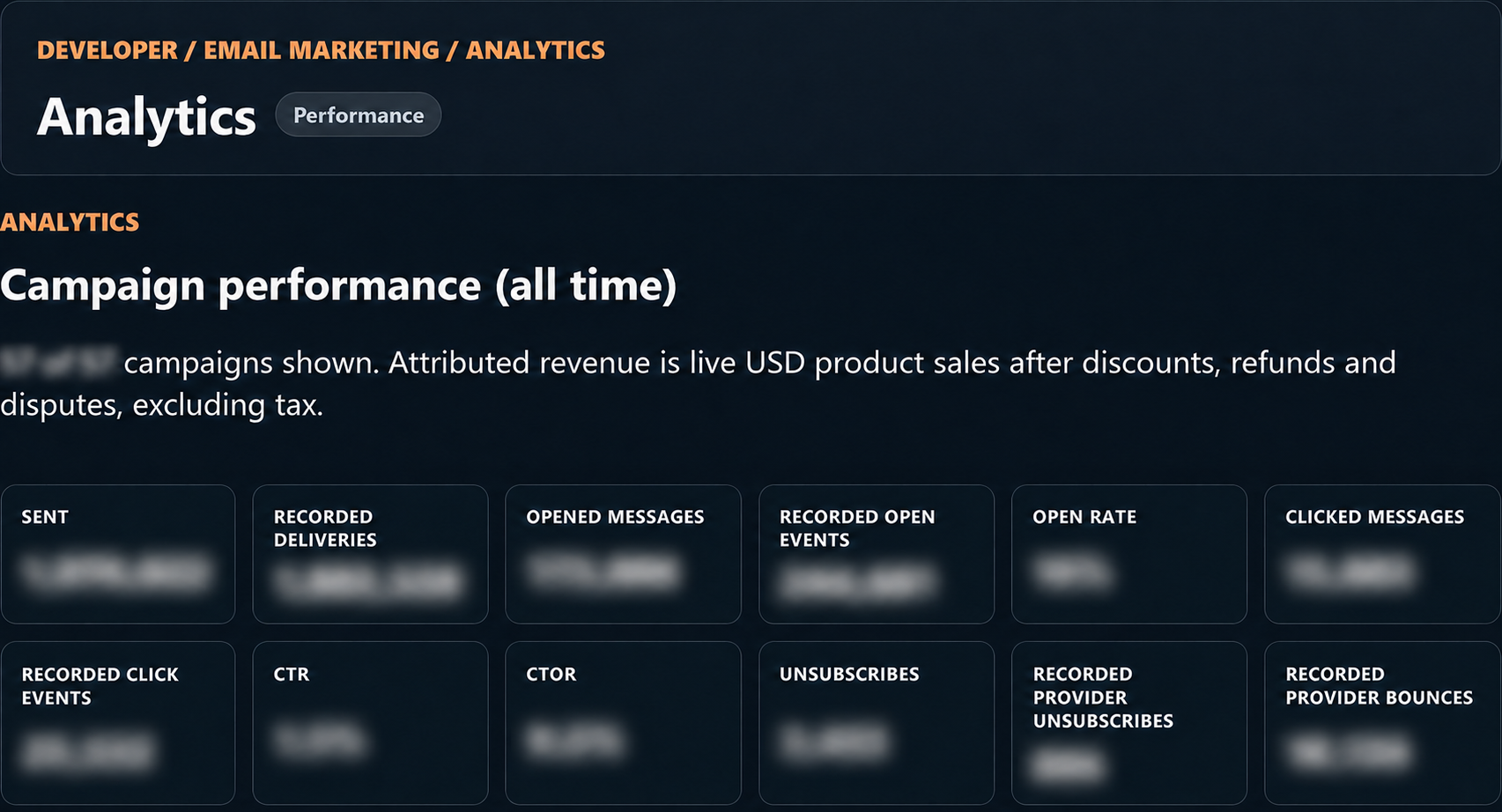
Moonwave’s reporting view, with delivery and engagement metrics (figures blurred).
The sending settings bring together your sender identity, reply-to, business details, and required footer. Home gives you a quick look at the audience, send usage, campaigns, and automation activity.
Sending settings show Moonwave’s sender identity and reply-to address.
All of this is managed through the dashboard. If there’s a particular part you’d like to see in more detail, I can put together a separate walkthrough.
What are you currently using for your emails and follow-ups, and what would you find useful to have connected to your products?
-
Setting Up Promotions Around Your Catalogposted in General Questions
Hey Gang,
I wanted to show a bit more of the promotions side of SoundSync and a few ways you can put an offer together around your products.
There are regular promo codes, single and tiered cart discounts, buy-one-get-one offers, group buys, and purchase rewards. There’s also a separate subscription-promotion option for the initial subscription payment; renewals use the regular list price.
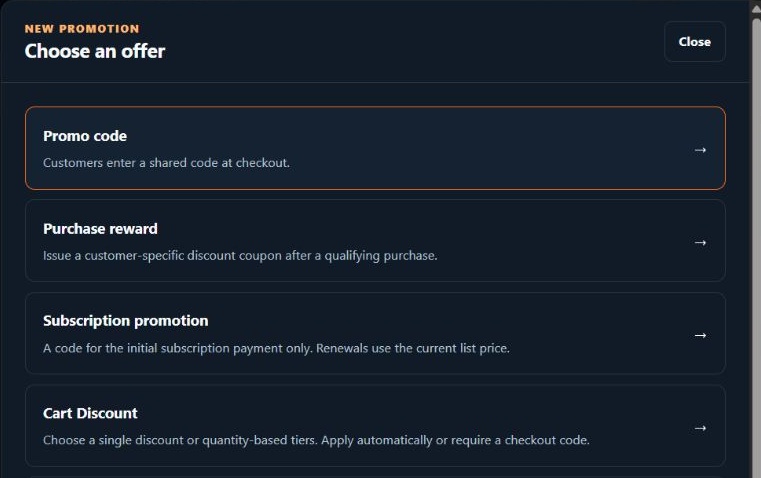
Some of the offer choices in the promotion editor.
Promo codes and the rules around them
For a code, you can choose a percentage or fixed USD discount, the eligible products, dates, minimum spend, and usage limit. Codes can also be restricted to specific customers.
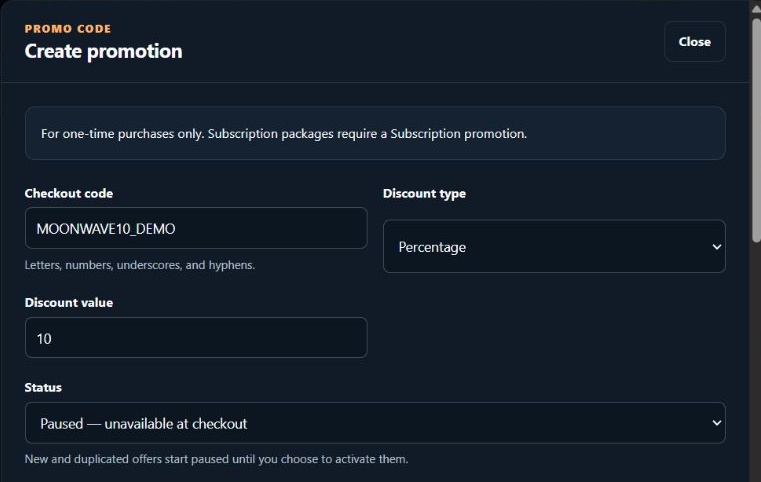
An example 10% code, with Paused selected during setup.
You can choose whether a code works on sale items and whether it combines with an automatic offer. Those are separate settings, so it’s worth checking both when putting a promotion together.
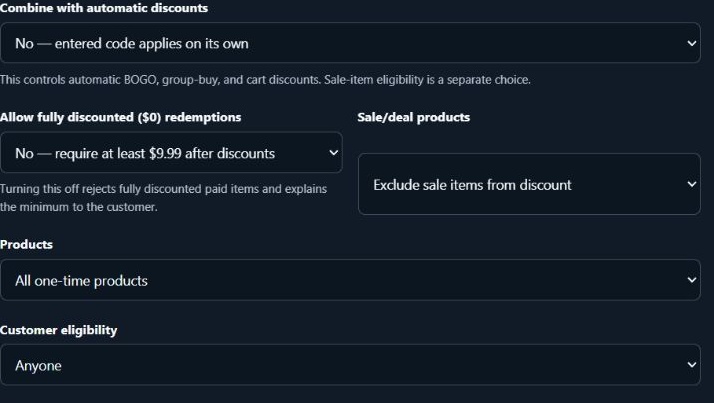
Sale-item eligibility, automatic-discount stacking, product scope, and customer eligibility are separate choices.
Cart discounts
A single cart discount can apply after the cart reaches a minimum number of eligible items. Tiered discounts let you change the percentage based on how many different eligible products someone chooses.
For example, I could include Moonwave’s Conduit, Voidline, and Eidolon and set:
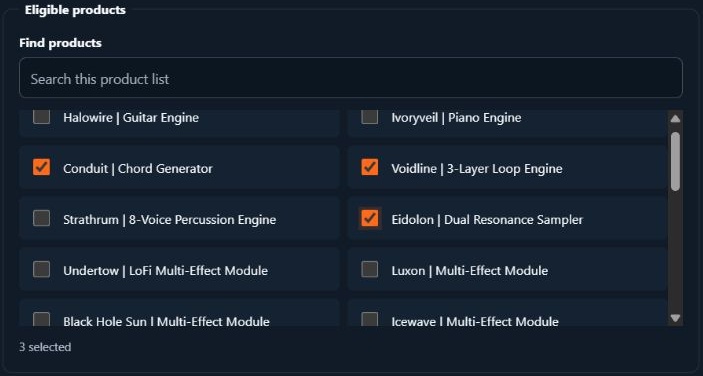
Conduit, Voidline, and Eidolon selected as the eligible products.
- Two different eligible products: 10% off.
- All three: 15% off.
That can apply automatically at checkout or require a code. Buying extra copies of the same product doesn’t unlock a higher tier; the threshold counts different eligible products.
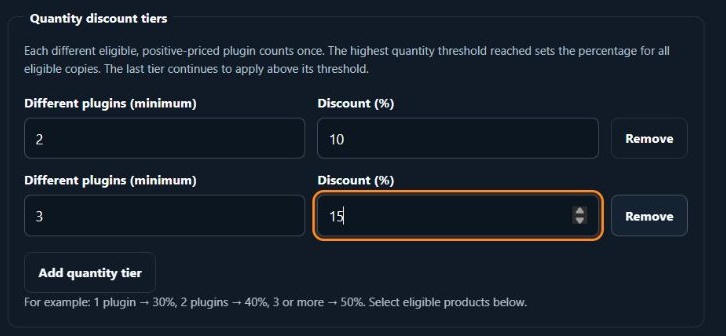
Entered example tiers: two different products for 10%, and three for 15%.
The customer preview shows the calculation before you activate anything. With three eligible products and an illustrative $100 subtotal, this example takes $15 off, leaving $85 before tax.
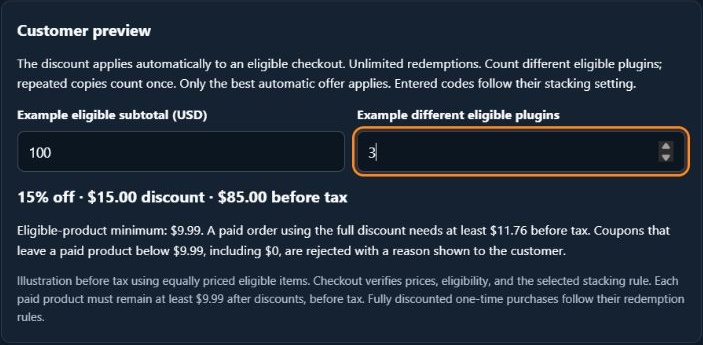
The three-product example reaches the 15% tier: $15 off an illustrative $100 subtotal.
Purchase rewards
You can also issue a customer-specific coupon after a qualifying purchase. For example, someone buys an instrument and receives a $10-off coupon for a future order, with one use and 30 days to redeem it.
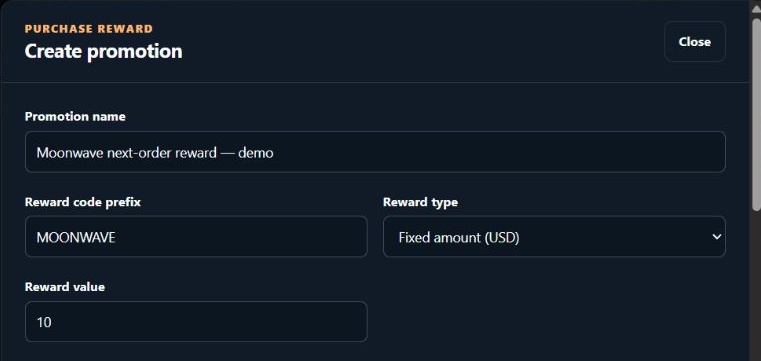
A Moonwave example reward with a $10 coupon value.
In this example I’ve set a $20 minimum eligible spend for redemption. You can configure the qualifying purchases, reward expiry, and whether to issue one coupon per order or per distinct qualifying product.
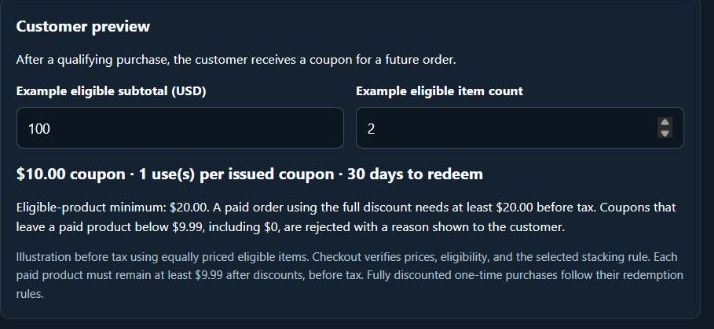
The preview shows the $10 coupon, one use, 30-day expiry, and $20 minimum spend.
Before making an offer active, check its preview, eligible products, and final checkout price. Paid products need to remain at least $9.99 after discounts, before tax.
You can keep offers paused while preparing them and review their usage once they’re running. Coupon imports also have a preview so you can check the matches and any problems before applying them.
What kinds of offers are you currently running, and which parts are the most awkward to manage?
-
Bringing an Existing Catalog Into SoundSyncposted in General Questions
Hey Gang,
One thing I wanted to go through is how you can bring an existing product catalog into SoundSync without entering every product again.
You can start with a public store URL, a product export such as a CSV, or use both together. The importer finds what it can, then gives you a review screen before anything is saved as a draft.
I’m using Moonwave for the examples below, with Conduit, Voidline, and Eidolon in the CSV walkthrough. The delivery ZIPs are small test files for showing the process; they aren’t the actual product installers. Everything shown stays unpublished.
1. Open the importer
Go to Products → Import / Upload. There is a Store URL field and an optional Product export field. You can leave the URL blank and use an export on its own.
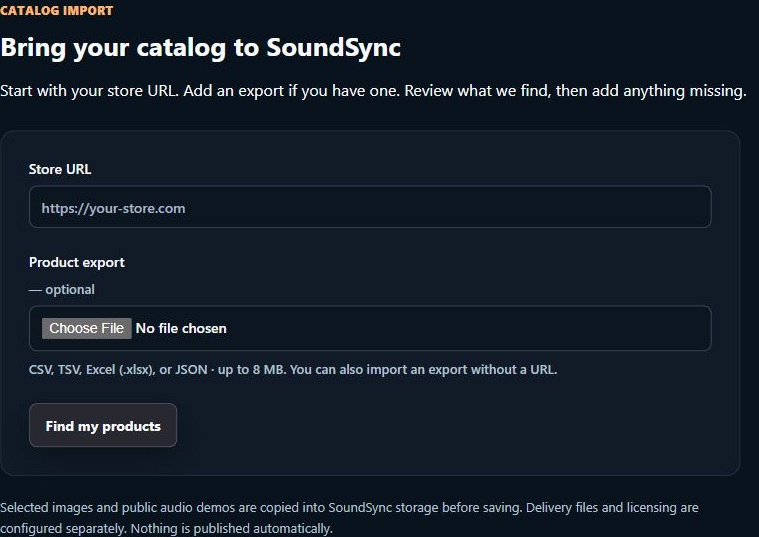
The starting screen supports a URL, an export, or both.
2. Import from a CSV
Choose your CSV and click Find my products. CSV, TSV, Excel (.xlsx), and JSON exports are supported, up to 8 MB.
Open Review export column mapping and check where your columns are going. For example, Product Name should map to the product name, Price to the product price, and any download-link columns to private delivery links. Use product prices here, rather than an order total or sales report.
There is also a Download Demo Import CSVs button with editable examples, including WooCommerce- and Shopify-style exports. Unzip the examples and replace the demo values and URLs with your own.
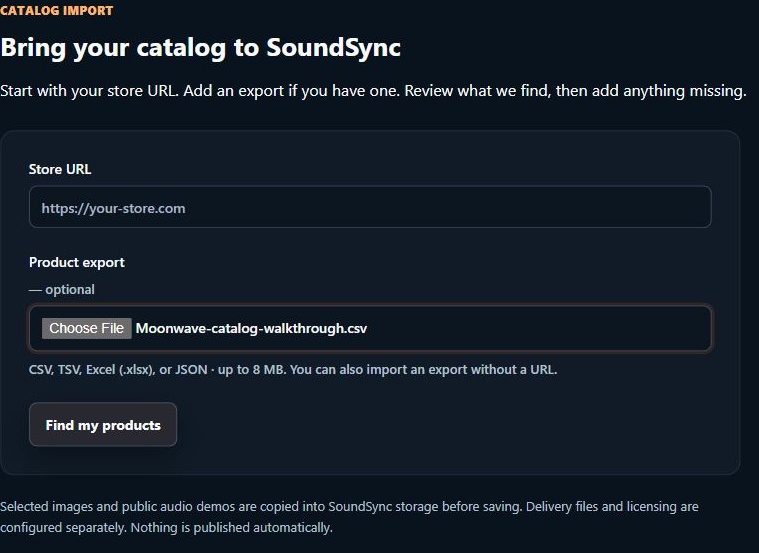
Moonwave CSV selected, with the Store URL left blank.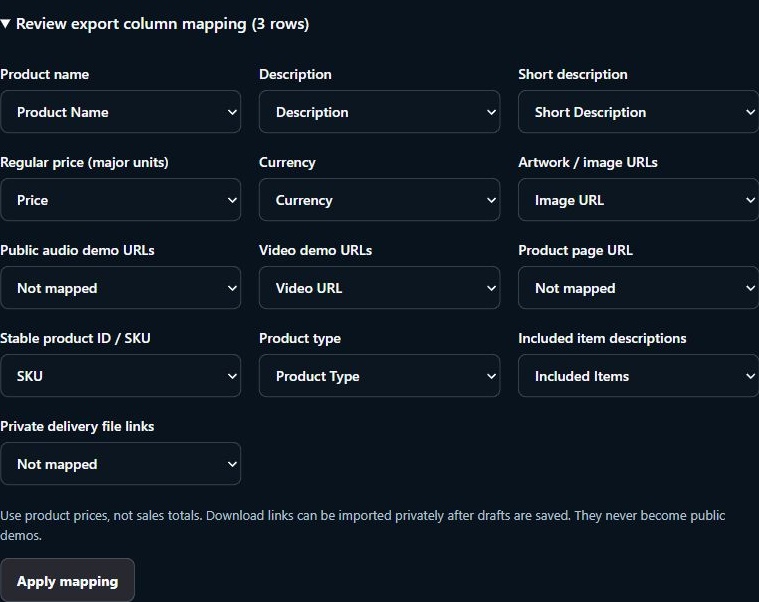
Check the name, price, artwork, and video column mappings.3. Import from a website URL
For the URL route, enter your public store address and click Find my products. The export field can stay empty. An individual public product page can also be used to bring in one product.
SoundSync looks for readable product information and supported artwork, public audio, and video references. Check the final product list against your original catalog; the number found is not a guarantee that every product was discovered.
If the site needs a login, blocks access, or only exposes its product content after JavaScript runs, use an export or fill in the missing information manually. You can also provide a URL and an export together.
For the Moonwave product results in this walkthrough, I used the CSV route. If homepage scan does not recognize the products or you get an empty or incomplete result, add an export and check it against your catalog.
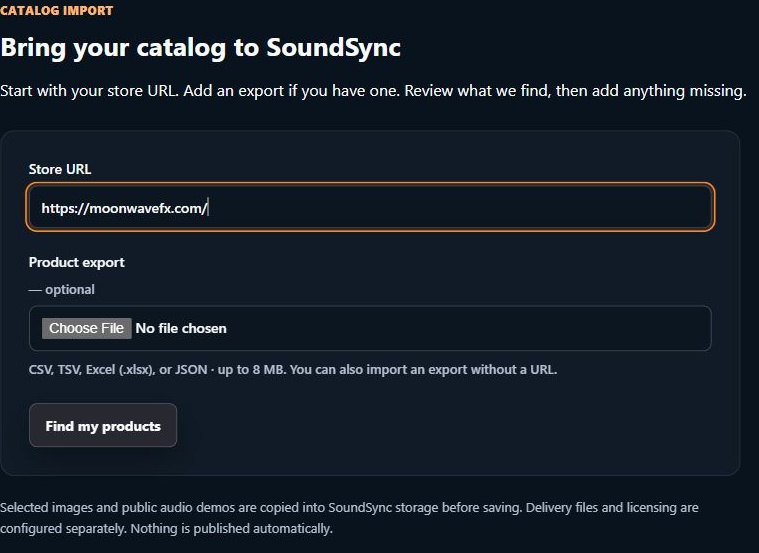
The URL entry step, using Moonwave’s public store address. Product-result screenshots below come from the CSV import.4. Check the product details
For either route, expand the products and check the actual information. In particular:
- Are all the expected products present, and are any duplicates or variants being mistaken for separate products?
- Are the names, descriptions, product types, and listed contents correct?
- Are the prices correct in USD? No currency conversion is performed. Review any missing-price or minimum-price warnings.
- Are the selected images the right artwork? Are audio files public demos rather than the files customers are meant to receive?
- Are video links correct, and is anything important missing?
- For repeat imports, is an item a new product, a matched draft, or a published product that will be skipped?
Selected artwork and public audio are copied into SoundSync storage before the drafts save. If a copy fails, retry it or deselect that file and upload a replacement later. Supported video embeds stay with their video provider.
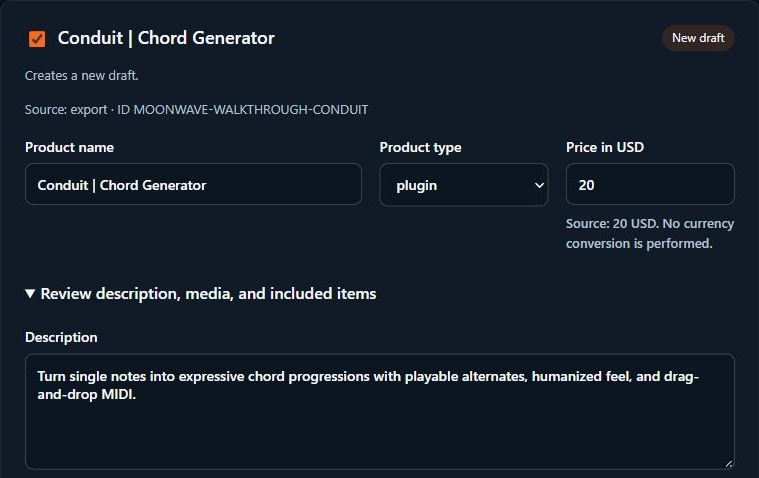
Review Conduit’s name, type, price, and description.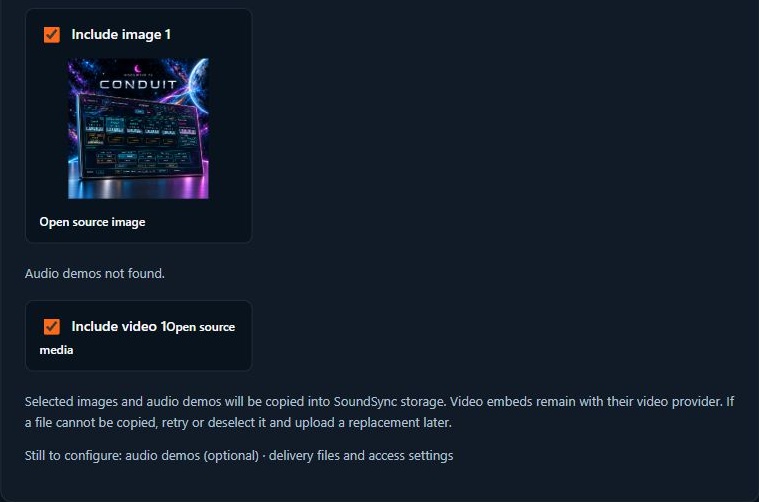
Review the Moonwave artwork and video included from the CSV. Public media is separate from private delivery files.5. Save the selected products as drafts
Select the products you want, confirm the review checkbox, and click Save selected as drafts. Nothing is published automatically.
Matched drafts are unselected by default. If you opt into filling their empty fields, existing saved content and prices are preserved. Published products are skipped by this importer.
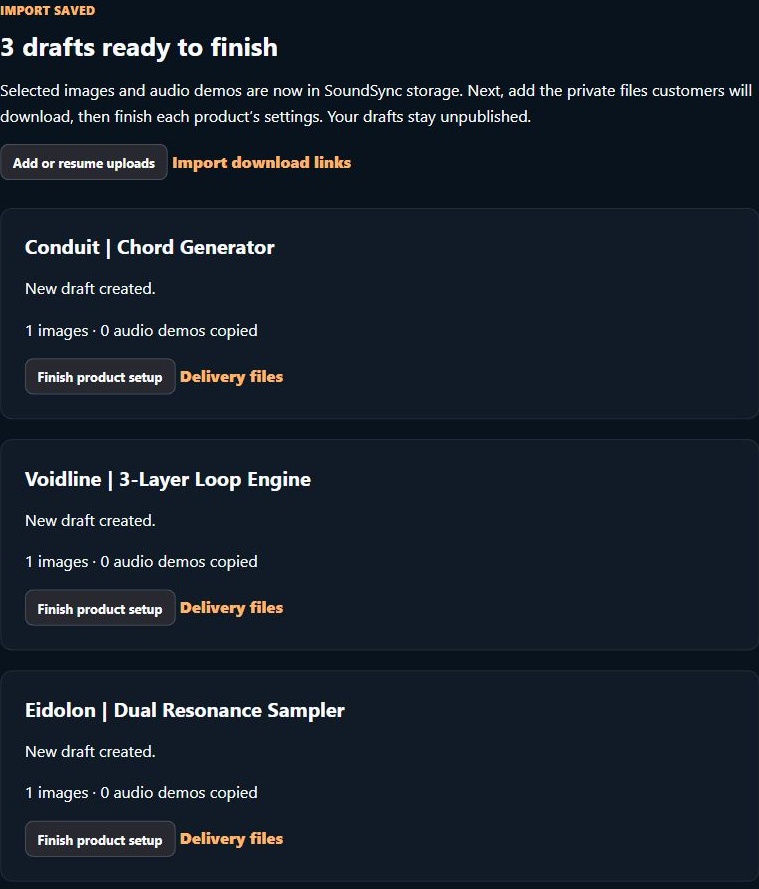
The three Moonwave walkthrough drafts are ready for delivery files and final setup.6. Add files from your computer
Under Add delivery files together, select your installers or product archives and check the product assigned to every file. Filename matches are suggestions, so correct them before clicking Upload matched files.
You can attach several files to one product. Here the Windows and macOS test ZIPs both go to Conduit, while the third test ZIP goes to Voidline.
These are private customer downloads, separate from the public artwork and audio demos. Package installers as ZIPs; supported manuals, audio, text, and MIDI files can also be attached.
The interface supports up to 10 GB per file. Keep the tab open for local transfers. Upload progress is retained for 24 hours from the start; after a reload, choose the same original files to resume saved chunks.
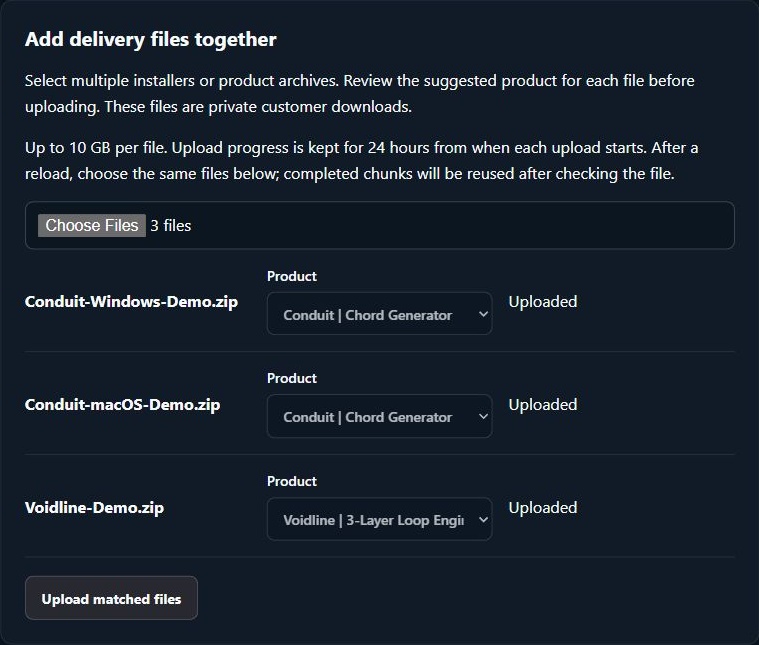
Two test files matched to Conduit, with a separate file matched to Voidline.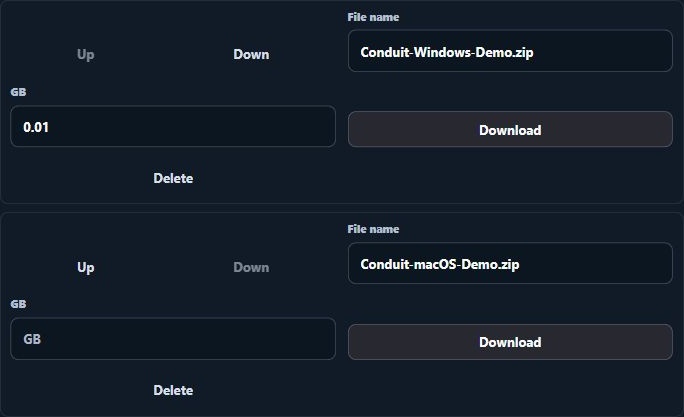
The Conduit draft retains both operating-system test archives when reopened.7. Add files from download links
If your files already have direct download URLs, use Import delivery files from links. Upload a CSV with a product-name column and one or more download-link columns, then click Review download links.
Confirm the name and link columns, check each product match, select the files you want, and confirm the private-delivery checkbox before starting the import. Unmatched or duplicate names need a manual product selection.
These need to be direct file links, including valid signed links where appropriate. A checkout page, sign-in page, or ordinary share page is not a direct download. Expired links need replacing.
SoundSync copies the files into private delivery storage and attaches them to the selected product. Link imports continue on the server if you leave the page. Check for an attached result and review or retry failures.
For the Eidolon example here, I used SoundSync’s public demo-CSV ZIP as a harmless test transfer. It isn’t an Eidolon installer. For an actual product, use your own delivery URLs.
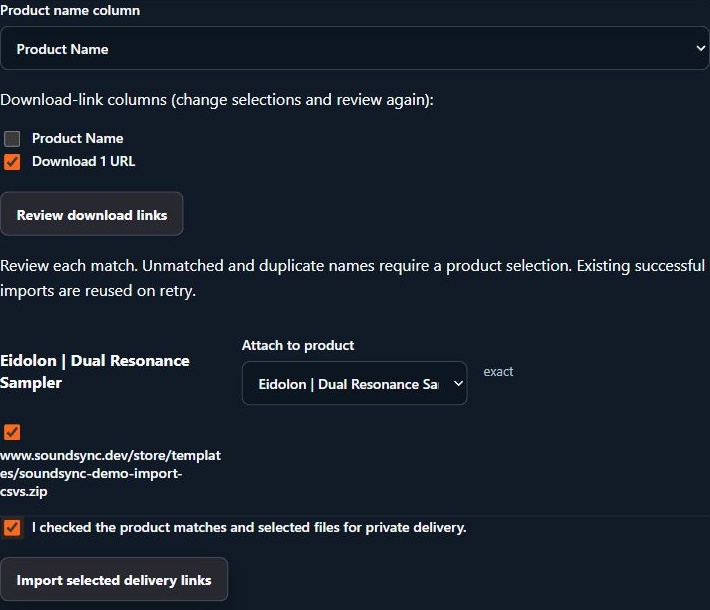
Review the Eidolon draft, selected test download, and confirmation before importing. The test download is attached privately to the Eidolon walkthrough draft.8. Finish the product setup before publishing
Open each draft and check the remaining setup:
- Product copy, artwork, public demos, version, product type, and price.
- Actual downloadable files: filenames, Windows/macOS versions, manuals, and archive contents. Test the downloads.
- Compatibility/specifications, installation instructions, license documents, and support information.
- Access and licensing settings. For a plugin, generate the appropriate integration package and test activation and validation in your exported build.
- Any bundle membership or subscription configuration, which needs its own setup.
- The product-page preview, storefront placement, and intended publication settings.
The catalog import handles product information and supported files. Existing customer accounts, past orders, recurring billing, and marketing permissions need their separate migration workflows.
I wanted to show the whole process because finding the products is only part of moving a catalog. The review and delivery steps are where you make sure customers receive the right thing.
If you have an export from another platform, I’d be interested to hear which fields or file formats have been the most awkward to move.
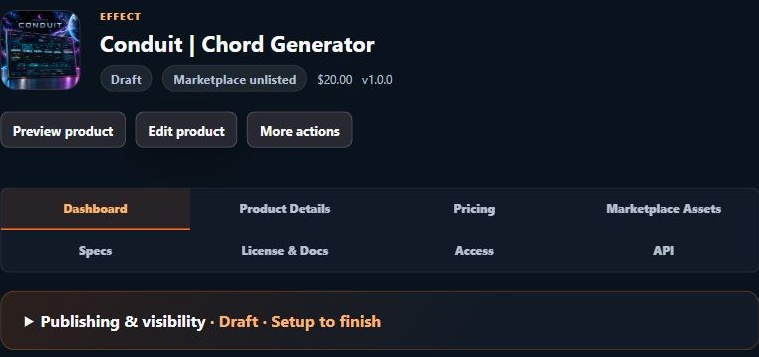
The imported product remains a draft while the remaining product sections are reviewed.Import overview: https://www.soundsync.dev/features/product-import
-
Automated Growth Flows | Onboarding, Reviews, Cross-Selling, Cart Recovery, Winback and more.posted in General Questions
Hey Gang,
I’ve been doing some more work on the Growth Flows in SoundSync and wanted to explain what they can do.
These let you set up emails around things like a purchase, an abandoned checkout, or a customer getting access to a product. You choose the products and audience, write the emails, and set the delays between them.
The current flows include:
- Product onboarding — send installation/activation help, then follow up with tutorials or tips.
- Cart recovery — follow up with eligible customers who started checkout but didn’t finish.
- Review requests — ask for feedback after giving someone some time with the product.
- Cross-sell / upsell — recommend other products from your catalog, leaving out products the customer already has.
- Product updates and new releases — prepare emails for existing owners or another selected audience.
- Promotion follow-ups — remind an eligible audience about an offer they haven’t used.
- Winback — follow up with eligible customers after a period of inactivity.
For example, you could send someone a getting-started email after purchasing an instrument, then a walkthrough a few days later. You could also set up a separate review request once they’ve had some time to use it.
Some flows also support rewards for certain actions. For example, you can offer a promo code after a qualifying review, with your own eligibility and expiry settings. Review rewards are for honest feedback, regardless of the rating.
One thing I’ve just updated is the cross-sell flow. That can now start when someone receives product access through a purchase, free claim, serial redemption, or a manual grant.
So if you have a free instrument, you can configure a follow-up that introduces eligible customers to other products they don’t already own. You choose the timing and what you want to recommend.
You can preview and test the emails, edit the individual steps, pause a flow, and see what’s queued, sent, or failed. There’s also recipient history so you can check what happened with a particular customer. Unsubscribes and other marketing restrictions are respected.
This is all handled through the SoundSync dashboard and email. There’s no extra scripting to add to your instrument for these flows.
I wanted to share this because a lot of the work continues after someone gets the product, especially when you’re handling everything yourself.
Would be interested to hear what follow-ups you’re currently doing manually, or what you’d find useful here.
-
RE: Overview, intro videos and AI....posted in General Questions
@David-Healey It's not perfect but I'm still figuring it out. Chat may not be the best option but I think it did pretty well. I have high hopes once its dialed in.
-
RE: Overview, intro videos and AI....posted in General Questions
@Lindon I released 2 plugins about a week ago and both used ChatGPT to help create the Intro and Walkthrough videos.
Ivoryveil
https://moonwavefx.com/products/ivoryveil-piano-engineHalowire
https://moonwavefx.com/products/halowire-guitar-engineI worked with Chat through the entire process creating the script, timeline, styling, etc etc etc.
The end product is Chat putting it all together. I only had 1 or 2 revisions and I was happy.
To be honest, the time saved was ridiculous and it tuned out better than I would do anyway.
-
RE: AI takeover the plugin industryposted in AI discussion
@lijas90 Time. This the the one & you've hit it on the nose.
-
RE: AI takeover the plugin industryposted in AI discussion
Davids right, it's more than a plugin, its the entire user experience. People still like interacting with people, they just don't care how the plugin came together, especially if it works great and solves the problem.
I started off nearly 15 years ago creating music, sample packs, midi packs, construction kits, etc.
I certainly wouldn't consider myself a professional coder, hense why I came to HISE years ago. It was a way, with limited coding experience, to expand my brand.
AI has done that x10.
My opinion is adapt and move forward, not retreat. I don't think AI is going anywhere. Praying for its downfall wouldn't be a hill I'd be willing to die on.
-
RE: Payment providers comparedposted in General Questions
Quick follow-up on the documentation gaps raised earlier: we’ve expanded SoundSync’s public pages so the features, fees, and commercial policies are easier to find.
Product migration is now supported. You can bring a catalog from another platform using public store/product pages or a supported spreadsheet/JSON export. Imports become drafts for review before publishing. Customer accounts and existing recurring payments are separate from catalog migration. Migration details
Security and integrations have expanded too. We support authenticator-based two-factor authentication, recovery codes, and team accounts with role and product-specific access. HISE developers have both HISEScript and native C++ integration paths, alongside the JUCE package. The API documentation now covers substantially more of the platform, including licensing, refunds, subscriptions, and partner integrations.
Account security · Developer documentationWe’ve also expanded the Website Builder and branding tools, including root-domain support and SoundSync-provided SSL, plus native affiliate and collaborator programs alongside reseller integrations.
The commercial details are now explicit: Stripe and PayPal checkout, USD-only pricing, and one 10% SoundSync fee covering ordinary payment processing on SoundSync-managed checkout. Developer, affiliate, and collaborator payouts follow the same schedule: the 1st and 15th, after the minimum 14-day hold.
The updated pages also explain Merchant of Record responsibilities, tax handling, refunds, disputes, and payout eligibility.
Pricing · Trust Center · Payout policyThanks again for pointing out what was missing. That feedback helped us make the information much clearer.