Forum
    • Categories
    • Register
    • Login
    1. Home
    2. DabDab
    • Profile
    • Following 0
    • Followers 2
    • Topics 138
    • Posts 1,044
    • Groups 0

    DabDab

    @DabDab

    Bollywood Music Producer and Trance Producer.

    281
    Reputation
    213
    Profile views
    1.0k
    Posts
    2
    Followers
    0
    Following
    Joined
    Last Online
    Age 38
    Location India

    DabDab Unfollow Follow

    Best posts made by DabDab

    • RE: The world of HISE

      Hi, My name is Dabbu Dabender in short DabDab. I am from Nepal. I am 26 years. I have completed Electronics Engineering. Last year I resigned from a famous motherboard company in China. Crazy about Music.

      If we can share here our original Photos/Selfies this will be a good idea. We can know each other well.

      posted in General Questions
      DabDabD
      DabDab
    • Wishing HISE Family a Very Happy Diwali

      Diwali.jpg

      What is Diwali ?
      Diwali, also known as ‘Deepavali’ (a row of lamps), is one of the most fervently celebrated festivals of India. Diwali is often called the ‘Festival of Lights’, and is celebrated by lighting lamps, and bursting crackers and fireworks. It is a festival which commemorates the victorious return of Lord Rama to Ayodhya after saving his wife Sita from the demon king Ravana. This religious festival represents the triumph of good over evil and light over darkness.


      People all over India celebrate Diwali by lighting earthen oil lamps and decorating their houses with lights of different colors and sizes. All these lights transform streets across India into a mesmerizing sight to behold. Kids celebrate the occasion by bursting crackers and different fireworks like sparklers, rockets, flower pots, fountains, peony fireworks, etc.

      Happy Diwali to you all from India.
      Hise Hd.gif

      posted in Blog Entries
      DabDabD
      DabDab
    • RE: Dear Hise Community

      IMG.jpg

      posted in Presets / Scripts / Ideas
      DabDabD
      DabDab
    • RE: Free HISE Filmstrips! Analog Knob-Kit 01 by Noisehead

      Please Enjoy Knob by DabDab.zip

      Gn.jpg

      posted in Presets / Scripts / Ideas
      DabDabD
      DabDab
    • RE: Have a nice christmas and new year vacation!

      Wishing all Merry Christmas Xmas-Gif-Cards-Greetings.gif

      posted in General Questions
      DabDabD
      DabDab
    • RDGAudio GUI Father GUI Designer for Windows x64bit | Pre Order

      RDGAudio.com
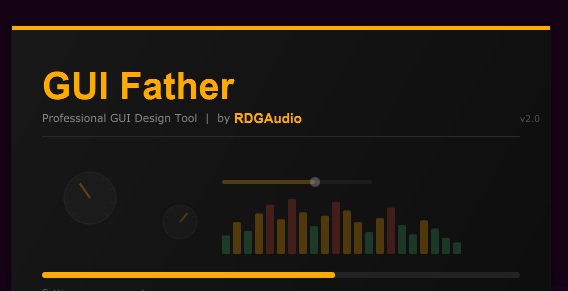
      Recently launched GUI father, GUI Designing app for Windows x64 bit OS.
      GUIF.jpg
      https://rdgaudio.com/product/gui-father/
      Build. Design. Animate. Export.
      Create professional knobs, sliders, buttons, VU meters, panels, displays, controls, and complete application interfaces with an intuitive visual workflow.

      Whether you’re an experienced designer or completely new to GUI design, GUIFather is designed to help you turn your ideas into functional, professional interfaces.

      A node-based visual editor for building animated knob, slider, and button graphics through a live compositing graph. Layers such as Body, Radial Gradient, and Blend connect via colour-typed input/output pins to form a processing chain, with results rendered instantly in the Output Preview panel on the right. A searchable node browser (Sources, Shapes, Textures, Distortion FX, Mask Generators, Layer Styles, Composite/Merge, and more) lets you drop in new effects at any point in the graph. The Inspector panel exposes per-node parameters — blend mode, opacity — for fine control, while the timeline strip at the bottom manages frame-by-frame animation across the filmstrip. Toolbar controls for frame count, resolution, and export quality, plus direct PNG/Film export and one-click “Send to Generator,” complete the workflow from design to finished asset.
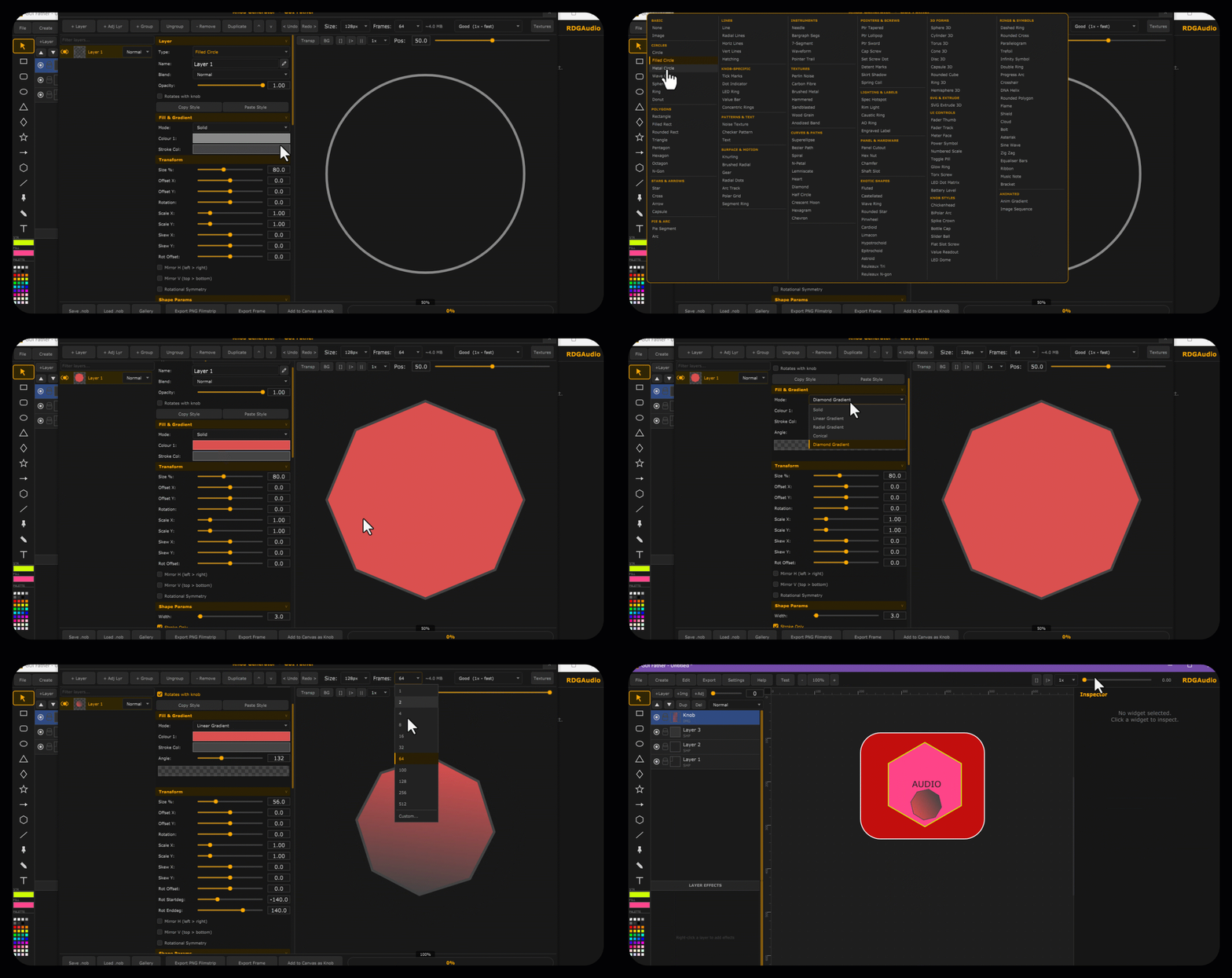
      GuiDesigner.gif

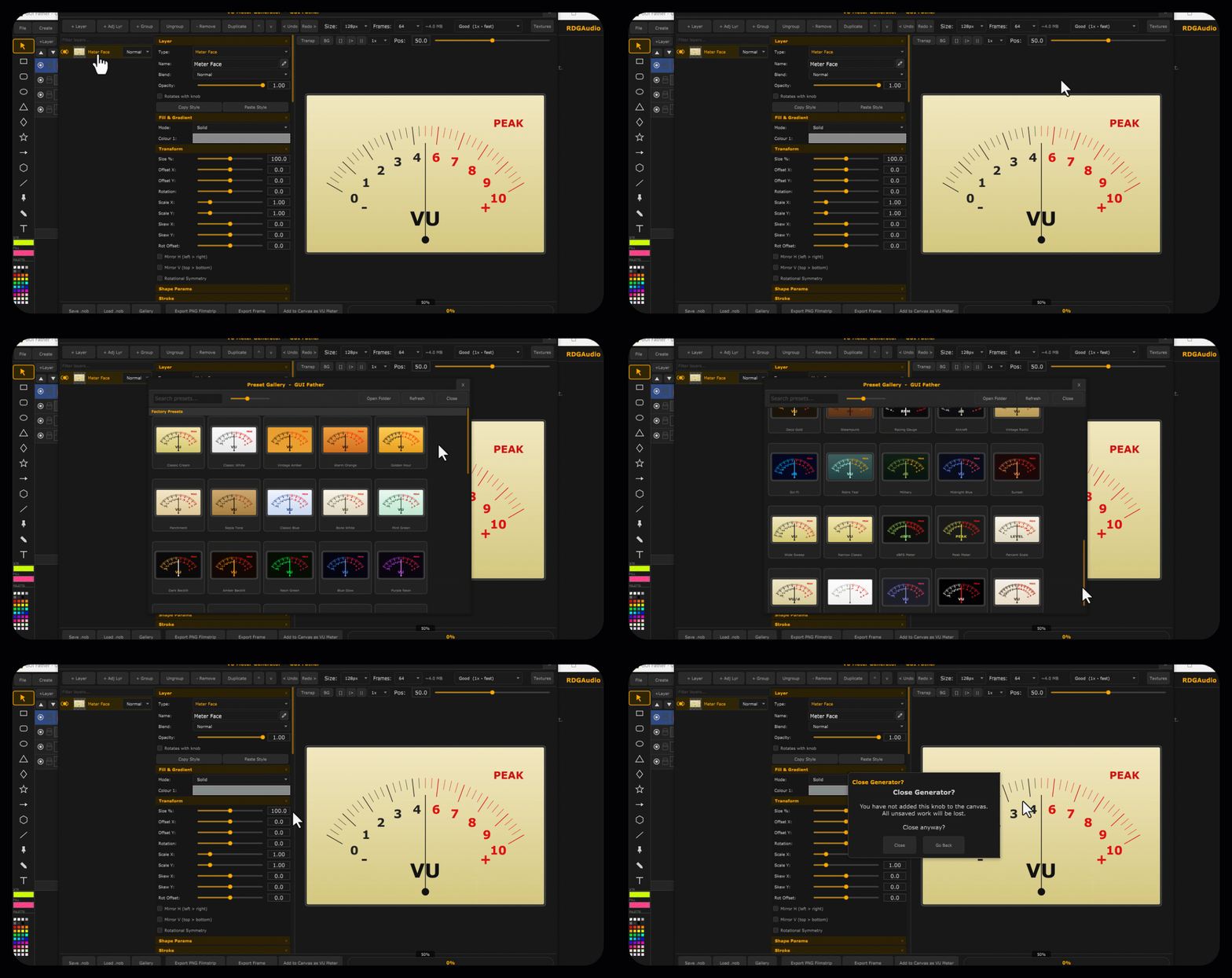
      GUI Father for building fully animated, filmstrip-based VU meters — no manual frame-by-frame drawing required. Each meter is assembled from stacked, independently editable layers (face, needle, ticks, labels), with full control over blend mode, opacity, fill/gradient, and transform (position, scale, rotation, skew, mirroring, rotational symmetry) per layer. A live preview updates in real time as you scrub through the needle’s full sweep, so you can see the exact animation frame-by-frame before export.
      VU meter.gif

      Built-in Preset Gallery ships with dozens of ready-made meter styles — from classic studio hardware looks (Pro Black, Studio Silver, BBC Green, Broadcast) to vintage and character designs (Cassette Deck, Reel To Reel, Vintage Radio, Steampunk, Aircraft, Racing Gauge) — giving designers a fast starting point that can be fully customized layer-by-layer.

      Finished meters export directly as PNG filmstrips or single frames, or drop straight onto the design canvas as a ready-to-use VU Meter widget — completing the path from concept to plugin-ready asset entirely inside GUI Father.

      Create , Save your own Knob, VU meter, Buttons, Sliders, panels, artwork and more.
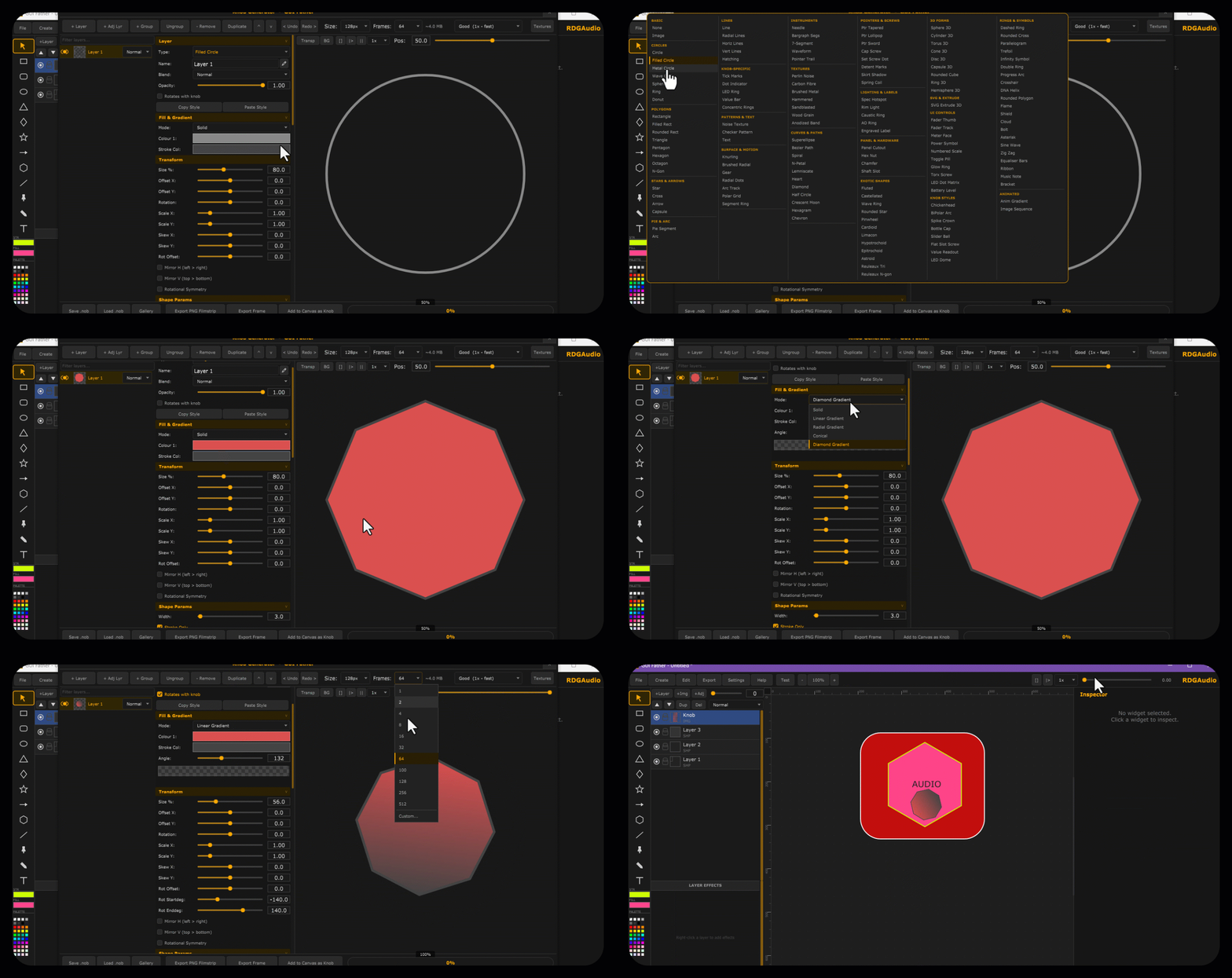
      GuiDesigner.gif

      Node based editor for building animated knob, slider, and button graphics through a live compositing graph. Layers such as Body, Radial Gradient, and Blend connect via colour-typed input/output pins to form a processing chain, with results rendered instantly in the Output Preview panel on the right. A searchable node browser (Sources, Shapes, Textures, Distortion FX, Mask Generators, Layer Styles, Composite/Merge, and more) lets you drop in new effects at any point in the graph. The Inspector panel exposes per-node parameters — blend mode, opacity — for fine control, while the timeline strip at the bottom manages frame-by-frame animation across the filmstrip. Toolbar controls for frame count, resolution, and export quality, plus direct PNG/Film export and one-click “Send to Generator,” complete the workflow from design to finished asset.
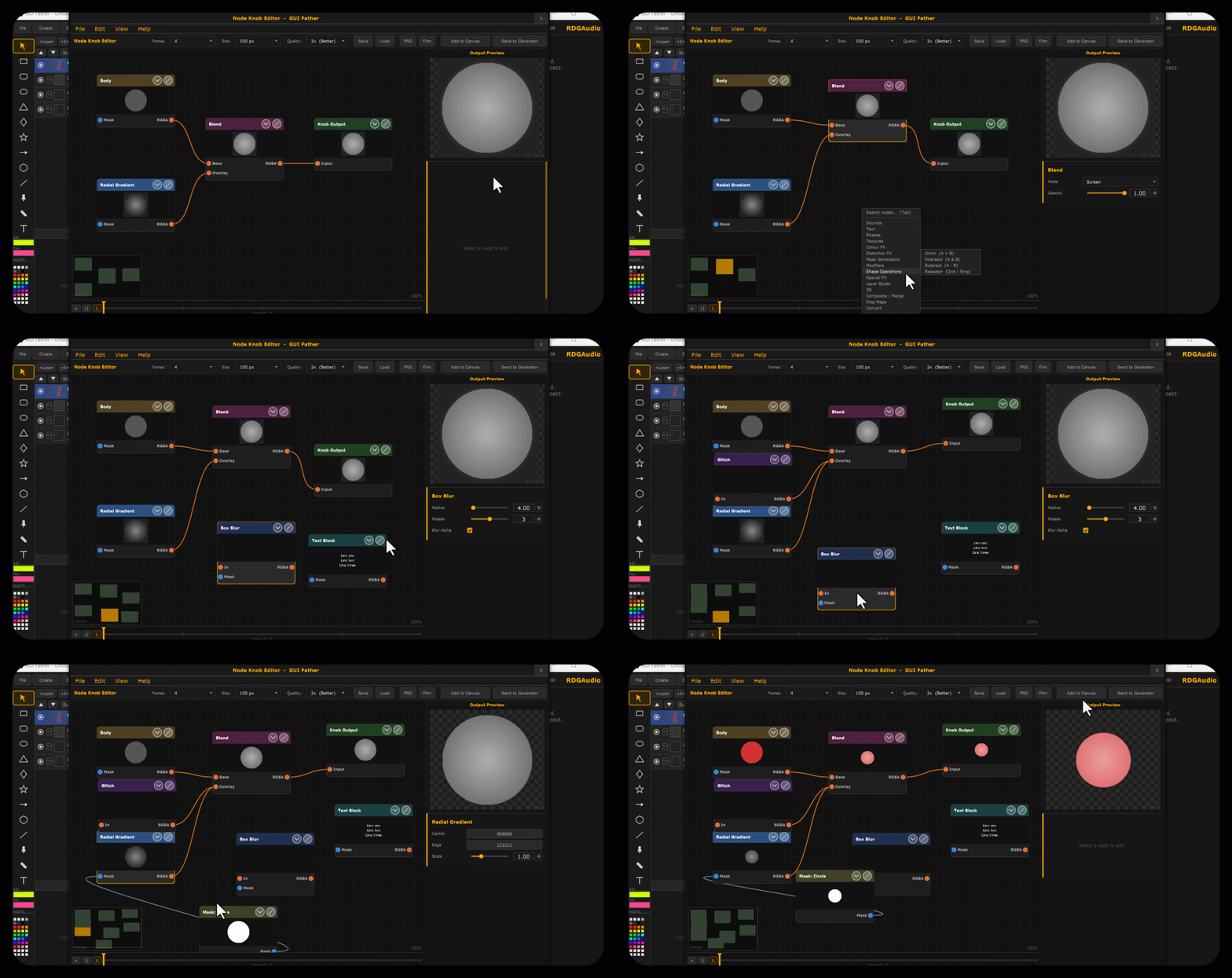
      Node editor.gif

      https://www.youtube.com/watch?v=0YSwOOGaNDI

      posted in Blog Entries
      DabDabD
      DabDab
    • RE: Happy Holidays..

      merry christmas to all of you guys.

      giphy (1).gif

      posted in General Questions
      DabDabD
      DabDab
    • RE: Preset Browser's Border & LAF

      He's Not A Developer I Guess.

      @d-healey @Natan Of course not....you have guessed right. I am a keyboard player and I do Music arranging and Remixing for a famous Indian artist/ producer name Rudra Ghosh at his new Studio in INDIA. I am from Nepal. One day I saw besides his Musical works he is programming in JUCE. It catches my eyes. I asked him what is this? he told me about C++ programming. Then I started digging around C++,I found Cabbage, HISE etc. which have been made based on JUCE. This is my short story how I came across HISE. Hope I will learn it from you a bit in future.

      posted in General Questions
      DabDabD
      DabDab
    • Make Video Tutorials Category on Forum

      At this moment only @d-healey is making Youtube video Tutorials. Free & Patreon. But this will be a good starting point for all new comers if we can add those tutorials on this Forum under Video Tutorials category. I am also planning to make some GUI tutorials as well. And I encourage all of you to record your screen and make a video tutorials and post under this category. Sometimes video demonstrations are better.
      Then nobody will complain..... "I am 52 years old" learning new software is difficult.

      posted in Feature Requests
      DabDabD
      DabDab
    • RE: How to use CSS pan button with HISE

      @orange can we have a similar Repo/thread for CSS like you did for LAF Collection For Everyone ?
      https://forum.hise.audio/topic/6615/laf-collection-for-everyone?_=1746597125645

      Everybody is free to share their CSS files as HISE Snippets or Codes.

      posted in Scripting
      DabDabD
      DabDab

    Latest posts made by DabDab

    • RE: RDGAudio GUI Father GUI Designer for Windows x64bit | Pre Order

      @Chazrox said in RDGAudio GUI Father GUI Designer for Windows x64bit | Pre Order:

      They could've atleast used a different colour scheme than the app I just launched so it didnt look like they took my idea. lol.

      Colour Scheme.gif

      I really appreciate your app looks stunning , Although You can easily change colour scheme easily on GUI Father too. Not always boring Yellow. Here is how.
      My job is to share with HISE people. Actual developer is RDGAudio

      posted in Blog Entries
      DabDabD
      DabDab
    • RDGAudio GUI Father GUI Designer for Windows x64bit | Pre Order

      RDGAudio.com
      Recently launched GUI father, GUI Designing app for Windows x64 bit OS.
      GUIF.jpg
      https://rdgaudio.com/product/gui-father/
      Build. Design. Animate. Export.
      Create professional knobs, sliders, buttons, VU meters, panels, displays, controls, and complete application interfaces with an intuitive visual workflow.

      Whether you’re an experienced designer or completely new to GUI design, GUIFather is designed to help you turn your ideas into functional, professional interfaces.

      A node-based visual editor for building animated knob, slider, and button graphics through a live compositing graph. Layers such as Body, Radial Gradient, and Blend connect via colour-typed input/output pins to form a processing chain, with results rendered instantly in the Output Preview panel on the right. A searchable node browser (Sources, Shapes, Textures, Distortion FX, Mask Generators, Layer Styles, Composite/Merge, and more) lets you drop in new effects at any point in the graph. The Inspector panel exposes per-node parameters — blend mode, opacity — for fine control, while the timeline strip at the bottom manages frame-by-frame animation across the filmstrip. Toolbar controls for frame count, resolution, and export quality, plus direct PNG/Film export and one-click “Send to Generator,” complete the workflow from design to finished asset.

      GuiDesigner.gif

      GUI Father for building fully animated, filmstrip-based VU meters — no manual frame-by-frame drawing required. Each meter is assembled from stacked, independently editable layers (face, needle, ticks, labels), with full control over blend mode, opacity, fill/gradient, and transform (position, scale, rotation, skew, mirroring, rotational symmetry) per layer. A live preview updates in real time as you scrub through the needle’s full sweep, so you can see the exact animation frame-by-frame before export.
      VU meter.gif

      Built-in Preset Gallery ships with dozens of ready-made meter styles — from classic studio hardware looks (Pro Black, Studio Silver, BBC Green, Broadcast) to vintage and character designs (Cassette Deck, Reel To Reel, Vintage Radio, Steampunk, Aircraft, Racing Gauge) — giving designers a fast starting point that can be fully customized layer-by-layer.

      Finished meters export directly as PNG filmstrips or single frames, or drop straight onto the design canvas as a ready-to-use VU Meter widget — completing the path from concept to plugin-ready asset entirely inside GUI Father.

      Create , Save your own Knob, VU meter, Buttons, Sliders, panels, artwork and more.
      GuiDesigner.gif

      Node based editor for building animated knob, slider, and button graphics through a live compositing graph. Layers such as Body, Radial Gradient, and Blend connect via colour-typed input/output pins to form a processing chain, with results rendered instantly in the Output Preview panel on the right. A searchable node browser (Sources, Shapes, Textures, Distortion FX, Mask Generators, Layer Styles, Composite/Merge, and more) lets you drop in new effects at any point in the graph. The Inspector panel exposes per-node parameters — blend mode, opacity — for fine control, while the timeline strip at the bottom manages frame-by-frame animation across the filmstrip. Toolbar controls for frame count, resolution, and export quality, plus direct PNG/Film export and one-click “Send to Generator,” complete the workflow from design to finished asset.
      Node editor.gif

      https://www.youtube.com/watch?v=0YSwOOGaNDI

      posted in Blog Entries
      DabDabD
      DabDab
    • RE: Tic-tac-toe

      @David-Healey said in Tic-tac-toe:

      @DabDab That's what the 1 player modes give.

      Oh nice.. Now I have seen it after loading your Snippet.
      👍

      posted in Snippet Waiting Room
      DabDabD
      DabDab
    • RE: Tic-tac-toe

      Is it possible to add PC/Computer as opponent ?

      posted in Snippet Waiting Room
      DabDabD
      DabDab
    • RE: Knob Web Studio

      @tsempire Hmm, I have found it on Arc only. How do I do on a main Circle?
      c298ec5d-6688-4f0b-ac2b-582b85b19079-image.png

      posted in General Questions
      DabDabD
      DabDab
    • RE: Knob Web Studio

      @tsempire Can you please add Gradient (Linear Radial)? I guess it is not present, if not tell me how to add gradient effect?

      posted in General Questions
      DabDabD
      DabDab
    • RE: Preset Browser - List item background

      @ustk Excellent. Working Correctly. thalaivar-rajinikanth.gif

      posted in General Questions
      DabDabD
      DabDab
    • RE: Preset Browser - List item background

      @ustk said in Preset Browser - List item background:

        if (identifiers.contains(id))
        {
        	a.removeFromLeft(30);
        	g.drawAlignedText(id, a, "left");
        }
      

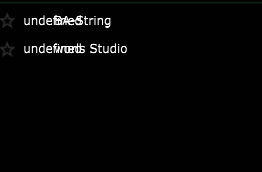
      But if a user only enters words without the id and cat the name is unidentified. End users must need to know how to write and save presets otherwise it will not be visible.
      91f01480-6171-4eea-a942-5c86728382b1-image.png

      posted in General Questions
      DabDabD
      DabDab
    • RE: How Can I do a Splash Welcome screen every time when I will launch the Plugin

      @ILIAM Superb..

      Superb.gif

      posted in General Questions
      DabDabD
      DabDab
    • RE: Preset Browser - List item background

      @ustk said in Preset Browser - List item background:

      One problem I guess.. If a user doesn't know the exact way to save presets name like

      Category names like "BA", "DR" etc  and  _  speparator
      

      the Presets name shows something like this 778cd3b3-8588-4740-8332-9d84604755e1-image.png

      posted in General Questions
      DabDabD
      DabDab