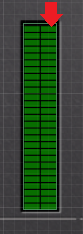
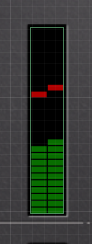
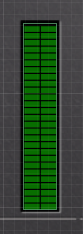
@Chazrox said in How to Crop button bounding boxes:
@Jeetender Try this. You'll have to use two vertical sliders and style them with this laf to get that look with this script. You can figure out how to customize it by reading the comments.
const var LED_Meter_Rectangle_TempGrade_HardStops = Content.createLocalLookAndFeel();

LED_Meter_Rectangle_TempGrade_HardStops.registerFunction("drawLinearSlider", function(g, obj)
{
    // ---- COLOUR CONTROL ----
    // Every colour this LookAndFeel draws with, in one place. Each name is one control in the
    // designer, so editing a value here changes that control and nothing else. The draw code
    // below only ever references these by name.
    var c_fillColourBot         = 0xFF03B300;
    var c_fillGradMidColour     = 0xFFFF981A;
    var c_fillColourTop         = 0xFFFF0A0A;
    var c_fillColourBot_a35     = 0x5903B300;
    var c_fillGradMidColour_a35 = 0x59FF981A;
    var c_fillColourTop_a35     = 0x59FF0A0A;
    var c_fillColourBot_a55     = 0x8C03B300;
    var c_fillGradMidColour_a55 = 0x8CFF981A;
    var c_fillColourTop_a55     = 0x8CFF0A0A;
    // Per-LED colour tables, sampled along the Fill gradient (one entry per LED).
    var ledColours = [
        c_fillColourBot,
        c_fillColourBot,
        c_fillColourBot,
        c_fillColourBot,
        c_fillColourBot,
        c_fillColourBot,
        c_fillColourBot,
        c_fillColourBot,
        c_fillColourBot,
        c_fillColourBot,
        c_fillColourBot,
        c_fillColourBot,
        c_fillColourBot,
        c_fillColourBot,
        c_fillColourBot,
        c_fillGradMidColour,
        c_fillGradMidColour,
        c_fillGradMidColour,
        c_fillGradMidColour,
        c_fillGradMidColour,
        c_fillGradMidColour,
        c_fillColourTop,
        c_fillColourTop
    ];
    var ledOffColours = [
        c_fillColourBot_a35,
        c_fillColourBot_a35,
        c_fillColourBot_a35,
        c_fillColourBot_a35,
        c_fillColourBot_a35,
        c_fillColourBot_a35,
        c_fillColourBot_a35,
        c_fillColourBot_a35,
        c_fillColourBot_a35,
        c_fillColourBot_a35,
        c_fillColourBot_a35,
        c_fillColourBot_a35,
        c_fillColourBot_a35,
        c_fillColourBot_a35,
        c_fillColourBot_a35,
        c_fillGradMidColour_a35,
        c_fillGradMidColour_a35,
        c_fillGradMidColour_a35,
        c_fillGradMidColour_a35,
        c_fillGradMidColour_a35,
        c_fillGradMidColour_a35,
        c_fillColourTop_a35,
        c_fillColourTop_a35
    ];
    var ledGlowColours = [
        c_fillColourBot_a55,
        c_fillColourBot_a55,
        c_fillColourBot_a55,
        c_fillColourBot_a55,
        c_fillColourBot_a55,
        c_fillColourBot_a55,
        c_fillColourBot_a55,
        c_fillColourBot_a55,
        c_fillColourBot_a55,
        c_fillColourBot_a55,
        c_fillColourBot_a55,
        c_fillColourBot_a55,
        c_fillColourBot_a55,
        c_fillColourBot_a55,
        c_fillColourBot_a55,
        c_fillGradMidColour_a55,
        c_fillGradMidColour_a55,
        c_fillGradMidColour_a55,
        c_fillGradMidColour_a55,
        c_fillGradMidColour_a55,
        c_fillGradMidColour_a55,
        c_fillColourTop_a55,
        c_fillColourTop_a55
    ];

    // ---- GEOMETRY ----
    var a = obj.area;
    var isH = false; // exported from current designer orientation
    var norm = (obj.valueNormalized !== undefined) ? obj.valueNormalized : ((obj.value - obj.min) / (obj.max - obj.min));
    norm = Math.max(0.0, Math.min(1.0, norm));
    // Axis-aware scale: horizontal skins scale from component width; vertical skins scale from component height.
    // This keeps slider element proportions stable when exporting either orientation.
    var scaleBase = isH ? a[2] : a[3];
    var sw = scaleBase / 300.0;
    // Output bounds: master Draw Padding on each edge (px @300 design).
    var padL = sw * 4.0000;
    var padR = sw * 4.0000;
    var padT = sw * 4.0000;
    var padB = sw * 4.0000;
    var dW = Math.max(1.0, a[2] - padL - padR); var dH = Math.max(1.0, a[3] - padT - padB);
    // Position the clamped rect by the pad ratio so a large pad never drifts the slider off-axis.
    var sumX = padL + padR; var sumY = padT + padB;
    var dX = a[0] + (sumX > 0.0 ? (a[2] - dW) * (padL / sumX) : (a[2] - dW) * 0.5);
    var dY = a[1] + (sumY > 0.0 ? (a[3] - dH) * (padT / sumY) : (a[3] - dH) * 0.5);
    var drawBase = isH ? dW : dH;
    var trackThick = drawBase * 0.1500;
    var fillThick = drawBase * 0.1200;
    var hPad = (isH ? dW : dH) * 0.0200;
    var tX, tY, tW, tH;
    if (isH) {
        tX = dX + hPad; tY = dY + dH * 0.5 - trackThick * 0.5;
        tW = dW - hPad * 2; tH = trackThick;
    } else {
        tX = dX + dW * 0.5 - trackThick * 0.5; tY = dY + hPad;
        tW = trackThick; tH = dH - hPad * 2;
    }
    // Fill has its own cross-axis thickness, anchored to the same centre-line as the track
    var fbX, fbY, fbW, fbH;
    if (isH) {
        fbX = tX; fbY = dY + dH * 0.5 - fillThick * 0.5;
        fbW = tW; fbH = fillThick;
    } else {
        fbX = dX + dW * 0.5 - fillThick * 0.5; fbY = tY;
        fbW = fillThick; fbH = tH;
    }
    // Radius from the rail THICKNESS (cross-axis) so the end caps keep one shape at any length.
    var tR = (isH ? tH : tW) * 0.1100;
    var thumbBaseW = drawBase * 0.1314;
    var thumbBaseH = drawBase * 0.0657;
    var thumbW, thumbH;
    if (Math.abs(thumbBaseW - thumbBaseH) < 0.0001) {
        thumbW = thumbBaseW; thumbH = thumbBaseW;
    } else {
        // Rotate width / height with orientation, so a 200x100 vertical handle becomes 100x200 horizontal.
        thumbW = isH ? thumbBaseH : thumbBaseW;
        thumbH = isH ? thumbBaseW : thumbBaseH;
    }
    var thumbSz = Math.max(thumbW, thumbH);
    // Thumb travel range: 0 = left / bottom, 1 = right / top
    var trMin = Math.min(0.0000, 1.0000);
    var trMax = Math.max(0.0000, 1.0000);
    var travelNorm = trMin + (trMax - trMin) * norm;
    // The thumb travels the TRACK RAIL - the same span the fill covers and the ticks sit on - so
    // all three stay in step. Track Pad insets the rail, and therefore the throw, by design.
    var railStart = isH ? tX : tY;
    var railLen = isH ? tW : tH;
    var thumbCX = isH ? railStart + railLen * travelNorm : dX + dW * 0.5;
    var thumbCY = isH ? dY + dH * 0.5 : railStart + railLen * (1.0 - travelNorm);

    // ---- FILL LED SEGMENTS ---- (rectangle shape)
    // Each LED is a solid segment coloured by its slot position in the Fill gradient. Crisp on/off meter.
    var ledN = 23;
    var ledLit = Math.round(norm * ledN);
    var ledAlong = isH ? fbW : fbH;
    var ledPitch = ledAlong / ledN;
    var ledLen = Math.max(0.5, ledPitch * 0.8200);
    var ledThick = Math.max(0.5, fillThick * 1.0000);
    var ledCross = isH ? (fbY + fbH * 0.5) : (fbX + fbW * 0.5);
    // LED Glow - blur the lit segments behind the meter
    if (ledLit > 0) {
        g.beginLayer(false);
        for (var fgi = 0; fgi < ledLit; fgi++) {
            var fgAlong = isH ? (fbX + (fgi + 0.5) * ledPitch) : ((fbY + fbH) - (fgi + 0.5) * ledPitch);
            var fglx = isH ? (fgAlong - ledLen * 0.5) : (ledCross - ledThick * 0.5);
            var fgly = isH ? (ledCross - ledThick * 0.5) : (fgAlong - ledLen * 0.5);
            var fglw = isH ? ledLen : ledThick;
            var fglh = isH ? ledThick : ledLen;
            g.setColour(ledGlowColours[fgi]);
            g.fillRoundedRectangle([fglx, fgly, fglw, fglh], Math.min(fglw, fglh) * 0.1100);
        }
        g.gaussianBlur(Math.round(Math.max(0.0, 5.0 * sw)));
        g.endLayer();
    }
    for (var li = 0; li < ledN; li++) {
        var lAlong = isH ? (fbX + (li + 0.5) * ledPitch) : ((fbY + fbH) - (li + 0.5) * ledPitch);
        var lx = isH ? (lAlong - ledLen * 0.5) : (ledCross - ledThick * 0.5);
        var ly = isH ? (ledCross - ledThick * 0.5) : (lAlong - ledLen * 0.5);
        var lw = isH ? ledLen : ledThick;
        var lh = isH ? ledThick : ledLen;
        var lr = Math.min(lw, lh) * 0.1100;
        var ledDrawn = true;
        if (ledDrawn) {
            if (li < ledLit) {
                g.setColour(ledColours[li]);
                g.fillRoundedRectangle([lx, ly, lw, lh], lr);
            }
            else {
                // Opaque black base first: Off Alpha then blends the dim colour over it, so a
                // low alpha fades toward BLACK instead of letting the background show through.
                g.setColour(0xFF000000);
                g.fillRoundedRectangle([lx, ly, lw, lh], lr);
                g.setColour(ledOffColours[li]);
                g.fillRoundedRectangle([lx, ly, lw, lh], lr);
            }
        }
    }

});
Dont mind the yellow dash lines. Thats just the guidelines from the designer app. Those wont come out in the render.
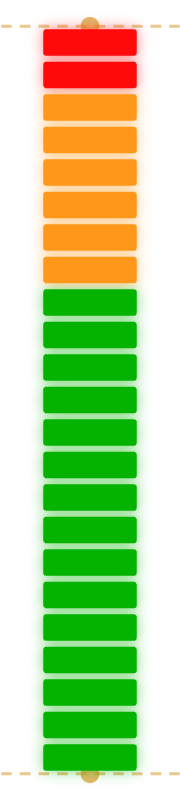
now this seems to be working fine and much customizable.. thanx a lot brother.
 you know what david, my screen time for today is beyond limits, i think i should take a break and continue tomarrow.. too much coding for today.. But thank you the plugin is done.