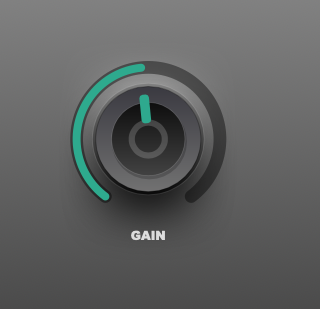
NEW: Online Knob Builder for HISE!! by Me :)
-
@pgroslou Thanks! I prefer to do as much as I can within HISE and this way is a lot more flexible if you want to make slight changes for secondary knobs or something. I have to do it all the time which is what inspired this approach. Glad you like it!
-
This post is deleted! -
@Chazrox
That sounds great! Thanks so much! :-) I'll give it a try this weekend.One thing immediately comes to mind:
I’m not sure how the shadow is generated in your code. So far, however, generating shadows using LAF hasn’t been particularly efficient. Especially with sliders, which are constantly re-rendered when modulated, this can lead to performance issues when there are many elements in the user interface.That’s why it would be great if we could choose between two options:
- Real HISE shadow
- Fake shadow, created using a radial gradient, for example
But I’m sure Sir @David-Healey also has a good idea for how to fake shadows... :-)
I'm looking forward to trying out your tool! :-)
P.S. This also applies to the inner glow, which I'm sure you're creating using the innerShadow as well...
-
@Oli-Ullmann said in NEW: Online Knob Builder for HISE!! by Me :):
But I’m sure Sir @David-Healey also has a good idea for how to fake shadows... :-)
I use the built in drop shadow, I haven't hit any issues
 but maybe you guys are using more than I am.
Free HISE Bootcamp Full Course for beginners.
YouTube Channel - HISE tutorials
My Patreon - More HISE tutorials -
@David-Healey
Oh, okay, yeah, I had a pretty big project (the one I sent you a while back) with a lot of UI elements, and I had to fake the shadows because otherwise it was causing performance issues... -
    // -- DROP SHADOWS --
    g.drawDropShadow([ox + stableSize * (1 - 0.45) / 2, oy + stableSize * 0.4 - stableSize * 0.35 / 2, stableSize * 0.45, stableSize * 0.35], cShadowsHighlight, stableSize * 0.35);
    g.drawDropShadow([ox + stableSize * (1 - 0.5) / 2, oy + stableSize * 0.65 - stableSize * 0.45 / 2, stableSize * 0.5, stableSize * 0.45], cShadowsShadow, stableSize * 0.35);
    g.drawDropShadow([ox + stableSize * (1 - 0.5) / 2, oy + stableSize * 0.65 - stableSize * 0.45 / 2 + 4, stableSize * 0.5, stableSize * 0.45 + 10], cShadowsShadowSoft, stableSize * 0.35);
Works great with shadows and highlights.
-
@Chazrox
Yeah, it works great in general! :-) I just had some issues with it, as I mentioned, when I had a lot of UI elements... -
@Oli-Ullmann ahh I see. We'll see how this works out. There possibly could be a limit. Probably has to do with the modulation repaints.
-
Just updated the app to include 'Noise' parameter for all face layer elements WITH rotation. :)
https://rox-knob-builder-for-hise.netlify.app/

-
@Chazrox How are you drawing circular noise?
Free HISE Bootcamp Full Course for beginners.
YouTube Channel - HISE tutorials
My Patreon - More HISE tutorials -
@David-Healey multiple layers. Theres a 'cap' in front of the ellipse that has noise applied to it.
-
@Chazrox This will probably be useful to you when Christoph merges it: https://github.com/christophhart/HISE/pull/936
And maybe this one: https://github.com/christophhart/HISE/pull/943
Free HISE Bootcamp Full Course for beginners.
YouTube Channel - HISE tutorials
My Patreon - More HISE tutorials -
@David-Healey Niiice!
 I can definitely think of some cool ways to use that already..
 -
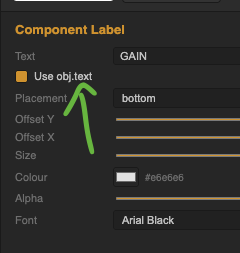
Update:
https://rox-knob-builder-for-hise.netlify.app/
Just added the option to inherit 'obj.text' for 'Component Label' element. You can still set a text for mockup and placement in the designer ui but ticking the box will inherit obj.text on compile.