Roadmap to HISE 5
-
@griffinboy yes good idea, and yes the C++ API documentation is seriously lacking, but one thing after the other.
I've just made a small example - a C++ node that wraps a pitch_mod node and a core::oscillator and then uses the API to pickup the pitch modulation from HISE and apply it to the oscillator frequency. This shows how to pickup modulation signals from HISE and use them however you like - using the
core::extra_modclass works the exact same way.This can be easily rewritten to a template that you can feed any sound generator type into to pickup the pitch modulation.
template <int NV> struct osc_with_pitchmod: public data::base { // set this to false and this class will use audio rate pitch modulation instead of the downsampled resolution. // This comes with a little overhead because it needs to resort to per frame processing in that case so it's disabled by default. static constexpr bool UseControlRate = true; // This can be any C++ oscillator class that follows the scriptnode API // The only requirement is that it must have a setPitchMultiplier() method // which will be used to set the pitch ratio accordingly. using OscillatorType = core::oscillator<NV>; SNEX_NODE(osc_with_pitchmod); struct MetadataClass { SN_NODE_ID("osc_with_pitchmod"); }; static constexpr bool isModNode() { return false; }; static constexpr bool isPolyphonic() { return NV > 1; }; static constexpr bool hasTail() { return true; }; static constexpr bool isSuspendedOnSilence() { return false; }; static constexpr int getFixChannelAmount() { return 2; }; static constexpr int NumTables = 0; static constexpr int NumSliderPacks = 0; static constexpr int NumAudioFiles = 0; static constexpr int NumFilters = 0; static constexpr int NumDisplayBuffers = 0; // Scriptnode Callbacks ------------------------------------------------------------------------ osc_with_pitchmod() { // we want the pitch mod to copy the pitch modulation values // to our temporary buffer so we can apply it to the oscillator pitchMod.setProcessSignal(true); } // now we just forward all callbacks to both objects void prepare(PrepareSpecs specs) { osc.prepare(specs); if(UseControlRate && specs.blockSize > 1) { specs.sampleRate /= HISE_CONTROL_RATE_DOWNSAMPLING_FACTOR; specs.blockSize /= HISE_CONTROL_RATE_DOWNSAMPLING_FACTOR; } pitchMod.prepare(specs); // make sure that the pitch mod buffer is initialised // to the correct size specs.numChannels = 1; FrameConverters::increaseBuffer(pitchSignal, specs); } void reset() { pitchMod.reset(); osc.reset(); } void handleHiseEvent(HiseEvent& e) { pitchMod.handleHiseEvent(e); osc.handleHiseEvent(e); } template <typename T> void process(T& data) { // create a ProcessData<1> object with our temp buffer // as data and feed that to the pitch mod so that it // copies the pitch modulation values coming from HISE // into our buffer float* pd[1] = { pitchSignal.begin() }; auto numPitchSamples = data.getNumSamples(); if constexpr (UseControlRate) numPitchSamples /= HISE_CONTROL_RATE_DOWNSAMPLING_FACTOR; ProcessData<1> pitchData(pd, numPitchSamples, 1); pitchMod.process(pitchData); if constexpr (UseControlRate) { // now we chunk the buffer into blocks of 8 (default control raster). // this is essentially the same as a container::fix_block<8> container. ChunkableProcessData<T, false> cd(data); int pitchIndex = 0; while(cd) { auto numToSlice = jmin(cd.getNumLeft(), HISE_CONTROL_RATE_DOWNSAMPLING_FACTOR); jassert(numToSlice == HISE_CONTROL_RATE_DOWNSAMPLING_FACTOR); auto sd = cd.getChunk(numToSlice); jassert(isPositiveAndBelow(pitchIndex, numPitchSamples)); auto pitchRatio = pd[0][pitchIndex++]; osc.setPitchMultiplier(pitchRatio); osc.process(sd.toData()); } } else { // otherwise we use frame processing to iterate over each sample // and before calculating the next oscillator sample we // update the pitch ratio. auto fd = data.template as<ProcessData<2>>().toFrameData(); int pitchIndex = 0; while(fd.next()) { auto pitchRatio = pd[0][pitchIndex++]; osc.setPitchMultiplier(pitchRatio); osc.processFrame(fd.toSpan()); } // copy the left channel to the right one. data[1] = data[0]; } } template <typename T> void processFrame(T& data) { span<float, 1> pd; pitchMod.processFrame(pd); osc.setPitchMultiplier(pd[0]); osc.processFrame(data); } //SN_EMPTY_HANDLE_MOD(); // SN_EMPTY_SET_EXTERNAL_DATA(); // now this is important: you need to define this method and forward it to any // member that connects to a HISE modulation chain for the pitch modulation to work! void connectToRuntimeTarget(bool addConnection, const runtime_target::connection& c) { pitchMod.connectToRuntimeTarget(addConnection, c); } template <int P> void setParameter(double v) {} void createParameters(ParameterDataList& data) {} // this is the pitch_mod node that picks up the pitch modulation from HISE core::pitch_mod<NV> pitchMod; // this is our oscillator. You can plugin any other class that has a // setPitchMultiplier method (where the pitch ratio is being applied. OscillatorType osc; // We'll "render" the pitch signal into a separate audio buffer heap<float> pitchSignal; }; -
Assigning a matrix modulator to the wavetable table index seems a little odd....
Here's the first case:

Assigning it to the Table Index parameter (unipolar), no matter what ranges I set, it never seems to adjust the Table Index parameter.
Second case. If I want unipolar control I have to setup the matrix modulator to control Table Index Bipolar, like this:

If I set the input and output range to 0.0 - 1.0, then the modulator can be bipolar, going from -100% to 100% ... which in the case of a wavetable, results in half of the range basically making no audible difference when used as a static value. I guess it would make a difference if you had a bunch of stuff setup to modulate all at once.
Anyway, I just found the setup a little odd is all.
-
@Orvillain you're missing the beauty of the matrix modulator: you can bypass all that weirdness and combine & set the mode of each modulation source within the matrix:
- ignore the Table Index Bipolar chain. This is a relict from ancient times where I tried to slap the ability of using different modulation modes for a parameter (same with the Filter). They stay around for backwards compatibility, but you should never touch them in a new project.
- Just add the matrix modulator in the TableIndex modulation chain, set the Table Index parameter to 100% so that it covers the entire range and then hack away with adding modulation connections to the matrix. The base value of the table position is then controlled by the Value parameter of the matrix modulator - that's also what you will connect the knob on your UI to.
- Also leave the input / output ranges alone - both work perfectly fine with a 0...1 range.
Here's an example how it works:
HiseSnippet 1647.3oc2X0saaTDEd2jrPhoE0.ETERHMphKbZRcsSbbSTAUm3jzZQbhUraAQUU03cm0dT1cls6NabBU8Q.wE7TvSAuBUbC2xi.bORvY1wd8tNtoFSHMvJYqcNmyLmu4Lm+lstO2jDDv80zyz7DOhl9ULZbBSzoRGLkoUcKM822nFNPP7QJRadhGNHfXooqO8CjDzmaFsnme69ahcvLSx.RZZOlSMI6RcohATqW9KoNN6fsHMotIjtX4plbVEtCODvyzF407vlGhaS1CKEaJCsGhC5noeKiUWdEyhV20Z4kWc8Rl3Rj0sw11EVwpXwRqsdgUVGWbsRj7qpo+NaaQEb+FBrfDnoOylbqSZzg2koTvioAzVND4fBZM.MqHuC2wRtEkT0pzg5XUuugJPCVz5CLaSqLaW2nF0hFSef46ZQLPClQRCn9Tog2zofWgjvKeB3MBHom.Rynfz7FML8odhAbj348LpxfSSaLbNkDJJY0l5GlxnBGjfIx4hOjriOLHdFYKkO+RH3uEtWlL24NnJ9D.3HLpUnsM3hzkJ5fDc4nt3iHBL.8fLvQZf.cD1G0xF8EnMijLmYzLyVL+5kf0Rx8HfY9b4GZgCnLxfUKiM2OKUJ38PTzmiVNew0f2VbwExLWK6mPeJvpFVzIGLMPt6DI.5VJZ0qBus7vHO.2cv5ivBjnCAEP.TagBb3hXU1SWfVkfdXstbt7vpmkdaoXKzWy2FUPtilKgQnq.jNJDKWah3q5qYoM2m63P7ydyXhJ4HAz.hega1C4xiLDkEgyAlYDFvKU.m.NNHWtuWGTKhnKgDInalthbNbr0VXANaK6kPEWKedvZuD5IvOIVe5B2yNjYJnbFhy1iKH6yxtPlW.f+kYPCyx1dj7RrKFEaY3t+YMwrrP2VD+k.KkSHIVPvkNcbhwqONIYXroxQNgfbVUFUruGg85Bt0548Cu8npRykL3pGMPNOhufJgf9VjifTapPs4L1hDbnf6AI2NUbHjAfaE5fEoSKHSd1iAXCREKJi2XATwIIStdtkqXbg37F0oByNiFiSMBLBVp+MvXuLrW0XaHygoX..mwXmu9emzoIU+rJ0+IFOvg2B6LvPA9D.RHpzpeZO1nX9nXAJbFEMe03VzzarKZNbvxziWvxHJpLykt5biqu6GdpiifKvHrTUimWASCic2Y+dVJ3sA.qvaFXaR83NXeI+c7IOOjvLSve1xRuhpCbpJ+8kkkPfBWt8ROEuR6RZC5LIklDWONTmwLoCXCWNWzgxZm1W65k2ky81lIq3XkbQp2AGHKJDPDoVFXYaxUsOVwgadXRlUay39DUgljzqDFH3t82.Qs80PP7hREq+DiREyAO1KJ+e8Jveqr+4y3+NIudCwMSM1doROg3iboOwkv5.JTF63cIEkmY0po++c0pC3gBHXE5x0mdLjpYuP2FP4.SBncFi3H6XReJYrkZbd43n.TByJZveBO8XVPNVuGyB8YpoV7DMDwHQMuoo+tMw9PqrUsjtJJwRlcCdkDujQnpJyhbbeHj5j4O9we+mq05U2eivi6ITrG0OEQaDmhUYGA8joLoZmNu60LhamNpa5nyhaXL5druXKT+vmqrMIROCsnSr1DyNL01ub2E2XGpSu6AeEiWTculaevdar6K0bkXTYIcwJi50zzbfzzfakunOOmn71VQCmUSqobmGohGKazNIDNfX6SB5Ti5UC6kJZY5y5pzEtrcU5YFunoyFd+Gna9T8ZLWeL1f554P1FBMbfqrDgwO.tihMNzQzmZZu8ZbF2qCmQS0HvADHbtcaheRrOxMzFBANYA9qW9.hCAZKX.oOq7tP6vX+g85O+J7pOlmW2vPAWjLDE8O4b6B0M6bnF24Ndm75cWnltqZDkyCoxq914XdTgpy2qhYLj60x0oqiddFrp5wVVwF5tNYIfec+u6Wt+qo6+pkGtDvDGnpz4AXVahzEsJyKTnFoa3RSccfnpZI2NCp1CWqvqA8aSUQtI4XAzbRjPfc3iM1CtDA1AjxpNA58.tRtTm6GJN2T4iBHPco5bvHCgjaD7MDe9vMibVtleTRWST+658VJSzEQqjWD5vEa5yelo5yJJi8lMhBruYQMQMGDgAiQEzNJcGPvwOzjwyLMSuTmZhKOoSbkIchEmzIt5jNwRS5Du6jNw0dyST1C3FgP5KUEPMsZ02V8wAzi+xDPv2eAp7Gy.I'm creating two wavetables programmatically so the snippet loads out of the box - no assets required.
-
@Christoph-Hart Ahhhhh, this was the missing key:
set the Table Index parameter to 100%Everything else you mentioned I was already doing or already tried. I hacked the input and output ranges instead of just setting the table index to 100% as its base. doh.
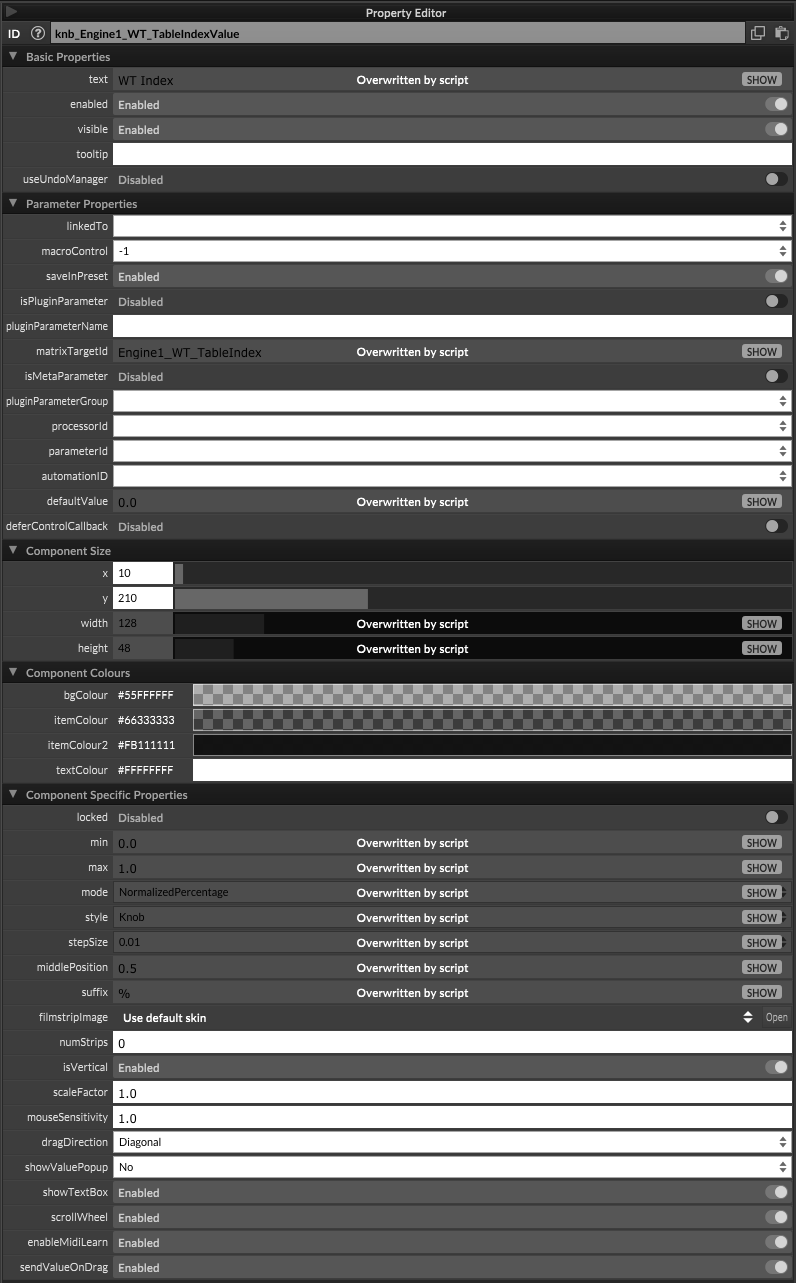
My UI control was always pointing just at the matrixTargetId.
-
My UI control was always pointing just at the matrixTargetId.
Ah yes, that's basically equivalent to connecting it to the
Valueparameter (internally it does the same thing). -
 L Lindon referenced this topic on
-
I'm a bit confused. Was this a beta branch at some point?
There's documentation about the modulation matrix on the website and a tutorial snippet, but it doesn't work, and I don't see matrixTargetId in my properties editor.I'm using 4.10 built from source.
-
@observantsound said in Roadmap to HISE 5:
There's documentation about the modulation matrix on the website and a tutorial snippet, but it doesn't work,
Got a link?
Free HISE Bootcamp Full Course for beginners.
YouTube Channel - HISE tutorials
My Patreon - More HISE tutorials -
No Matrix entry in docs: Navigating to Audio/Modulators/Envelopes/list of Envelopes
https://docs.hise.audioMatrix entry in docs: Found when googling "Hise Modulation Matrix"
https://docs.hise.audio/hise-modules/modulators/envelopes/list/matrixmodulator.htmlhttps://docs.hise.dev/tutorials/scripting/index.html#modulation-matrix-tutorial
This page says "This is a minimal example of all the new modulation features in HISE 5.0:"
The snippet provided on that page is the same as the example snippet "Modulation Matrix Tutorial" from hise.exe help/browse example snippets. I think at least.I think syntax has changed in multiple places after that snippet was made.
Like using ("") that's not accepted, or
matrixHandler.setEditCallback(["my funky item", "another item"], function(index)
argument mismatch. Expected 1, got 2.
And .setDragCallback doesn't seem to exist anymore in the API list.What is the current state of the modulation matrix?
I've seen posts from 3 years ago from @Christoph-Hart regarding the mod matrix being new.
But like I said, I don't see matrixTargetId as a property in the interface property editor.HiseSnippet 6384.3oc6b07babjcefjf2kXs8Zu6VoRkJop1vqs.k.gvmTTjki3WhVXEoDEAsz50qW6Fyz.XLGLM7LCHHjJkxaU6dOGxk8xV6gj+.xsja9ZNjpRUI+AnjbJ21+CTdutmO5Yv.RpwzejsBrMLld5W2u2q+89pmd39NbclqK2QKWgCmNhok6Uy2Yps2fsFPMs0ZuM1vdTOGySNj45os4zQTWWlgVtbW98wdjagqnI97Gu8lTKpsNKpIMsGwM0Y6ZNzzKp08W+dlVV6PMXGZNTo2MWusN2dKtEeLvMWNeUsQT8in8Y2mhc6R40tK0cfVtqk+VrtL8FzpMqUsWKilM5wX0atRikaVqUqFcaz5l0a1kVqNUK2qbGCSOtSGOpGyUK2U1jaLsy.9Da4D7HSWytVL7hZZcfYV17NbKCTDwV01Zfokw9ApIWMXP2ORocYoR6mjeOSCyv1iTdug3FjHJTUf4tTb16xwXuZprWUE1KEVJmBKcEIK8l46n6XNxK5NH+7Cx211i4ziBqSprhruZW5mVN+Mt10H6wMFaQAVStzSXmPGNxhQta6N2gzpRUBx3lb6BENbfoKA9WJ4XlyTRWpCaotbaVHIdCndDWPnbIvWDONYrK1JiLTN1CClKW7llHQCY1dvHZL0lNzTOnG374N00iMrBocOxT9XhNe3HXFggCXgvYjKF9QNriM4iciFRwPP38jyd3f5yHkwQ7pVVDWlOWCcqvP5mwcL8lFPlN2fQLsICXvzBS5mM10irUmNjaP1cicHtdSsLs6SVRxRv+BPUZfDC7fIPVuw153DSsfAtLwf5QAdvFf5BA+cK7Asgo.VlnhtQFPwggYKZruC.VLH1.qeLyZJ1FWttPsMH8gFcEpFGF0X5Rd7kvIu6X.wf7UWKt9QtjdbGrSNypZeqBEZamPeJjUoZ1gESy4BiAftVsPgkH6tyCfu23ta24.3++HFLSf3UnvF.aMCgdTm9LOjvZUHOnyV0Hn2jB08uXeSO8AEZ3e0AL.a0EwZftyzAT3dS3oLZBdbFTUYxjAl5CHCYTa2vEVbAsGyQrrzaLrpqLbNLWt0XgR4ceWxHt0zQC31.Pzc7nQbGuJDjS.cjiwrbQHnfRbfUD9P4hine.nj5.dyfkV.g.nHbIPm5iNl.DSGxGa6U..aThq.3BbCJ89C.N0vDfHB6Xp.WKtWYXc1izcJff87vUabT+ToB4PAy013SA6B9HliJh11loiXpOncgir4cQFCugYfmBhoGYB3yF.g.2z2DvINP2AdfZH8CPsRQQHU6ADN.TFV.U.6gCtKnFHRHGNPnoVQ.xZUj.NObqPtO2iIcXDXo0k5ZpSs.HOH4F.SXJshfA2aBZc.8zM.iFfH7EEwjiZj2kPGMhAKBPfp2pv0tQgs3fTZ6UYH8H1NNvEg9GKUqV0pkIKWs5hqUnvM.6al2UcI5.WBrFM.nIkKGBu6mAZQI9RmhbE5ny.8FAZbvpcHPfu.nCD0mgi4mOF8Zlvej+JB7S2JXmD5Bw.CZJWNzCpzF2mWDVq9yevRE0xkSl.dtXmxnKcdf2GXUGziIfbvYzkqXnfVUvc.aIPbz4NN.0VSqT.FH.leL0wWUbWeMw6QticeSaVEI6sW3TKClTp36aw6BHlvfLDbQ.L+YN0J5qq88uOgB9CAVDTl1bOydlHrqKGP4QRgu1zsrTk.pdpmGEPdTBpsoPDz.kCBkJDiYq.B7VgC0VP+6BIcTJvCcIoCtx93ox.Nbq.ykEK7zBK.WA9JXUF4.pR+dChPh1kTOa6pi1ZEdlurukE.PgEPqXKUkl.KHnqfXshh7.pgbM2FLW5hA9PKWif3f5xobwDBtNNKaXYEI8tkJFn9ENYRfhAac.FoD9xMbF.2cfetQ7QiGAtYsGSD9ufnXB2IBjDlhfqqYea+ASMxCLgRMzrqMXdFgqJeTwgSwY+HHpG32nXYRQJ.KfUU40eb4PdqjosA6jTVhjsGormmj5KScYCnXVDNf2LlsP8GZt.DZ3P62G8qnJOxVYNyJMaC23rwXvrX6gIwIX+JFiGN5T5Snn7VhzP19N6z99sOr8CteGx68U5SAoqmIPboqBq584hHJQouYylP5YwoxHMlfUFSllkqum+n.rC4tnE6vgbav6mCC754hHzdf+gwfqEEWIVzdfCj.uxROH6xAC4c47ifTI1gwrJ4u10Ah.nldBjC0TRIKJXT3sn+Jn4SBhoKlTvKgLLAx8..ESfDB3fLcOtkEHsTTMtjfQ8SlS3CdGSagqaJlXkKFjiC2m53A5CYnVS22p.v835baafNVGfbVmALlWoh.+BoUioMfq88cfn7FPx.1LKQtXQoCWg.AkpH+Mt7qK0DqRt5UA2GQDuJ4saznA1D2wf4rjC0vbr6pjFiNAZbDFX1t+pjZUwqelb5a2SQYAAQUcjLgIRRGjO1vQPxACgZFfDRUYmUk24ojBDfTKtCvCKu7xqIuNfMuerwsRkqB2GlePsPcfb5dZBgnUqV.+NDf0l1PgCdvRV.WGIEsDWNfY1e.LE0k28zD7krX87vwo5wCVCUhRt8V25VqovLqtZWFn8YmlddIygfZXUDaVZokLgtsX76GL1qrxJvMlXZ3MHZhkxku..S7aK75llpHw3jPVCFmZpWBI2OZUh5B7gQUU4Ih6M.JB.b8fKhdCfUNUUuGjDjKV8js2ZjmcN.nnaMwBsCXo3Opucz0yrzJwmIfhour0yhcxRFlNRTypDG9jkD485xDBWD2I7sJjs3VuhfLAI.X.o3B4QJhy3GERBjC7Lmpp2oeWZIHiO++sRCbktGLLK0CJC0ZJfM1ERW4pQ.JAE0a0pbv+ATcyEifAzwd7YE4VUeGU8BnVBzM5icbwwExVraW3lnrGvyqNfiQedZfoG3i0igKbgc.qV7XFzCwJKrpAVRtfmSVoasx6r3ZOq.TcfGncOyAZNlEKjlRSR87sXvwbep2.EsR8lwvzA1FdFkIUjw21k1kYImdECW4Zgq4SfAuV.UIoHv.rQfcQEWKSiTPmMa1bdnw.NqtbQwmG51sq5.J8FpxjnuP0NLWuK97HrznWRpkNlZMlsH4Znii2YQE6e75z82byadSDEwcMklLzthhVYonYqL11DphkFxRfhta7VPlD+mabMY0DHugoyvDklQ76MQv4v2vWtbn.NpwwXkTFEVfPDoe.deFPXmfUR3JJK8HHwTWgwWfXOjdRIgnK9pZkVPovpZgP0PYBQLtAehHJlRaIvnqUHQKtVbhlqHgQHD4kDnBCpGVLrDzUDTVgkLB3Bx3ICMsKM2Usxng8hBEtKjIjt2KCjKEf9DeHPWtkAzlG6DuknVPFzqJ384FkGRxbhu+ZvKnAeBTPjC3PUHHRNScUGIAW4vDj.GvJdRcGwzM6go73Cei15.fXoVFy3ZjKarAOH6uvz8EaVheF0ckYWXKUlwsFjrv9P0AX05TxlTW1xMgjqbv7pvfOhIAAVAoZwvTurMnNFxMWAcvfLI3WyyOvTJNj9kEWoYEupVzic27g2b4JdaMYmJUdz1O7me8a0aqI0d7Oaysen8mUQGZeTqObyG139C97slXMs5jJO7I6sktn+FUd3gOpRe32auLzGP3OdqIOxCGS6Ja.iox3u2i9veYQgHNmnMIhczbwP8QGlmbWLCPmXvLeS7vxywh841WExsFpHNrVdDofo3QkJhTcQLm7TVQ.Fcj.OUP0dzijY8KfRDKrGDnZOfIDgSRAbIiyjdnV+nFvfKiIkzTwgYLOKkTrnha7DgtdPudWU5.DJNajEjb4rwADyjR1OfI0MbXCAV+Fhb0HRFT5Bqhe1NKEw09JxaJCfiixA3lnDT4cbyFksUgvAsLVSgb4BqkzzcDT6ByXViDQFzAgu0GvzOBb4lz6RfzK0ExjuTzE1W0OSpX03a5ptU7g4S4WAmba6oX5XBCQFtsJJ67hHP.ROtsy1XpVAk.pTQm+iPHpnt93Vt3OQkJJuMxTxeg0OMSAePcUow03VMzECKEUuo7NyYUD22rILb2wbCJR2M1N1gtLGAtrvtZOEmuvMw.bv4hIUa5NP5QzWILijtUXFwmgLG0wHoOpsSSODMkcDoZbFpX0NgSk50mt59sP4+d2+AaJd3FeU2OgH1FUo6ddqzOhrMNXKfj5U.idEUvgabvgPyKA2cs3c9Sdb6sO7tBRpBgoSzgCua6st28uCD668H0ZVoJLUXyifKe5yViD+C.E12T+Hb2o8STvksZgQUtiswVzQhR8A5JJLFYFEWSRxGUDAd3FU494iAWx3uB5xGCT+y3fW6Ph6BU7XIHVP5PSw9riz.EFbL9qvtfDClB5GYCIZAzFJKfPXJ18gvsBCQ5S1iaHW0K0uLtanhsVxB01.X98.eV9Y6TBtWEL1whUfodLjZWovg9F0IWmTGCQIIzNFgUqHJZB9pl+W3ZmeWgJR.cWxUaLrMrBKuKBD2DUMtkDkXKaDLj2vQujcY4x7RvDzx+2.yDtDecrcYvSydBYHZ63vMcS7DVWrvBfPeJc..3f7AcA61B8k6ML93nEDfawn7xZ3Lsvyf+iY4xRq+UOoYycDeB6ZArG8frguikkIj0PIZnFdIUU7RjZKhD8LYB4wG0adyphOXG5i0qMQnCE5pxDZ4HbfTYH09fnd.tE4ycAHnCIWCBaOwx.n58Ug6YZ+HQ9xWKZwnLpMV.SOLYmomLSmE5GYuSJr0qGoBUD1.lJt7B5s5pxrLK94Ivh6lTZkMltnJt28gRpgLveBDfXVwMn2fa0AUbPFTfZDEfaHEa4PASf3xHqkESSgT3r.fJpjikiWB8QSU8g2fwC6NeKP7tyXAJZ7kVeHJHqZsDpkyhnqKHRxwpBt7+4VQjwXRXOxfBwdT.g381vR7XFNDxqpT3ztgKdsnyE0AE.5XUNbpPtVsRB4RNXdIGkME6YYQYgehDThdJjgtfCdHnAOgACVOzEsHUkvmGYJmLAkbsjapfq34PHerOhzqgYTrcNTYZJhLxR+g8I3NifhCKFk6XwfIVtwPxGiSISacqwFA0aIMmrvcYYw4EfQwc5lgCtZ7FeOuhow2YrDbZ4LSLHwTsAFHBihjXYZmcZJ9HrUjdUOPFUMZPrbJSZHBBMK0aH93eKj6mG0AwwRNDaush28zAJBori3w1fGfI.fWbURQeKAwMk.RKmv3.MAWBKl.e9LeXE9nLwmXRPV3y93lPbkCCDC4t0VDwCEC27V7QBZ6hGHiyd0qepoI.qEomovZmqn7AcJXCAOq9Id3JgWAxkvB2cBdxPBBfGDRWbDJptJ5wQ9LYBxFDZ.nz+RL6kf7.guCcMH5VWfGNZsfwpVrwppx.c1zVe0Su2gbHhsf6JEsnQQD3OPKo3SNPWmLaof1KLCLu9J3+H8kEKyCeJluYgDRq1+HKAElyO1fXuFBAw.BVHhkQIalL4lou3JSYTQkjiBsSH2lfICzS7grJbQsZxKhDsnzf7QScfxnfpjEs2BMjKVDlrzj7vHLfqy8Fa4YNxxjYrg0nAzDgcElDUzsLw5uAtBW+.1oxJKlfQBUPmCd4YpE3r8Aa79eRm1+h6.3iFKuVfkubeKisePni4n3EQUypTg6Y52FpRL7LXf18aS8DhrhUuG2iZ8Xwt99dRoW4Y6Ywr6C23ZjRQ780kocnP20wpqppjJxIy3FQFaShm+nperTOGqwZerumyXs1.5ZzLUNR8gr.NMmTQnacvCWhwigEXSawDJerWxQQZ6.9IKI1.xDBIVN.1DpfwvQtUFM1cPoSpH2dgcb3C2k0yKRCDU3T8EkC8L8sVU4MhEmC4Vbu2XdicDbg.Z3Wnbkfic0NAGZfhxvVfg1TYgcPYhwJzClhSm34EwNZfR81m53lFhBFuzZ9kj+5qJgwaO9dD7As+DbCKvh5+nz2ND4wIDLAKPR8S5TINRhurDgGpwhK9w.Ch3qiP7U.+A.qiRcyW70JKtVncJ2FOAXOvtjvvDfEjj2pWuTuWztIk5swyesyoQXIaHAaF32S9jNB5nVtqD+fKme9GbY0yUs+tQpzQtcaaSuGLhYOuSasluhUC5fOWA+xSbDmec+i3rDvqYZnk6UxKNU5B90+nku9+4S9Ots14f1uWdwZbLhkeNGD+8yKgUIo942V6CZi3c7TZ6KK6K2OXST0kaa1wl5L4Y1dg7aybOxiORKWgPTjVtW0y+PlKm0c7OzMGZBpX4bK2KOsShl2e55SCuX8wqK1l5vFd9e65xGvXTW3q6ybRN4GkO4w1Sqa+fyl+Buhl1eifrnXixV0RzZc0lwRmlsyBcStmk+ofgUwvU91FX1xm1AEDMDK1FOMWPOqJtZGwI34wbmibGQ0YP68nVtLw8jKUhsZCG46xcLeBNXVEK7LbA9bqr+Q4StSspp8ehhZ+K1HtN8ubFcpxXDW6pcwpc+UeMpcA0Wbv0W7qSBtzZutpF90OKq24.iIe55CUeiS9vubHUoq+4vcMLrX66mgjpELVqfz7R2Dh2lPyV62+u7hTzrW8W+2KZNt3o8gyHde35C4Pk8cDEXYdLTjUz8tx5wO+03qfQ34cOFv6MNSGSQB6W1U07NgdYk35kUNE8BD0cTGymvTeMdbG2qGXtmKedHO9DZp+tG9YuHUvVZ5OZis+5P+8p4idEAho.+gmsy4H0BwQQC9ofFTfP9yxGs8T6ybvBwo8YZApjKm+czlmx742dTj4kVtWKuxqtfV3w9GuUg7OFB6iajeBs6u82taZ5wd8VUzbREQ7o3qnV9kwEHngUdBRJJ0m+DEkp1u5kLjxErSue+2dgTD2VJig2N1CgaFml+geSx0qunWr0jWStl7Z9qIhy6jO1V76Zyyq4W7n0QsDhs8E5fSO28fDMc0vyZh7Mr6UxiGuMQCw8ITccQanjf8ZStkQR1e55LHiPpHoubWVcc8d26d+iXWRBGatd7EuW7hW7O4mr04VnqOOrWnP+C8gp9Oa1KHo827shz1XdKwvERo8uVwDiDcv9IaGr6.uqZqJuxYdbt0EDT.xs7aCkSy4ob9TWekyOVU4bQBGtHk3YeONei7g9pTesRwzGhjmXuKmsC1pW0n5WXuqomWV7MkIsjNOdoT3Qn.ouN3Q+2P2WK+c50C.9QL3UxuyO+qmWGW0o+6Km9+h7x.OQJpfvNBd4uJ+oDW5Tdoq+2Nuuz0iN2uz0Iqs+JmuZ6Oi2Y5q7ct2Y5yKN9GOyRi62fVa4trBa9lR1Le9c24ABdS9qyja1Td5cw6ui38fwVO39O++5e842FgEsiUWvioGimgug9aKQ3HsKqO5kTokCYfK5NSs0UIuyPNG2q09wAaZZ6x4itiM5ozPcP1e.0E2DKWlWrgAF1C46Qw8FbK7EWV8ls6aycXxMFSs8sDu1OABf3ua.cfpbj4D9Q4WtYE3SuqieeqsfuZ7fKlqeY7dU6zWyuz4FZBK+jvkbDg9cv.ARtLD38sHW5a+7CxuiE6DwKptfA+d4k+Vko1iaykuz2pXqCXPVCXlTyw5JUQYC7sQ8H0sH5tXNDJC61LcZ.Iew+vy+706.X3H+7q2nw+9sOfYw.ijnc.vY88japQhIRVX4LMuEdBxTqVULoyzp+zLS6WXf6ThMVHever.DKGJW9x3Y6CbYGJSASwGg7DgmTYiaATbkml1WKBXlyO5x+oc9QGvGianfeR34xe+wCkmTBX1gxSrvGoPtKgNykWWEuVDQfYaHt.RX9E92rFdcN+aVK3lZxAWty6px6qG3DnC9JZh+otQHsuhXyT9lMUqGn6AgoNT7d3wciMvcXCMOD+KgfZi.DGcid.BWhExiiuSgobq+3s2ADxTooC9l2JvcaH9SNQLb1k++SA76HUaE6urOKD7W1GI1NjS8+K6Sz1JmwHYoJJx7ov8aDxj5QIetZyISu1qmDCkc+oh4TbhOQOfssGM1SdUtW4zeb.Qd+yc4Y2naMsCEkf6+RCo9zAl+9kq8fwdQye9XyOtAsJyu1YN+f4LfxCllMb+ELGN12+uPDjX3xBmFtL110qtE.WfoXMWL5oUMx2LXz7m9il4zwHX4UwvnPTKHvfmHvvohE+xKFr3k9VNSgzb+85Pja7OLR9O2CjAh+jPT4jC37gJx5e32869et81zgi.zPT10+22N7AxnlfryzYZ6wJa7mXrfXqrmvTRlDZ8e91Wb.quIxT5OUligTcG9m3+J5gfm0Es.5VawV7t.3eBtlTa1S3A3w27Sz0iOTyPX8rRXirRXyrRXqrR3xYkvalUBWIqDdqWVBKD..plYJqkYJqmYJajYJalYJakYJWNyTdyLS4JYlxLigpmYLT8LigpmYLT8LigpmYLT8LigpmYLT8LigpmYLT8LigZjYLTiLigZjYLTiLigZjYLTiLigZjYLTiLigZjYLTiLigZlYLTyLigZlYLTyLigZlYLTyLigZlYLTyLigZlYLTyLigZkYLTqLigZkYLTqLigZkYLTqLigZkYLTqLigZkYLTqLigVNyXnkyLFZ4LigVNyXnkOGXHbuq2XrGenbW4zz1a+6He9y4Be324tr1+KfLtzIu -
@observantsound It's true that the doc and the Matrix Modulation itself isn't reputed fully functional yet (but still it works for some of us who patched it) and PRs have been made.
But
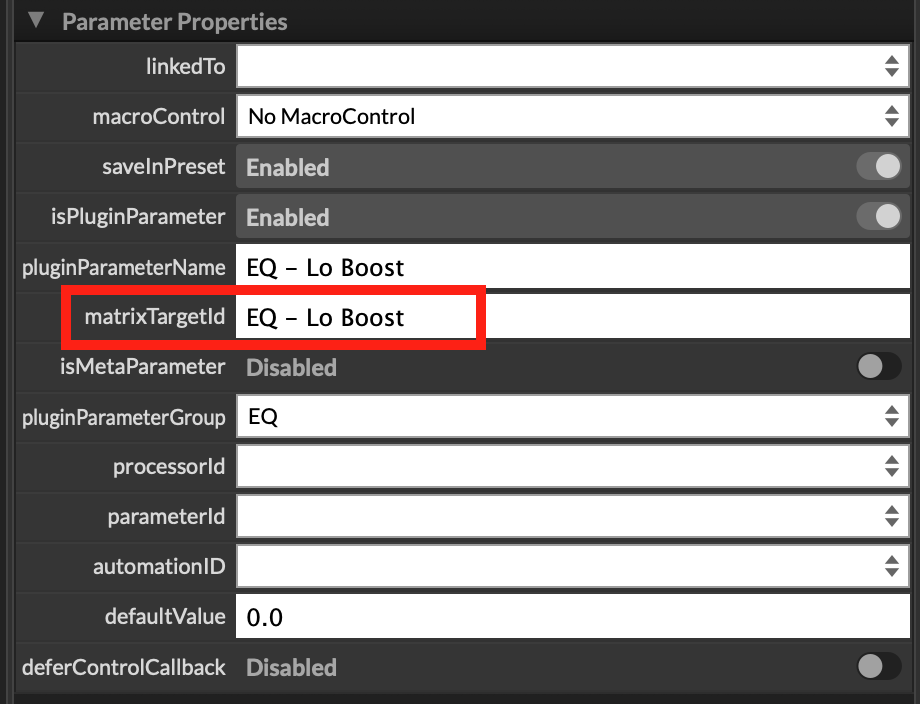
I don't see matrixTargetId as a property in the interface property editor.
Only tells me you probably haven't compiled a recent develop branch, because there definitely is a property:
-
@ustk I'm indeed still on the latest stable release...
I read it as 4.10 instead of 4.1 so I was convinced I was on the latest version.
I'll compile from the latest develop branch instead and try again.So what state is the mod matrix actually in?
Do some things work but others don't?
I'd just like to know what to look out for, if the documentation isn't super up to date.What are PRs?