RNBO effect bypassed in exported VST3 (works perfectly in HISE editor via Script FX / Global Cables)
-
@voxuer1
You have a Dry/Wet knob. Is the default value for that knob set to “Wet”? For example, 1.0 or 100.0?Other things I had to do to get my effects plugin to work:
- Enable Sound Generator FX
- Force Stereo Output
- Project Type: FX Plugin
Does it work without a Global Cable?
In your image, you didn't load the effect as a hardcoded effect; you can only see the ScriptFX. Are you sure you loaded the effect as a hardcoded effect before compiling?
-
@Oli-Ullmann already tried all of that exactly as you suggested, but unfortunately no success yet — neither as AU nor as VST3.
Current setup:
Project Type = FX Plugin
Force Stereo Output = enabled
Enable Sound Generator FX = enabled
Dry/Wet default is set to Wet
I even added an extra global bypass button for testing
The GUI works, but the audio signal just passes through unchanged in the exported plugin.
The reason I’m not using a hardcoded effect is because I need to read data back from RNBO via outports for my peak meter. That only works for me through Global Cables / Script FX. As soon as I hardcode the network, I lose the outport communication.
So currently the RNBO patch is loaded directly inside a Script FX on purpose.
Inside HISE everything works perfectly, including:
RNBO processing
Global Cable communication
Peak meter
parameter control
Only the exported plugin loses the DSP processing. -
@voxuer1
Oh, okay. I've encountered this issue before, where something worked in HISE within a network but didn't work in the compiled plug-in. It worked fine as a hardcoded effect, though. I never figured out why, but I didn't look into it further since I was able to work with the hardcoded effect.You could try moving your RNBO patch into a frame block. I don't know if that will help, but it solved some performance issues for me.
-
@voxuer1 It probably is the ScriptFX, I've had that issue as well. You should still be able to access the global cable from the HardcodedMasterFx. The script shouldn't change much but you need to create a Global Routing Manager:
const grm = Engine.getGlobalRoutingManager();and a reference to your global cable:
const peak = grm.getCable("peak");from there you can use connectTo (ModuleParameter, macroControl, etc.) or in your case register a callback (most likely you will want to use asynchronous): https://docs.hise.dev/scripting/scripting-api/globalcable/index.html#registercallback
	peak.registerCallback(function(value)
	{
		Console.print(value);
	}, AsyncNotification);
Sonic Architect && Software Mercenary
-
@HISEnberg Also maybe worth just testing the RNBO node in a hardcodedmasterFX (no peak or scriptFX) just to see if you are getting an audio output.
Sonic Architect && Software Mercenary
-
This post is deleted! -
@HISEnberg Yeah, that’s the frustrating part — as a hardcoded master FX everything works perfectly, including the exported VST/AU.
But I need RNBO outports for my peak meter / UI data, and I can only access those through Script FX / Scriptnode runtime. In hardcoded mode I lose the outport communication completely.
-
@voxuer1 Export the Scriptnode Network and load that into the HardcodeMasterFx, then use the code above. That's typically what I would do unless there is a breaking change I am missing in your setup!
-
@HISEnberg export as custom Cpp?
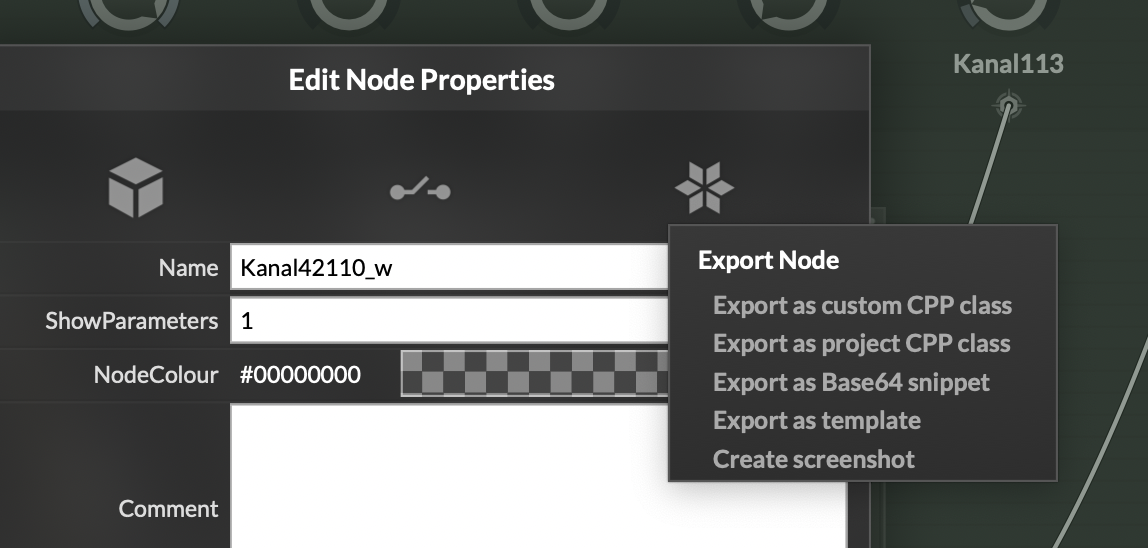
-
@voxuer1
Export → “Compile DSP networks as dll” -
@Oli-Ullmann no no success
-
@voxuer1 Which part is not working?
-
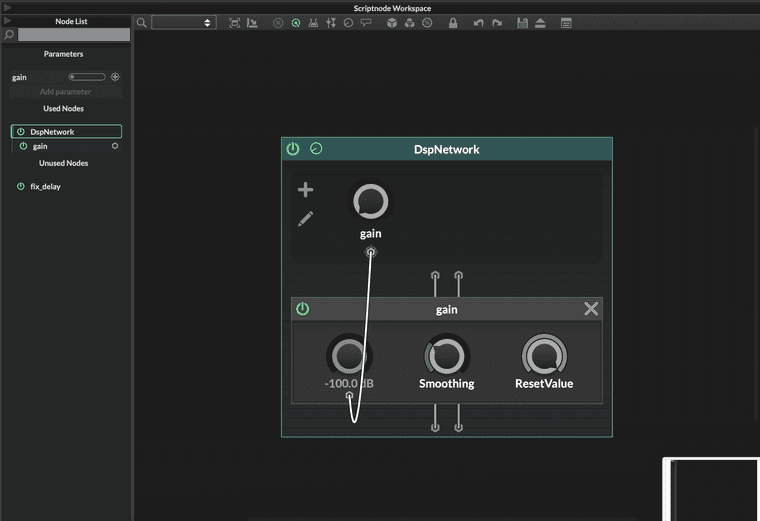
@HISEnberg tested it with a completely simple core.gain ScriptFX network (no RNBO at all) and the same thing happens: works inside HISE, but after export the plugin passes audio through dry. So it seems the issue is not RNBO-specific but Scriptnode/ScriptFX export related on my setup (HISE 4.1 macOS).
-
@voxuer1 and if you compile that gain network: Export → “Compile DSP networks as dll” , then load that network into the HardcodedMasterFx, do you still have the same issue?
-
@HISEnberg Yes, if I compile the simple gain network with Export -> Compile DSP networks as DLL and load it into the HardcodedMasterFX, then the DSP works correctly after export.
But with my RNBO setup I lose the outport / modulation connection in Hardcoded mode, which I need for the peak meter communication.
-
@HISEnberg even after trying this?
For a hardcoded master fx, the global cable is still there. To make it present you need to make a variable for it:
const grm = Engine.getGlobalRoutingManager();
const gcPeak = grm.getCable("gcpeak");
After that it will show up again. Try this example, compile this scriptnode network as dll. Once it's done restart HISE. Remove the Script FX and load the network into the Hardcoded Master FX.
HiseSnippet 1466.3oc2Ws0aaaCElxNJswsaXEqaXOJTrGbGxLhctzFTLzD6jzZr5Di3zr8V.MEsMgkH0nnSi2Pee+71Ok9OX6bzEKIG2zNi1h04.DHdtP9ctS1UqX7vPklXU4roAbh0cs6MUZF0ZDUHIsOfXslM+JpefGmzbZ.MLj6RrrJ+Ljs0ZqPh98lm1j5QkLdFIB4bkfwegvWXxnFr2OK77Nh5xOS3mS5s1qMSIao7TS.nT1dCR.kMlNjeLEEqjM44zvQDqevlWeP+s2Zmc29Q82lt6fGsU+5tMFvGznAa6s1r+fc2Ym96P2bah0pG5JLJcOC0vCIVqzT4Ns2H0qjwGv4hPQevpfE0I8fSNl7QJOWzDQpjViDdtcS8QgDhkc2LOV4XO18s6HbEynm449pHFNYZj2AZUpH7JW.d0yCuMxAuE.IqbPZkXHcO6dLsHvjwAwycraKMb8.JqXrLVVRo.K6VJPBoolOcL+HMrXlFU2YiMV2A92CeRkJPrJz3LT667SNGJGJj7ZC4lm4o5S8NUMwHjC6PkP3SWEDOQZVWNcLn.nFJcKJXdUevPV.P9A3tFKQMMenHDN0VTOu9PVP0ASjLiPIqdI0aB+gU9iJqA3LT4wqEnERSB8mT40q6re3TI6XkQLPvnnR.4T8cTRfC+DY0n8nxqq3LOqACVHOzsnUddn8r.1Xtr9lTrpbheetdcmLK.EDhWESBre6IA4yQYwQobBpjskByIAb4aKykjDZgudY6CnFJl4jPCjKfqMBDBVGvuDpaiyiVy9.d3XiJfPtdRFjdqbm3QMEy4wNCIL.ePgDMLYRFJLSy243CVgv6KDumcWggMZwXrzBvH3o9Xfwj1Geg8gCFvYlL.th8Q+5GodEkttOpRRuB3LiaRDuzYNLjzjv5OsyxuCz7.plelpqGcZ0vnoDmBPbcm9dJ13dheme8hhfXDzDknJaDUJ4dgKSsypu2Nk52bLYVGKiVbETDd7D+dvbHFuUB5.ZVkvRn30afqwzhdboazh+F9kvrNt1JgY8Tl4p9NladkRONpycx2Dqait9uzFaEdQ531887TupkxOPjjlFaVbcXzhaYuQM3uXw5p7lFLRIELLVEqTJ722WMAN4DaHKsuYZLJ0bfQrmQEdXUPuIgPuD2Sj8f8IZtNlEdrxE9Z0inLvuOsK0LBqlvtQPpKWWiMKEdNSIKQBCAwyzmSDbuSm+GCGvJ7QWFN82pLxOJCNAD3orZzVPJfm6.3QCCFPFK5XSz4cbbqj4lNipgoUgIsKkbVbrHBGscQ6XXzbuKX3.MRWpFNGX7Ex6V1miIsQaNXjWk128.QX.TxzbBT4GOCu.EXcaoK+JrUvOBMymsmIcPRaVSH4bFygiBNku0VGmiWqfLKNrTPj79o6ZuUiG2X2s2XyFMlK5jGTQWHAWAsPKgH6t14bbwNDqaaGO3unwApltBBKcDxDoswbcRG5UyVWGVi6cpG9.9.5DOSA96Own7glCo2laAwz2tqcAVQ6vyQtLpWpU.UTMUpw9zn54OTCV+Z6mS0tLvy61gh2DJo072jQ2Ilw7Mom0OIJn74T+wbdguL1K.ChflJQOFIw5w0N+B8Rtyy3P6Fbp9M7lj+5C+aRNgYfS+LMUFFnBKrw839hyTRzQmQ7kgvkn4+1oXNWd5sTT8BY8lmdDXiKTmdTyDcTxaZ+7bWOo7M8Tm5K4ScV4+bO04yfKgV30XqkhwdBr8+gxK4dPCgjaglzxZF07friRpRmmmEmOkCUfCGhMGyf9Bsm8MF3kSYTt+dmx83z74re+du.x0n5NQiPVJWQ8+0OLcggquyNFtNX8mymuucn7+qe6vmjw.eJNCeJSqtfE+5BLO81QT.6VFcCn0r6fqcpStLdJeVrzGZxcAiUbqtlhMVVE2bYUbqkUwsWVE2YYU7QKqhO9cqHNCJ4ReXoIbiutGFciLKqCk30YipHH+C3d0N2COr are you saying the modulation from the RNBO patch is not outputting to the global cable in this scenario still? I do this all the time with my C++ modules without issues.
-
@HISEnberg Yes, it works now

Thank you very, very much! -
@voxuer1 nice glad it worked!