Custom browser - custom preset file format???
-
@Orvillain said in Custom browser - custom preset file format???:
I'd probably settle for a preset file and accompanying .samples folder that sits next to it, with the preset file being updated to no longer include hard-paths, but relative ones instead. The enforcement being that the .samples folder HAS to live next to the preset file on disk.
That sounds like the simplest solution. So then it's just additional lines to add to your preset json file.
-
Right so it looks like there's quite a few ways to potentially address this. But probably the most flexible is using the UserPresetHandler API:
https://docs.hise.dev/scripting/scripting-api/userpresethandler/index.htmlThis function seems extremely relevant:
UserPresetHandler.setUseCustomUserPresetModel(var loadCallback, var saveCallback, bool usePersistentObject)It takes two functions - onPresetLoad and onPresetSave.
So in theory, I write a custom namespace for handling my custom preset format. It needs to be able to this kind of stuff:
- Gather all loaded samplemap names and any relevant identifiers
- Gather all parameters and their values
- Construct a sensible JSON array of all of the above
- Save it to a file on disk, using the FileSystem API coupled with the UserPresetHandler API.
- Use the onPresetLoad() method to reconstruct a selected preset in full.
- It also needs to be able to flag when sample content cannot be found.
- It needs to be able to also save and restore modulator states
- Any internal values for midi processors also need to be stored
- Arpeggiator patterns also
- Any routing matrix changes
- Maybe sample map details beyond names - root notes, velocity splits, etc?
- Add a version number to the file for future use
- UI states for selected tabs
- Provide some kind of sample relink method in situations where a samplemap or individual sample cannot be found
- For saving a preset, I should plan to allow custom meta-data to be added to a preset; things like author, style, type, etc...
Need to do some heavy thinking about this. Because the clients requirements are definitely quite a bit more expanded in scope than I initially thought.
-
@Orvillain It's definitley a big task. Out of curiousity have you considered just "hijacking" HISE's preset system using the
UserPresetHandlerAPI? This is what I am testing out currently in a project that demands more from the preset browser than is currently available.My idea is to let HISE's preset system to handle all the heavy lifting while I just define custom save/load callbacks that embed extra metadata as necessary. So instead of creating a completely separate file format, I'm using
UserPresetHandler.setUseCustomUserPresetModel()to replace HISE's default data structure with my own while keeping the standard .preset file format.As an example I am trying to define my own Tagging system and adding that information into the .xmls found in the UserPreset folder.
It might breakdown in your use case given the client requirements here, but may be worth investigating.
-
That's the right direction, but I would also try to stay within the HISE user preset system so you get the intended loading prodecure (kill voices, load the preset on a background thread, then unsuspend the audio processing).
With the custom data model you can define the layout of the user preset file as you wish. Note that it will be converted from JSON to XML at some point though (which is a bit weird).
They also want to be able to export a preset, and include any sample content with the preset - ie; bundle the custom loaded .wav file, or the samplemap, with the preset. For personal sharing purposes.
I would detach this from the user preset system. A preset with sample mapping data and samples should be
- The preset file
- The JSON (or SFZ or whatever) mapping file
- The audio samples
all in one folder.
-
@Christoph-Hart I'm looking at this again. Before I begin, is there a decent snippet anywhere that demonstrates how to do this for a simple plugin?
Also, what are the gotcha's to watch out for? You mentioned killing voices, loading on the background thread, etc...
-
@Orvillain nope, I'm using it in Triaz, but I haven't made a public example yet, but it's a good idea to do so. The problem is that it cannot be encompassed into a nice simple snippet as it requires additional data (preset files) to be useful.
Just from thinking about it there are a few things to watch out for:
- initialisation order. Usually you can decide what you restore first by rearringing your script function, but be aware that restoring module states for whole HISE modules will always come after this method.
- the function is being executed synchronously in the loading thread (but it should take a lock to prevent simultaneous execution of scripting tasks in the scripting thread). You can safely assume that there are no voices playing during this function call (because it kills all voices when loading a preset).
- The XML -> JSON conversion is a bit weird because the data structures are not 100% convertible, so there are a few edge cases to consider here. You'll notice when you run into them :)
-
Hey Christoph - I've not really got my head around this yet, and my client is requesting multiple types of preset. They want effect chain presets as well as full state presets. They also want to be able to add meta-data and copy samples along with the preset.
Does that mean I'm going to need custom data models for each type ??
I could really do with a simple tutorial that shows some of this stuff

Musician - Instrument Designer - Sonic Architect - Creative Product Owner
Crafting sound at every level. From strings to signal paths, samples to systems. -
Here's what I've figured out so far:
namespace PluginUserPresetHandling {

    const UserPresetHandler = Engine.createUserPresetHandler();


    inline function onPresetLoad(obj) {
        Console.print("we just loaded a preset!");
        if (obj.presetData.ui)
            UserPresetHandler.updateSaveInPresetComponents(obj.presetData.ui);
    }

    inline function onPresetSave() {
        Console.print("we just saved a preset!");
        return {
            "version": "1.0.0",
            "presetName": "This is a magic string for the preset name",
            "presetAuthor": "Drew",
            "presetDescription": "This is a saucy preset",
            "presetTags": ["Fat, Warm, Round"],
            "presetData": {
                "ui": UserPresetHandler.createObjectForSaveInPresetComponents()
            }
        };
    }

    inline function init() {
        UserPresetHandler.setUseCustomUserPresetModel(onPresetLoad, onPresetSave, false);
    }
}
And this will actually produce a file that looks like this:
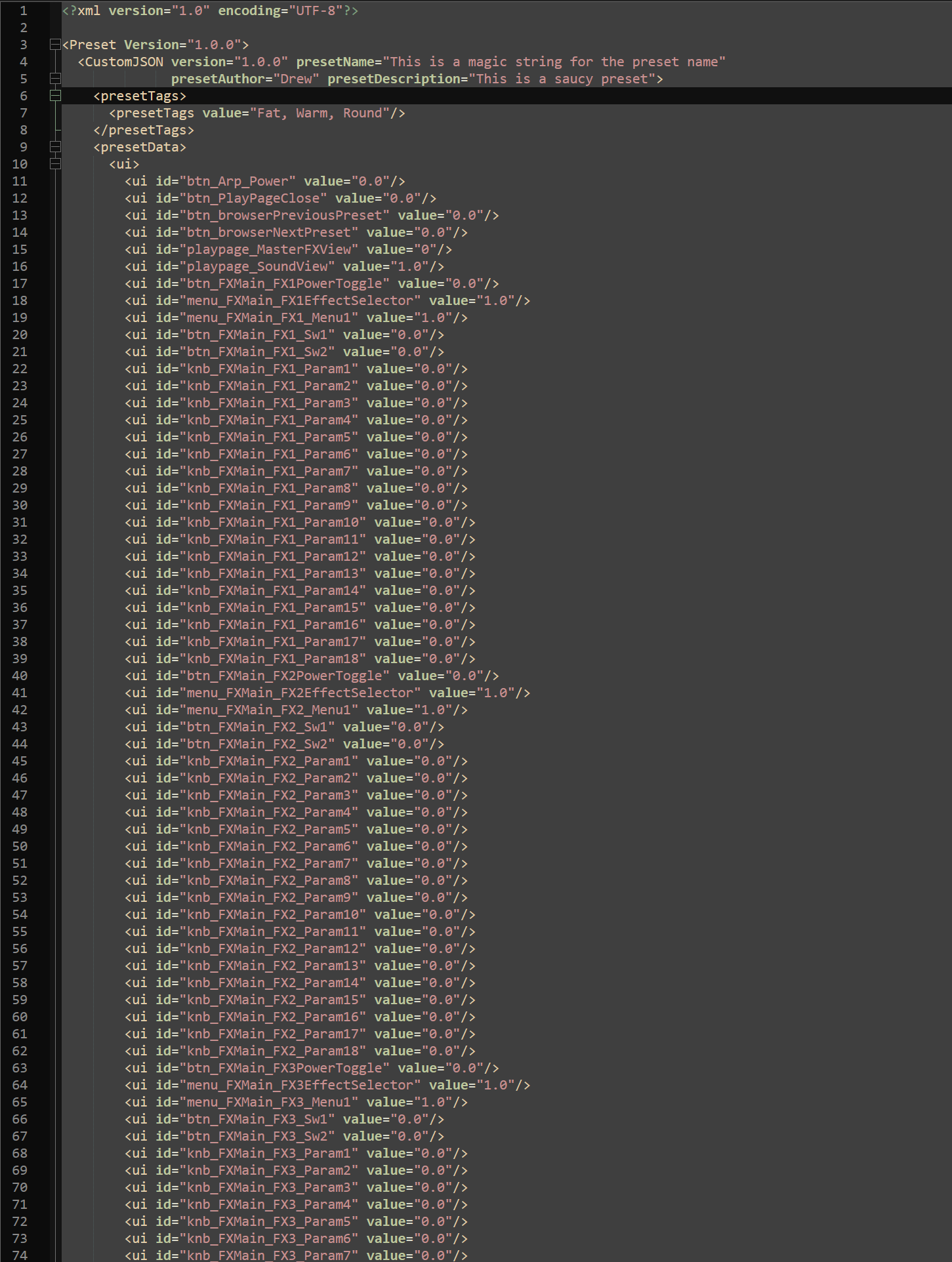
So that's quite cool.... but something about my preset did sound different, versus how it sounded when I saved it. So I guess there's more data across the modules that I need to grab too.
Musician - Instrument Designer - Sonic Architect - Creative Product Owner
Crafting sound at every level. From strings to signal paths, samples to systems. -
@Orvillain said in Custom browser - custom preset file format???:
Hey Christoph - I've not really got my head around this yet, and my client is requesting multiple types of preset. They want effect chain presets as well as full state presets. They also want to be able to add meta-data and copy samples along with the preset.
FX Chain presets should be pretty simple to encode in a json data model - what meta-data and samples?
Does that mean I'm going to need custom data models for each type ??
yes
-
@Orvillain there’s a mini preset system posted on here a while back by the lunacy guys / Casey Kolb. I’m about to take off otherwise would post.
-
Okay... starting to get a feel for this system now....
One thing I ran into today was trying to decide whether my menus should have their saveInPreset bool enabled or not. My menus have a callback associated with them that controls the loading of an effect and the binding of parameter knobs.
But because I am eventually going to be aiming at an effect chain preset format.... I figured saveInPreset should be disabled, and I should track the effect data manually.
I got there in there, but it did require a bit of thought. Because loading the effect networks seems to be asynchronous, so you cannot rely on the parameter knobs to be properly flushed at the right time when calling updateSaveInPresetComponents().
So after a lot of trial and error, I just decided to call it twice!!
    inline function onPresetLoad(obj) {
        local data = obj.presetData;
        if (!isDefined(data)) return;

        if (isDefined(data.ui)) {
            UserPresetHandler.updateSaveInPresetComponents(data.ui);
        }

        local engIds = ["Engine1", "Engine2", "Engine3"];
        for (i = 0; i < engIds.length; i++) {
            local engineIdx = i + 1;
            local smKey = "engine" + engineIdx + "SampleMap";
            local wtKey = "engine" + engineIdx + "Wavetable";

            if (isDefined(data[smKey]))
                UISoundSelector.syncSamplerMenu(engineIdx, data[smKey]);

            if (isDefined(data[wtKey]))
                UISoundSelector.syncSynthMenu(engineIdx, data[wtKey]);
        }

        if (isDefined(data.fxSelections)) {
            for (k in data.fxSelections) {
                local fxName = data.fxSelections[k];
                UIEffectDropDownMenu.syncEffectMenu(k, fxName);
            }
        }

        if (isDefined(data.ui)) {
            UserPresetHandler.updateSaveInPresetComponents(data.ui);
        }
    }

    inline function onPresetSave() {
        return {
            "version": "1.0.0",
            "presetAuthor": "",
            "presetDescription": "User Preset",
            "presetTags": [],
            "presetData": {
                "ui": UserPresetHandler.createObjectForSaveInPresetComponents(),
                "engine1SampleMap": PluginSharedData.engineSounds["Engine1"].sampler,
                "engine2SampleMap": PluginSharedData.engineSounds["Engine2"].sampler,
                "engine3SampleMap": PluginSharedData.engineSounds["Engine3"].sampler,
                "engine1Wavetable": PluginSharedData.engineSounds["Engine1"].synth,
                "engine2Wavetable": PluginSharedData.engineSounds["Engine2"].synth,
                "engine3Wavetable": PluginSharedData.engineSounds["Engine3"].synth,
                "fxSelections": captureFXSelections()
            }
        };
    }
This works well, if a little wasteful perhaps.
Part of the reason I wanted to do this is because the menu values are obviously floats, not the text value of the menu. And I knew that in the future if I wanted to add an effect type, and change the order of effects in the menu list, that this would break backwards compatibility. So I basically have a shim that will take a string and convert it to the right integer for the menu as it is in that moment, and then set the menu to the appropriate value .... which then triggers the callback to load the right effect network...
and then that last updateSaveInPresetComponents() call makes sure the parameters match what the preset has stored.
-
@Orvillain this all seems massively complicated for preset saving and loading, what does the existing prest management and a custom tag based browser on the front of it not give you?
HISE Development for hire.
www.channelrobot.com -
@Lindon said in Custom browser - custom preset file format???:
@Orvillain this all seems massively complicated for preset saving and loading, what does the existing prest management and a custom tag based browser on the front of it not give you?
Ultimately it isn't just about preset saving and loading.
They want full customization of the preset data model. They want each preset to have an associated image. They want to be able to import and export presets along with sample content at the same time. Which means I need full path control over the samples when saving. They want rich meta-data based browsing and on the fly searching. When saving a preset, they want to be able to specify various tags and descriptors, and it makes sense to store that stuff directly into the xml. There's probably more they want, but off the top of my head that's all I remember.
Everything they're asking for seems to involve deeper control over the load and save mechanics. But it's actually not that complicated. I'm essentially overriding the HISE automatic system, with a manual system. I'm capturing nearly everything that HISE captures automatically in a single call to UserPresetHandler.createObjectForSaveInPresetComponents() - everything else is custom.
Unless I'm missing something, there's a lot that the stock preset management system doesn't give you.
After spending a fair amount of time trying things out and reading the API, I'm fairly sure I have a decent grasp of how it all works now. There are also pre and post callbacks for loading and there's a post callback for saving too, which I'm going to need to tell the system to refresh the list of presets; or to update the external database, which is probably going to be required too.
-
woohoo! I've now got a custom FX chain file format too. At least in prototype form.
I think I'll write a tutorial on all of this once I've properly sussed it all out. Because it is quite powerful, and no-one else really seems to have dove into this.
Musician - Instrument Designer - Sonic Architect - Creative Product Owner
Crafting sound at every level. From strings to signal paths, samples to systems. -
@Orvillain said in Custom browser - custom preset file format???:
and no-one else really seems to have dove into this.
I have :)
-
Battling a little with extension issues however.
@Christoph-Hart When saving a user preset am I stuck with the .preset extension??
-
@Christoph-Hart said in Custom browser - custom preset file format???:
@Orvillain said in Custom browser - custom preset file format???:
and no-one else really seems to have dove into this.
I have :)
No one else with the time to do a tutorial example ;-)
Musician - Instrument Designer - Sonic Architect - Creative Product Owner
Crafting sound at every level. From strings to signal paths, samples to systems. -
@Orvillain said in Custom browser - custom preset file format???:
and no-one else really seems to have dove into this.
I have too... :)
-
@Orvillain said in Custom browser - custom preset file format???:
No one else with the time to do a tutorial example ;-)
Seemed pretty trivial really - its just taking the values you have assigned to params of a given FX and encoding those with the FX name in a json object...
HISE Development for hire.
www.channelrobot.com -
@Lindon said in Custom browser - custom preset file format???:
@Orvillain said in Custom browser - custom preset file format???:
No one else with the time to do a tutorial example ;-)
Seemed pretty trivial really - its just taking the values you have assigned to params of a given FX and encoding those with the FX name in a json object...
Cool, thanks for the help.





