Look & Feel - ComboBox Background.
-
@DanH gives me this;

and whilst thats a nice colour :-), its not what I'm looking for...
HISE Development for hire.
www.channelrobot.com -
@Lindon can't you make it 0x00000000?
DHPlugins / DC Breaks | Artist / Producer / DJ / Developer
https://dhplugins.com/ | https://dcbreaks.com/
London, UK -
@ulrik - oh yeah, very odd I think...
-
@DanH said in Look & Feel - ComboBox Background.:
@Lindon can't you make it 0x00000000?
hmm, just randomly throwing hex values into the ring isnt helping here...try it yourself and see if this works (hint: it doesnt)
HISE Development for hire.
www.channelrobot.com -
@Lindon so sorry
-
this gets a strange result:
ComboBoxLAF.registerFunction("drawPopupMenuBackground", function(g, obj)
{
	//var a = obj.area;
	g.setColour(Colours.red);
    g.drawRect([0,0,2000,2000], 1);
});
you get this:

-- see the little red line on the left side?
ComboBoxLAF.registerFunction("drawPopupMenuBackground", function(g, obj)
{
	//var a = obj.area;
	g.setColour(Colours.red);
    g.fillRect([0,0,2000,2000]);
});
predictably gets this:

but this:
ComboBoxLAF.registerFunction("drawPopupMenuBackground", function(g, obj)
{
	//var a = obj.area;
	g.setColour(0x00000000);
    g.fillRect([0,0,2000,2000]);
});
gets us back to this:

HISE Development for hire.
www.channelrobot.com -
@Lindon I'm pretty sure you can't make the background of the combo box transparent. It will give a white outline (the panel is opaque basically). You can make the individual items have a transparent background though.
Free HISE Bootcamp Full Course for beginners.
YouTube Channel - HISE tutorials
My Patreon - More HISE tutorials -
@d-healey - yeah that's the position I'm rapidly reaching. Thanks. I'm not sure this is a bug but its certainly a feature it would be nice to have,....
-
BG CB transparent is not a bug. Transparent is not possible right now with out altering the source Code. How ever it will be a good feature request to have CB transparent BG.
-
I would like to give this one a bump. According to everything I read on the JUCE forum, the popup menu is by default opaque, unless you set
PopupMenu::backgroundColourIdto a colour with an alpha < 1.0.I've been through all the HISE popup look and feel functions I could find and set this property to
transparentWhitebut still the combo boxes show a white background.@Christoph-Hart Any ideas?
Free HISE Bootcamp Full Course for beginners.
YouTube Channel - HISE tutorials
My Patreon - More HISE tutorials -
If you use a viewport and check 'useList'. Then you can make a transparent list area. You just have to also make a label of some sort showing the currently loaded index/value, so that the user can click to reveal the viewport list. Pretty much what a combobox is. Little hacky but I got what I wanted without doing anything too crazy. I prefer to do this when the list is very long, you can set it to open at a set size and have a nice scrollbar.
-
@David-Healey I just had a go at fixing this. Is that what you mean?
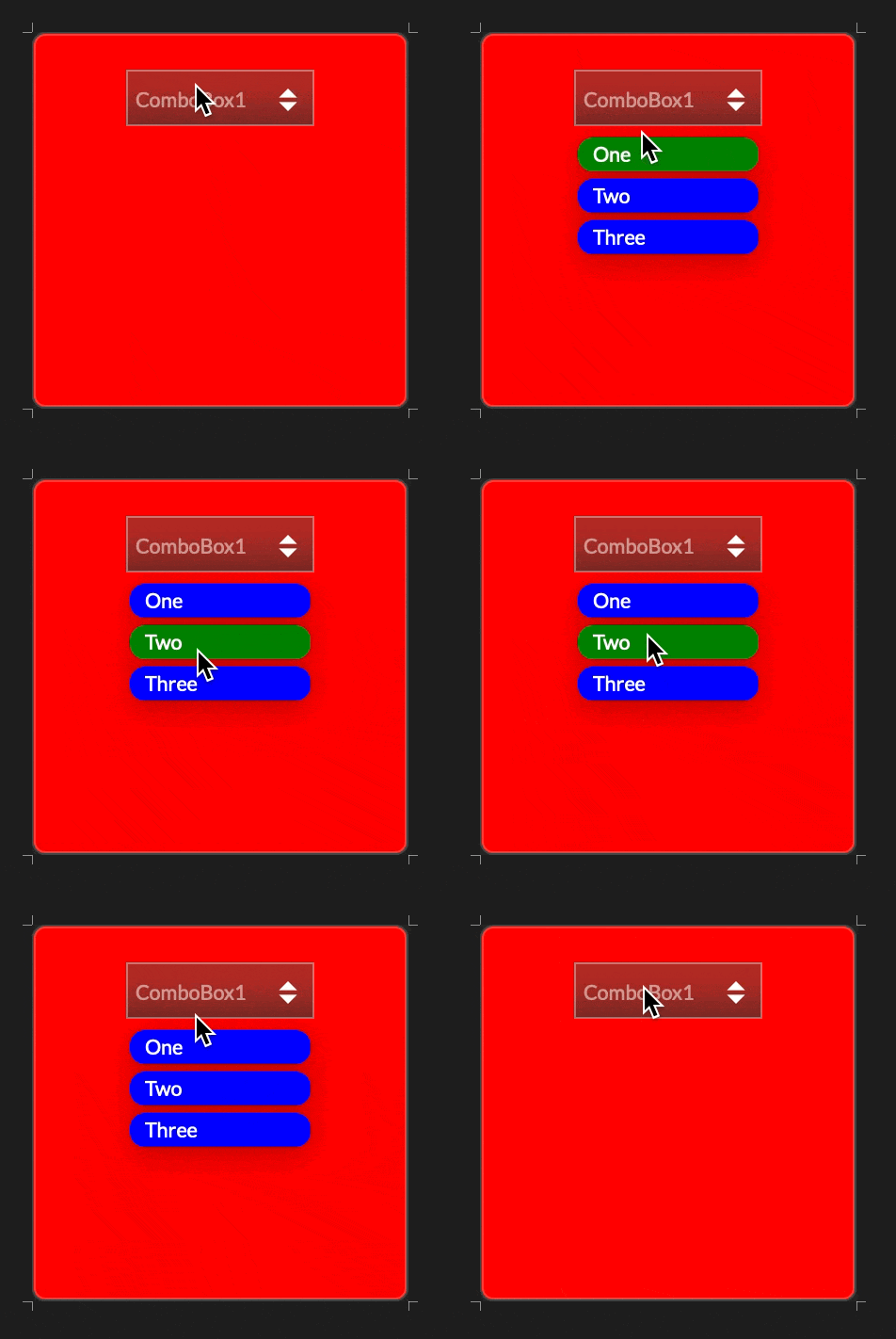
HiseSnippet 1112.3ocsVs2aaaCDmJIJKwacqEne.H7e4roYH+pIcACMO8pwxCi4rhMDDTPKcxhKRjFRTMwXneH12z8MH6ndXKO6klZfI.av6Eue2wi2w9QRGHNVFQLpb0jw.w3qLGLQn7O1mwEjdmPL9ZyyYwJHhlw5nIiYwwfKwvX8eRyvX6MHoe+8aNhEvDNvLVDx6jbG3LdHWMia+C9YdPPWlKbEOrj1sOnmiTbrLPlf3YcSaxXlysrQvELsZqYRdKK1mX7sl1scX60zqSqVu9061wcH330.FtqCytCyqCC41l0tSi1DiMO0kqjQCTLEDia5QR2IC7k2Ixbv63w7gAflnAY.54L1ji84At8KRNwDhwF8mkpVOKU8Ryy4t7o7mkxddp.5LKJmzLV6wfTiOCHYTBRajAoWXNvIhOVMShFOeoYOAdB5wvylxPISWxZ+05lGKQMDp5gragtQHwTKp0z11hh+sy9UpfmOwJZ.yi9izBSbh.LRNS5vBNSJu8PgaW.BpoUGUrdDLhqqe5lHbTbonVU2H1c8kiSFeNHRNBOhGEISDtUsndE5LxhJG9G6T4OqPwuQ0iAUVcQsp12am+UEcQlXOrd5W.GUsqssrsz.F+cCJ9iOQTzSAg+29+CrHJCiXjUcFFs3dVvdLy8PjCJ7Z1012P+NZSKJ65FSW07F52SaqW0Jc0M6uPHo2Vd7a4i7CveJvk9FZln35ih.PP+gozCCRf4CacpCb0QOSLJ.pkiHK5d6TBmJ3dUAPy0HCt6YUDCHnmsNE1Md0LFstYIHu.U24yUyfEJuKVaTq5IfGKIPgI1FsqaOUtNyeHFpBv8JDVowuFeVSQoEsZ.3opVbBlU1crLbn7H48MJU7MRikvwRAnc3TMzVNkPCnEJOwhhc1u37lJEWHUvkhZ5i7sq7wJz+sHOukJSiiHYP.DsTw5FbQOlg0DIgCgHK7PRexVnHdgd9tDa9z5R3jkVJonTzSvUWNFxo6JCb0290qWrmBIOup6tjiPTUUZukmm2aoHuR3t5VKSSyjzPnbyexu16DlhUrY39h9ZLDo35Px3D3C3vgrFWaadBDeqRNF6yO8.kXrUlqeVQaMl.BR86VloqaPturCmTl.KICKFlr8lDxCOLO2lkYeG2U4OyZ9A9f9tXYNjR35KdhoDDclFMyPlowKwEgrTdqunO+8CzXCSLei4kBnxU2IqbkOd8GGXtPedbBizMIfoleridfbt.rJatd8594hXtZR4A1eFyhrezYQOUH9By9bki+xw3ZKAiXsy+GXLeB9yLO0yC6bNCfaX182V0w0eB2icpUbwnyYpHttF3hjvAXYnCfdWf0xw55h0z2Ayns0z5Lv.P3lR7.9kKrgl1HWXiBgX0kSj78NY2b0uQXqTNHlDougZa7wbHMcIWVCwmr7dGm42pELr4pZXqU0v1qpgcVUCe0pZ3tqpg68oMT+hxCSTxvrqMDx48OMs4pgwoBFVAlVsR9GztgJYGContent.makeFrontInterface(200, 200); const laf = Content.createLocalLookAndFeel(); laf.registerFunction("drawPopupMenuBackground", function(g, obj) { g.setColour("0x00000000"); // any transparent colour g.fillRect([0,0,200,200]); }); laf.registerFunction("drawPopupMenuItem", function(g, obj) { var a = obj.area; var padArea = [a[0] + 2, a[1] + 2, a[2] - 4, a[3] - 4]; g.setColour(obj.isHighlighted ? Colours.green : Colours.blue); g.fillRoundedRectangle(padArea, 8); var textArea = [padArea[0] + 8, padArea[1], padArea[2] - 16, padArea[3]]; g.setColour(Colours.white); g.setFont("Default", 14.0); g.drawAlignedText(obj.text, textArea, "left"); }); const ComboBox1 = Content.getComponent("ComboBox1"); ComboBox1.setLocalLookAndFeel(laf);The drawPopupMenuBackground object should probably include an area, and the popup menu items still have a subtle drop shadow. But they're both fixes for another day.
PR here, if it's useful: https://github.com/christophhart/HISE/pull/805
HISE dev latest / herdr + Claude Code / Figma + Affinity
Meat Beats: https://meatbeats.com
Klippr Video: https://klippr.video -
@dannytaurus Excellent, thanks
-
@dannytaurus sick man.

-
@dannytaurus Seems to work perfectly
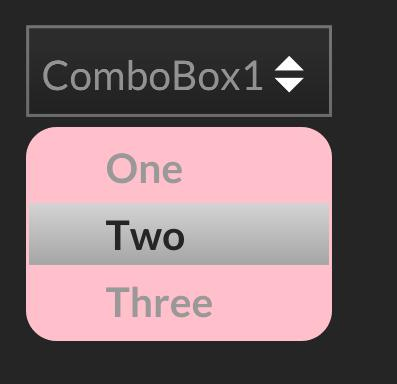
Free HISE Bootcamp Full Course for beginners.
YouTube Channel - HISE tutorials
My Patreon - More HISE tutorials -
@David-Healey Excellent! Your example just reminded me this also solves my issue with getting rounded corners on the MID Learn popup too. Bonus

HISE dev latest / herdr + Claude Code / Figma + Affinity
Meat Beats: https://meatbeats.com
Klippr Video: https://klippr.video -
@dannytaurus You just upped everyones combo box game. haha.
-
@dannytaurus @David-Healey Doesnt work on older Version!
I see a White Bg Here!
Did you Guys Changed the Source code? -
@ILIAM said in Look & Feel - ComboBox Background.:
Did you Guys Changed the Source code?
Yes you'll need to wait for Christoph to merge it, use one of our forks, or make your own fork and pull in the PRs.
Free HISE Bootcamp Full Course for beginners.
YouTube Channel - HISE tutorials
My Patreon - More HISE tutorials -
@David-Healey said in Look & Feel - ComboBox Background.:
wait for Christoph to merge it, use one of our forks, or make your own fork and pull in the PRs.
Great!
Can you point me to the Code you guys changed?
I want to stay with my Current Version of Hise for now