From what I can see, there's no way to add or remove elements after the onInit phase. I wonder how people handle different layouts and elements for each expansion...
D
Posts
-
RE: How to add an element after onInitposted in Newbie League
-
How to add an element after onInitposted in Newbie League
I need to add some components after loading an expansion, but got this message:
Tried to add a component after onInit() -
RE: Detect if Stereo or Multi-Output?posted in General Questions
@Chazrox yes, I've added an UI toggle, so when it's on it'll route it to multiple outputs, otherwise to stereo
-
Detect if Stereo or Multi-Output?posted in General Questions
This topic got a bit lengthy, so I'm posting this question here:
Since
Engine.getNumPluginChannels()always returns the max outputs, even if it was added as Stereo, is there another way to detect if the plugin was inserted in the DAW either as Stereo or Multi-Output?(I'm currently implementing an UI toggle switch, but it'd be great to detect it automatically)
-
RE: Enable Multi Output in Logicposted in General Questions
EDIT: actually, maybe not. I think for a multi-output enabled plugin it will always return the max outputs, even if the plugin is loaded as a stereo version.
You're right, @dannytaurus, it always returns the max outputs. I think the UI toggle will be the only viable way.
Thanks a lot for the help!
-
RE: Enable Multi Output in Logicposted in General Questions
Thanks @dannytaurus, it worked indeed! However, when I add the plugin as Stereo instead of Multi-output, the other 4 instruments, routed to outputs 3-10, are mute. Do you know how to make it work also on Stereo?
-
RE: Enable Multi Output in Logicposted in General Questions
@dannytaurus I've tried a lot, with no result. The only thing that worked was changing
juce_AU_Wrapper.mm. Would you have a guide on how to achieve that without changing HISE's source code? -
RE: Enable Multi Output in Logicposted in General Questions
Thanks @dannytaurus.
It worked well on Reaper, but not in Logic.
Somehow, Logic needs to be told the output options it should offer. I've tried to use these posts you've mentioned with ChatGPT, but after trying many different things, I still couldn't figure it out. -
Enable Multi Output in Logicposted in General Questions
I'm trying my plugin to have a multi-output option.
I've built HISE with these Preprocessor Definitions:
NUM_MAX_CHANNELS = 10
HISE_NUM_PLUGIN_CHANNELS = 10
I can see the multiple outputs in HISE:
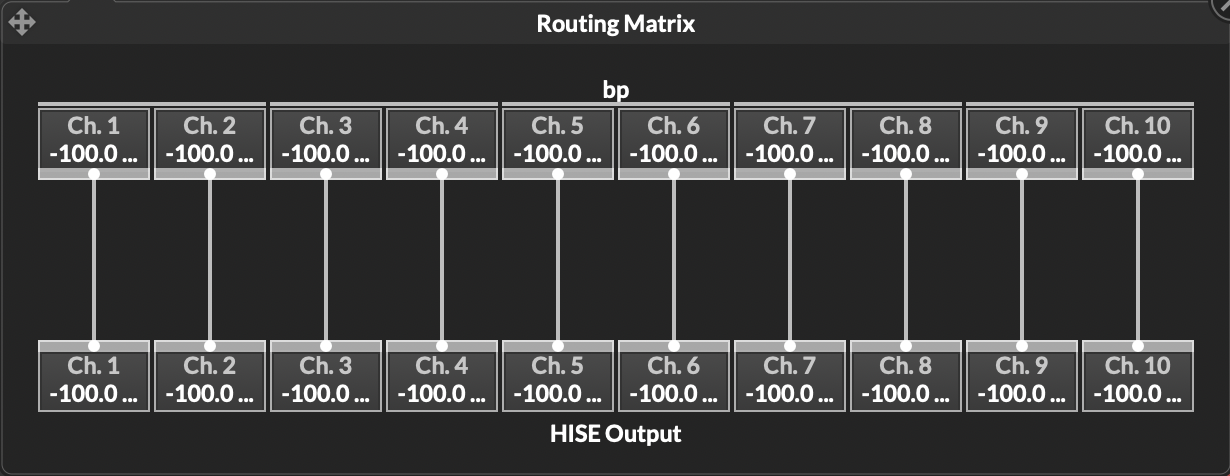
But when I export the plugin, Logic only shows the Stereo options.

Does anyone know what else I need to do to enable multi-output options?
-
RE: HISE doesn't open on Windows (virtual machine, M1)posted in General Questions
@resonant ARM64 (Windows on ARM), Windows 11, 24H2 branch (build 26100)
-
HISE doesn't open on Windows (virtual machine, M1)posted in General Questions
I've build HISE from source on Windows 11 (UTM virtual machine, Mac M1). It builds OK, but when I try to open, the cursor changes to detault/loading for a few seconds, then goes back to normal, and HISE doesn't open.

I was able to build from source on an M2 OK, but this one just doesn't open.
I've tried mulitple flags and configurations, no luck. Any clues?
-
RE: HISE doesn't recognize MS Buils installedposted in Newbie League
Solved it. Created a junction to "remove" this
18folder:mklink /J "C:\Program Files\Microsoft Visual Studio\2022" "C:\Program Files\Microsoft Visual Studio\18" -
HISE doesn't recognize MS Buils installedposted in Newbie League
I've built HISE from source, and when I clicked "Save Project and Open in IDE..." Projucer found Visual Studio no problem.
I've installed MS Build checking every single option mentioning C++.
HISE is still not recognizing MS Build installed. The path it was installed is
C:\Program Files\Microsoft Visual Studio\18\Community\MSBuild, so I'm wondering if this18is an issue.Any clues, anyone?
-
My instrument is not listed in Pro Tools (goes to AudioSuite instead)posted in Newbie League
I've just managed to export my instrument as
aaxplugin.When I open Pro Tools (Developer Build) my plugin is not listed in the instruments list, but it's listed as instrument under the AudioSuite menu.
Any clues on how to fix this?
-
RE: Difference between "Compile project" and "Export as..."posted in Newbie League
@David-Healey when I try to export as AAX on HISE, I get this error:
❌   "AAXStartup(IACFUnknown*)", referenced from:
❌   "AAXShutdown(IACFUnknown*)", referenced from:
❌   "AAXCanUnloadNow(IACFUnknown*)", referenced from:
❌   "AAXGetSDKVersion(unsigned long long*)", referenced from:
❌   "AAXRegisterPlugin(IACFUnknown*, IACFPluginDefinition**)", referenced from:
❌   "AAXGetClassFactory(IACFUnknown*, _acfUID const&, _acfUID const&, void**)", referenced from:
❌   "AAXRegisterComponent(IACFUnknown*, unsigned int, IACFComponentDefinition**)", referenced from:
❌ ld: symbol(s) not found for architecture x86_64
❌ clang++: linker command failed with exit code 1 (use -v to see invocation)
When I then open the Xcode project and compile it, it works. So I was wondering if there is an option in HISE to generate the Projucer and Xcode files without compiling them

