@boim98208 @Christoph-Hart Do Flex AHDSR Envelopes require connecting to a floating tile? The issue I have of Flex AHDSR not triggering the samplers was also an issue when I did a compiled build
B
Posts
-
RE: Rhapsody not loading after installing a project expansion fileposted in General Questions
-
RE: Rhapsody not loading after installing a project expansion fileposted in General Questions
@David-Healey Ok I fixed it. For some reason, Flex AHDSR on the samplers was the problem. When I replaced it with any other envelope, it started playing 100% fine on Rhapsody. Do I need to connect the Flex envelopes to a floating tile? I was only using them because I prefer thinking of adsr with the visual but with it playing just fine in HISE I thought I didn't need to connect it to a floating tile
-
RE: Rhapsody not loading after installing a project expansion fileposted in General Questions
@David-Healey Yes I hear noise with Bell and Bone
-
RE: Rhapsody not loading after installing a project expansion fileposted in General Questions
@David-Healey I'm on the March 10th commit of HISE. Also, the samples do seem to load. I see RAM usage go up as I load the library and I do see the link file. I'll build with the newest commit and see how it goes
-
RE: Rhapsody not loading after installing a project expansion fileposted in General Questions
@David-Healey I'm not on the latest develop branch. What's the "link" file?
-
RE: Rhapsody not loading after installing a project expansion fileposted in General Questions
@David-Healey Yes it worked 100% fine. I think I may have found the issue. In onNoteOn I called Message.getNoteNumber instead of Message.getNoteNumber(). Maybe it is maybe it isn't but the plugin now loads in Rhapsody. But I've come across a new issue: none of my samplers play within Rhapsody. Even when disabling all my midi mutes, it still doesn't play them. I doubt it's anything to do with the midi processing because when I add a sine wave generator it does play in Rhapsody. Do I need to load the sample maps via script or do something specific with the preset?
-
Rhapsody not loading after installing a project expansion fileposted in General Questions
When I went through manual installation of my own rhapsody project expansions, I get stuck on a loading screen. After waiting for at least 20 minuets, I stay stuck here. I see the project is "installed" but it never opens
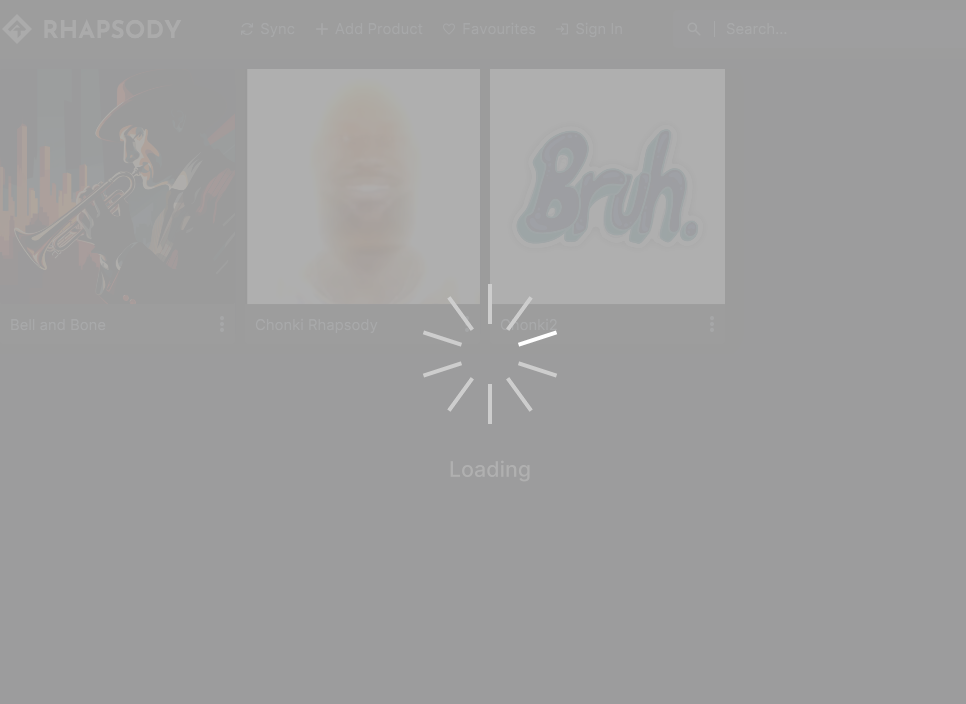 (Ignore the icons, I was just testing it out)
the sample files get extracted perfectly fine and I see all the .ch1 files. Any ideas on what's going on? -
RE: Getting "illegal call in audio thread" while changing a cc valueposted in Bug Reports
@boim98208 For some reason this was only happening when I did learn midi CC. I decided to just stick with a set CC channel for the knob to be better safe than sorry.
-
Getting "illegal call in audio thread" while changing a cc valueposted in Bug Reports
I'm trying to change a knob with midi CC but I keep getting this "! Illegal call in audio thread detected: String creation" error whenever I start start playing midi in the middle of changing CC. If I change the CC while playing, I don't get this error. It's only at the start with a changing CC value. Any ideas why I'm getting this?
-
RE: Loris Install / HISE App Data Directory?posted in General Questions
@David-Healey can you show me where this appears? I think I've looked everywhere I could with the wavetables, I have loris enabled, and I STILL can't seem to find it
-
question on the loris toolbox "use samplemaps" functionposted in Newbie League
I want to do a lot of resynthesis with the Loris Toolbox and I see the option of "USE SAMPLEMAPS" but no matter what I do I just can't seem to load anything with it? Loading examples works fine and I can load my own files but I can't seem to load batches of files
-
HISE crashing in opening a project when missing samples.... sometimes?posted in Newbie League
I was trying to open up a preset xml that was meant to test scripts for a sample map and it kept on crashing no matter what I did. I decided to move on and just do it over in another preset xml. I notice that in the sample map I was testing that I was supposedly missing files. I had forgotten that I did a batch renaming. I undid that renaming, fixed up the sample map, and went back to the xml that kept crashing and this time around it opened fine. I just don't understand why a broken sample map would crash one project and not the other. Is this a bug or is this me missing something?
-
RE: Changing RR group from sample table won't workposted in Bug Reports
@David-Healey but I don't think I can add RR groups in any other way, right? The old circles on the top right of the samplemap editor that'd represent the RR groups aren't there anymore and I couldn't find any other way to get the RRs assigned through the sample table unless I used the complex group editor.
-
Changing RR group from sample table won't workposted in Bug Reports
I appreciate the new complex group editor in the sampler interface a lot. It's been making a lot of things easier. But I still find trying to copy and paste into another sample group as buggy. Whenever I copy the samples and try to go to a new group, it still pastes into the first RR group. And for some reason, in this particular scenario, the RR group just won't change even when going directly through the sample table
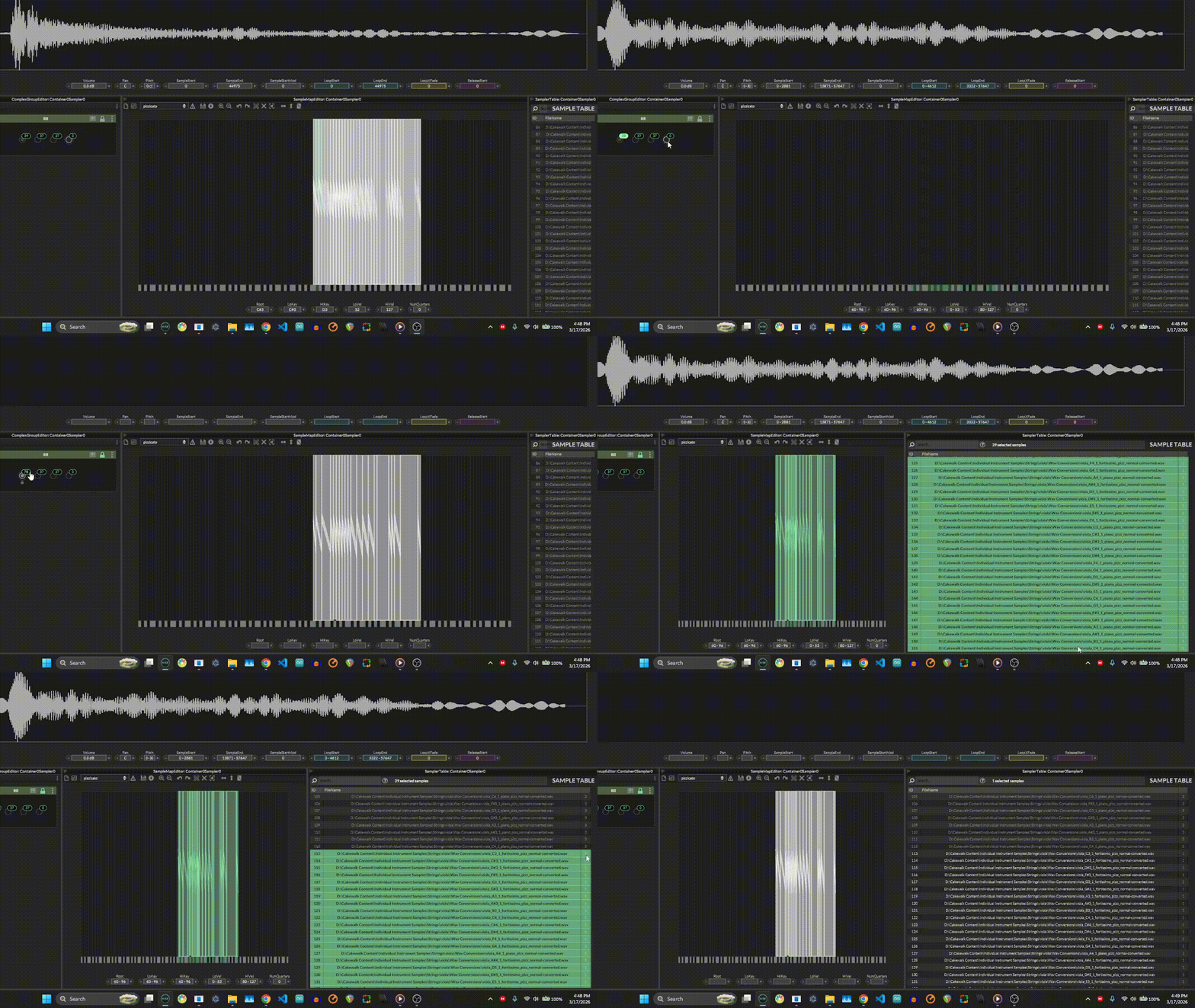
-
RE: Is there a way to do artifical RRs via pitch shift in script?posted in Newbie League
@David-Healey Back to this question of doing it within the sampler, I'm trying to figure out a quick way to do this. If I copy the samples, go to a new RR map, and paste, it'll always go back to the RR map that it was originally from seemingly no matter what I do. What I was doing for a bit was just going to the new RR map and importing the same samples back in, parsing data from the file name, but there has to be a more efficient way to do this, right? Am I copy and pasting wrong?
-
Is there a way to have certain samples go through a different RR cycle than others in the same sampler?posted in Newbie League
One advice I heard from someone is to sample more than what you plan to have in your sample library in case you have a bad RR sample. But then I was wondering what if one note had more usable RRs than the other? Is there a way for a note to cycle through a different RR map than another within the sampler? Or do I just need to bite the bullet and have a separate sampler for that one specific note.
-
RE: Is there a way to do artifical RRs via pitch shift in script?posted in Newbie League
@David-Healey Is it really easier?
 I feel with a script I can just copy and paste that and be done with it
 -
RE: Is there a way to do artifical RRs via pitch shift in script?posted in Newbie League
@griffinboy could you send an example of what you mean? Also, this would be in the script processor of a midi processor, right?
-
Is there a way to do artifical RRs via pitch shift in script?posted in Newbie League
What I'm thinking is going through the same RR group but pitch shifting the lower sample up and pitch shifting the upper sample down to get them at the same pitch. The workaround I found is to just have 3 RR groups with the same samples and pitch shift accordingly with the sample editor. But, I was wondering if there's a quicker way to do this with a script processor? I looked at the documentation and saw something like addPitchFade and I tried getting it with a sampler but I just couldn't get anything to work
-
RE: Can't find Test MSBuild when doing export setupposted in General Questions
@David-Healey Just did that and can confirm it works now :D. Thanks a lot for all the responsive help