My setup for building HISE plugins with AI (YMMV)
-
@dannytaurus nice post buddy! I would add the Pi agent as a viable harness option as I found this to be the most token efficient one - although it might not work with a claude sub as they restrict sub usage to claude code last time I checked (and subsequently cancelled the sub and went over the the street to ChatGPT.
One detail: if you use the hise-cli to edit external files instead of the native edit tool you get a diagnostic back which uses the shadow parser I‘m about to rewrite :) I found that just giving direct feedback for most obvious coding issues saves you from spamming your md files with HISE gotchas.
-
@dannytaurus great writeup :)
I can't share the source for the harness because it contains a web-exploitation module & toolkit I use for bug-bounties and could very easily be used inappropriately / illegally if a bad actor got hold of it.
In general it's a simple harness written in Python using the
textualpackage for the UI. It contains all of the standard tools likeread_file,write_file,run_commandetc, plus some extra goodies:Git Tools
Includes things like
diffandstatusto verify the code it wrote, as well asresetin case it breaks something. It can't commit or push or otherwise modify the repo directly.Browser
It includes the
camofoxbrowser, which uses various techniques to bypass turnstiles / captchas and bot-detection. It's not 100% successful but it's able to consistently browse sites like reddit, run web-searches etc.ComfyUI
The harness contains additional custom tools for controlling a local ComfyUI instance directly, so I can have the harness create images, videos, edit things etc. Probably one of my favourite features as I get access to a variety of local models for product images, videos etc. I've been using it to make ad creatives for meta.
Ponytail
It leverages the popular
ponytailskill in the system prompt, basically a checklist to help improve the quality and consistency of the code:Before adding code, walk this ladder and stop at the first solution that fully holds: 1. Does this need to exist? Do not build speculative work. 2. Does the standard library already solve it? Use that. 3. Does the platform or framework solve it natively? Use that. 4. Does an already-installed dependency solve it cleanly? Reuse it before adding machinery. 5. What is the smallest readable implementation that fits the codebase?And later:
## Editing Files

Make file changes with `write_file` — it creates or overwrites in a single call, so there is no separate "create" step, and parent directories are created automatically. Prefer `write_file` over shell redirection for anything that creates or replaces a file.

For surgical edits to an existing file, use a Python script via `run_command`: read the file, transform the text, write it back — preserving the file's existing line endings (e.g. CRLF). Read the file before editing it; never write blind.
This combination of Ponytail and surgical Python edits noticeably improved the quality and consistency of the code.
Verification
The system prompt includes things like:
Verify your changes work, but scale the verification to the size of the change — verification should never become the bottleneck of a session.

- Small, localized fixes: run the smallest check that exercises the changed behaviour — compile the affected target, run a single filtered test, or do a quick manual check. Do not run the full test suite or a full rebuild for a small fix.
- Major fixes, rewrites, and new features: run the full build and relevant test suite. This is the only case that justifies building a broader verification harness.
- Prefer the project's existing test/lint/build commands. Do not build verification harnesses (new tools, pipelines, or persistent test files) unless the change is major, a rewrite, or a new feature.
This sort of pessimistic critic-gating is a combination of GAN-style adversarial gating, and some of the stuff in
hermes-agent.Deepseek Harness
I (the agent) also ripped some of the guts out of DSH: https://github.com/deepseek-ai/deepseek-harness to improve the cache hit rate and context compression (doesn't work 100% but I haven't bothered to go in and fix it yet).
Models
It's hardcoded to run Deepseek Flash via API, which costs cents on the dollar at 80-90% of the quality of the "western" models. For my personal uses it has outperformed basically everything else, including Gemini.
It can also use Ollama, either locally or one of their cloud models. As well as strata: https://github.com/niko1221/strata
Unfortunately my PC is not amazing for local models, 12gb VRAM and 32gb system RAM can only just run strata with nothing else open, the instant I open a web-browser or anything it OOMs.
Security / Safety
The harness is initialized by
cd'ing to a directory and launching it. Only the read tools work on files outside of that directory (and sub-directories), if the agent tries to write files or do anything sketchy to anything outside the workspace - it gets blocked.Example Project
I'm noodling at a harmonic + stochastic model trying to recreate my sample libraries without any actual samples. I put some of the original samples in the workspace and asked it to do some web-research, write up a plan for whichever method it thinks is the best and start working on the model.
It researched things like DDSP and Loris, wrote up a plan and used Python to continuously analyze the generated synthetic output against the original samples until it was happy. It took 1-2 extra rounds but it was able to accurately recreate my guitar harmonics instrument as a synth with infinite round-robins and an extended keyrange, all for just 100kb of data (no torch / DDSP used, it just researched it to understand the harmonic + stochastic decomposition).
I think the main takeaways are:
- Secure the harness to prevent external writes
- Be intentional with tooling, too few restricts the agent, too many tools confuses it.
- Iterate on the system prompt so the agent understands the available tools and how to use them
- Test it on real work and incrementally improve it to fit your specific use-cases
-
@iamlamprey have you tried the pi agent? It‘s also highly customizable and embeddable - I actually integrated it into hise-cli for fun and hardwired the tool usage to directly call the Rest API of HISE.
-
@Christoph-Hart Nah, I did look at it among some other ones and settled on hermes before rolling my own. embedding use-cases like that sound very useful though
-
@Christoph-Hart said:
I would add the Pi agent as a viable harness option
I've tried a handful of other harnesses but ended up feeling most comfortable in Claude Code.
The beauty for CC for me is the subscription. The amount of token usage I get compared to paying API pricing in other harnesses is substantial.
I do want to try some of the cheaper models in another harness though, to check what the quality is like compared to Fable. I'll check out Pi, looks cool.
HISE dev latest / herdr + Claude Code / Figma + Affinity
Meat Beats: https://meatbeats.com
Klippr Video: https://klippr.video -
@dannytaurus Thanks for the detailed post. I'm setting up herdr now, looks like Christoph was right about Pi, you pay extra to access Claude through third-parties.
Free HISE Bootcamp Full Course for beginners.
YouTube Channel - HISE tutorials
My Patreon - More HISE tutorials -
@David-Healey Yep, the Claude subscription is a blessing and a curse.
The blessing is you get a ton of usage for a fixed monthly fee.
The curse is that you can only use your subscription allowance through Claude surfaces (Claude Code, Chat, Cowork, Design).
-
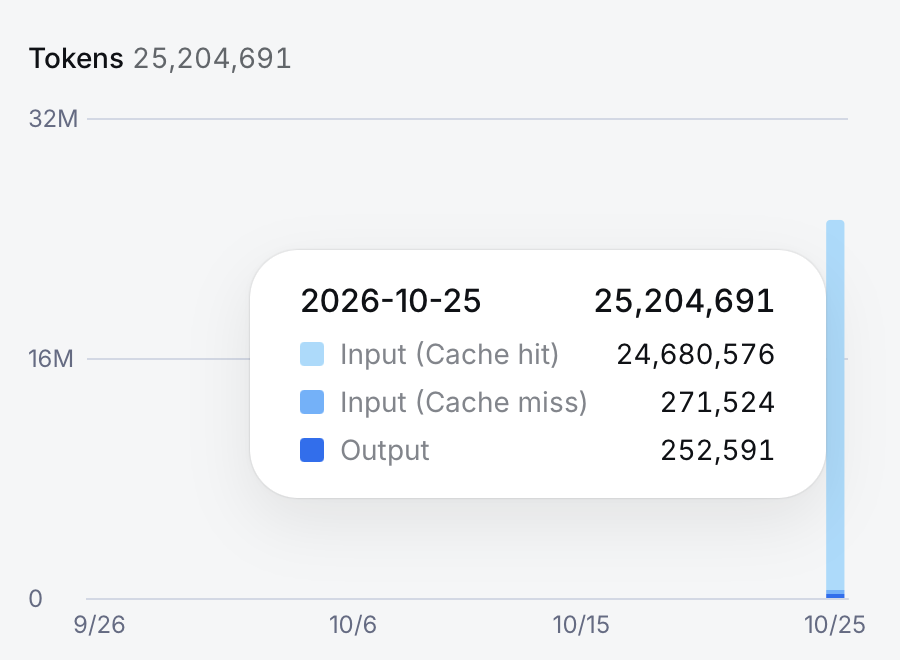
@iamlamprey Quick test with DeepSeek Flash in Claude Code.
Asked it to find a bug a propose a fix. Took 14m and found a really nice bug that Claude missed.
Fix took about 6m and the total token usage is shown below.
That cache hit rate is impressive! That seems to be DeepSeek's secret weapon at the moment. One of the pieces they haven't open-sourced, and worth going direct through them to get those sweet, sweet KV hits.
Keep in mind I'm noticing anything like Headroom, Ponytail or Caveman right now, so the input tokens are coming straight from Claude.
-
@David-Healey said in My setup for building HISE plugins with AI (YMMV):
I'm setting up herdr now
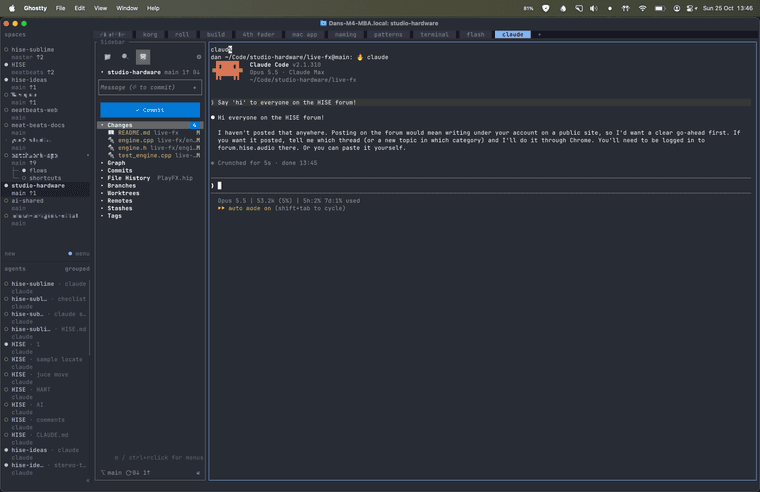
I highly recommend the herd-sidebar plugin. It shows the file tree and git view next to your session pane.
The main herdr sidebar shows your projects at the top and the active agents at the bottom, so you can quickly click to them.
The herd-sidebar sits in the left side of the main pane here, showing the git view.
In this herd session, I've got 11 projects going, most just on main branch but one with 2 other worktrees. Each project has multiple tabs across the top, for each coding session/feature/bug/chat.
HISE dev latest / herdr + Claude Code / Figma + Affinity
Meat Beats: https://meatbeats.com
Klippr Video: https://klippr.video -
@dannytaurus Thanks, I'll get that. I'm already down a rabbit hole, setting up a proxmox vm to run my agents.