Measuring plugin delay times....
-
Okay, so I have a massive multi-fx plugin - there are 6 slots in it, and each slot can load any of the FX that ship with the plugin.
There are 133 FX.....
Yep, thats not a typo ... 133 FX.
Any of these can be loaded into one of 6 Hardcoded FX "slots", there are C++ FX, Scriptnode FX and Faust FX all in there....
So now I'd like my plugin to report to the DAW some consistent delay time...
So the plan is, nothing special here, to have a variable delay at the end of the chain....whos value can max out at the worst case scenario (6 copies of the worst "performing" FX loaded across all slots in the plugin), and to calculate every time a new FX is loaded what the current delay is - and add "make-up delay" to get us back to this worst case scenario - and thus always report this worst case to the DAW.
Now I realise that some of the actual delay any given FX induces may well be changable based on the params the FX are set at, the sample rate being used or even the type of content arriving at the plugin.... Im going to live with this inaccuracy.
Heres the plugin layout - its pretty simple:
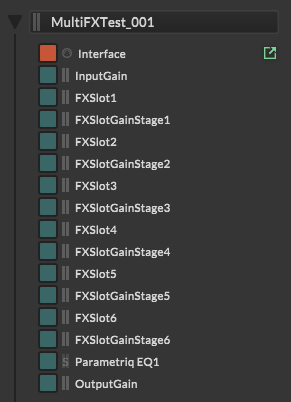
So, to the question:
What currently the best way to measure delay induced by any given FX?HISE Development for hire.
www.channelrobot.com -
I was under the impression that Hise has a Hisescript way to probe latency?
And so you could measure it whenever you make a change to the FX stack. But maybe I was mistaken.If I'm honest with you, in this situation, this is the kind of task I would be lazy and let an AI agent handle.
Although I know already that you might not have something like that set up.
But if it were me solving it, I would be tempted to be lazy and brute force it, use the REST API and Codex, and have it send timed impulses through the empty chain, and then through each FX once loaded individually. That then becomes the lookup table of all the latencies. Do it for different sample rates to find the ones that scale with sample rate. Since its a serial chain, you can basically just add together the latency that each processor give you. I would also entirely discard any latency that is non-linear / different for different frequencies, for individual effects.
I would discard the entire value for that effect, because those are likely nonlinear-phase / group delay latencies and it will actually have a worse sounding phasing if you compensate for those.That's the lazy route. It's pretty wasteful.
And I suppose you could actually do this by hand too, using the Hise latency finding tool, and write the LUT yourself.But personally I always keep track of the latency of my own DSP while I'm developing it, so it's never a mystery. But I can only do that because I only use my own C++ DSP in Hise.
An alternative is that you could read through the source code of whatever DSP pieces you are using and find all the delays though (it will mostly be explicit delay lines for lookahead, feedback stabilization, and things like Linear phase oversampling (dont try to compensate nonlinear phase oversampling), and FIR filters, FFT) those all give measurable latency.
But yeah, if there is a Hisescript API for measuring latency, I would assume that is the thing to use! You could even build a LUT using Hisescript and no C++, if that feature exists.
-
@Lindon @griffinboy 's method is essentially how I do it too (measure them beforehand while working on the core DSP). But to do it from within HISE is not so hard either:
You can leverage Engine.get/setLatencySamples to do this.
I discussed it here, and I believe someone developed an automated process for it on the forum elsewhere (I can't find the link, or perhaps I am going mad)....
I'm not terribly confident the HISE CLI/MCP could handle this, but you could direct an agent to load each network, one at a time, into a HardcodedMasterFx. Each time get it to recompile with:
Console.print(Engine.getLatencySamples);Collect all those values, then anytime that network is loaded in, use Engine.setlatencySamples to update the host. In my experience these two functions will work both when the plugin is loaded, and during real-time processing (presumably at blockrate).
Likewise you could turn an Agent onto the source code and read the DSP pieces (as griffinboy suggested), but in a complex network, done for all 133 FX, I picture that leading to more errors long-term.
*Note: I've never tested this method thoroughly enough. Possibly some hosts are not going to support dynamic changes to the latency reported *
Sonic Architect && Software Mercenary
-
@Lindon My process is to automate this from Hise itself.
You can write a test script that:
- loads the FXs one by one
- play a test signal
- record that test signal before and after the FX in 2 scriptFX module process callbacks (or 1 unique recorder with 2 passes, bypassed/unbypassed)
- perform a cross correlation between the two buffers to get the sample diff
- and populate an array that will hold the latencies per FX
Claude can easily create this for you if you need
And as @griffinboy said group delay can be tricky and give weird results, especially with impulses. I'd do it with white noise since cross-correlation is very effective with it (I do this in my Align-IT app)
Hise made me an F5 dude, any other app just suffers...
-
@HISEnberg said in Measuring plugin delay times....:
Console.print(Engine.getLatencySamples);Unfortunately, all that does is show you the value you already set with
setLatencySamples(), it doesn't get the actual latency of the current configuration. -
@Lindon @HISEnberg said in Measuring plugin delay times....:
Possibly some hosts are not going to support dynamic changes to the latency reported
This might end up being the biggest issue of all. Even if you accurately record all those permutations and combinations of latency, if the hosts don't play ball with dynamic changes to latency values you're SOL.EDIT: nonsense, as oust points out below

HISE dev latest / herdr + Claude Code / Figma + Affinity
Meat Beats: https://meatbeats.com
Klippr Video: https://klippr.video -
@dannytaurus said in Measuring plugin delay times....:
This might end up being the biggest issue of all
Not really because this would be poor design to report dynamic latency anyway.
The way (one way?) to do it is to report for the maximum latency, and add a delay in the chain based on the difference between the maximum and the currently loaded FXs. This is the purpose of having a latency array per FX.
So the host sees a permanent latency, and it's the plugin job to compensate for exceeding reported latency. -
@ustk Oh yeah, of course. We already discussed all that previously in other topics. I must be delirious!

-
@ustk said in Measuring plugin delay times....:
@Lindon My process is to automate this from Hise itself.
You can write a test script that:
- loads the FXs one by one
- play a test signal
- record that test signal before and after the FX in 2 scriptFX module process callbacks (or 1 unique recorder with 2 passes, bypassed/unbypassed)
- perform a cross correlation between the two buffers to get the sample diff
- and populate an array that will hold the latencies per FX
Claude can easily create this for you if you need
And as @griffinboy said group delay can be tricky and give weird results, especially with impulses. I'd do it with white noise since cross-correlation is very effective with it (I do this in my Align-IT app)
do you have an example(snippet) of this cause I dont(yet) use Claude and its all new to me.
HISE Development for hire.
www.channelrobot.com -
@Lindon I'll try to find and recycle something...
-
@Lindon this one uses an impulse. See if you can make it work with your project, then you might need to use a noise and a correlation algorithm later instead of simple subtraction of the peak index
Note that it takes the number of channels of the routing matrix.
the current snippet gives you a report of ch0-1 delay L-R, and ch2-3 scriptFX, which is L=silent and R=untouched. A silence gives a negative latency that easily speaks for "there's nothing to report"HiseSnippet 2567.3oc6Z80baabDGTxvNjwsSbl9Pm9zE9RghnoHnUbriicknDUrlZJwgj1Mc73ndD3n3YAdfE.zRrc7646Wm9snOzuAs6d2g+QBZIqX2LYlRayg31a++d68aIc2.eGVXnefQoJClOkYT51l8mKhFu2XJWXb39Fk9Lyms6f1Gs2e9jCN7n8a2yn07ozvPlqQoRq+c3tJU9FFxW+6+PKpGU3vRWxv3E9bG1y3S3Qoq1cm+H2y6.pKa.eRlcu8NG53K1y2yeFXQqa1vXJ04L5orin31Vyz3ozvwFk9RyG533LZ6sG0z1Ya6sev8G9PamQNCa17gM9Z2lL2g2eHi8vGLxnzMa6xi7C5GQiXgFktQKe248G6etPofWvC4C8X3C1F8AMqV9.eOWzEwUM1aL2ysabnJz.jR2z.25p.2uwrC2kmrd1.HRfjxQ1.Xo0xadqmy7ryZdMxXdEXRkxXR2PYR2wruS.eZTJEzd9TyCEQrfQTHOk0TT60Xs+UEy87gcHhpOgdF6f.3gDNrteiF0Hvaa7nJvtB88X0c7Xz.KXgJUDPdJDxYLR9hlJ+cfHeDw5K3g6yFwELWqSOY3rQiXAgarQY30od9CodjjUIOl7xW8nkYJfQc4hSaI2UeOn3B3Og4koBxoQghwwO3cJnkouBQMzy24r97+FS5Ho9Q7x.asEmBat9orHs3fkwHVgdWOlygBW1E4EWVJfDuqMFugSKgQj2PCH8GrauAmjOpeRqAGAaMNaRccaMKJxWXUcU6tZMBjdwj6p1Q8PVjUUdXG+IfLoAyAVhBlwvzep0DyW6NGNXP6dfQH6pfAfd9yhfvZGZT.+BqpKrypfbREyQOuyI68zcQmXg8gR5nYS1mEBBiFwgtFioBAyKzJukDkF8cfPXjriSvwCeMyIRUyBElBOfNYzLgCJIxz.1TZ.Skp.ABUukgjIjF7ErVzfcira1X3zI4Rr8oSl5w5AZvZCxWRZ9nJkqTdje.wh+3FOhv+1XmA97latQkxfPKmTs+R9qTE7js1hvnNiIUcTNTUxXnWTHI5behdyPFhvgUFyHLnuJbzrFwNdEnvkweCK.jN7WoA7Zz.d821DdSpYopyo6W9ZT8JGVGmrx6qaHsrlgLGf22pDdNIz3UuLOGasMJyF0+JkOoLTxXZHgRt68baQlBkAjo9gbLnCk+PzkLDTMoYEPCusxhoAYxBD0ehxwJHB5aZOVcTkDAgHFwErCBU3RTNBnNPP9AQUhvhWY9eOpm2P3pEq3btJIiGGW7jFdTSmsha3MMfKfCAOItnjnNdP50t6w8F7MXMbZvGRkbQZasjvOVbxcwixIzpyQUd7HfGoHj6wCbAgy7CEpBLX+Nieo8qh2aWF8Lnf6t3pMVd0LsgVVhcByUA2AtSl2GBlB2vCfqjj5KzZACPYY3+fTgi+LQDQ1wOTlOnDAlAinvkVj2vYmWi75YvQwgLG5rPF4bFwgJpWudrwbJcJXD1MRrt2P8lwjc+gnSshbqZEEApk0UqsXT6UIhWaqpKWzNR1SoJ0W2iINMZb7QUcJK09dljLHEn.MjA2NZg9wcIVUqR1T6BvghMzxQEyz52AXqZU0Jx2xdFMizSNsBuPt1DXijkOkqn5b.aPR4sw9DpKUYOptmP16oeCvd4xaJK5jBcScv.BvjMU5oLoZ2CO56h2ZQ0TorYmksds2KCW1qlqlY4pU+XlxdeYVa6dY2t97ljmMW5jQFt1NKWcRTRlJ+jje9C0pPlLeoaxEMlGVOLxeprwA1EBaNkzLB.tAg37sglpvasz8J9hUcqJdEcfumki+joP2KQTMUQTRWI8Sx5PnMFpTk8XKghg8hW.fPCkg9tuIWq2j1gWpEpuwDe8VrsdanMa9MSRv.VI8UlPvQ9Qri08agl7jEIMZTgzz52CSAEPVmbVMiVhYSFhWTlFWwMBXkyC.2b0.vyNefiBSUlM5KNTviNdJSrpoFLz.wPv5ZqB1ZjDp9uVCUWAPyfCHx+clqJWXH8grCYY77C2mFQikLnDPwSYAQbzmJsO6M.7U0PAkMAPSmA0yx8pK2LJcqqicbADuJgped7Gx.LDWBW6btaz3TiUryXF+zwYlF7G1wX4YWfol7cmAGXyOJENvol.jdyM+BNih..SLO6.oevlu5pZh2wrKOxYbw13ZEXiPN6igMpmJ8WY1FfV3DkZf2v7fu+izHn2X4XTEc8DnSUzYAb7ENA5uecyk.iOvuqGctUXBJ6Zjz4tV5XutCbKbGVZfzgqBh2WjAhmBlOzqPi9AZjBSpLt9DtHQN3chp60qkhcCw+lrtD3UtQ4zHBwNlS.jv.NID8adLho14RPDiIsDBQEP9Bm5UilOfAuOv2JCXc2KPas1B1XsLtcpv4irxFMdbgyXGCyIEojDa3z45KFg8A26xHgRSCPoiKq8IUZTxTgNxSdBryTrMPPfkpFU5JrHucYQImscQeTCkZA0jLfStBE.AVJ65LZA0SO4wqnrHynWELMuTq3bOuGWdYdkO5Z+t6bjapbn4DLace+YANr3wpwt4XGK8yMha32mIbkO7efWZh1ws9Qh1KPrI97ZZhMWf38vmWWS7dwDSu37ZcOW11heph3s.hP6DYOoOQ8Y6bshjKgfJdFaTlqp9s6jPnWlKw9KO+eFsyALlKBhJOGFFwq2K+sdFFOy+7tfBOHf8WSV9G+G67T9RqZr+Ncjokj60Fvfat6OW3j6hj0+EZ4.97JKGhIlVNboWyba8ijC9d6htgozO9w6Bl2S3m27m0TVbrsvTVLwOrmfOhEctevYxuxZ8mgyfprVnL8bxnK.GGZdhnmfipMpC+wXWOO+yQ.qbMtJHcJWqqu27oi8EbGbI0Nhc5cmfeAEw1aJnrVwY1351mRCGP4dHFs9yBAP7tGK5CxQ9iYfXjNx2E9zMOf5.Yq4coHj16XhiA..qvuzrD.V4bizhOLso9YLxsATtw+fGJSA7fIRH4qYBbgzUwJkAfZ3VlSl4EwMVownHWjtiY8pp10xoV42zed0dayIH9HEkh0nh1knw05RCf8Gwz+XFwOAatCW7B0.OlXsfQG5EIOaCOqrM0R4139rQTvayslQlKLLLx6cxT3kjgWgKJocECpFYc0b1i7GwAeBlOXMUszggu.oBvbh8MnTdkB3mtna46e1Dp774O4KaKt47mmLCPu16cbu8WwP.V+BcH.6e9FBnvewp28X.1W2w.bFWHnekQrL99XP+KLKfjMvwAz2E6.u2.+cFeYv7uDE813jzU.7+VacEf+amB+eqsz1+RRWMB.RWOD.4+OEvG3o.9eryY7tbtRK4bSnNA9m3nxzX+5OQtBjpDx6XJa1AelXu7W92DtK+DGm7hZIFadcY7dWWF295x3WccY79WWF+5qKiO3xYD+e+wtyh7mnfsBvP61VV9VpTaA96jIu1y3+BPu2HsI -
@ustk thanks mate I will give it a go...I have no idea how to do a "correlation algorithm" but its all an adventure...