Last best commit for VS2022....?
-
OK so I'm stuck back on an April 2025 commit because of the "global modulators breaking presets" bug... as I have a reasonably imminent product update to support...
But I'm at that stage where its all demo videos, marketing materials, distributor release scheduling etc. etc. Which Im sure many of you know involves a fair amount of "waiting around"....
I also have a Horizen update looming over me, so I thought I'd get a start on some of the functionality changes, which I've started to do, but now (or soon) it will require a version of HISE that supports the compiled "Hardcoded synths" functionality - which is not in my current commit.
So as may be clear by this long winded explanation I'm very reluctant to go to the latest set of commits that require V2026, so......
Can any one tell me the most recent working commit that I can build using my current set up of VS2022???
Which as a general question makes me think it would be a good idea to have some documentation that includes the required/advised 3rd-party products and versions in each commit, perhaps Claude can help?
HISE Development for hire.
www.channelrobot.com -
@Lindon you can still use VS2022 with the latest commits, you just need to set the compiler settings to use that version - the new default is VS2026, but I didn't want to be too aggressive with the migration so the old toolset is still usable.
-
@Christoph-Hart said in Last best commit for VS2022....?:
@Lindon you can still use VS2022 with the latest commits, you just need to set the compiler settings to use that version - the new default is VS2026, but I didn't want to be too aggressive with the migration so the old toolset is still usable.
Ok great, which compiler settings?
HISE Development for hire.
www.channelrobot.com -
@Lindon the one in the HISE settings (either under compiler or development I'm currently to lazy to load up HISE lol). You can choose between VS2026 and VS2022 there and it should create the projucer file for exporting this accordingly. It will complain if you build HISE with a different VS version though, so if you compiled HISE with VS2022 and then try to export a VS2026 project, you'll be screamed at rightfully so.
-
@Christoph-Hart well this actually doesnt make any sense to me... you mean this setting right?
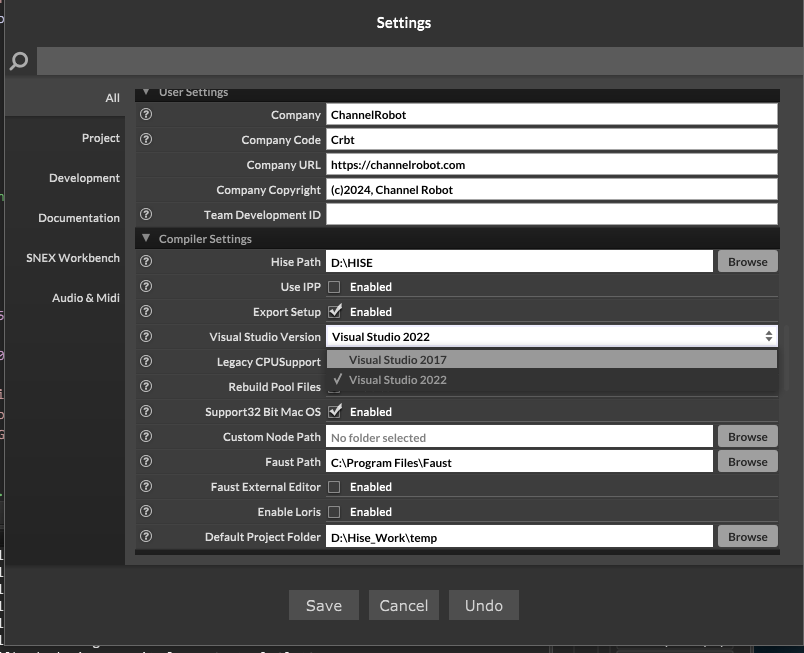
So, in order to select this I would need to build HISE .....which is what I need this setting for...its a lovely Catch-22 position....I need ot build the thing in order to set the setting so I can build the thing...
HISE Development for hire.
www.channelrobot.com -
@Lindon That's just for exporting from HISE. For building HISE I think you can use the 2026 exporter in Projucer and when it opens in VS it will give you some prompt about converting the project for VS22 - I haven't tried it so could be wrong.
Free HISE Bootcamp Full Course for beginners.
YouTube Channel - HISE tutorials
My Patreon - More HISE tutorials -
If it says 2017 then you‘re living in the past. It now says 2022 / 2026
-
@Christoph-Hart said in Last best commit for VS2022....?:
If it says 2017 then you‘re living in the past. It now says 2022 / 2026
..if you recall........... and maybe take a look at the post that started this thread....... I cant currently get on anything "current" because of the "global modulators breaking presets" bug, so what you are seeing is my current set up - as I said Im looking at getting on something more up-to-date if and when I can.
HISE Development for hire.
www.channelrobot.com -
@Lindon still don't understand it. If you're stuck with a past state in HISE what does VS have anything to do? Either you can upgrade or not because of your projects requirements or not?
-
@Christoph-Hart So as I said I have two projects- one requires the bug to be fixed - until it is Im stuck on the April version.....
The other requires Hardcoded Synth voices - which are not in the April version, so Im looking for a version of HISE I can go to (and go back from quickly as required by my support commitments) that supports this - thus looking for a HISE version that does not require me to install VS 2026...
HISE Development for hire.
www.channelrobot.com -
@Lindon Unless I'm misunderstanding, none of the HISE versions require you to install VS2026.
And I don't understand why you can't have both VS2022 and VS2026 installed, along with 2 versions of HISE (latest version and older version for your older project) with and 2 copies of the source code.
I know we tell beginners to only have one version of HISE but I'm sure you know enough about all this to make sure each version of HISE references the correct source code and VS version.
HISE dev latest / herdr + Claude Code / Figma + Affinity
Meat Beats: https://meatbeats.com
Klippr Video: https://klippr.video -
@dannytaurus said in Last best commit for VS2022....?:
And I don't understand why you can't have both VS2022 and VS2026 installed, along with 2 versions of HISE (latest version and older version for your older project) with and 2 copies of the source code.
because 10+ years of HISE development has taught me "keep the install config. as simple as you can"
HISE Development for hire.
www.channelrobot.com -
@Lindon I imagined 10+ years of HISE development would've taught you "I know exactly how all this sh*t works". It's all just apps, code directories and config paths at the end of the day.
Although I suppose if all versions of the HSIE app reference the same Application Support files then it could get messy.
OK, I concede!

-
@Lindon Try the last commit before the JUCE folder was turned into a submodule
Free HISE Bootcamp Full Course for beginners.
YouTube Channel - HISE tutorials
My Patreon - More HISE tutorials -
@David-Healey said in Last best commit for VS2022....?:
@Lindon Try the last commit before the JUCE folder was turned into a submodule
any ideas on which that was, to save me looking for hours.....
HISE Development for hire.
www.channelrobot.com -
@Lindon Looks like the JUCE sub module was added on the 8th of January, so try end of December.



