JUCE submodule PSA
-
@Christoph-Hart said in JUCE submodule PSA:
@David-Healey can you check if it works now? I've recompiled the Projucer in both JUCE branches and it should now compile & export, but I'm running against the funky SimdRegister error here (BTW, have you fixed that on your HISE branch?).
I'll give it a try.
That
invalid use of incomplete typeerror never showed up my fork. It only happens upstream. I can't see any difference in the lines of code related to it between upstream and my fork so it's had me scratching my head. The only thing I can think is that the order that files are being included is somehow different, but I'm really not sure.I did add this PR to fix the symptom. The error first showed up with this commit.
Edit: Interesting, I've just pulled in the latest changes and my branch has now inherited the simd error.
-
@Christoph-Hart Apart from the SIMD error everything worked. I did have to enable the execute permission on Projucer - can't remember if I had to do that in the past.
-
@David-Healey Does that JUCE commit exist on Remote?
-
@clevername27 Not sure what you're asking
-
 D David Healey referenced this topic on
-
 D dannytaurus referenced this topic on
-
@Christoph-Hart Some issues I've come across:
- The Linux build of Projucer doesn't have execute permission - I think this must be set on a Linux system, not sure.
- The MacOS build of Projucer has not been codesigned/notarized so it gets flagged by gatekeeper
- The export setup Wizard has not been updated so it's still looking in tools/projucer
Free HISE Bootcamp Full Course for beginners.
YouTube Channel - HISE tutorials
My Patreon - More HISE tutorials -
The MacOS build of Projucer has not been codesigned/notarized so it gets flagged by gatekeeper
Was the previous build codesigned & notarized?
The export setup Wizard has not been updated so it's still looking in tools/projucer
Good catch!
-
@Christoph-Hart said in JUCE submodule PSA:
Was the previous build codesigned & notarized?
FWIW I don't think I've ever seen a gatekeeper dialog for Projucer.
-
@Christoph-Hart said in JUCE submodule PSA:
Was the previous build codesigned & notarized?
I just checked and no it doesn't seem that it was. I wonder why I never saw a warning.
-
@Christoph-Hart The Projucer binary appears to be Apple Silicon only
-
D dannytaurus referenced this topic on
-
@David-Healey Sorry for the noob question,
What we need to do is to download the modules, extras & projucer folders in the submodule repository?
Then copy them to the tools/projucer folder in the latest Hise develop branch that we downloaded them from?
-
@JulesV Remove any copies of the HISE source you already have. Then reclone the repo using this command:
git clone --branch develop --recurse-submodules https://github.com/christophhart/HISE.gitThat's it, you'll be good to go.
Free HISE Bootcamp Full Course for beginners.
YouTube Channel - HISE tutorials
My Patreon - More HISE tutorials -
@David-Healey I am not using GitHub and cloning procedure.
Previously, I was just downloading and compiling the Hise branch. What do I need to do to use it this way?
-
@JulesV said in JUCE submodule PSA:
What do I need to do to use it this way?
I don't know, I've never downloaded submodules manually. Google time for you - or just install git and run one command :)
Free HISE Bootcamp Full Course for beginners.
YouTube Channel - HISE tutorials
My Patreon - More HISE tutorials -
Updated with the new submodule version, selected JUCE 8 (because, yeah, why not...).
During compilation, XCode complains about the Projucer being outdated (v6.1.4)
"This project was last saved using an outdated version of the Projucer! Re-save this project with the latest version to fix this error." -
I'm leaving the solution here as a note in case others experience this problem. I had to look back to this commit: https://github.com/christophhart/HISE/commit/c948b81f7a86f24a8fce4ea81051c73b7129e2b5
There's a folder named JUCE in the downloaded "Hise-develop" branch. You need to copy all the files from the submodule into this folder.
From now on, the Projucer application will be launched inside this JUCE folder.
-
D David Healey referenced this topic on
-
@David-Healey thanks
-
[Nevermind! Solved! I needed to install visual studio 2026]
Solved question:
Do you know about this issue?D:\Projects\HISE-develop\projects\standalone\Builds\VisualStudio2026\HISE Standalone_App.vcxproj : warning : The build tools for v145 cannot be found. Install v145 to build using the v145 build tools.I'm getting this problem when trying to compile Hise Develop on windows.
v145 is not something that exists.
-
@griffinboy I‘ve also updated the default VS version to 2026 yesterday. All for HISE 5…
-
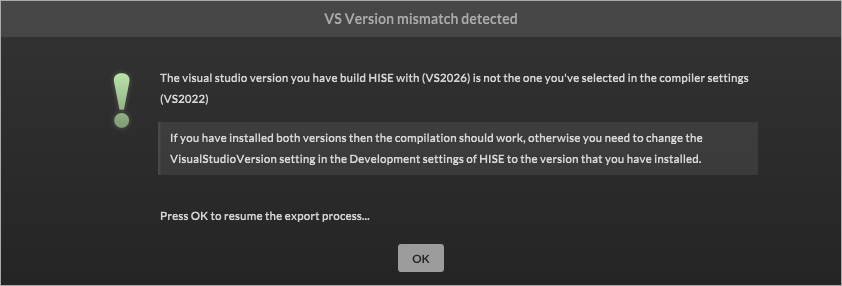
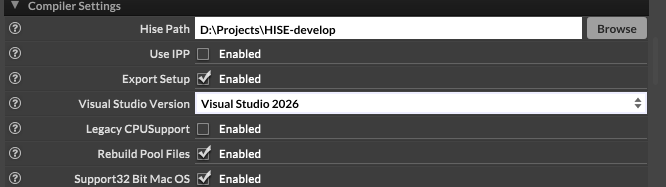
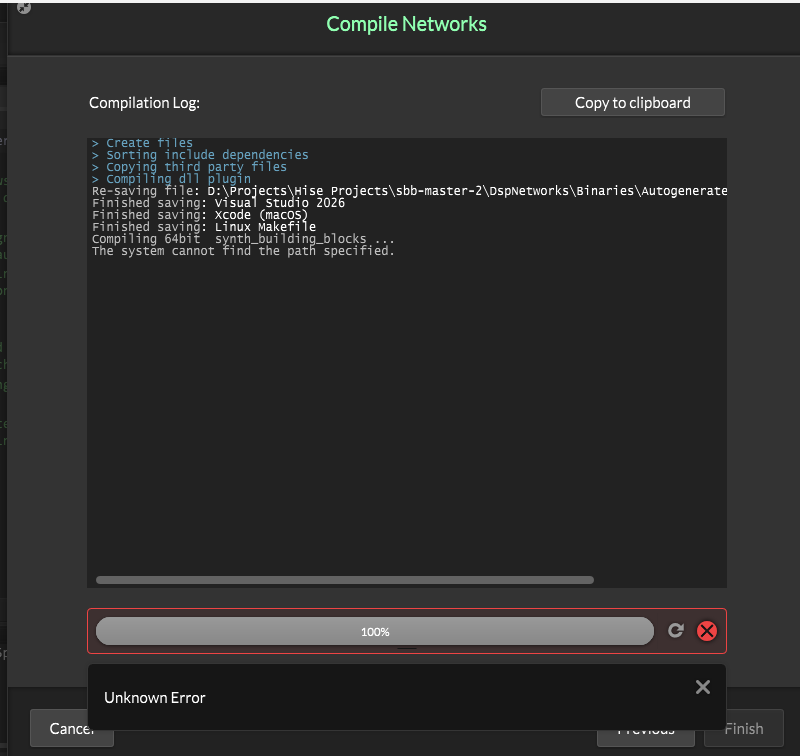
I'm actually having a spot of bother there too!
Compiling dsp networks:
But when I do as it asks:
-
@griffinboy have you installed vs2026?