Forum
    • Categories
    • Register
    • Login

    HISE User Interface Unusable

    Scheduled Pinned Locked Moved General Questions
    14 Posts 8 Posters 212 Views
    Loading More Posts
    • Oldest to Newest
    • Newest to Oldest
    • Most Votes
    Reply
    • Reply as topic
    Log in to reply
    This topic has been deleted. Only users with topic management privileges can see it.
    • pcs800P
      pcs800 @Ajak
      last edited by

      @Ajak What it looks like to me is that you started a new project but never saved by hitting Ctrl+Shift+S (windows anyway). So there's no interface xml file yet.

      1 Reply Last reply Reply Quote 0
      • David HealeyD
        David Healey @Ajak
        last edited by

        @Ajak Can you make a little video showing you opening HISE?

        Free HISE Bootcamp Full Course for beginners.
        YouTube Channel - Public HISE tutorials
        My Patreon - HISE tutorials

        1 Reply Last reply Reply Quote 0
        • A
          Ajak
          last edited by

          I saved it in a folder called LAB most of the sub folders are empty, I'll try to make a video, have a screen recorder somewhere.

          A 1 Reply Last reply Reply Quote 0
          • A
            Ajak @Ajak
            last edited by

            @Ajak HISE-open.mov

            David HealeyD 1 Reply Last reply Reply Quote 0
            • David HealeyD
              David Healey @Ajak
              last edited by

              @Ajak When you first open HISE, before loading your project, the interface script is there.

              e16198c6-2449-4f7e-8cb8-190b0d49cf78-image.png

              Once you load your project it's gone. That means you must have deleted it before you saved your project. Start over with a fresh project.

              Free HISE Bootcamp Full Course for beginners.
              YouTube Channel - Public HISE tutorials
              My Patreon - HISE tutorials

              A 1 Reply Last reply Reply Quote 0
              • A
                Ajak @David Healey
                last edited by

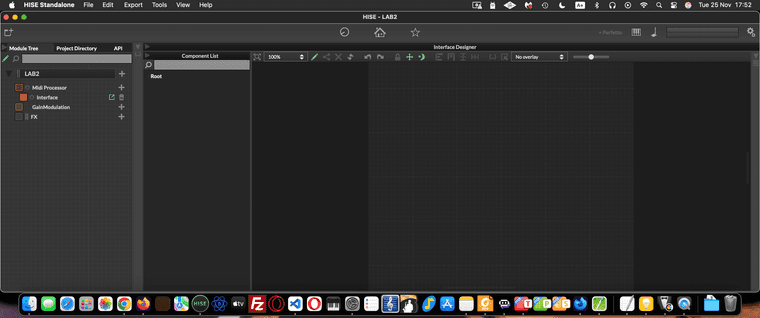
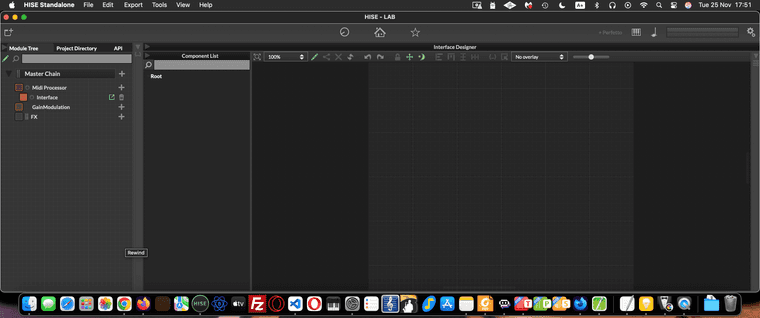
                @d-healey Created new project, tweaked Mac display settings, tools & grid now visible on both projects:LAB2.png LAB.png

                Opened HISE on Laptop, pressed left trackpad button to drag app for scaling & it just popped into place. Thanks for pointing me in the right direction.

                H 1 Reply Last reply Reply Quote 1
                • H
                  HaizalD3 @Ajak
                  last edited by

                  Whew, glad you got this sorted out!
                  That's an awesome update—it's super useful to know that tweaking the Mac display settings made the tools/grid visible. And thanks for confirming that the interface script issue d.healey mentioned was also part of the initial problem.
                  Definitely helpful for anyone else who hits a weird UI scaling bug!

                  DanHD 1 Reply Last reply Reply Quote 0
                  • DanHD
                    DanH @HaizalD3
                    last edited by

                    I think we keep this guy just for the positivity

                    DHPlugins / DC Breaks | Artist / Producer / DJ / Developer
                    https://dhplugins.com/ | https://dcbreaks.com/
                    London, UK

                    dannytaurusD Christoph HartC 2 Replies Last reply Reply Quote 6
                    • dannytaurusD
                      dannytaurus @DanH
                      last edited by

                      @DanH 😂

                      Meat Beats: https://meatbeats.com
                      Klippr Video: https://klippr.video

                      1 Reply Last reply Reply Quote 0
                      • Christoph HartC
                        Christoph Hart @DanH
                        last edited by

                        @DanH said in HISE User Interface Unusable:

                        I think we keep this guy just for the positivity

                        That's the plan. He hasn't linked anything scammy yet so as long as he behaves we consider him our little AI pet robot.

                        ChazroxC 1 Reply Last reply Reply Quote 5
                        • ChazroxC
                          Chazrox @Christoph Hart
                          last edited by

                          @Christoph-Hart Damn these bots are everywhere.

                          1 Reply Last reply Reply Quote 0
                          • First post
                            Last post

                          27

                          Online

                          2.1k

                          Users

                          13.0k

                          Topics

                          112.5k

                          Posts