Problem launching HISE build on Windows (Parallels Desktop)
-
@lloyduss UPDATE:
After some debugging, I’ve figured out what’s most likely causing the issue.
When I try to launch my “HISE Debug.exe” build, Visual Studio throws this error:
Unhandled exception at 0x00007FF70655F7C6 in HISE Debug.exe: 0xC000001D: Illegal InstructionIt seems that this happens because I’m running Windows 11 ARM inside Parallels Desktop on an Apple Silicon Mac (M1/M2), while the build targets x64 (Intel).
In other words, HISE is compiled for an Intel CPU, but my Windows installation is ARM-based — and that mismatch causes the app to crash immediately on launch.
So now I’m wondering:
 Is there a way to make HISE fully compatible with Windows ARM (maybe by compiling it as ARM64 in Visual Studio)?
Or do I absolutely need to use a computer or virtual machine running a proper x64 Windows environment to get HISE working correctly?Any insights or workarounds would be super appreciated.

-
I'm interested in this too.
-
@lloyduss Yeah I think you need to be on an x86 CPU, unless Parallels can fake it.
Free HISE Bootcamp Full Course for beginners.
YouTube Channel - HISE tutorials
My Patreon - More HISE tutorials -
@d-healey said in Problem launching HISE build on Windows (Parallels Desktop):
unless Parallels can fake it.
It can but it's really (really) slow.
@lloyduss said in Problem launching HISE build on Windows (Parallels Desktop):
Or do I absolutely need to use a computer or virtual machine running a proper x64 Windows environment to get HISE working correctly?
Yeah, I spent a lot of time trying to run Windows x64 on an Apple Silicon Mac. It’s not worth it. The solution is buying a decent Intel computer. I got a $200 Lenovo ThinkCentre with an Intel i7 7th gen, and it works like a charm — it compiles HISE in just 4–5 minutes.
In the end, if you spend too much time trying to make that setup work, you’re probably losing more than $200.
-
I'm guessing Windows doesn't have a Universal Binary system like Mac does?
-
This post is deleted! -
@lloyduss @David-Healey Sorry to necro this, but just wanted to add my experience.
I followed David's Building HISE on Windows video form the HISE Bootcamp course, and it all seems to have worked fine.
I'm running Windows 11 in Parallels Desktop 26.2.2, on macOS Sequoia 15.7.3 on a 2025 M4 MacBook Air.
I installed git and cloned the HISE repo. Then installed Visual Studio 2026 and built both Debug and Release (no Faust) x64 versions of HISE.
HISE launches properly and responds to scripts, UI actions, etc.
I haven't exported a plugin from HISE yet. That's the next step. EDIT: success, see below.
But as far as building x64 HISE on ARM Windows 11 running on Parallels on macOS, it's all good here.
Note: I didn't use IPP or FFTW when building HISE. IPP doesn't work (the clue is in the name) and I can't use FFTW because I'm building closed source. I'm not using convolution anyway (not directly at least) so I don't think that will matter too much.
-
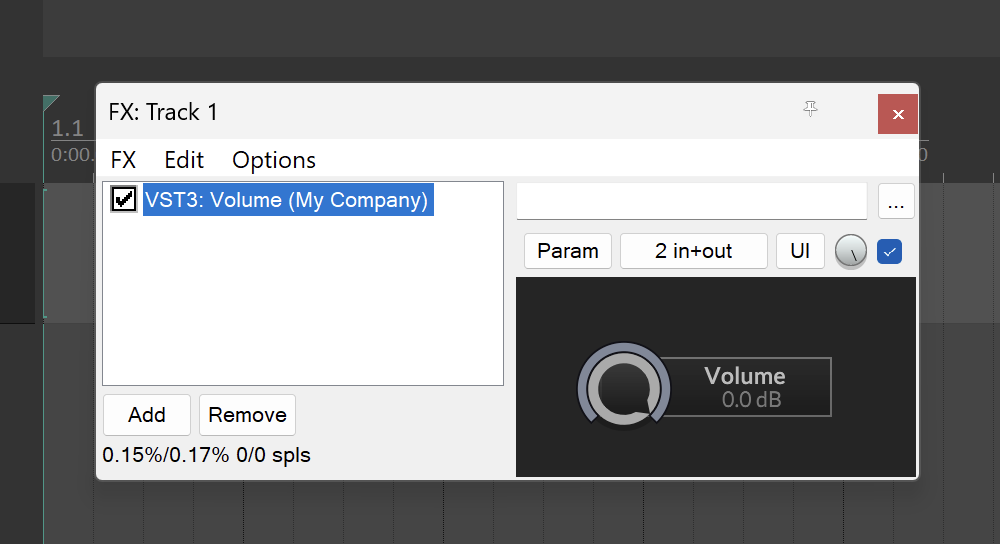
Good news. I have a fully working volume knob plugin in Reaper.
Had to add MSBuild to the PATH because HISE doesn't detect it properly for VS2026 (I'm guessing the snazzy new Setup Wizard will fix that), and wait a painfully long export time of 22 minutes. But it works!

So this is an x64 VST3 running in an emulated x64 version of Reaper, in ARM Windows 11 in Parallels Desktop, on an Apple Silicon M4 MacBook Air.
What a crazy world.
-
@dannytaurus congratulations that looks like a wonderful plugin, I wish you the best with the release! Will you make this a one-time purchase or are you thinking subscription model?
JK, but I also had rather annoying experiences with Parallels on my M1 Macbook - I just use it to type stuff out in a super sluggish Visual Studio when I'm on the road - still better than Xcode though...
-
Maybe the 32GB RAM on my MacBook Air means there's enough to go around so it's not like typing through syrup.
I interact with Xcode, and now Visual Studio, as little as possible anyway. Launch, press Build keyboard shortcut, wait, quit.



