Forum
    • Categories
    • Register
    • Login

    AAX Build on MacOS

    Scheduled Pinned Locked Moved General Questions
    31 Posts 5 Posters 8.2k Views
    Loading More Posts
    • Oldest to Newest
    • Newest to Oldest
    • Most Votes
    Reply
    • Reply as topic
    Log in to reply
    This topic has been deleted. Only users with topic management privileges can see it.
    • ustkU
      ustk @David Healey
      last edited by

      @David-Healey Well so an SDK downgrade would be the best thing to test, at least to see if the process is the good one

      Hise made me an F5 dude, any other app just suffers...

      LindonL 1 Reply Last reply Reply Quote 0
      • LindonL
        Lindon @ustk
        last edited by

        @ustk OK can someone point me at a download for an earlier SDK please.

        HISE Development for hire.
        www.channelrobot.com

        ustkU 1 Reply Last reply Reply Quote 0
        • ustkU
          ustk @Lindon
          last edited by

          @Lindon I reckon you need to use the links of the actual version, and change the version number manually so:

          https://cdn.avid.com/aax-toolkit/aax-sdk-2-8-0.zip

          becomes:

          https://cdn.avid.com/aax-toolkit/aax-sdk-2-6-1.zip

          All legacy versions "should" be available this way

          Hise made me an F5 dude, any other app just suffers...

          1 Reply Last reply Reply Quote 0
          • David HealeyD
            David Healey
            last edited by

            I just ran into an issue with the latest SDK on Windows, might be related. By default the Visual Studio project is set to dynamic linking. I had to change it to static linking and rebuild.

            Free HISE Bootcamp Full Course for beginners.
            YouTube Channel - HISE tutorials
            My Patreon - More HISE tutorials

            LindonL 1 Reply Last reply Reply Quote 1
            • LindonL
              Lindon @David Healey
              last edited by

              @David-Healey said in AAX Build on MacOS:

              I just ran into an issue with the latest SDK on Windows, might be related. By default the Visual Studio project is set to dynamic linking. I had to change it to static linking and rebuild.

              hmm, AAX builds and works fine for me on windows, its MacOS where I have problems (when is it never?)

              HISE Development for hire.
              www.channelrobot.com

              ustkU 1 Reply Last reply Reply Quote 0
              • ustkU
                ustk @Lindon
                last edited by

                @Lindon Have you tried the version I pointed you at?

                Hise made me an F5 dude, any other app just suffers...

                LindonL 1 Reply Last reply Reply Quote 0
                • LindonL
                  Lindon @ustk
                  last edited by

                  @ustk trying it now.....

                  HISE Development for hire.
                  www.channelrobot.com

                  LindonL 1 Reply Last reply Reply Quote 0
                  • LindonL
                    Lindon @Lindon
                    last edited by Lindon

                    @Lindon well that failed with these errors:

                    ❌ ld: library 'AAXLibrary_libcpp' not found

                    ❌ clang: error: linker command failed with exit code 1 (use -v to see invocation)

                    ▸ Linking KeyEngine

                    ❌ ld: library 'AAXLibrary_libcpp' not found

                    ❌ clang: error: linker command failed with exit code 1 (use -v to see invocation)

                    So Im still doing something wrong.....

                    HISE Development for hire.
                    www.channelrobot.com

                    LindonL 1 Reply Last reply Reply Quote 0
                    • LindonL
                      Lindon @Lindon
                      last edited by Lindon

                      @Lindon Im just opening this file:

                      /xcode/AAX_SDK.xcworkspace in xcode and hitting Build for Profiling right???

                      HISE Development for hire.
                      www.channelrobot.com

                      LindonL 1 Reply Last reply Reply Quote 0
                      • LindonL
                        Lindon @Lindon
                        last edited by

                        @Lindon ok so I went away and rebuilt HISe....

                        and tried again: now Im getting this;

                        Undefined symbols for architecture x86_64:
                          "AAXStartup(IACFUnknown*)", referenced from:
                        ❌   "AAXShutdown(IACFUnknown*)", referenced from:
                        ❌   "AAXCanUnloadNow(IACFUnknown*)", referenced from:
                        ❌   "AAXGetSDKVersion(unsigned long long*)", referenced from:
                        ❌   "AAXRegisterPlugin(IACFUnknown*, IACFPluginDefinition**)", referenced from:
                        ❌   "AAXGetClassFactory(IACFUnknown*, _acfUID const&, _acfUID const&, void**)", referenced from:
                        ❌   "AAXRegisterComponent(IACFUnknown*, unsigned int, IACFComponentDefinition**)", referenced from:
                        ❌ ld: symbol(s) not found for architecture x86_64
                        ❌ clang: error: linker command failed with exit code 1 (use -v to see invocation)
                        [KeyEngine - AAX] Linking KeyEngine
                        ** BUILD FAILED **
                        

                        HISE Development for hire.
                        www.channelrobot.com

                        LindonL 1 Reply Last reply Reply Quote 0
                        • LindonL
                          Lindon @Lindon
                          last edited by

                          @Lindon yep its def the AAX config. VST3 builds fine and other projects build fine for VST3 but fail with the above for AAX, so Im doing something wrong here.....

                          HISE Development for hire.
                          www.channelrobot.com

                          ustkU 1 Reply Last reply Reply Quote 0
                          • ustkU
                            ustk @Lindon
                            last edited by ustk

                            @Lindon I might have pointed you to the wrong xcode project. you should build Libs/AAXLibrary/MacBuild/AAXLibrary.xcodeproj

                            If you tried to build the SDK itself then it's probably my bad. I just updated the screenshot to the good project path so people won't get confused.

                            Hise made me an F5 dude, any other app just suffers...

                            LindonL 1 Reply Last reply Reply Quote 0
                            • LindonL
                              Lindon @ustk
                              last edited by Lindon

                              @ustk ok here is what I did:

                              • downloaded aax-sdk-2-6-1.zip
                              • unzipped it and got aax-sdk-2-6-1 folder
                              • copied this folder to HISE/tools/SDK/
                              • opened SDK/aax-sdk-2-6-1/Libs/AAXLibrary/MacBuild/AAXLibrary.xcodeproj in xcode
                              • ran Product>Build For/Profiling. xcode tells me this was a success...
                              • renamed aax-sdk-2-6-1. to AAX in the HISE/SDK folder
                              • opened my project in HISE
                              • ran Export>Export As Instrument and selected AAX as my target....

                              got this in the console window:

                              ⚠️  ld: ignoring file '/Users/lindonparker/HISE/tools/SDK/AAX/Libs/Release/libAAXLibrary_libcpp.a[2](AAX_VDescriptionHost.o)': found architecture 'arm64', required architecture 'x86_64'
                              Undefined symbols for architecture x86_64:
                                "AAXStartup(IACFUnknown*)", referenced from:
                              ❌   "AAXShutdown(IACFUnknown*)", referenced from:
                              ❌   "AAXCanUnloadNow(IACFUnknown*)", referenced from:
                              ❌   "AAXGetSDKVersion(unsigned long long*)", referenced from:
                              ❌   "AAXRegisterPlugin(IACFUnknown*, IACFPluginDefinition**)", referenced from:
                              ❌   "AAXGetClassFactory(IACFUnknown*, _acfUID const&, _acfUID const&, void**)", referenced from:
                              ❌   "AAXRegisterComponent(IACFUnknown*, unsigned int, IACFComponentDefinition**)", referenced from:
                              ❌ ld: symbol(s) not found for architecture x86_64
                              ❌ clang: error: linker command failed with exit code 1 (use -v to see invocation)
                              [KeyEngine - AAX] Linking KeyEngine
                              ** BUILD FAILED **
                              
                              
                              The following build commands failed:
                              	Ld /Volumes/Untitled/Nomad\ Sounds/KeyEngine/Binaries/Builds/MacOSX/build/KeyEngine.build/Release/KeyEngine\ -\ AAX.build/Objects-normal/x86_64/Binary/KeyEngine normal x86_64 (in target 'KeyEngine - AAX' from project 'KeyEngine')
                              (1 failure)
                              ⚠️  /Volumes/Untitled/Nomad Sounds/KeyEngine/Binaries/Builds/MacOSX/KeyEngine.xcodeproj: The macOS deployment target 'MACOSX_DEPLOYMENT_TARGET' is set to 10.9, but the range of supported deployment target versions is 10.13 to 14.5.99. (in target 'KeyEngine - All' from project 'KeyEngine')


                              so its something about this:

                              found architecture 'arm64', required architecture 'x86_64'.

                              for some reason its not set up to build properly on my M1 mac...

                              HISE Development for hire.
                              www.channelrobot.com

                              LindonL 1 Reply Last reply Reply Quote 0
                              • LindonL
                                Lindon @Lindon
                                last edited by Lindon

                                Ok so I downloaded the latest HISE, installed it and built a VST3..all fine - I think

                                I downloaded aax-sdk-2-8-0 again, unpacked it changed its name to AAX and built the MacOS project - all works fine,

                                Started HISE loaded my project (again) and tried to build an AAX plugin, and I get this again:

                                ⚠️ ld: ignoring file '/Users/lindonparker/HISE/tools/SDK/AAX/Libs/Release/libAAXLibrary_libcpp.a[2](AAX_VDescriptionHost.o)': found architecture 'arm64', required architecture 'x86_64'
                                ❌ Undefined symbols for architecture x86_64
                                ❌   "AAXStartup(IACFUnknown*)", referenced from:
                                ❌   "AAXShutdown(IACFUnknown*)", referenced from:
                                ❌   "AAXCanUnloadNow(IACFUnknown*)", referenced from:
                                ❌   "AAXGetSDKVersion(unsigned long long*)", referenced from:
                                ❌   "AAXRegisterPlugin(IACFUnknown*, IACFPluginDefinition**)", referenced from:
                                ❌   "AAXGetClassFactory(IACFUnknown*, _acfUID const&, _acfUID const&, void**)", referenced from:
                                ❌   "AAXRegisterComponent(IACFUnknown*, unsigned int, IACFComponentDefinition**)", referenced from:
                                ❌ ld: symbol(s) not found for architecture x86_64
                                ❌ clang: error: linker command failed with exit code 1 (use -v to see invocation)
                                ** BUILD FAILED **
                                
                                
                                The following build commands failed:
                                	Ld /Volumes/Untitled/Nomad\ Sounds/KeyEngine/Binaries/Builds/MacOSX/build/KeyEngine.build/Release/KeyEngine\ -\ AAX.build/Objects-normal/x86_64/Binary/KeyEngine normal x86_64 (in target 'KeyEngine - AAX' from project 'KeyEngine')
                                

                                Im pretty sure its something to do with this:

                                found architecture 'arm64', required architecture 'x86_64'

                                Im on an M1 arm-based Mac, but I dont know what to do about it...ANYONE????

                                HISE Development for hire.
                                www.channelrobot.com

                                dannytaurusD David HealeyD 2 Replies Last reply Reply Quote 0
                                • dannytaurusD
                                  dannytaurus @Lindon
                                  last edited by dannytaurus

                                  @Lindon said in AAX Build on MacOS:

                                  required architecture 'x86_64'

                                  I know nothing about AAX, but if it's saying you need required architecture 'x86_64' then maybe you simply need an Intel machine to compile it?

                                  Meat Beats: https://meatbeats.com
                                  Klippr Video: https://klippr.video

                                  1 Reply Last reply Reply Quote 0
                                  • David HealeyD
                                    David Healey @Lindon
                                    last edited by

                                    @Lindon Can you set xcode to build a universal binary?

                                    Free HISE Bootcamp Full Course for beginners.
                                    YouTube Channel - HISE tutorials
                                    My Patreon - More HISE tutorials

                                    LindonL 1 Reply Last reply Reply Quote 0
                                    • LindonL
                                      Lindon @David Healey
                                      last edited by

                                      @David-Healey how?

                                      HISE Development for hire.
                                      www.channelrobot.com

                                      LindonL 1 Reply Last reply Reply Quote 0
                                      • LindonL
                                        Lindon @Lindon
                                        last edited by

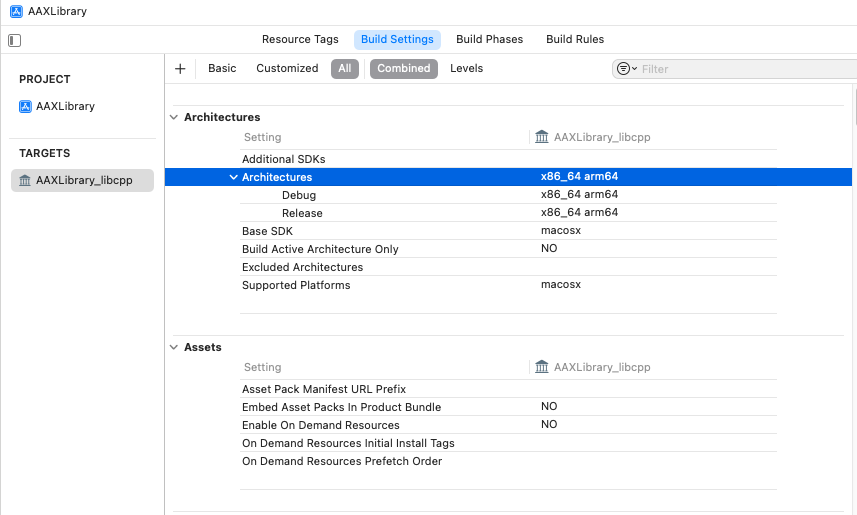
                                        @Lindon I have this in XCode:
                                        1fc25fa8-0374-4fdb-a24f-9edc6d5a408c-image.png

                                        HISE Development for hire.
                                        www.channelrobot.com

                                        LindonL 1 Reply Last reply Reply Quote 0
                                        • LindonL
                                          Lindon @Lindon
                                          last edited by

                                          I removed aax-sdk-2-8-0 and replaced it with aax-sdk-2-6-1. built it and got exactly yhe same result ....

                                          HELP!

                                          HISE Development for hire.
                                          www.channelrobot.com

                                          David HealeyD 1 Reply Last reply Reply Quote 0
                                          • David HealeyD
                                            David Healey @Lindon
                                            last edited by

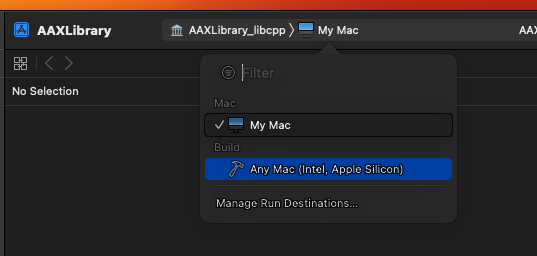
                                            @Lindon b112011a-fb8b-4979-85ce-c5790f43896a-image.png

                                            Free HISE Bootcamp Full Course for beginners.
                                            YouTube Channel - HISE tutorials
                                            My Patreon - More HISE tutorials

                                            LindonL 1 Reply Last reply Reply Quote 0
                                            • First post
                                              Last post

                                            22

                                            Online

                                            2.4k

                                            Users

                                            13.9k

                                            Topics

                                            120.7k

                                            Posts