AAX Build on MacOS
-
@ustk said in AAX Build on MacOS:
Can your mac support a more recent OS?
I'm still on Ventura, so not sure a newer OS will help Lindon here.
Free HISE Bootcamp Full Course for beginners.
YouTube Channel - HISE tutorials
My Patreon - More HISE tutorials -
@David-Healey Well so an SDK downgrade would be the best thing to test, at least to see if the process is the good one
-
@ustk OK can someone point me at a download for an earlier SDK please.
HISE Development for hire.
www.channelrobot.com -
@Lindon I reckon you need to use the links of the actual version, and change the version number manually so:
https://cdn.avid.com/aax-toolkit/aax-sdk-2-8-0.zip
becomes:
https://cdn.avid.com/aax-toolkit/aax-sdk-2-6-1.zip
All legacy versions "should" be available this way
-
I just ran into an issue with the latest SDK on Windows, might be related. By default the Visual Studio project is set to dynamic linking. I had to change it to static linking and rebuild.
Free HISE Bootcamp Full Course for beginners.
YouTube Channel - HISE tutorials
My Patreon - More HISE tutorials -
@David-Healey said in AAX Build on MacOS:
I just ran into an issue with the latest SDK on Windows, might be related. By default the Visual Studio project is set to dynamic linking. I had to change it to static linking and rebuild.
hmm, AAX builds and works fine for me on windows, its MacOS where I have problems (when is it never?)
HISE Development for hire.
www.channelrobot.com -
@Lindon Have you tried the version I pointed you at?
-
@ustk trying it now.....
HISE Development for hire.
www.channelrobot.com -
@Lindon well that failed with these errors:
 ld: library 'AAXLibrary_libcpp' not found clang: error: linker command failed with exit code 1 (use -v to see invocation)
▸ Linking KeyEngine
ld: library 'AAXLibrary_libcpp' not found clang: error: linker command failed with exit code 1 (use -v to see invocation)So Im still doing something wrong.....
HISE Development for hire.
www.channelrobot.com -
@Lindon Im just opening this file:
/xcode/AAX_SDK.xcworkspace in xcode and hitting Build for Profiling right???
HISE Development for hire.
www.channelrobot.com -
@Lindon ok so I went away and rebuilt HISe....
and tried again: now Im getting this;
Undefined symbols for architecture x86_64:
  "AAXStartup(IACFUnknown*)", referenced from:
❌   "AAXShutdown(IACFUnknown*)", referenced from:
❌   "AAXCanUnloadNow(IACFUnknown*)", referenced from:
❌   "AAXGetSDKVersion(unsigned long long*)", referenced from:
❌   "AAXRegisterPlugin(IACFUnknown*, IACFPluginDefinition**)", referenced from:
❌   "AAXGetClassFactory(IACFUnknown*, _acfUID const&, _acfUID const&, void**)", referenced from:
❌   "AAXRegisterComponent(IACFUnknown*, unsigned int, IACFComponentDefinition**)", referenced from:
❌ ld: symbol(s) not found for architecture x86_64
❌ clang: error: linker command failed with exit code 1 (use -v to see invocation)
[KeyEngine - AAX] Linking KeyEngine
** BUILD FAILED **
HISE Development for hire.
www.channelrobot.com -
@Lindon yep its def the AAX config. VST3 builds fine and other projects build fine for VST3 but fail with the above for AAX, so Im doing something wrong here.....
HISE Development for hire.
www.channelrobot.com -
@Lindon I might have pointed you to the wrong xcode project. you should build
Libs/AAXLibrary/MacBuild/AAXLibrary.xcodeprojIf you tried to build the SDK itself then it's probably my bad. I just updated the screenshot to the good project path so people won't get confused.
-
@ustk ok here is what I did:
- downloaded aax-sdk-2-6-1.zip
- unzipped it and got aax-sdk-2-6-1 folder
- copied this folder to HISE/tools/SDK/
- opened SDK/aax-sdk-2-6-1/Libs/AAXLibrary/MacBuild/AAXLibrary.xcodeproj in xcode
- ran Product>Build For/Profiling. xcode tells me this was a success...
- renamed aax-sdk-2-6-1. to AAX in the HISE/SDK folder
- opened my project in HISE
- ran Export>Export As Instrument and selected AAX as my target....
got this in the console window:
⚠️  ld: ignoring file '/Users/lindonparker/HISE/tools/SDK/AAX/Libs/Release/libAAXLibrary_libcpp.a[2](AAX_VDescriptionHost.o)': found architecture 'arm64', required architecture 'x86_64'
Undefined symbols for architecture x86_64:
  "AAXStartup(IACFUnknown*)", referenced from:
❌   "AAXShutdown(IACFUnknown*)", referenced from:
❌   "AAXCanUnloadNow(IACFUnknown*)", referenced from:
❌   "AAXGetSDKVersion(unsigned long long*)", referenced from:
❌   "AAXRegisterPlugin(IACFUnknown*, IACFPluginDefinition**)", referenced from:
❌   "AAXGetClassFactory(IACFUnknown*, _acfUID const&, _acfUID const&, void**)", referenced from:
❌   "AAXRegisterComponent(IACFUnknown*, unsigned int, IACFComponentDefinition**)", referenced from:
❌ ld: symbol(s) not found for architecture x86_64
❌ clang: error: linker command failed with exit code 1 (use -v to see invocation)
[KeyEngine - AAX] Linking KeyEngine
** BUILD FAILED **


The following build commands failed:
	Ld /Volumes/Untitled/Nomad\ Sounds/KeyEngine/Binaries/Builds/MacOSX/build/KeyEngine.build/Release/KeyEngine\ -\ AAX.build/Objects-normal/x86_64/Binary/KeyEngine normal x86_64 (in target 'KeyEngine - AAX' from project 'KeyEngine')
(1 failure)
⚠️  /Volumes/Untitled/Nomad Sounds/KeyEngine/Binaries/Builds/MacOSX/KeyEngine.xcodeproj: The macOS deployment target 'MACOSX_DEPLOYMENT_TARGET' is set to 10.9, but the range of supported deployment target versions is 10.13 to 14.5.99. (in target 'KeyEngine - All' from project 'KeyEngine')
so its something about this:
found architecture 'arm64', required architecture 'x86_64'.
for some reason its not set up to build properly on my M1 mac...
HISE Development for hire.
www.channelrobot.com -
Ok so I downloaded the latest HISE, installed it and built a VST3..all fine - I think
I downloaded aax-sdk-2-8-0 again, unpacked it changed its name to AAX and built the MacOS project - all works fine,
Started HISE loaded my project (again) and tried to build an AAX plugin, and I get this again:
⚠️ ld: ignoring file '/Users/lindonparker/HISE/tools/SDK/AAX/Libs/Release/libAAXLibrary_libcpp.a[2](AAX_VDescriptionHost.o)': found architecture 'arm64', required architecture 'x86_64'
❌ Undefined symbols for architecture x86_64
❌   "AAXStartup(IACFUnknown*)", referenced from:
❌   "AAXShutdown(IACFUnknown*)", referenced from:
❌   "AAXCanUnloadNow(IACFUnknown*)", referenced from:
❌   "AAXGetSDKVersion(unsigned long long*)", referenced from:
❌   "AAXRegisterPlugin(IACFUnknown*, IACFPluginDefinition**)", referenced from:
❌   "AAXGetClassFactory(IACFUnknown*, _acfUID const&, _acfUID const&, void**)", referenced from:
❌   "AAXRegisterComponent(IACFUnknown*, unsigned int, IACFComponentDefinition**)", referenced from:
❌ ld: symbol(s) not found for architecture x86_64
❌ clang: error: linker command failed with exit code 1 (use -v to see invocation)
** BUILD FAILED **


The following build commands failed:
	Ld /Volumes/Untitled/Nomad\ Sounds/KeyEngine/Binaries/Builds/MacOSX/build/KeyEngine.build/Release/KeyEngine\ -\ AAX.build/Objects-normal/x86_64/Binary/KeyEngine normal x86_64 (in target 'KeyEngine - AAX' from project 'KeyEngine')
Im pretty sure its something to do with this:
found architecture 'arm64', required architecture 'x86_64'
Im on an M1 arm-based Mac, but I dont know what to do about it...ANYONE????
HISE Development for hire.
www.channelrobot.com -
@Lindon said in AAX Build on MacOS:
required architecture 'x86_64'
I know nothing about AAX, but if it's saying you need
required architecture 'x86_64'then maybe you simply need an Intel machine to compile it? -
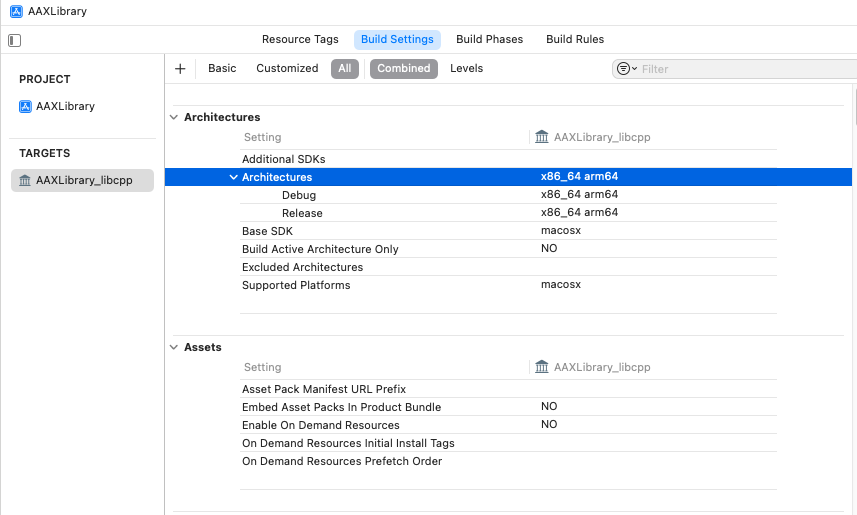
@Lindon Can you set xcode to build a universal binary?
Free HISE Bootcamp Full Course for beginners.
YouTube Channel - HISE tutorials
My Patreon - More HISE tutorials -
@David-Healey how?
HISE Development for hire.
www.channelrobot.com -
@Lindon I have this in XCode:
HISE Development for hire.
www.channelrobot.com -
I removed aax-sdk-2-8-0 and replaced it with aax-sdk-2-6-1. built it and got exactly yhe same result ....
HELP!
HISE Development for hire.
www.channelrobot.com



