Forum
    • Categories
    • Register
    • Login

    RNBO Integration in HISE 4.1.0: Updated Workflow for Hardcoded-style DSP Networks?

    Scheduled Pinned Locked Moved C++ Development
    25 Posts 4 Posters 675 Views
    Loading More Posts
    • Oldest to Newest
    • Newest to Oldest
    • Most Votes
    Reply
    • Reply as topic
    Log in to reply
    This topic has been deleted. Only users with topic management privileges can see it.
    • DanHD
      DanH @voxuer1
      last edited by DanH

      @voxuer1 said in RNBO Integration in HISE 4.1.0: Updated Workflow for Hardcoded-style DSP Networks?:

      DspNetworks/ThirdParty/rnbo

      Should be DspNetworks/ThirdParty/src for the c++ rnbo file and the rbno folder goes in there too. Then compile DSP networks as dll. restart Hise and it should appear in the Hardcoded FX list. If not check it exists in Scriptnode. Open a Script FX effect module, open up the patch and click anywhere to open the node menu, click project tab and look if it's in there.

      DHPlugins / DC Breaks | Artist / Producer / DJ / Developer
      https://dhplugins.com/ | https://dcbreaks.com/
      London, UK

      V 1 Reply Last reply Reply Quote 1
      • V
        voxuer1 @DanH
        last edited by

        @DanH said in RNBO Integration in HISE 4.1.0: Updated Workflow for Hardcoded-style DSP Networks?:

        Should be DspNetworks/ThirdParty/src for the c++ rnbo file and the rbno folder goes in there too. Then compile DSP networks as dll. restart Hise and it should appear in the Hardcoded FX list. If not check it exists in Scriptnode. Open a Script FX effect module, open up the patch and click anywhere to open the node menu, click project tab and look if it's in there.

        Thanks for the suggestion, but the standard workflow is currently failing with newer RNBO versions.

        While this approach works perfectly for older exports (Max 8 / RNBO 1.3), it fails with RNBO 1.4.2. Even with the correct folder structure (DspNetworks/ThirdParty/src/) and the "Create C++ template" tool, the compiler throws errors in Xcode.

        The main culprit seems to be a change in RNBO's code generation:

        Error: Use of class template 'RNBO::Volume' requires template arguments.

        Result: HISE fails to find members like prepare and process because the generated wrapper doesn't match the new template-based structure of RNBO 1.4.2.

        It seems RNBO changed its C++ export format, and the HISE 4.1.0 template generator isn't handling these new class templates correctly yet. Has anyone found a workaround for this specific version mismatch?

        dannytaurusD 1 Reply Last reply Reply Quote 0
        • dannytaurusD
          dannytaurus @voxuer1
          last edited by

          @voxuer1 Is this the video you're referring to?

          https://www.youtube.com/watch?v=64dTcwnP40o

          Meat Beats: https://meatbeats.com
          Klippr Video: https://klippr.video

          V 1 Reply Last reply Reply Quote 0
          • V
            voxuer1 @dannytaurus
            last edited by

            @dannytaurus Yes, However, the same patch no longer compiles in HISE due to errors in main.cpp. It worked fine with Max 8/RNBO 1.3, but fails with RNBO 1.4.2 in Max 9.

            DanHD 1 Reply Last reply Reply Quote 0
            • DanHD
              DanH @voxuer1
              last edited by

              @voxuer1 I'd suggest rolling back your RNBO in that case. I'm on Max 9.09, not sure which version of RNBO - where does it state that? But I can compile the patches ok

              DHPlugins / DC Breaks | Artist / Producer / DJ / Developer
              https://dhplugins.com/ | https://dcbreaks.com/
              London, UK

              V 2 Replies Last reply Reply Quote 0
              • V
                voxuer1 @DanH
                last edited by

                @DanH I'm having no luck rolling back RNBO; it just won't work on Max 9.1.2

                1 Reply Last reply Reply Quote 0
                • V
                  voxuer1 @DanH
                  last edited by

                  @DanH Just to be sure — are your Max 9 RNBO patches actually running inside HISE

                  DanHD 1 Reply Last reply Reply Quote 0
                  • DanHD
                    DanH @voxuer1
                    last edited by DanH

                    @voxuer1 100%

                    Have you tried rolling Max back?

                    DHPlugins / DC Breaks | Artist / Producer / DJ / Developer
                    https://dhplugins.com/ | https://dcbreaks.com/
                    London, UK

                    V 1 Reply Last reply Reply Quote 0
                    • V
                      voxuer1 @DanH
                      last edited by

                      @DanH Yes — I tested this.
                      I installed Max 9.0.9 (RNBO 1.4.0) and tried the same RNBO patch.
                      No change: the patch compiles in Max, but fails in HISE with errors in main.cpp, same as with newer Max 9 versions.
                      The exact same patch works when authored with Max 8 / RNBO 1.3.x.

                      DanHD 1 Reply Last reply Reply Quote 0
                      • DanHD
                        DanH @voxuer1
                        last edited by

                        @voxuer1 are on Hise Develop branch?

                        DHPlugins / DC Breaks | Artist / Producer / DJ / Developer
                        https://dhplugins.com/ | https://dcbreaks.com/
                        London, UK

                        V 1 Reply Last reply Reply Quote 0
                        • V
                          voxuer1 @DanH
                          last edited by

                          @DanH said in RNBO Integration in HISE 4.1.0: Updated Workflow for Hardcoded-style DSP Networks?:

                          are on Hise Develop branch?

                          HISE 4.1.0, custom GitHub build (no branch info available)

                          DanHD 1 Reply Last reply Reply Quote 0
                          • DanHD
                            DanH @voxuer1
                            last edited by

                            @voxuer1 perhaps try with develop: https://github.com/christophhart/HISE/tree/develop

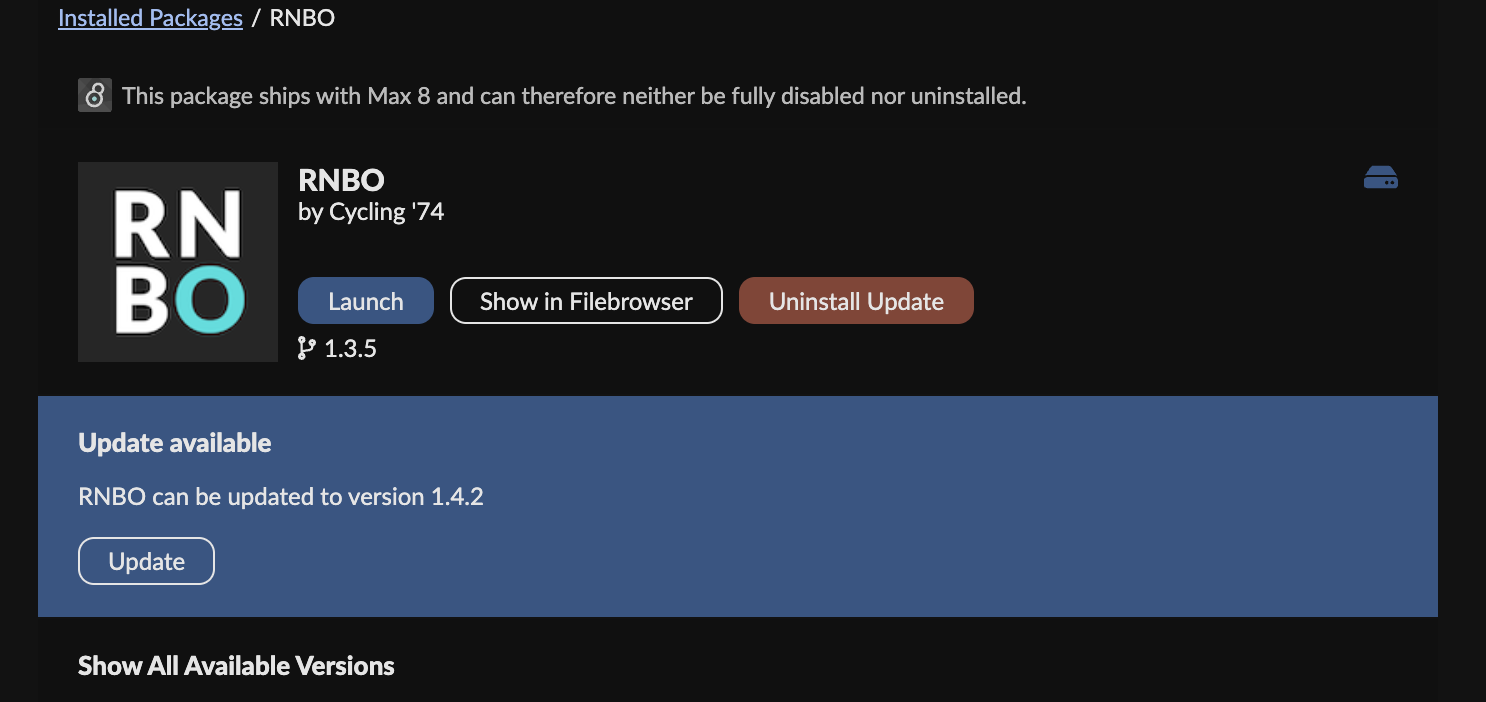
                            How can I check my RNBO version?

                            DHPlugins / DC Breaks | Artist / Producer / DJ / Developer
                            https://dhplugins.com/ | https://dcbreaks.com/
                            London, UK

                            V 2 Replies Last reply Reply Quote 0
                            • V
                              voxuer1 @DanH
                              last edited by

                              @DanH in the Package Manager Bildschirmfoto 2026-01-28 um 11.08.45.png

                              1 Reply Last reply Reply Quote 0
                              • V
                                voxuer1 @DanH
                                last edited by

                                @DanH Thanks!
                                Just to be sure — which HISE version / branch are you using exactly (master vs develop), and on which OS?
                                I want to match the setup before testing further.

                                DanHD 2 Replies Last reply Reply Quote 0
                                • DanHD
                                  DanH @voxuer1
                                  last edited by

                                  @voxuer1 I sent you the link above, and I'm on OSX.

                                  DHPlugins / DC Breaks | Artist / Producer / DJ / Developer
                                  https://dhplugins.com/ | https://dcbreaks.com/
                                  London, UK

                                  1 Reply Last reply Reply Quote 0
                                  • DanHD
                                    DanH @voxuer1
                                    last edited by

                                    @voxuer1 so I'm on RNBO 1.4.2 and everything works fine

                                    DHPlugins / DC Breaks | Artist / Producer / DJ / Developer
                                    https://dhplugins.com/ | https://dcbreaks.com/
                                    London, UK

                                    V DanHD 2 Replies Last reply Reply Quote 0
                                    • V
                                      voxuer1 @DanH
                                      last edited by

                                      @DanH said in RNBO Integration in HISE 4.1.0: Updated Workflow for Hardcoded-style DSP Networks?:

                                      so I'm on RNBO 1.4.2 and everything works fine

                                      ok, wau good to hear.

                                      V 1 Reply Last reply Reply Quote 0
                                      • V
                                        voxuer1 @voxuer1
                                        last edited by

                                        @voxuer1 Hi everyone,
                                        I’ve been trying to get RNBO 1.4.2 to compile with HISE on macOS for an entire day, but unfortunately without success.
                                        What I already tried:
                                        Clean reinstall of HISE
                                        Regenerating the JUCE project multiple times
                                        Fresh builds in Xcode
                                        No custom modifications to the generated project

                                        Create files
                                        Sorting include dependencies
                                        Copying third party files
                                        Compiling dll plugin
                                        Re-saving file: /Users/thomaszalud/Documents/HISE Projects/0/DspNetworks/Binaries/AutogeneratedProject.jucer
                                        Finished saving: Visual Studio 2022
                                        Finished saving: Xcode (macOS)
                                        Finished saving: Linux Makefile
                                        Compiling 0 ...
                                        ** BUILD FAILED **

                                        The following build commands failed:
                                        CompileC /Users/thomaszalud/Documents/HISE\ Projects/0/DspNetworks/Binaries/Builds/MacOSX/build/0.build/Debug/0\ -\ Dynamic\ Library.build/Objects-normal/arm64/Main.o /Users/thomaszalud/Documents/HISE\ Projects/0/DspNetworks/Binaries/Source/Main.cpp normal arm64 c++ com.apple.compilers.llvm.clang.1_0.compiler (in target '0 - Dynamic Library' from project '0')
                                        (1 failure)

                                        DanHD 1 Reply Last reply Reply Quote 0
                                        • DanHD
                                          DanH @voxuer1
                                          last edited by

                                          @voxuer1 are you building networks at the same time as the nodes? if so remove the networks from the compile process and just build the nodes first. If it succeeds add the networks back in and compile again.

                                          DHPlugins / DC Breaks | Artist / Producer / DJ / Developer
                                          https://dhplugins.com/ | https://dcbreaks.com/
                                          London, UK

                                          V 1 Reply Last reply Reply Quote 0
                                          • V
                                            voxuer1 @DanH
                                            last edited by

                                            @DanH said in RNBO Integration in HISE 4.1.0: Updated Workflow for Hardcoded-style DSP Networks?:

                                            are you building networks at the same time as the nodes? if so remove the networks from the compile process and just build the nodes first. If it succeeds add the networks back in and compile again.

                                            Thanks for the advice regarding building the nodes first. I tried to follow this workflow, but I've hit a wall with my Max 9 / RNBO 1.4.2 patch (named 'Volume').

                                            What I did:

                                            I put the RNBO files into DspNetworks/ThirdParty/src/rnbo.

                                            I used the 'Create RNBO Template files' wizard. The wizard successfully recognized Volume.cpp.

                                            HISE confirmed: "The file Volume was created".

                                            The Problem: Despite the successful template creation and multiple HISE restarts, the 'Volume' node never appears in the Scriptnode Workspace 'Add Node' menu (under project or search).

                                            Interestingly, all my older Max 8 / RNBO 1.3.3 patches (like 'Grafik7') show up perfectly and can be added to the workspace. It seems like the template for the Max 9 patch is created but not registered by HISE, so I can't even reach the step of 'building the node first' as suggested.

                                            Has anyone encountered this where the wizard succeeds but the node remains invisible in the workspace?


                                            DanHD 1 Reply Last reply Reply Quote 0
                                            • First post
                                              Last post

                                            26

                                            Online

                                            2.2k

                                            Users

                                            13.4k

                                            Topics

                                            116.7k

                                            Posts