basically though, a preset change is just changing all the Faust nodes knobs... so there wouldn't really be a reason to reset anything... so maybe a custom preset loader might work

Posts
-
RE: HELP! I modeled a Roland D-50 in HISE/Faust, but...posted in General Questions
-
RE: [DEVLOG] Pro EQposted in C++ Development
dude you are the goat! aehm I mean griffin! I've been wishing for something like this to shape harmonic sounds from noise... for my linear arithmatic synth style PCM samples
-
HELP! I modeled a Roland D-50 in HISE/Faust, but...posted in General Questions
Ahoi!
This has been a couple of hard all-nighters, and it finally somewhat works
https://www.youtube.com/watch?v=rT4RH9pRJxQBUT:
Every time changes the preset in HISE, the Hardcoded Master FX reverb drops out and is somehow reset although nothing writes to it, at least not in any of my scripts. What I've traced so far in the HISE source:
UserPresetHandler.cpp: alls allNotesOff(false), then killAndCallOnLoadingThread meaning all voices are killed before the preset loads.
With no voices left, EffectProcessorChain::killMasterEffects() soft-bypasses the master effectsIs there a supported way to keep a master FX's internal state across a user preset load?
Does moving the effect out of the synth's FX chain (into the plugin-level master chain) avoid the voice-kill path, or does the same reset apply there?
Ideally I'd like the reverb to ring out across a patch change, which is what the hardware I'm modelling does. -
RE: Made a thing: Roland JX-8P/JC-10/MKS-70 emulation in HISEposted in General Questions
@griffinboy sick isn't it? I wonder myself how I got there, but then again given Idid nothing else for the past months than spend every free hour on this... it's a bit pathetic ;))) I need to start having a life again lol
-
Made a thing: Roland JX-8P/JC-10/MKS-70 emulation in HISEposted in General Questions
I spent the past months modeling a Roland jX-8P/JX-10 in faust (dsp) and HISE, it's finally done and working,including sysex capabiligies to function as a PG-800 and the ability to load old patches.
if anyone wants to have a look, try or listen https://www.morphoice.com/eightyten
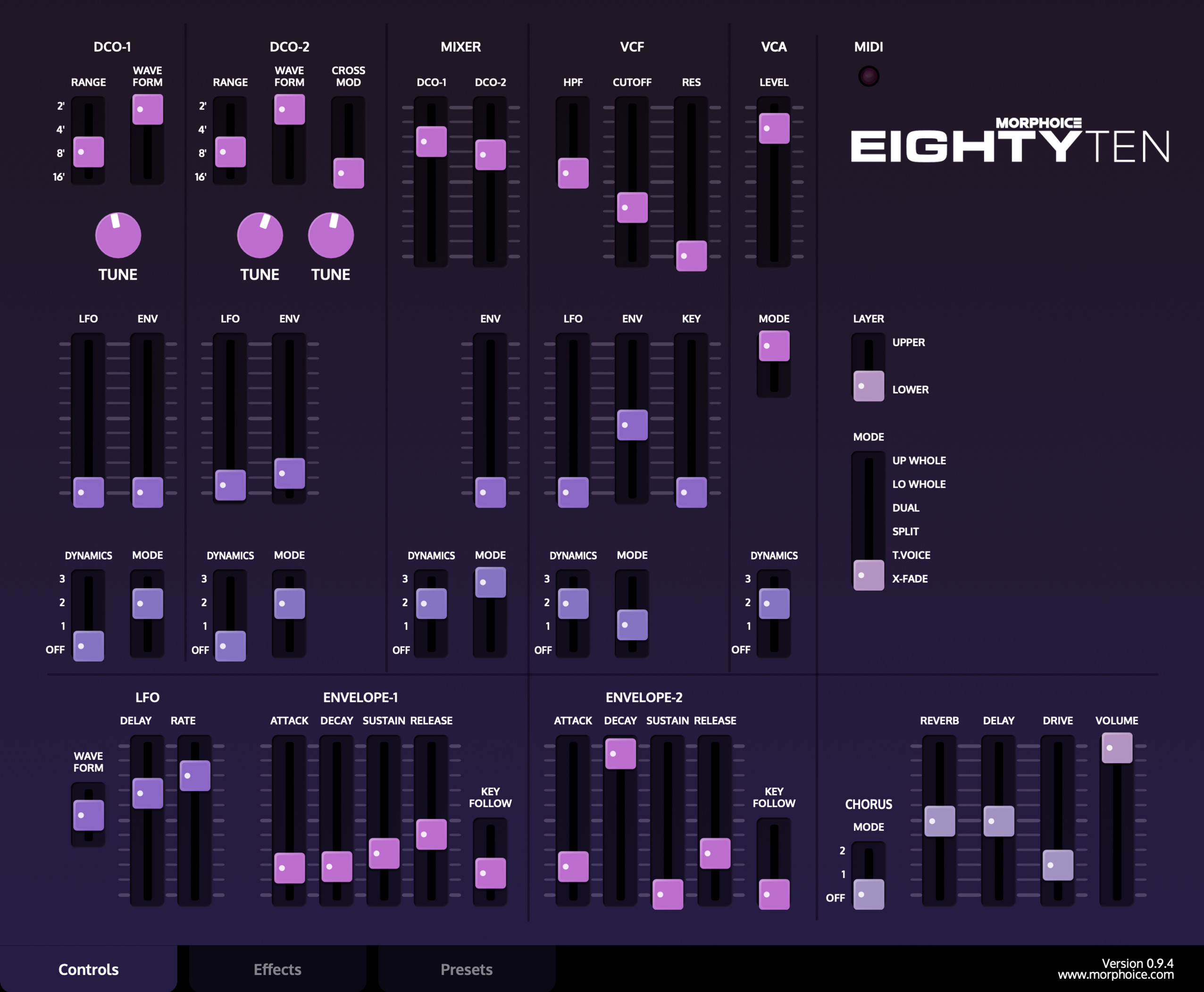
So it's time again for me to say thanks to everyone here who taught me how to do it and HISE/Christoph for the skills that were given to me in this awesome community.
Special Thanks to @David-Healey for all the LAF tutorials without which I would have completely failed the big one ;)
I had to make a few significant changes to HISE for this to work, all of which I have documented in the forum/ and HISE github. If anyone wants to include them in future releases, I'm sure they would be helpful for others.
Next up is finishing my Roland Jupiter 8 emu which you can already hear on. my youtube
All the best!
-
RE: Custom controlsposted in General Questions
@David-Healey I added a dragThumbOnly property to Scriptslider
if enabled:
- A left-click on the slider track no longer starts a drag or jumps the value.
HiSlider::mouseDown hit-tests the click against the drawn handle centre
and only forwards to Slider::mouseDown when the click lands on the
thumb (within dragThumbSize/2 + dragThumbPad). Right-clicks still pass
through for MIDI-learn / context menu. - Snap-to-mouse is disabled, so dragging the thumb is relative and the
value does not snap to the cursor on click.
if anyone is interested it's on my fork
https://github.com/morphoice/HISE/commit/7b206d1951558381a2a38b2691a504d7542eec56however the dimensions are currently hardcoded to my needs, so there will be further changes needed to make this a general feature. I therefor didn't make a PR
- A left-click on the slider track no longer starts a drag or jumps the value.
-
RE: Custom controlsposted in General Questions
@David-Healey I rewired a test slider in my plugin as a panel-as-parameter exactly like you did in your example, no change in Cubase. I'm attempting to patch HISE to have that handle click gated
-
RE: Custom controlsposted in General Questions
@David-Healey Confirmed in your own snippet: if I write the automation by moving the knob from script (panel -> Knob1.setValue/changed) instead of dragging it, Cubase records the lane but won't read it back on playback until I reload the project.
-
RE: Custom controlsposted in General Questions
@David-Healey at it. If this works in Cubase I'm gonna cry
-
RE: Custom controlsposted in General Questions
@David-Healey using the knob's control callback for the read side is cleaner than the poll I was using, so thanks for that. But I think the reason it works for you and not me is the host. Nothing here emits beginChangeGesture/endChangeGesture - Knob1.changed() from script doesn't - and Cubase only arms a parameter for automation read once it has seen that gesture. Your host seems to arm on a plain edit, so the round-trip fires; in Cubase the lane is written but never armed, so the read is never sent back and onKnob1Control never runs (until a project reload). So I think your test actually pins it on Cubase's gesture requirement rather than the link logic.
-
RE: Custom controlsposted in General Questions
@David-Healey said in Custom controls:
Oh I missed that, I'll check
I wonder if my best option is to simply modify HISE to give the slider a thumb-only mode (gate that Slider::mouseDown call in HiSlider on getPositionOfValue) and throw the stack away
-
RE: Custom controlsposted in General Questions
@David-Healey Yep, that's exactly what I have. The invisible knob is the parameter and its control callback does panel.setValue(value); panel.repaint();. That half works - if the knob receives a value, the panel follows it.
The gap is on the write side, not the read side. I never drag the knob - I drag the panel, because I need handle-only dragging (move only when you grab the handle, not when you click the groove), which a normal slider can't do. So the panel intercepts the mouse and sets the knob's value from script. A real drag fires beginChangeGesture/endChangeGesture, and that's what tells the host to arm the parameter for automation read. A scripted setValue/changed doesn't fire it, so the host records my lane but never arms it - on playback it never sends the value back to the knob, the callback never runs, the panel never moves. A project reload fixes it because the host re-reads the parameter list.
So the knob->panel read path you're showing is already in place and fine. The only missing piece is that my value change comes from script rather than a drag, and there's no HISEScript API to emit the gesture.
-
RE: Custom controlsposted in General Questions
@David-Healey said in Custom controls:
I was demonstrating the host automaton on the slider (invisible in your case) updates the panel
Right, but in your demo you're dragging the knob. We're not - we drag a view (panel) that sets the knob's value from script. A real drag fires beginChangeGesture/endChangeGesture, which is what arms the parameter for read; a script setValue/changed doesn't. So the host writes our automation but won't read it back until reload. The knob itself automating fine was never the issue - it's that our value comes from script, not a drag, and there's no script API to emit the gesture.
-
RE: Custom controlsposted in General Questions
@David-Healey Thanks for testing. I think your working case is actually the same gesture thing seen from the other side.
In your example Knob1 is a real slider you drag directly, and it just mirrors its value into Panel1 for display. The knob is the parameter, and because it's a real slider being dragged, JUCE fires beginChangeGesture/endChangeGesture, so it reads back. The panel there is only a readout.
Mine is different: the panel is the thing being dragged. I need handle-only dragging (move only when you grab the handle, not when you click the groove), which a normal slider can't do, so the panel intercepts the mouse and pushes the value into the invisible slider with setValue/changed from script. The slider itself is never dragged, so no gesture fires, and Cubase records the lane but doesn't arm it for read until I reload the project.
So dragging a real slider directly works (your case), but I can't do that without losing handle-only, and driving the slider from script gives me handle-only but no gesture. As far as I can find there's no HISEScript API to emit beginChangeGesture/endChangeGesture.
So the real question: has anyone gotten host automation to read back on a script-driven control - one you set with setValue/changed rather than by dragging the actual slider - without a project reload?
-
RE: Custom controlsposted in General Questions
@David-Healey said in Custom controls:
I'm asking why not use the panel as the parameter instead of the slider?
Good question, and you're right that it's technically possible - I was wrong to assume a panel flat-out can't be a parameter. A ScriptPanel IS automatable (isAutomatable() returns true), it inherits setControlCallback, and with HISE_SEND_PANEL_CHANGED_TO_PLUGIN_PARAMETER=1 its changed() sends straight to the host. So you can make the panel the parameter and drop the invisible slider.
But there are real reasons I went with an invisible ScriptSlider underneath, and a couple of common assumptions about it are actually wrong, so to be precise:
What a panel-as-parameter genuinely lacks vs a slider:
It's not a plugin parameter by default. isPluginParameter is deactivated on panels (the base deactivates it; ScriptSlider re-enables it, ScriptPanel does not), so it only works behind the non-default HISE_SEND_PANEL_CHANGED_TO_PLUGIN_PARAMETER compile flag.
No skew. middlePosition is slider-only; the parameter range for a panel is built linear (the skew step runs only for the Slider case). So you lose non-linear mapping (log frequency etc.).
Not preset-saved by default (saveInPreset defaults false on panels, true on sliders).
What is NOT missing (contrary to what I'd assumed):stepSize - panels have their own and it's used as the parameter interval.
processorId/parameterId - base properties, still active on panels, so a panel can bind to a processor.
The actual blocker for my case though: whichever component is the parameter, the value is set from script via setValue/changed(), and ScriptPanel::changed() (like the slider path) emits no beginChangeGesture/endChangeGesture. My problem is Cubase writes the automation but doesn't read it back until I reload the project, and I traced that to the missing gesture. So moving the parameter onto the panel simplifies the structure but I expect the exact same write-works/read-fails behaviour - the parameter being a panel vs a slider doesn't add the gesture.So the open question is really: has anyone gotten host automation to read back on a script-driven control (panel or invisible slider) without a project reload, given there's no script API to emit a parameter gesture? I'm running a test now too
-
RE: Custom controlsposted in General Questions
@David-Healey The dragslider's view is a ScriptPanel over an invisible ScriptSlider (the parameter). I can make the panel the parameter via HISE_SEND_PANEL_CHANGED_TO_PLUGIN_PARAMETER, but its changed() also emits no beginChangeGesture/endChangeGesture, so I expect the same write-works/read-fails issue. Has anyone confirmed a panel-as-parameter reads host automation back without a reload?
-
RE: Custom controlsposted in General Questions
@David-Healey Clicking a slider handle should make it stay exactly in place unless it is dragged.
To solve this I have a custom slider built as an invisible ScriptSlider (the plugin parameter) with a ScriptPanel overlay that handles the dragging, because a normal slider can't be restricted to handle-only (it moves on a groove drag). The panel sets the value with setValue() + changed().
Problem: in Cubase the automation is written correctly, but on playback it does NOT read back - until I reload the project. Normal sliders that the user drags directly read back fine immediately.
Cause (traced in source): dragging a real HiSlider calls beginChangeGesture()/endChangeGesture() on its plugin parameter (sliderDragStarted/Ended), which is what the host uses to arm the parameter for automation read. Script setValue/changed() emit no gesture, and there is no HISEScript API to emit one.
Required: exposing beginChangeGesture/endChangeGesture (e.g. Control.startGesture() / endGesture()) so panel-driven custom controls can bracket their edits and behave like a real slider for host automation. That, however, would be a hise source change which breaks with an update
-
RE: Custom controlsposted in General Questions
@David-Healey a simple vertical slider. however using the standard one with a LAF doesnt work as the handle would jump to the mous position when it is clicked and not even yet dragged also just accidentally clicking into a slider's track would set the handle to that position
-
Custom controlsposted in General Questions
How would I go about adding custom controls to my UI that write/read automation?
Someone said have a model knob invisible underneath and a view knob/control actually taking the mouse input and mimicing the knob behavior. but I can't seem to figure out or find anything about how to transfer the info between the two especially on reading automation
The script control's plugin parameter (ScriptedControlAudioParameter) is a juce::AudioProcessorParameter, so it already has beginChangeGesture()/endChangeGesture(). What's missing is only a script-accessible entry point that calls them. A visible HiSlider already does this on drag (MacroControlledComponents.cpp:735/752); HISEScript has no equivalent.