Forum
    • Categories
    • Register
    • Login
    1. Home
    2. Kaih
    K
    • Profile
    • Following 0
    • Followers 0
    • Topics 0
    • Posts 7
    • Groups 0

    Kaih

    @Kaih

    4
    Reputation
    3
    Profile views
    7
    Posts
    0
    Followers
    0
    Following
    Joined
    Last Online
    Age 52
    Location Finland

    Kaih Unfollow Follow

    Best posts made by Kaih

    • RE: FREE W/ CODE ::: NEW GUI DESIGNER APP! ::: ROX DESIGNER SUITE ::: is LIVE!

      @Kaih

      --- Edit 2: Now, spending around 5 hours with the software, I have to say the application is a golden resource for an interface designer and non-designer as well.

      The possibilities to change parameters are vast, and all the parts of the software have been working as expected. This is well worth the asking price, and I urge you to just get it if you're doing work with interfaces in HISE. Absolutely golden.

      One thing that bugs me a little, is the application logging in to the server when started, Probably for the licence checking, but might be used for the code generating as well. That always makes me think of the future with that kind of softwares. It gives a possibility for subscription based licensing, which is the pestilence of this time, or if the company goes down for reason or another, it renders the software useless.

      Quite a number of presets is always a welcome thing and possibilities for community generated presets seem to be integrated as well. The developer seems to have big vision for this, and not without a reason, I could see it widening to other application targets as well with the code base, although it's already useful with the javascript, filmstrip and .png exports. There hasn't been too many of this kind of softwares over the years, some come to mind like jknobman, knobstudio, and those aren't exactly modern.

      Anyway, for the time being, damn, this is excellent and takes off the unneeded pain of manually going through the code line by line. Brilliant!
      posted in General Questions
      K
      Kaih
    • RE: RNBO Compile DLL Crash (RNBO --> HISE)

      @dannycouture

      So you got it working with RNBO 1.4?

      Since...
      I've found posts saying it works over 1.4, and others that it won't, and wasted half a day yesterday trying with different settings on 1.4.5 export. Today I decided to use my time a bit better and try to find what works, not what doesn't.

      I've been testing things all morning, and have come to a conclusion, that after RNBO 1.3.5
      something changed in their code, and the import doesn't work anymore starting from RNBO 1.4.0 upwards. I would be interested to know how in hell some people are getting it to work over 1.3.5

      Here's the versions I've been testing with.
      The HISE base folder being a new duplicate of the same original one on every case.
      Only exported RNBO files are changed in /src
      I didn't bother to try every update/downgrade, since the pattern seems quite clear.

      Using HISE 4.9.3 3deb6f2a compiled with Faust

      Max 8.6.5 RBNO 1.3.0 Guitar Pedals 1.0.4 Booster Working
      Max 8.6.5 RBNO 1.3.4 Guitar Pedals 1.0.4 Booster Working
      Max 8.6.5 RBNO 1.3.5 Guitar Pedals 1.0.4 Booster Working
      Max 8.6.5 RBNO 1.4.0 Guitar Pedals 1.0.4 Booster Not working
      Max 8.6.5 RBNO 1.4.1 Guitar Pedals 1.0.4 Booster Not working
      Max 8.6.5 RBNO 1.4.2 Guitar Pedals 1.0.4 Booster Not working

      Max 9.0.9 RBNO 1.3.5 Guitar Pedals 1.0.4 Booster Working
      Max 9.0.9 RBNO 1.4.0 Guitar Pedals 1.0.4 Booster Not working
      Max 9.0.9 RBNO 1.4.5 Guitar Pedals 1.0.4 Booster Not working

      As with the tutorial video on the tube about the matter, you cannot see what the actual version of RNBO is used, so that doesn't really help either.

      The reason posting here being really to spread the conclusion I came to with my set-up,
      and maybe someone trying to exchange files between MAX and HISE can actually find something helpfull.

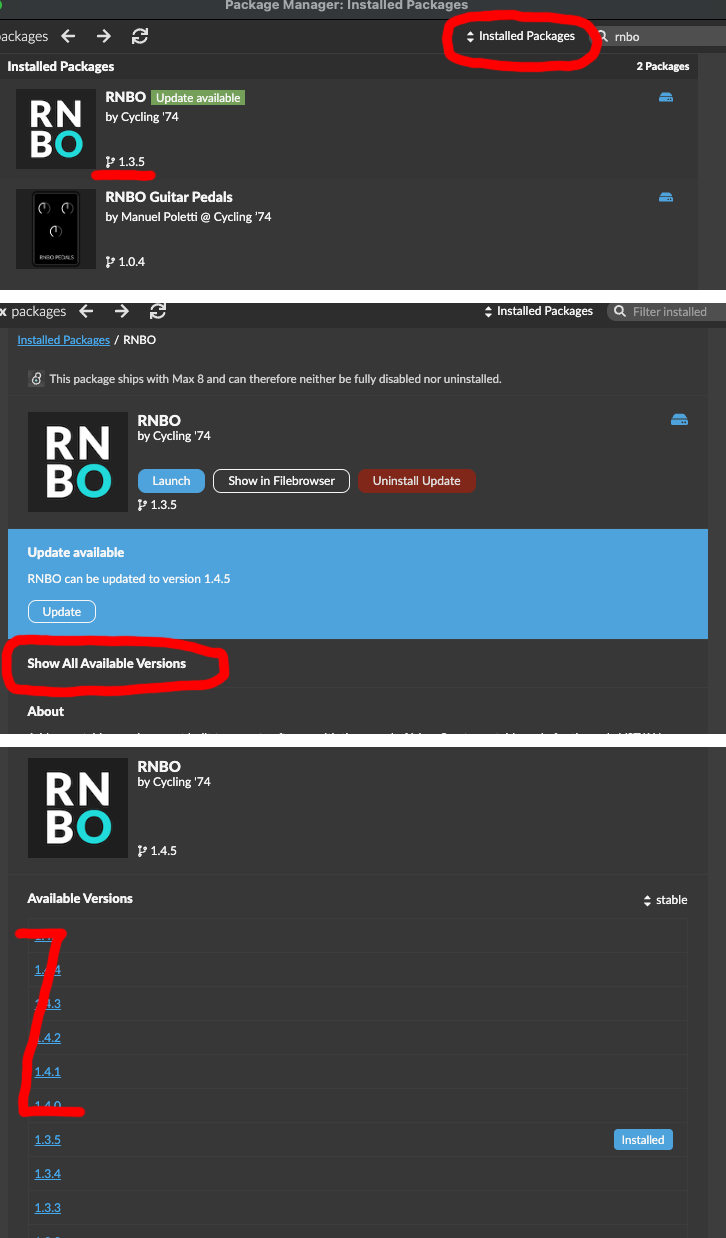
      Here's where you can find the version of the RNBO you're using in MAX:
      Go to File/Package manager, and be sure that you're in Installed packages, not the remote packages. Then from Show all versions you can find the versions of RNBO available for up/downgrade. Based on the experiments, I would advise not to go above 1.3.5 at this time, but of course, I might be wrong as well, That's how it works for me anyway :)

      rnbo.png

      posted in Bug Reports
      K
      Kaih

    Latest posts made by Kaih

    • RE: Scriptnode compilation failing on ARM Mac

      For one thing, I would avoid spaces in naming things, like you have two there around - and one between Dynamic and library. Might not be the problem here, but better not to use those. Personally I’d get rid of the dash as well.

      posted in ScriptNode
      K
      Kaih
    • RE: FREE W/ CODE ::: NEW GUI DESIGNER APP! ::: ROX DESIGNER SUITE ::: is LIVE!

      @Kaih

      --- Edit 2: Now, spending around 5 hours with the software, I have to say the application is a golden resource for an interface designer and non-designer as well.

      The possibilities to change parameters are vast, and all the parts of the software have been working as expected. This is well worth the asking price, and I urge you to just get it if you're doing work with interfaces in HISE. Absolutely golden.

      One thing that bugs me a little, is the application logging in to the server when started, Probably for the licence checking, but might be used for the code generating as well. That always makes me think of the future with that kind of softwares. It gives a possibility for subscription based licensing, which is the pestilence of this time, or if the company goes down for reason or another, it renders the software useless.

      Quite a number of presets is always a welcome thing and possibilities for community generated presets seem to be integrated as well. The developer seems to have big vision for this, and not without a reason, I could see it widening to other application targets as well with the code base, although it's already useful with the javascript, filmstrip and .png exports. There hasn't been too many of this kind of softwares over the years, some come to mind like jknobman, knobstudio, and those aren't exactly modern.

      Anyway, for the time being, damn, this is excellent and takes off the unneeded pain of manually going through the code line by line. Brilliant!

      posted in General Questions
      K
      Kaih
    • RE: FREE W/ CODE ::: NEW GUI DESIGNER APP! ::: ROX DESIGNER SUITE ::: is LIVE!

      So.
      Does this app work fully?
      I mean, some bugs expected for a brand new app, but the basic functionality, is it there?
      I tested the trial, but it's kinda hard to tell since only the knob part is unlocked.

      Since I fell for the Romplur scam five years ago, an app marketed as fully functional but in reality wasn't even at Alpha 0.0.0.1 level and isn't that workable even today in version 2.5 or something,
      I've been quite careful with these new small-brand softwares that I cannot fully test and prove to be working as should.

      I am a bit interested in this, it promises some good shortcuts for the graphics development, but putting my money blindly on something not completely seen is quite out of the question.
      Any non-affiliate reviews on the matter?

      ---- Edit: Scratch that, there seemed to be free couponcode slots remaining, so I'll get to test it out fully myself. Thank you @Chazrox , gesture appreciated.

      posted in General Questions
      K
      Kaih
    • RE: RNBO Compile DLL Crash (RNBO --> HISE)

      @dannycouture

      So you got it working with RNBO 1.4?

      Since...
      I've found posts saying it works over 1.4, and others that it won't, and wasted half a day yesterday trying with different settings on 1.4.5 export. Today I decided to use my time a bit better and try to find what works, not what doesn't.

      I've been testing things all morning, and have come to a conclusion, that after RNBO 1.3.5
      something changed in their code, and the import doesn't work anymore starting from RNBO 1.4.0 upwards. I would be interested to know how in hell some people are getting it to work over 1.3.5

      Here's the versions I've been testing with.
      The HISE base folder being a new duplicate of the same original one on every case.
      Only exported RNBO files are changed in /src
      I didn't bother to try every update/downgrade, since the pattern seems quite clear.

      Using HISE 4.9.3 3deb6f2a compiled with Faust

      Max 8.6.5 RBNO 1.3.0 Guitar Pedals 1.0.4 Booster Working
      Max 8.6.5 RBNO 1.3.4 Guitar Pedals 1.0.4 Booster Working
      Max 8.6.5 RBNO 1.3.5 Guitar Pedals 1.0.4 Booster Working
      Max 8.6.5 RBNO 1.4.0 Guitar Pedals 1.0.4 Booster Not working
      Max 8.6.5 RBNO 1.4.1 Guitar Pedals 1.0.4 Booster Not working
      Max 8.6.5 RBNO 1.4.2 Guitar Pedals 1.0.4 Booster Not working

      Max 9.0.9 RBNO 1.3.5 Guitar Pedals 1.0.4 Booster Working
      Max 9.0.9 RBNO 1.4.0 Guitar Pedals 1.0.4 Booster Not working
      Max 9.0.9 RBNO 1.4.5 Guitar Pedals 1.0.4 Booster Not working

      As with the tutorial video on the tube about the matter, you cannot see what the actual version of RNBO is used, so that doesn't really help either.

      The reason posting here being really to spread the conclusion I came to with my set-up,
      and maybe someone trying to exchange files between MAX and HISE can actually find something helpfull.

      Here's where you can find the version of the RNBO you're using in MAX:
      Go to File/Package manager, and be sure that you're in Installed packages, not the remote packages. Then from Show all versions you can find the versions of RNBO available for up/downgrade. Based on the experiments, I would advise not to go above 1.3.5 at this time, but of course, I might be wrong as well, That's how it works for me anyway :)

      rnbo.png

      posted in Bug Reports
      K
      Kaih
    • RE: Need help for Export on Mac

      @LUIS29

      I can give the mac compiling a go and try if it compiles ok.
      No guarantees. You need to codesign it afterwards thou on every mac machine it is running.
      it's not too hard, just running some code through terminal on mac.

      posted in General Questions
      K
      Kaih
    • RE: Hise general and compiler settings not saving

      @Christoph-Hart
      Yes, you're quite right, that probably is the real cause.
      Still a bit weird, since an older install worked as should.
      Although it was the one with an .pkg, or was it .dmg, installer from the website,
      so that might have to do with it as well.
      And as the admin and the sole user of the machine, the writing rights should've been ok.

      posted in General Questions
      K
      Kaih
    • RE: Hise general and compiler settings not saving

      OSX Tahoe 26.5.2 M2 HISE 3deb6f2a

      Had the same issues just today after few updates from much older version.
      The cog wheel settings not saving at all and snippet + document bowsers not working.
      Did few rebuilds, but the solution is to create a new empty HISE folder to
      '/Users/yourUserName/Library/Application Support/HISE' and start HISE again.
      After putting in the settings again, it will populate the folder with the necessary files.

      Why the folder has vanished is anyones guess, the easiest solution is to blame disc cleaning and maintenance softwares if you use one and you probably wouldn't be far off.

      posted in General Questions
      K
      Kaih