Congratulations, it sounds nice and looks very polished 
Can i ask,did you record the samples or source them elsewhere?
B
Posts
-
RE: Oriental Drummerposted in General Questions
-
RE: VST/plugin GUI design + launch graphics — ads, motion, webposted in General Questions
Great design styles

Are you plucking these from your imagination, or getting style inspirations from somewhere?
-
RE: Testers Needed for Rhapsody v3posted in General Questions
I've completely uninstalled Rhapsody and the sample pack, then reinstalled new versions, also installed latest FL Studio beta.. unfortunately seeing the same crashes 10 seconds after unload.
The 10 second delay between unload and crash might be a clue, but sometimes it takes changing something in the plugin or DAW after unload to see the crash.
Key switches are working

They also working now when triggering sequenced key switch notes and melody notes @ same time.. before your fix the key switch notes had to be placed before the melody notes. -
RE: Testers Needed for Rhapsody v3posted in General Questions
Windows 11 25H2
Build 26200.8457
Intel i7-11800H 2.30GHzFL beta from 2 months ago
I'll get the new beta and test it later todayIt doesn't matter if new project or not, was consistently crashing with method stated.
-
RE: Testers Needed for Rhapsody v3posted in General Questions
@David-Healey said in Testers Needed for Rhapsody v3:
What are the steps to recreate the crash?
It was happening by simply unloading the pack / click unload button and accept.
Trying it now has inconsistent results..
Sometimes can't get the sample pack to reload at all after unload.Try unload | reload.
Move some controls.
Toggle play stop.
Crashing randomly doing these now.Unload seems like the culprit.
Haven't noticed crash without unloading first.
Doesn't necessarily have to be reloaded to get crashes. -
RE: Testers Needed for Rhapsody v3posted in General Questions
@David-Healey said in Testers Needed for Rhapsody v3:
@Bart I've been down a little rabbit hole today with global cables, the articulation switching should work now
https://e.pcloud.link/publink/show?code=XZm4ycZWRIqN1pUCPmGxb4Vxktn7LJfhul7
Did you intend to link the sample pack again, or meant to be a patched app update?
Within 10 seconds of unloading the sample pack Rhapsody crashes FL Studio consistently.
Maybe place the library icon on the left side of the preset header, possibly with a gap.
That's where I'd expect to access it, yet I'm not familiar with sample based plugins. -
RE: Testers Needed for Rhapsody v3posted in General Questions
The key switches are neither working when exporting to audio file, even if the plugin is open and in focus at time of export.. but this will likely fix itself when you patch it up.
Sounds nice, but stuck on Staccatissimo here

-
RE: Testers Needed for Rhapsody v3posted in General Questions
@David-Healey said in Testers Needed for Rhapsody v3:
@Bart said in Testers Needed for Rhapsody v3:
Regarding the Dynamics knob, the Vibrato and Effects knobs - they're not working while in Performance state.
By not working do you mean the controls are disabled or that they are not having an effect on the sound?
Is this in the plugin/standalone or both?
Oh no wait, they are working.. they didn't seem to be sounding before, maybe it was related to the keyswitch issue somehow, or I just wasn't hearing them clearly.
Only testing with VST.
-
RE: Testers Needed for Rhapsody v3posted in General Questions
Was assuming the other controls aren't meant to be working yet.. but then your first message here is stating the plugin is 'ready'.
Regarding the Dynamics knob, the Vibrato and Effects knobs - they're not working while in Performance state.
-
RE: Testers Needed for Rhapsody v3posted in General Questions
Just having another tinker and FL Studio crashed..
Can't be sure it was Rhapsody.. but the project had been working fine for a good while before, then a few minutes after opening Rhapsody and playing some sequenced notes through it, FL Studio crashed.
I'll play some more to see if it happens again.Oh, the key switches are not working when the plugin is minimized or closed.
Annnnndddddd-aaaaaaaahhhhhh, where's the filter bro!?
I've never been in to sampled sounds, but feeling a need for a filter.
Likely more so for bright brassy sounds, to both tame the high end and add more expression.
Maybe a single lowpass knob that can be automated in DAW.
Ignore this if already planned -
RE: Testers Needed for Rhapsody v3posted in General Questions
Very nice David!
Really like the clean polished interface.
Briefly tested the VST with FL Studio on Windows, no issues.
A few tweaks maybe:
Was naturally trying to use the Dynamics | Speed | Amount knobs - not realizing they were disabled.. They could have more contrast between enabled / disabled states to be clearer.The UI corner resize isn't nice when it jumps in big steps, and users may not be able to resize exactly as they want.. Fine step resize is superior imo, if no performance issues.
Great work

-
RE: Optimal Midi Architectureposted in General Questions
@ulrik said in Optimal Midi Architecture:
So I set the TransportHandler to trigger the clock every 1/64T note (the lowest value available)
and based on that, I can make calculations for each note value for position and length etc.. using this functionNice plugin ulrik
I'm likely aiming for a higher PPQ of 960, so not sure it's possible that way..
Chatbot stating: Running a JS loop 960 times per quarter note per sequencer lane will cause hell. And I think you're stating that 96 PPQ is the highest that can go?.
Supposedly the Hise MIDI Player has an internal PPQ resolution of 960 PPQ, handled by sample accurate C++ timing. That's what I need

The MIDI Player could work, but I don't see a way to use it without initially clogging up the plugin with 50 - 100+ MIDI Players, nor finding a way to set them to other MIDI Channels.
Info pointing toward a lot of work to get higher resolution timing without using the MIDI Player..

Stuck, but there must be a way in Hise.
-
RE: Optimal Midi Architectureposted in General Questions
I'm hitting the pillow anyway, guess this projects on hold for now. Sounds like working without the MIDI Player to achieve the objectives might be too much to take on myself atm.
Cheers doods.
-
RE: Optimal Midi Architectureposted in General Questions
@Christoph-Hart said in Optimal Midi Architecture:
I'm living under a rock here. How wide is the DAW industry adoption of this? All of the hosts I'm using don't care at all about MIDI 2.0.
It's only just being rolled out across operating systems and will indeed take some time for DAW's to catch up, although predicting Bitwig will be all over it soon enough.
I guess for me it's always been a fantasy to have more control and resolution, particularly regarding per note automation, next level music... MPE has always been a limited workaround.
Internal synths could could make use of the upgrade

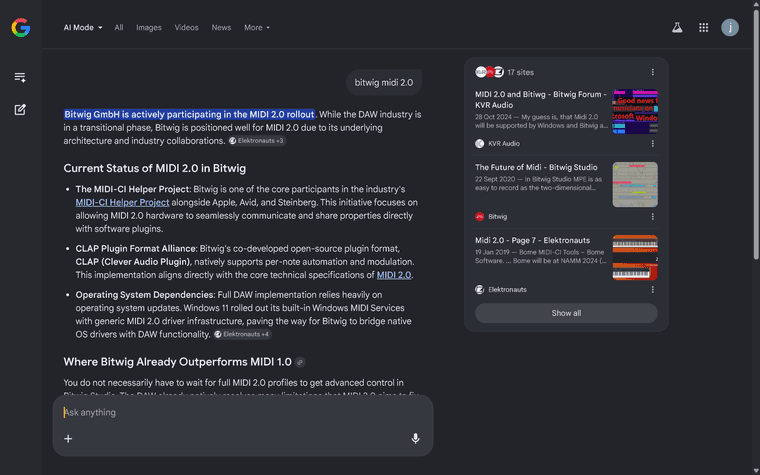
Oh look Bitwig are already in the game.... yas
-
RE: Optimal Midi Architectureposted in General Questions
Wow COOL!

I think the MIDI Player is whats needed also... it just wants an upgrade into the MIDI 2.0 future

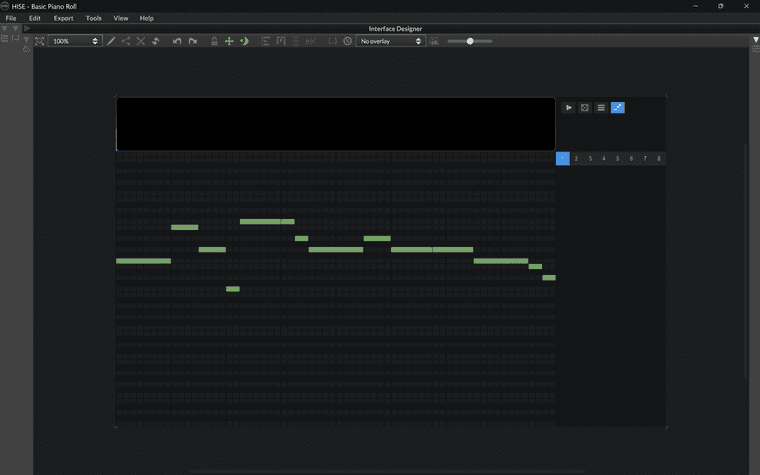
DAW's do in fact purpose Sequencers and Piano Rolls effectively, but I think they're a little lacking in realm of fun easy fast inspirational music composition, so I want to fill the void.
Took a video but the files too large, next time

-
RE: Optimal Midi Architectureposted in General Questions
Don't know if MIDI Players can be dynamically added and removed via the final exported plugin
Don't think it handles parameter automations
Don't think they can playback and display more than one Sequence and or Track at a time
Couldn't get them to output MIDI to anything other than MIDI channel 1,
Using the MIDI Channel Setter Module would be fine, but couldn't get it working with stuck notes
MIDI Player doesn't seem to immediately update it's Sequence and Track when changing themWould be great if a single MIDI Player could manage everything:
Sample accurate playback for MIDI events (already does) and automations (doesn't do)
MIDI 2.0 per note parameter modulation (Hise Events may already be capable??)
Manage parameter automations with sample rate accuracy and MIDI 2.0 resolution
Playback more than one Sequence and or Track together from the single MIDI PlayerSo basically a single MIDI Player Module that handles it all, and then you can utilize the Floating Tiles and custom Piano Roll Panels to view any of the content within the one MIDI Player Module.
So Floating Tile 1 might display Sequence 5 Track 2, while scripted Panel displays piano roll for Sequence 10 Tracks 1 2 3 4 all from the one MIDI Player.Having the option to use a single MIDI Player would then help declutter plugins when many MIDI tracks are needed, but not necessarily wanted clogging up the module tree.
More things I'm sure

A single MIDI Player that can handle it all optimally and accurately, something like that

-
RE: Optimal Midi Architectureposted in General Questions
Oh my goodness I feel so dumb,,, you know what..... I've never seen that Interface tab in the popup module for script processors, because I only ever click the open in workspace icon, or jump straight to the midi callback tabs..
You're right, they're the exact same thing!
Hise is AWESOME!
But I still don't know the answers to questions at the top of this thread..
Do you think @ulrik may know some things about midi and automation sample accurate playback and optimal data management. (without using the Midi Player Module) -
RE: Optimal Midi Architectureposted in General Questions
Ohhh, so you don't mean scripting an actual Hise Module with a pop out UI like the current MIDI Player Hise Module... You just mean a normal script processor for managing the MIDI data?
Guess the script can have an interface within the Interface Designer anyway..
