Opening plugin UI disables active automation in Ableton Live
-
Observed Behavior:
When opening the plugin UI during playback, Ableton Live instantly disables active parameter automation lanes. The DAW behaves exactly as if a parameter was manually adjusted by the user, terminating the automation playback and illuminating Live's "Re-Enable Automation" button.Minimum Reproducible Example:
This behavior can be reproduced from a new project without any scripts.
Create a new HISE project.
Add a single UI Slider (Knob).
Enable isPluginParameter for the knob.
Export as a VST3 / AU.
In Ableton Live, configure the parameter, draw automation on the timeline, and press play.
Open and close the plugin UI window repeatedly.Result: The automation lane will eventually disable upon opening the UI.
Reproduction rate: With a simple 1 knob UI, the failure rate is approximately 1/30 attempts. It may depend on the rate of change of the parameter. With a complex UI (60+ parameters) the failure rate is approximately 1/3 attempts.
HISE 4.9.3
Commit Hash 5d34685f
Live 12.4.3
MacOS 15.7.9
VST3 and AU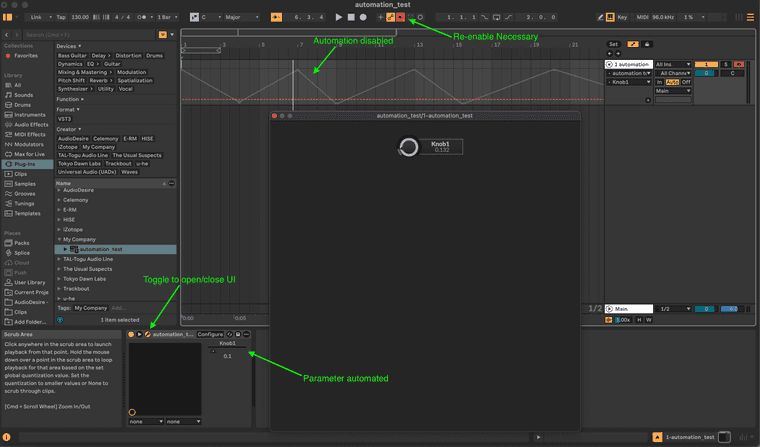
-
I'm not going to pretend I came up with this myself or understand the underlying JUCE implications, but this seems to have fixed it.
In this file:
HISE/JUCE/modules/juce_audio_processors/processors/juce_AudioProcessor.cppModify the setValueNotifyingHost function to abort if the value hasn't actually changed:
void AudioProcessorParameter::setValueNotifyingHost (float newValue)
{
    // Abort if the value hasn't changed. This prevents redundant DAW notifications
    // during UI initialization that cause Ableton to incorrectly disable automation.
    if (getValue() == newValue) return;

    setValue (newValue);
    sendValueChangedMessageToListeners (newValue);
}
I haven't noticed any other side effects so far

-
@justmull I hit the same thing in Live 12. Claude tracked it down.
HISE reports every parameter change back to the host as a manual edit, including the ones from the state restore on project open and from the editor being created, and Live treats those as a user takeover and greys/disables the lane.
PR here: https://github.com/christophhart/HISE/pull/1037
It gates those non-user origins and stops the plugin echoing the value the host just sent.
Verified in Live 12 with six automated lanes over repeated project opens and editor open/close.
One note on the
getValue() == newValueguard: HISE stores the attribute before it notifies, so that check is also true for the user's own knob drags. With it in place the host is never told about a user move, which breaks automation writing.That is why the PR filters on where the change came from instead.
HISE dev latest / herdr + Claude Code / Figma + Affinity
Meat Beats: https://meatbeats.com
Klippr Video: https://klippr.video -
@dannytaurus another useful and helpful PR...@Christoph-Hart ??
HISE Development for hire.
www.channelrobot.com -
@Lindon Christoph said in another thread that he's currently busy with a theatre project but will get to the PRs soon.
Free HISE Bootcamp Full Course for beginners.
YouTube Channel - HISE tutorials
My Patreon - More HISE tutorials -
@David-Healey said in Opening plugin UI disables active automation in Ableton Live:
@Lindon Christoph said in another thread that he's currently busy with a theatre project but will get to the PRs soon.
yes I know I read it- Im just tagging this one as one I think needs to be included - of course Christoph is entitled to tell me to F'k right off with my view of what is important or not :-)
-
@justmull I asked claude to impliment this fix on my project and it said:
The generic forum patch would actually break UI-driven automation in HISE since its getValue() updates before notifying the DAW. I'll apply the narrower fix that only affects the DAW-to-plugin path instead.and instead did:
I applied the fix in ScriptComponentWrappers.cpp:3137. When Ableton sets a value, HISE now records it, so the later update matches and nothing gets sent back to Ableton. Values that change from the plugin's own UI still get reported, so recording automation by turning knobs still works. It's the only change in that file, and git checkout -- hi_scripting/scripting/api/ScriptComponentWrappers.cpp in the HISE folder undoes it. I left your existing uncommitted changes to the .jucer and AppConfig.h alone.

You don't need to rebuild HISE.app for the plugin. The exported Xcode project compiles HISE's source folders directly, so re-running ./build_mac.sh (with the version bumped) builds the fix into the VST3 and AU.
I'm about to test and see if it worked. I mainly just wanted to chime in as I've been trying to figure out this issue for weeks now, as Ableton is my main daw and I have been trying EVERYTHING I could inside HISE and my scripts to troubleshoot. And for some reason I didn't think to search the forum for Ableton specific issues until I did some searching on google and its AI told me that it was likely ableton specific issue.
I am also curious if this is new behavior due to a change in ableton? Because I could swear I had this working fine in an old version of my plugin last year.
-
@justmull said in Opening plugin UI disables active automation in Ableton Live:
I haven't noticed any other side effects so far
it also just said this
I haven't been able to test it in Live myself. If it still freezes, the forum's JUCE patch is the fallback, as long as you accept that it can stop knob moves in the plugin UI from being recorded.Which implies that maybe your fix would not allow for motion recording of the knobs
-
@dannytaurus hey thanks for the updated fix! You are right the knob movements weren't being recorded with mine. I haven't got around to integrating your fixed version yet but appreciate you sharing it.
@AxiomCrux this is my first HISE plugin so not sure when the issue appeared with Ableton, and I would look at that other PR if you want knob movements recorded - my proposed fix indeed broke that.