Forum
    • Categories
    • Register
    • Login

    Console.blink() not blinking?

    Scheduled Pinned Locked Moved General Questions
    17 Posts 3 Posters 1.3k Views
    Loading More Posts
    • Oldest to Newest
    • Newest to Oldest
    • Most Votes
    Reply
    • Reply as topic
    Log in to reply
    This topic has been deleted. Only users with topic management privileges can see it.
    • CyberGenC
      CyberGen @clevername27
      last edited by

      @clevername27 great alternative when you need a debug hint and you don't need to print out something. But it stopped working for me. 😲 Along with the green mini printout that shows up next to the actual line of code.

      Anyone one else missing these debug tools?

      I'm using version 4.

      David HealeyD 1 Reply Last reply Reply Quote 0
      • David HealeyD
        David Healey @CyberGen
        last edited by

        @CyberGen said in Console.blink() not blinking?:

        But it stopped working for me. 😲 Along with the green mini printout that shows up next to the actual line of code.

        Does it work in a new project?

        Free HISE Bootcamp Full Course for beginners.
        YouTube Channel - Public HISE tutorials
        My Patreon - HISE tutorials

        CyberGenC 1 Reply Last reply Reply Quote 0
        • CyberGenC
          CyberGen @David Healey
          last edited by

          @d-healey uh yeah, it does 😧

          what the?

          David HealeyD 1 Reply Last reply Reply Quote 0
          • David HealeyD
            David Healey @CyberGen
            last edited by

            @CyberGen That would make me think that your code isn't reaching the blinky line. Perhaps there is an error earlier in the script.

            Free HISE Bootcamp Full Course for beginners.
            YouTube Channel - Public HISE tutorials
            My Patreon - HISE tutorials

            CyberGenC 2 Replies Last reply Reply Quote 0
            • CyberGenC
              CyberGen @David Healey
              last edited by

              @d-healey no, it's not that. Things are working beyond the blinking point, and I moved it to the top for testing.
              I just noticed that it works when I'm working on the onInit script but it does not work on any of the includes scripts. Weird.

              1 Reply Last reply Reply Quote 0
              • CyberGenC
                CyberGen @David Healey
                last edited by

                @d-healey Check out the gif below. I start out in "onInit" with a blink and a print and it works. I switch to my arp.js page, and not only does it not blink or screen print, when I hit F5 it switches the combo box to show the script editor as disconnected. This happens with all other user scripts.

                What could be causing this?
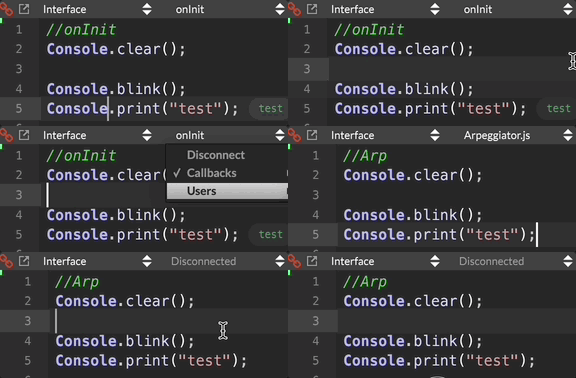
                blink.gif

                David HealeyD 1 Reply Last reply Reply Quote 0
                • David HealeyD
                  David Healey @CyberGen
                  last edited by

                  @CyberGen can you recreate it in a minimal project?

                  Free HISE Bootcamp Full Course for beginners.
                  YouTube Channel - Public HISE tutorials
                  My Patreon - HISE tutorials

                  CyberGenC 1 Reply Last reply Reply Quote 0
                  • CyberGenC
                    CyberGen @David Healey
                    last edited by

                    @d-healey I haven't been able to reproduce it. I started from a clean project. But I can't get user files to stack in the way the are show in the gif.... Somehow this is al related to the user/docu/etc stack and this particular project.

                    CyberGenC 1 Reply Last reply Reply Quote 0
                    • CyberGenC
                      CyberGen @CyberGen
                      last edited by

                      @d-healey @CyberGen said in Console.blink() not blinking?:

                      I haven't been able to reproduce it.

                      I take that back... I wasn't doing it correctly... I can reproduce it now.

                      simple test

                      Content.makeFrontInterface(600, 600);
                      
                      Console.clear();
                      Console.blink();
                      Console.print("do you see me?");
                      
                      
                      //Move this to external file.
                      Console.clear();
                      Console.blink();
                      Console.print("do you see me?");
                      
                      HiseSnippet 687.3ocsUssSaCDDc2PLpw8hJR8CvhmBRHHokBUpO.kboJpMPTCE02PKqmPVk06ZsdMknp9O2+f1YsCXmRDWhZ8CQYtb183YNy3AFMGRRzFBs1ISiAB8YdCmpriaMlITjdsIzW30mkXASPtqCmFyRRfPBktxGcNn0pRxd909GxjLEGJbQHmpEb3yhHgsv6fC9jPJ6xBgSDQkxdmC5w0pVZoNE4yJdMHwL9D1EvQLWZU7HzU6DJrZyPKyBIXNGpCmNbr96p77OUjHNWBNiljg3Ak6lzZrPFN3520DBgVcPwa9J4u4uxquHTbi+hJvKyBDTfnbMfV4tnTyGAknknT0bJsl2PtQDaKh33yS85ovFxHFVpKSk7bIUtf50RiYnraEwl.cMnwMHpuaiFaFf+rw688wzRzRXKtDXl5nmqcbtTnlT1QrQnr0WOTGLUmFj.PPDr+5tyve6s6quDBriEIAVc.bEdSJlLXj.w8O3JFkp3VgVEnUGosvwp5a3+C+Z9+zO3uCMZzBi4pFFsTBlEF1oBM2Ev5pznyAylAWxjovMIhso468q9v5877lSoD0pdJg83XXlcWsLz0Sc++1JExrtK9uu1qMyxbhmY9v7hAiU3nCsMbIN8kKkp40FRlX0w372szYnBWGlJY14k8t46YAv5wbZMmdRkHrSKO++HlEZbmyBOTJtl2.gkOdwbrxB3HVo9evwYaPdtWmQi.tsffU859skccw8b8eQmZEpK5yrFwUDp2QoQCwEmb.uckBj3g6Qq3TK41Mb1tJvPPElY7a7YVvlNa5rfMuNHIhwM5y34SAtcTOIyCxIU1J4Z32FP6fljrIix04Hbk4Yb97G0s.95kE3aVVf6rr.e6xBb2kE3dKKv2c+.ceQ6CoVcT9XCgzePmrUITZGECUfYpUxePQoUzR
                      
                      1 Reply Last reply Reply Quote 0
                      • David HealeyD
                        David Healey
                        last edited by

                        Yeah looks like a bug. I see it printed to the console but I don't see the inline output and the blink doesn't work.

                        Report it on github.

                        Free HISE Bootcamp Full Course for beginners.
                        YouTube Channel - Public HISE tutorials
                        My Patreon - HISE tutorials

                        CyberGenC 2 Replies Last reply Reply Quote 1
                        • CyberGenC
                          CyberGen @David Healey
                          last edited by

                          @d-healey will do. Thank you!

                          1 Reply Last reply Reply Quote 0
                          • CyberGenC
                            CyberGen @David Healey
                            last edited by CyberGen

                            @d-healey in regards to the scripts-disconnected issue, I was able to trace it down to a Engine.setCurrentExpansion() call. It seems that when this is called, it moves all user scripts into a "user" submenu and then the scripts show as disconnected.

                            Can you please help me confirm this?

                            • Add the code below to an external script file like the on in the post above.

                            • Uncomment:

                            //Engine.setCurrentExpansion(expNames[0]);
                            
                            • Hit F5.

                            • Your script menu should now have a "user" stack and the script should appear disconnected.

                            
                            const expHandler = Engine.createExpansionHandler();
                            const expList = expHandler.getExpansionList();
                            const expNames = [];
                            
                            
                            //Set Default Expansion
                            inline function setDefaultExpansion()
                            {
                            	for (e = 0; e < expList.length; e++)
                            	{
                            		local p = expList[e].getProperties();
                            		local n = p.Name;
                            		expNames.push(n);
                            	}
                            	//Engine.setCurrentExpansion(expNames[0]); 
                                   // this can also be:
                                   // expHandler.setCurrentExpansion(expNames[0]);
                                 
                            };
                            
                            setDefaultExpansion();
                            
                            David HealeyD 1 Reply Last reply Reply Quote 0
                            • David HealeyD
                              David Healey @CyberGen
                              last edited by

                              @CyberGen I think I'd only be able to test this with a project that contains expansions?

                              Free HISE Bootcamp Full Course for beginners.
                              YouTube Channel - Public HISE tutorials
                              My Patreon - HISE tutorials

                              CyberGenC 1 Reply Last reply Reply Quote 0
                              • CyberGenC
                                CyberGen @David Healey
                                last edited by

                                @d-healey yes. The project needs at least one expansion.

                                1 Reply Last reply Reply Quote 0
                                • David HealeyD David Healey referenced this topic on

                                • First post
                                  Last post

                                50

                                Online

                                2.1k

                                Users

                                13.0k

                                Topics

                                113.0k

                                Posts
