Forum
    • Categories
    • Register
    • Login

    My first VST is built but it does not show in Ableton, why?

    Scheduled Pinned Locked Moved General Questions
    19 Posts 5 Posters 638 Views
    Loading More Posts
    • Oldest to Newest
    • Newest to Oldest
    • Most Votes
    Reply
    • Reply as topic
    Log in to reply
    This topic has been deleted. Only users with topic management privileges can see it.
    • David HealeyD
      David Healey @Electrolove
      last edited by

      @Electrolove Yes, and

      91924026-d25b-41d0-9cbd-6600c891dd7b-image.png

      Free HISE Bootcamp Full Course for beginners.
      YouTube Channel - Public HISE tutorials
      My Patreon - HISE tutorials

      E 1 Reply Last reply Reply Quote 0
      • E
        Electrolove @David Healey
        last edited by

        This post is deleted!
        David HealeyD 1 Reply Last reply Reply Quote 0
        • David HealeyD
          David Healey @Electrolove
          last edited by

          @Electrolove Did move your plugin from the Binaries folder the correct location on your system for Ableton to see it?

          Free HISE Bootcamp Full Course for beginners.
          YouTube Channel - Public HISE tutorials
          My Patreon - HISE tutorials

          E 1 Reply Last reply Reply Quote 0
          • E
            Electrolove @David Healey
            last edited by

            @d-healey From here...

            Screenshot 2024-11-14 at 13.54.47.png

            ...to VST3 Plug-In System Folders

            David HealeyD 1 Reply Last reply Reply Quote 0
            • David HealeyD
              David Healey @Electrolove
              last edited by

              @Electrolove https://helpcenter.steinberg.de/hc/en-us/articles/115000171310-VST-plug-in-locations-on-Mac-OS-X-and-macOS

              Free HISE Bootcamp Full Course for beginners.
              YouTube Channel - Public HISE tutorials
              My Patreon - HISE tutorials

              E 1 Reply Last reply Reply Quote 0
              • E
                Electrolove @David Healey
                last edited by Electrolove

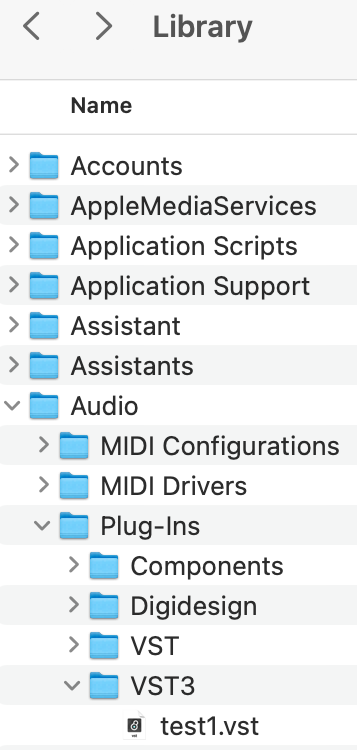
                @d-healey Yes that is the path I used.

                Library/Audio/Plug-ins/VST3/test1.vst
                Screenshot 2024-11-14 at 14.08.05.png

                LindonL David HealeyD 2 Replies Last reply Reply Quote 0
                • LindonL
                  Lindon @Electrolove
                  last edited by

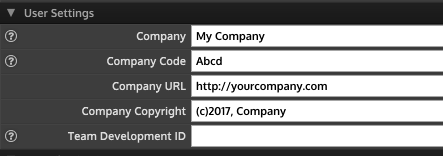
                  @Electrolove give each of your plugins a unique Name, Bundle Identifier and Plugin Code, also use your own Company, Company Code URL, etc. Then rebuild your plugin, move it and see if it shows up.

                  HISE Development for hire.
                  www.channelrobot.com

                  E 1 Reply Last reply Reply Quote 0
                  • David HealeyD
                    David Healey @Electrolove
                    last edited by

                    @Electrolove Your plugin should have a .vst3 extension, did you export a VST3?

                    Free HISE Bootcamp Full Course for beginners.
                    YouTube Channel - Public HISE tutorials
                    My Patreon - HISE tutorials

                    1 Reply Last reply Reply Quote 0
                    • E
                      Electrolove @Lindon
                      last edited by

                      @Lindon Ok I see, where do I set VST3?

                      David HealeyD 1 Reply Last reply Reply Quote 0
                      • David HealeyD
                        David Healey @Electrolove
                        last edited by

                        @Electrolove project preferences

                        Free HISE Bootcamp Full Course for beginners.
                        YouTube Channel - Public HISE tutorials
                        My Patreon - HISE tutorials

                        E A 2 Replies Last reply Reply Quote 0
                        • E
                          Electrolove @David Healey
                          last edited by

                          @d-healey It was the VST3 setting that was the problem. Now it appeared and worked as it should. Thanks to both of you for the incredible support. I appreciate it very much.

                          1 Reply Last reply Reply Quote 1
                          • A
                            aaronventure @David Healey
                            last edited by aaronventure

                            @d-healey this really should be the default, there's no point in it not being since you cannot get a VST2 license anymore. Just hide the old default (off) behind a preprocessor.

                            David HealeyD 1 Reply Last reply Reply Quote 1
                            • David HealeyD
                              David Healey @aaronventure
                              last edited by

                              @aaronventure Yeah I agree - @Christoph-Hart make it so :)

                              Free HISE Bootcamp Full Course for beginners.
                              YouTube Channel - Public HISE tutorials
                              My Patreon - HISE tutorials

                              B 1 Reply Last reply Reply Quote 0
                              • B
                                Ben Catman @David Healey
                                last edited by

                                @d-healey

                                Btw i found out that for Cubase you need to set the vst3 category, otherwise it wont work.

                                Cheers

                                1 Reply Last reply Reply Quote 0
                                • First post
                                  Last post

                                51

                                Online

                                2.1k

                                Users

                                13.0k

                                Topics

                                113.0k

                                Posts