Saving MIDI CC assignments in user presets?
-
the Midi CC settings are part of the data model of a user preset that is saved in the DAW project, otherwise it would loose the connections when you reload a DAW project.
If you want to clear the Midi assignments when browsing user presets, you can easily just clear it in the post load callback and guard it behind the
!uph.isInternalPresetLoad()check.And any Midi CC connection reacts the same way as note input, so if you have armed multiple tracks it will control multiple instances. Feature, not a bug.
-
@Christoph-Hart said in Saving MIDI CC assignments in user presets?:
the Midi CC settings are part of the data model of a user preset that is saved in the DAW project
Are you referring here to the saved DAW session, or the saved user preset? Or both?
Saving as part of the DAW session is cool, I just don't want them saved in the user presets.
HISE dev latest / herdr + Claude Code / Figma + Affinity
Meat Beats: https://meatbeats.com
Klippr Video: https://klippr.video -
@dannytaurus HISE treats a user preset and a DAW state exactly the same - it reloads everything in the data model including the CC assignments.
If you want to distinguish between the two, you need this method:
https://docs.hise.audio/scripting/scripting-api/userpresethandler/index.html#isinternalpresetload
I wouldn't start hacking around in the source code for this, the data model needs to stay consistent, this is just an UX problem while preset browsing that you can solve easily on the script level.
-
@ustk From what Claude says, this is minimally useful for my situation.
Although you can preprocess the preset data before loading it, you still have to set all the values to something, meaning you can't just say "don't overwrite the existing CC assignments". I suppose you could read the current assignments, then preprocess to replace the preset assignments with the current ones. Phew!
But as I replied to David earlier, that leads to there being lies on disk.
-
@Christoph-Hart I don't really want lies in my user preset data. Might be confusing to anyone who read/edits the XML
-
@Christoph-Hart said in Saving MIDI CC assignments in user presets?:
If you want to distinguish between the two, you need this method:
https://docs.hise.audio/scripting/scripting-api/userpresethandler/index.html#isinternalpresetload
Personally, I don't need to distinguish between a DAW session reload and a preset load. I just want no MIDI CC data saved to, or loaded from, user presets.
HISE dev latest / herdr + Claude Code / Figma + Affinity
Meat Beats: https://meatbeats.com
Klippr Video: https://klippr.video -
So my solution is incomplete because it doesn't restore CC with session... Back to Chris solution...
-
@dannytaurus said in Saving MIDI CC assignments in user presets?:
Personally, I don't need to distinguish between a DAW session reload and a preset load. I just want no MIDI CC data saved to, or loaded from, user presets.
Of course you need to distinguish between a DAW session and a user preset, you want the CC assignments to be retained when loading a DAW project, no?
It's pretty simple: the data model that drives the plugin state MUST include the CC assignments. If you want you can strip it out of the user preset system with the script callbacks (or you can hack around in your local source code but there's no chance of this making it upstream).
-
@Christoph-Hart said in Saving MIDI CC assignments in user presets?:
Of course you need to distinguish between a DAW session and a user preset, you want the CC assignments to be retained when loading a DAW project, no?
Not if someone wanted a truly global system. But that use case has too many downsides for me, so I'm going for per-instance restore and no CC in preset data.
HISE dev latest / herdr + Claude Code / Figma + Affinity
Meat Beats: https://meatbeats.com
Klippr Video: https://klippr.video -
Here's the PR with the preprocessors. I already closed it but leaving it rather than deleting in case the specifics help anyone.
https://github.com/christophhart/HISE/pull/995
The two preprocessors:
HISE_MIDI_AUTOMATION_IN_USER_PRESETS // load/save CC mappings from preset data?
HISE_MIDI_AUTOMATION_IN_PLUGIN_STATE // load/save CC mappings from session data?
Allow you to set up any of four scenarios:
-
U=1, P=1 (default): "I want CC mappings to be part of the sound, recalled with every preset, and I also want each plugin instance to remember them in the DAW session."
-
U=0, P=1 (per-instance): "I don't want browsing presets to touch the user's CC mappings, but I do want each instance to remember its own mappings when the DAW session reopens."
-
U=0, P=0 (global, script-owned): "I don't want presets or DAW sessions storing CC mappings at all, because I want one global mapping file that my script owns and every instance shares."
-
U=1, P=0 (odd but technically valid): "I want CC mappings treated purely as patch data that loads with each preset, but I don't want sessions keeping their own separate copy that could drift from whatever preset is loaded."
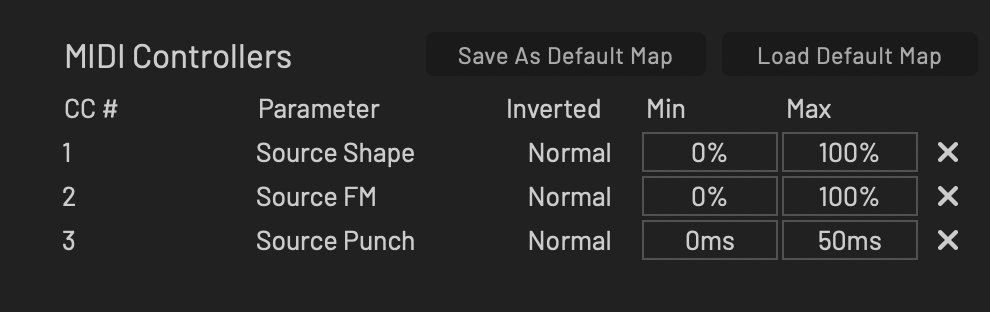
I'm going for the per-instance approach plus manual [Save As Default Map] and [Load Default Map] buttons in my UI.
Feels like the best approach for my synth, and what I would want as a user.
HISE dev latest / herdr + Claude Code / Figma + Affinity
Meat Beats: https://meatbeats.com
Klippr Video: https://klippr.video -
-
@dannytaurus I think option 3 is what I want. I'd like it to be seamless. The user assigns a CC to a control and that's it. They can change presets, add new instances, reload the DAW sessions, etc. and their assignments stick.
I'm trying to get it working just via scripting but it's actually a real pain, the settings keep getting overwritten. It might be because I'm using expansions rather than it being a plugin. I'll keep trying.
-
Finally got it working. I had to add several flags to guard against my save to file function running and overwriting the stored CC values.
-
I'm still hitting some bugs with this.
@Christoph-Hart I think you should take a look into this because it is a very good point.
So far I haven't really ran into this situation because most of my projects only have one or two presets. But I'm developing a project at the moment that might have 100 or more presets and this will definitely be an issue.
If a user has a set of CCs they like to work with then they likely want to set it up once for the entire instrument (all presets past, present, and future) and forget about it. They don't want to have to redo it each time they add an instance of the plugin.
With this instrument wide setup I don't see a reason to distinguish between daw load or user preset because the source of truth will be a separate file that can be read in both situations.
I'm currently trying to implement a working solution through scripting but I'm running into annoying issues with
setUpdateCallbackbecause it fires at init - it fires multiple times when using full instrument expansions. I'm gating it currently with flag variables but still haven't got it working reliably yet, and the code is a tangle.-- Should also include macros and MPE assignments too.
Free HISE Bootcamp Full Course for beginners.
YouTube Channel - HISE tutorials
My Patreon - More HISE tutorials -
@David-Healey I have it set up like this. Works for me so far, but it's one of those things with a lot of use cases.
The only scripting I have is to load and save the MidiMappings.json file. The preprocessor handles the rest.
I had Claude write this (hence the em-dashes
 ), to catch all the states:
The three persistence layers
- Plugin state (the DAW session) — per HISE default, every instance's current CC assignments are serialized into the plugin state chunk the host saves with the session. This is the day-to-day layer and it's completely automatic.
- User presets — new preprocessor
HISE_MIDI_AUTOMATION_IN_USER_PRESETS=0in project_info.xml ExtraDefinitions means presets neither store nor restore mappings. Switching or saving presets never touches CC assignments. - Default map file —
AppData/MidiMappings.json, handled byScripts/MidiMappings.jsviaEngine.createMidiAutomationHandler(). Only ever touched by the two buttons in the MIDI Control panel ("Save As Default Map" / "Load Default Map"). Nothing reads or writes it automatically — there is no auto-load inonInitor anywhere else.
Use cases
First launch after installation — No plugin state exists and
MidiMappings.jsondoesn't exist yet. The instance starts with zero CC mappings. If the user clicks "Load Default Map" at this point,loadDefault()returnsfalse(no file) and the button flashes "No map found"; nothing changes.New instance in a fresh DAW session (plugin already in use on this machine) — Same as above from the plugin's perspective: a fresh instance has no state, so it starts with no mappings, even if a default map file exists. The default map is opt-in per instance — the user clicks "Load Default Map" to apply it. This is the intentional trade-off of the design: no surprise mappings, at the cost of one click per new instance.
Reopening a DAW session where mappings were set — The host hands back the saved plugin state, and the exact assignments from when the session was saved are restored per instance. The default map file is not consulted, so it can't overwrite or drift from what the session had.
Reopening a DAW session where no mappings were set — The restored state contains an empty assignment set and the instance stays empty. There's no fallback to the default map file; saved state is authoritative.
Loading / switching user presets (any time) — No effect on mappings in either direction, thanks to the
HISE_MIDI_AUTOMATION_IN_USER_PRESETS=0flag. A preset saved while mappings existed doesn't carry them, and loading one doesn't clear them.Clicking "Save As Default Map" — Writes the current instance's entire assignment set to
AppData/MidiMappings.json(temp-file + atomic rename, so a failed write can't corrupt an existing map). Flashes "Saved!" or "Error!". Attempting to save with zero assignments shows "No mappings to save" and doesn't save an empty default map.Clicking "Load Default Map" — Replaces all current assignments in that instance with the file's set. If the file is missing or doesn't parse (hand-edited/corrupt JSON), current assignments are left untouched and the button flashes "No valid map found". A successful load gives no flash; the MIDI learn table updating is the feedback.
Multiple instances in one session — Each instance's mappings are fully independent (per-instance state). The only cross-instance channel is the default map file, and only via explicit save in one instance and explicit load in another. Changes in one instance never propagate on their own.
One subtlety worth remembering: since the default map is per-machine AppData, it's shared across all DAWs and sessions on that machine, but versioned by nothing — the last "Save As Default Map" click from any instance wins. There is no "Save over existing map?" kind of confirmation.
Also note that the
HISE_MIDI_AUTOMATION_IN_USER_PRESETSpreprocessor I added is unlikely to get merged, per Christoph's responses earlier in this post.HISE dev latest / herdr + Claude Code / Figma + Affinity
Meat Beats: https://meatbeats.com
Klippr Video: https://klippr.video -
@dannytaurus said in Saving MIDI CC assignments in user presets?:
Also note that the HISE_MIDI_AUTOMATION_IN_USER_PRESETS preprocessor I added is unlikely to get merged, per Christoph's responses earlier in this post.
Yes I'm hoping Christoph will find a solution that is mergable, although I don't see why yours shouldn't be.
Free HISE Bootcamp Full Course for beginners.
YouTube Channel - HISE tutorials
My Patreon - More HISE tutorials -
@David-Healey I think maybe the
HISE_MIDI_AUTOMATION_IN_USER_PRESETSpreprocessor is more mergeable than theHISE_MIDI_AUTOMATION_IN_PLUGIN_STATE?The system might be built around a certain state that has repercussions when it changes.
For the
USER_PRESETone, on preset save theMidiAutomationstate manager is skipped, so the preset file gets noMidiAutomationnode at all and on preset load theMidiAutomationrestore step is skipped entirely, so nothing is overwritten in the UI.The mappings are still persisted in the DAW session chunk and embedded plugin data.
So maybe that change to the preset format - the missing
MidiAutomationnode - could cause some issues?HISE dev latest / herdr + Claude Code / Figma + Affinity
Meat Beats: https://meatbeats.com
Klippr Video: https://klippr.video -
In hindsight, I think adding the
HISE_MIDI_AUTOMATION_IN_PLUGIN_STATEpreprocessor in the same PR asHISE_MIDI_AUTOMATION_IN_USER_PRESETSwas a mistake.
I don't think I'll ever use it, since
USER_PRESETSand some simple save/load MidiMappings.json in script gets me exactly what I need.The
PLUGIN_STATEis more complex and messes with the state of the plugin instance, which I think is Christoph's main objection.HISE dev latest / herdr + Claude Code / Figma + Affinity
Meat Beats: https://meatbeats.com
Klippr Video: https://klippr.video -
@dannytaurus I'm getting a bit overloaded here following what each part does.
I want everything to be in an external file (midi/macros/mpe). If the file doesn't exist then create it based on the values stored in the preset.
When the plugin loads, the daw session loads, the user changes preset, I want the same values from the external file to be used.
Which combination of your preprocessor definitions should I be using to achieve this?
Free HISE Bootcamp Full Course for beginners.
YouTube Channel - HISE tutorials
My Patreon - More HISE tutorials -
@David-Healey Sounds like you might want the truly global behaviour that I ultimately decided against.
If you enable both preprocessors (by setting them to
0since1is default and current behaviour) :HISE_MIDI_AUTOMATION_IN_USER_PRESETS=0 HISE_MIDI_AUTOMATION_IN_PLUGIN_STATE=0then NO mappings will be saved per-preset, NO mappings will be loaded from a saved DAW session state, and NO mappings will be loaded when the user changes presets.
Every preset saved by the user will have zero mappings.
Every instance of the plugin freshly loaded in a new DAW will have zero mappings.
Every instance of the plugin loaded from a saved DAW session will have zero mappings.
Every additional instance of the plugin loaded into a DAW will have zero mappings.Then all you have to do is wire up your global mappings file to the plugin-load and preset-load callbacks.
I decided against this approach because:
- This will overwrite a user's saved custom mappings with global when a saved DAW session is reloaded
- When loading a fresh instance of the plugin, the global mappings will load, which might not be what the user wants
- When changing presets, the global mappings will be loaded, which might not be what the user wants.
My take on those situations is:
- Load whatever mappings are in the saved DAW session because that's how the user saved them
- If the user wants to load mappings in a new instance of the plugin, it's just one "Load Default Mappings" button press
- When changing presets, I want whatever mappings are already there to stay there and not switch to the global ones.
I hope all that makes sense. I was genuinely trying to answer as briefly as possible, but there's a lot going on!
HISE dev latest / herdr + Claude Code / Figma + Affinity
Meat Beats: https://meatbeats.com
Klippr Video: https://klippr.video -
@David-Healey By the way - you might have to extend my PR to include macros and MPE in the saved data. I'm only accounting for MIDI CC mappings because I haven't down any thing with macros or MPE in my plugins yet.