AAX Build on MacOS
-
@ustk ok here is what I did:
- downloaded aax-sdk-2-6-1.zip
- unzipped it and got aax-sdk-2-6-1 folder
- copied this folder to HISE/tools/SDK/
- opened SDK/aax-sdk-2-6-1/Libs/AAXLibrary/MacBuild/AAXLibrary.xcodeproj in xcode
- ran Product>Build For/Profiling. xcode tells me this was a success...
- renamed aax-sdk-2-6-1. to AAX in the HISE/SDK folder
- opened my project in HISE
- ran Export>Export As Instrument and selected AAX as my target....
got this in the console window:
⚠️  ld: ignoring file '/Users/lindonparker/HISE/tools/SDK/AAX/Libs/Release/libAAXLibrary_libcpp.a[2](AAX_VDescriptionHost.o)': found architecture 'arm64', required architecture 'x86_64'
Undefined symbols for architecture x86_64:
  "AAXStartup(IACFUnknown*)", referenced from:
❌   "AAXShutdown(IACFUnknown*)", referenced from:
❌   "AAXCanUnloadNow(IACFUnknown*)", referenced from:
❌   "AAXGetSDKVersion(unsigned long long*)", referenced from:
❌   "AAXRegisterPlugin(IACFUnknown*, IACFPluginDefinition**)", referenced from:
❌   "AAXGetClassFactory(IACFUnknown*, _acfUID const&, _acfUID const&, void**)", referenced from:
❌   "AAXRegisterComponent(IACFUnknown*, unsigned int, IACFComponentDefinition**)", referenced from:
❌ ld: symbol(s) not found for architecture x86_64
❌ clang: error: linker command failed with exit code 1 (use -v to see invocation)
[KeyEngine - AAX] Linking KeyEngine
** BUILD FAILED **


The following build commands failed:
	Ld /Volumes/Untitled/Nomad\ Sounds/KeyEngine/Binaries/Builds/MacOSX/build/KeyEngine.build/Release/KeyEngine\ -\ AAX.build/Objects-normal/x86_64/Binary/KeyEngine normal x86_64 (in target 'KeyEngine - AAX' from project 'KeyEngine')
(1 failure)
⚠️  /Volumes/Untitled/Nomad Sounds/KeyEngine/Binaries/Builds/MacOSX/KeyEngine.xcodeproj: The macOS deployment target 'MACOSX_DEPLOYMENT_TARGET' is set to 10.9, but the range of supported deployment target versions is 10.13 to 14.5.99. (in target 'KeyEngine - All' from project 'KeyEngine')
so its something about this:
found architecture 'arm64', required architecture 'x86_64'.
for some reason its not set up to build properly on my M1 mac...
HISE Development for hire.
www.channelrobot.com -
Ok so I downloaded the latest HISE, installed it and built a VST3..all fine - I think
I downloaded aax-sdk-2-8-0 again, unpacked it changed its name to AAX and built the MacOS project - all works fine,
Started HISE loaded my project (again) and tried to build an AAX plugin, and I get this again:
⚠️ ld: ignoring file '/Users/lindonparker/HISE/tools/SDK/AAX/Libs/Release/libAAXLibrary_libcpp.a[2](AAX_VDescriptionHost.o)': found architecture 'arm64', required architecture 'x86_64'
❌ Undefined symbols for architecture x86_64
❌   "AAXStartup(IACFUnknown*)", referenced from:
❌   "AAXShutdown(IACFUnknown*)", referenced from:
❌   "AAXCanUnloadNow(IACFUnknown*)", referenced from:
❌   "AAXGetSDKVersion(unsigned long long*)", referenced from:
❌   "AAXRegisterPlugin(IACFUnknown*, IACFPluginDefinition**)", referenced from:
❌   "AAXGetClassFactory(IACFUnknown*, _acfUID const&, _acfUID const&, void**)", referenced from:
❌   "AAXRegisterComponent(IACFUnknown*, unsigned int, IACFComponentDefinition**)", referenced from:
❌ ld: symbol(s) not found for architecture x86_64
❌ clang: error: linker command failed with exit code 1 (use -v to see invocation)
** BUILD FAILED **


The following build commands failed:
	Ld /Volumes/Untitled/Nomad\ Sounds/KeyEngine/Binaries/Builds/MacOSX/build/KeyEngine.build/Release/KeyEngine\ -\ AAX.build/Objects-normal/x86_64/Binary/KeyEngine normal x86_64 (in target 'KeyEngine - AAX' from project 'KeyEngine')
Im pretty sure its something to do with this:
found architecture 'arm64', required architecture 'x86_64'
Im on an M1 arm-based Mac, but I dont know what to do about it...ANYONE????
HISE Development for hire.
www.channelrobot.com -
@Lindon said in AAX Build on MacOS:
required architecture 'x86_64'
I know nothing about AAX, but if it's saying you need
required architecture 'x86_64'then maybe you simply need an Intel machine to compile it? -
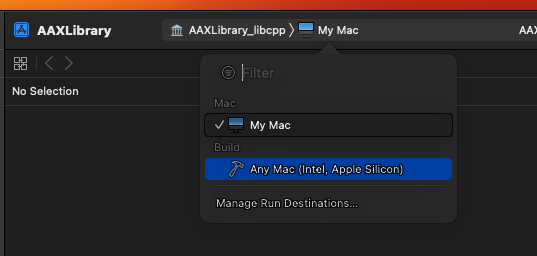
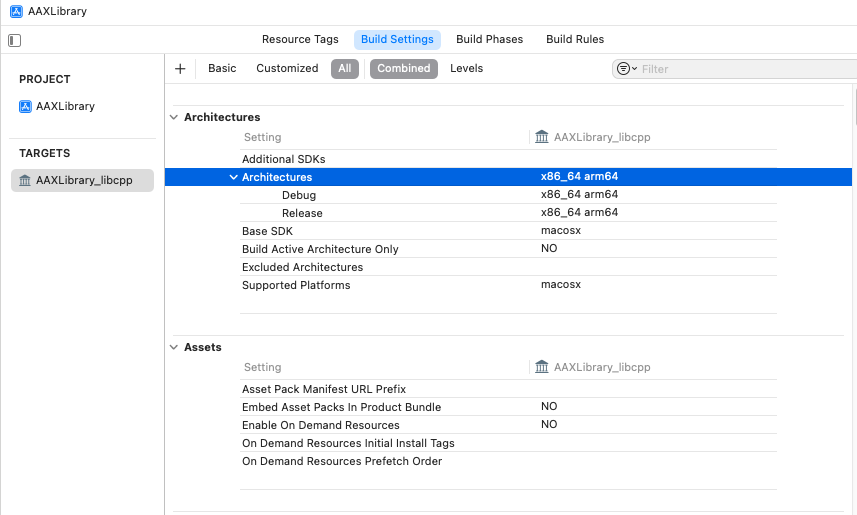
@Lindon Can you set xcode to build a universal binary?
Free HISE Bootcamp Full Course for beginners.
YouTube Channel - HISE tutorials
My Patreon - More HISE tutorials -
@David-Healey how?
HISE Development for hire.
www.channelrobot.com -
@Lindon I have this in XCode:
HISE Development for hire.
www.channelrobot.com -
I removed aax-sdk-2-8-0 and replaced it with aax-sdk-2-6-1. built it and got exactly yhe same result ....
HELP!
HISE Development for hire.
www.channelrobot.com -
Free HISE Bootcamp Full Course for beginners.
YouTube Channel - HISE tutorials
My Patreon - More HISE tutorials -
@David-Healey yep that was it.... yet another drink I owe you, thanks mate...
..we need a t-shirt that says "I owe Dave Healey a drink..."
HISE Development for hire.
www.channelrobot.com -
@Lindon
I second that! :-)