Issues with Panel.repaint() and Panel.repaintImmediately() - laggy user interface
-
Hi everyone :-)
When I use
repaint()orrepaintImmediately()- for example, in a timer callback to create an animation - the user interface quickly becomes very laggy if the panel is somewhat large. The Cubase interface also becomes very laggy.Does anyone have any ideas on how I can solve this problem? I already tried using a background task, but it didn’t work - or maybe I did it wrong. :-)
Thanks a lot,
Oli -
@Oli-Ullmann said in Issues with Panel.repaint() and Panel.repaintImmediately() - laggy user interface:
Does anyone have any ideas on how I can solve this problem?
Drop the animation, ain't nobody looking at your sexy UI anyway.
Seriously though, I find users add the plugin to their project, set up some parameter (or more likely load a preset) then close the interface. Animations that aren't functional are just a way to use up some extra CPU. Since Juce6 isn't using the GPU for drawing, your framerate is limited unless you're using shaders.
Free HISE Bootcamp Full Course for beginners.
YouTube Channel - HISE tutorials
My Patreon - More HISE tutorials -
@David-Healey
Ha ha ha
I was afraid this wouldn't be an easy task...If I want to use shaders, I need to enable OpenGL, right? But I've heard that this isn't supported on Mac anymore. Or am I mistaken?
-
@Oli-Ullmann said in Issues with Panel.repaint() and Panel.repaintImmediately() - laggy user interface:
If I want to use shaders, I need to enable OpenGL, right? But I've heard that this isn't supported on Mac anymore. Or am I mistaken?
I have no idea, as you can probably tell from my response, I don't use animations on my UIs (yet)

Free HISE Bootcamp Full Course for beginners.
YouTube Channel - HISE tutorials
My Patreon - More HISE tutorials -
@David-Healey
Ha ha, that makes sense! :-)
Thanks anyway for your reply! :-) -
@Oli-Ullmann
Yeah so to confirm this, Juce6 uses CPU instead of GPU, one of the main reason I am waiting for the full Juce8 implementation.
Shaders are shady... That OpenGL dependency is quite bad too, I got issues on mac that made me effectively drop them (for now?)
Until then, you can make 8bit retro audio plugins that require less UI precision... There's still a market for those squary bast****...
-
@Oli-Ullmann What about using a web view?
Free HISE Bootcamp Full Course for beginners.
YouTube Channel - HISE tutorials
My Patreon - More HISE tutorials -
@David-Healey I reckon some people reported a black square with some DAWs...
-
Juce6 uses CPU instead of GPU, one of the main reason I am waiting for the full Juce8 implementation.
Where do you get that information? JUCE8 is using the same Graphics renderer, it just adds a Direct2D renderer that might or might not be faster on Windows depending on your projects (HISE itself eg. was super slow when I enabled it).
If JUCE8 would be a revelation in solving UI performance I would have made the jump years ago, but it's more or less the same.
-
in a timer callback to create an animation - the user interface quickly becomes very laggy if the panel is somewhat large. The Cubase interface also becomes very laggy.
Use this to deactivate animation timers if multiple instances start clogging up the UI thread:
https://docs.hise.dev/scripting/scripting-api/content/index.html#setsuspendtimercallback
-
@Christoph-Hart I asked GPT a while ago, so I just did it again with Claude:
Trustability: 92%
JUCE 6 (and prior)- Default renderer is purely CPU-based (software rasterizer). Vector-based drawing means significant CPU math per frame.
- OpenGL was optionally available via OpenGLContext::attachTo(), but it was opt-in and not the default.
JUCE 8
- Introduced a Direct2D renderer on Windows as the new default — this is GPU-accelerated via native Windows APIs with GPU-backed images.
- macOS uses Metal (also GPU-accelerated via native API).
- The software (CPU) renderer still exists as a fallback.
Performance delta
- The Direct2D renderer is built on modern native platform APIs, taking advantage of hardware acceleration and GPU-backed images, bringing significant rendering and performance improvements — including better and faster font rendering. JUCE
- Component transforms and tiled image fills show the biggest wins. On some older machines with integrated GPUs only (no dedicated VRAM), the software renderer can actually outperform Direct2D. JUCE
I didn't know Direct2D could in some cases not bring better performances. Do you think it is the same for Metal?
But still, using Win's Direct2D or mac's Metal is deporting the weight to the GPU so this should (perhaps for more usual plugin cases that don't have the complexity of Hise) be faster, am I not right?But following Juce:
On some older machines with integrated GPUs only (no dedicated VRAM), the software renderer can actually outperform Direct2D
So yeah, might or might not be better on everything...
-
@ustk on macOS JUCE6 is already using the native CoreGraphics API which then uses whatever is fastest. Plus you can attach OpenGL, then it will use this for rendering primitives.
You can already switch to JUCE8 and try it the performance gets better. Ask Claude to reenable Direct2D then as I had to disable it to remain consistent with the UI performance of JUCE6 - I discovered some things to get much faster, but some things to get much much more slower, so I decided to disable it by default in the custom JUCE8 branch as this introduces too much of a moving target.
-
@David-Healey
Yes, I'm currently testing the WebView. It worked great in an empty project. I'm trying it out in my main project now.@Christoph-Hart I have some concerns about the WebView, since there have been discussions here in the forum about issues with FL Studio. Or have you managed to fix the problem in the meantime?
-
@Oli-Ullmann what are you trying to achieve? Not sure if a webview is the solution.
-
@Christoph-Hart
Here is a demo gif.
It's about the blue animation above the magician, which changes based on the large knob.
Everything works perfectly in HISE. However, it's still unstable in the compiled plug-in.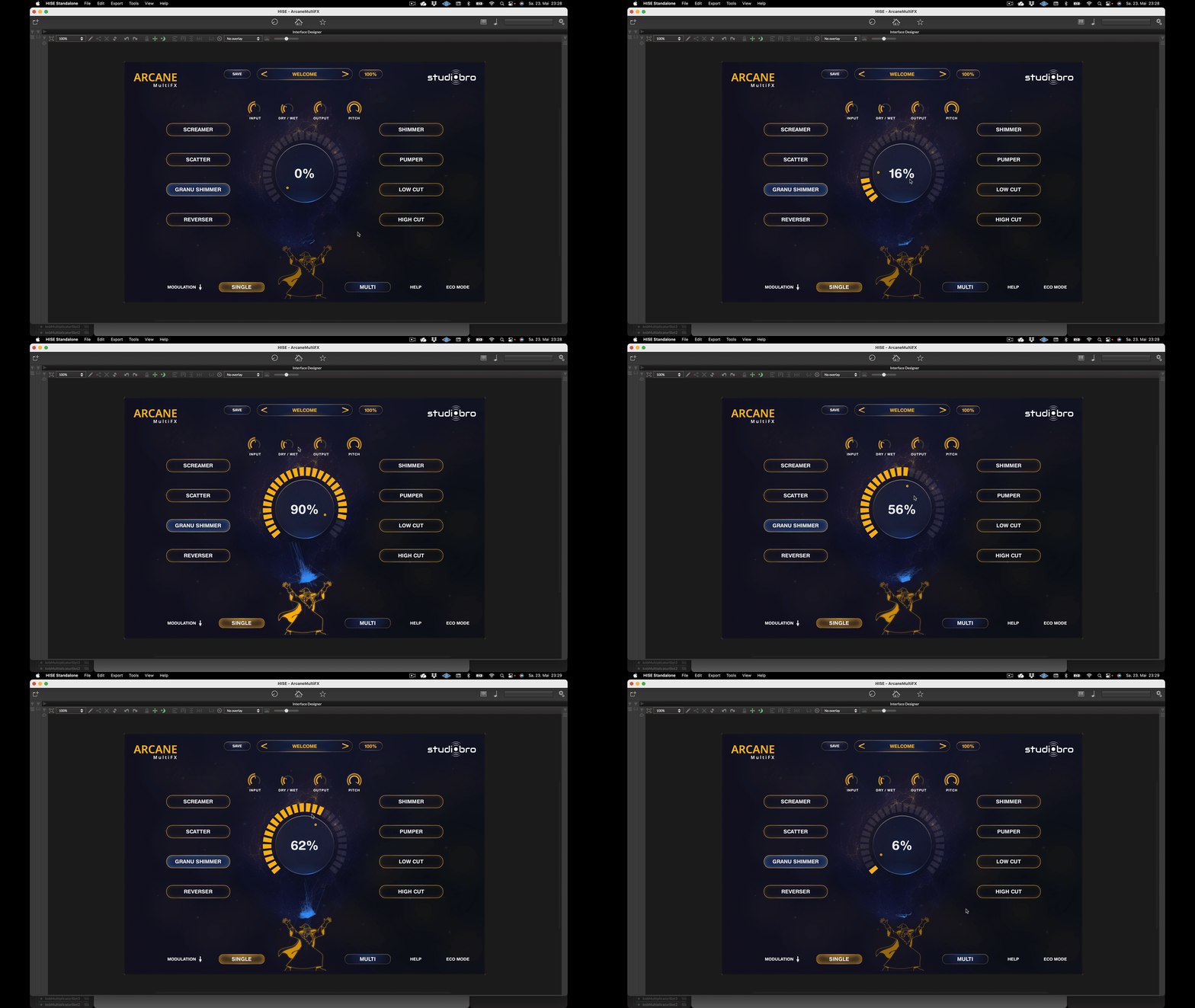
PS. I also want to build a xy-pad with a web view...



