Audio Looper in FX Plugin
-
Your description is a little confusing, can you explain what exactly it is you're trying to build?
-
@griffinboy I'm trying to build an effect plugin, that will play vinyl crackles in a loop. Standard effects can't do that thing to sound realistic, so I though plotting a loop when audio is playing should be fine. My attempt is:
- Effect plugin detects audio -> plays the looper (crackles in the loop)
- Effect plugin has no audio input -> looper is silent
Is it possible to do this?
-
@svkpowa What you are describing is an audio player, so you should create an instrument plugin.
Free HISE Bootcamp Full Course for beginners.
YouTube Channel - HISE tutorials
My Patreon - More HISE tutorials -
@David-Healey yes, but I'd like it to work like convolution reverb, to make it working in an audio channel in DAW, also in MIDI, cause I want it to work as effect, not an instrument
edit:
I tried with convo to play that crackles, but it's not working as intended. It helps, it can be used as an effect, but it's not clean -
Oh yeah really possible.
And the way you should go about it depends on how complex you want the algorithm to be.
The simplest way to achieve what you want, is to use scriptnode.
You can use an envelope follower to track the volume level of incoming audio, and then use that to modulate the volume of a looper that is continuously playing your noise loop.
I don't know the exact chain: I don't use scriptnode much. But I know that this is possible without too much work involved.If you're wanting to make something more realistic, where you've got more control over the crackles and want to build a system where you can trigger noises to play at certain times and under certain conditions, I'd personally do that kind of thing using a c++ third party node. You'd code a node in c++ so that it can load and play back samples (using an external data sample map) and has all the input detection and crackle logic, and then in hise you just have this single effect node that does the entire thing you're after.
You get ultimate control this way. But if you've not done c++ effects before there is some learning to do. -
@David-Healey
Ah no, I think he's describing an effect that adds noise ontop of existing audio.
It's an effect not an instrument. -
@griffinboy An effect should process the incoming audio, what he describes is playing an audio file over the incoming audio, no?
Free HISE Bootcamp Full Course for beginners.
YouTube Channel - HISE tutorials
My Patreon - More HISE tutorials -
It does process the incoming audio.
He said he wants noise audio files to react to the volume on incoming audio. That's the effect he's describing I believe.The wording of the post was misleading / vague
Effect chain:
Input audio -> measure activity / volume -> apply that to a noise file / trigger noise sample -> sum both to outputUnless I've misunderstood!
-
Thanks for the help!
Yes, it process the incoming audio. The plotted loop can react to input's volume, that's even better.I'll try with ScriptNode, but I think there are no ready-to-plot modules, so needs some coding apparently. I wish there was an effect like Convolution, but without the room effect. That would be perfect.
Edit:
Oh, there's a "file player" in a scriptnode
that makes things easier -
That's right! Sorry I didn't mention: File player is how you'd do a playback of audio in scriptnode.
-
@griffinboy I made this and it works perfectly.
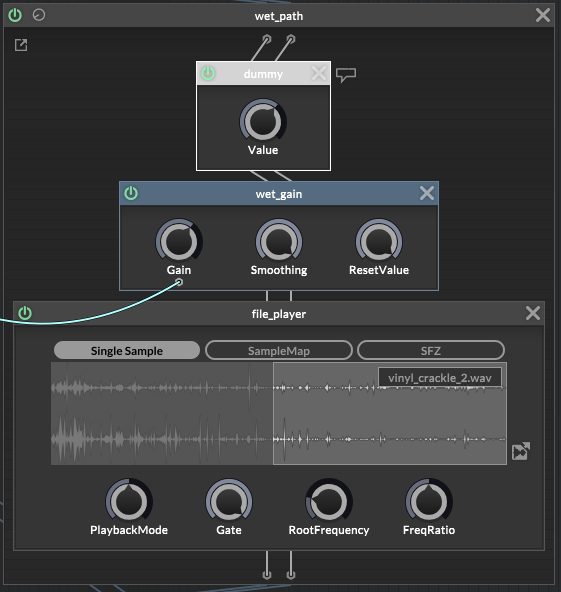
-
@svkpowa Just FYI: https://forum.hise.audio/topic/13200/audio-fx-play-an-audio-file/7
I think you may also need "Enable Sound Generators FX" Enabled in the Project Settings before building the plugin as well.
-
@HISEnberg Yeah, I built it without checking this box and effect was silent, now I checked it and compiling. The "Signal Input" plays a very short loop and follows the audio, it's a very nice way to build effects.
Edit:
It worked! One knob has harder tickles, other one is warmer with some high cut. I'm impressed by the effect.


