@David-Healey Quick update - Gemini helped me get me through Git and I replaced the files with those fixes. Filter works properly now.
Thank you again David, you're the support blessing. I wish all the best to you!
@David-Healey Quick update - Gemini helped me get me through Git and I replaced the files with those fixes. Filter works properly now.
Thank you again David, you're the support blessing. I wish all the best to you!
You have to be AVID signed developer to be able to compile your plugins on AAX (and run it). It's not so easy. Imho not worth it, since there is a way to open vst3 and au on ProTools. Most of the PT users know how to do this and don't bother finding the exact AAX format. So if you'll be selling/developing the plugin, VST3 & AU should be enough
@blush I updated HISE after that thread and I had the same problem, previously it was like in the topic, now it’s been reversed.
Getting the latest fix on GitHub solved this. Check out if your filters on Mac are working, if not - you may need an update that dropped like two weeks ago or so.
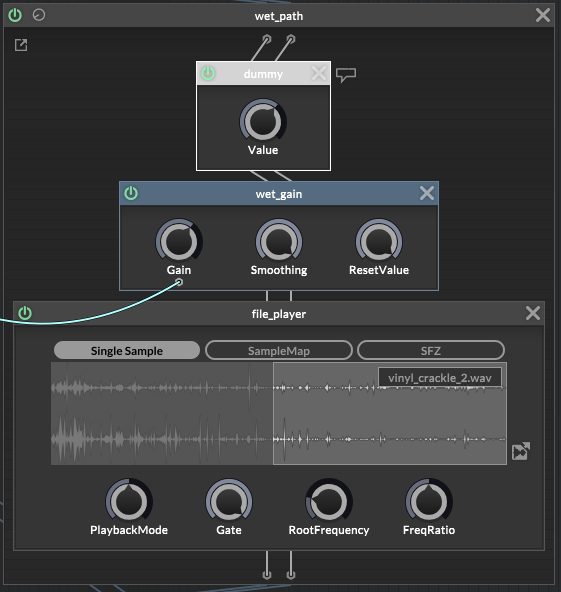
@HISEnberg Yeah, I built it without checking this box and effect was silent, now I checked it and compiling. The "Signal Input" plays a very short loop and follows the audio, it's a very nice way to build effects.
Edit:
It worked! One knob has harder tickles, other one is warmer with some high cut. I'm impressed by the effect.
Thanks for the help!
Yes, it process the incoming audio. The plotted loop can react to input's volume, that's even better.
I'll try with ScriptNode, but I think there are no ready-to-plot modules, so needs some coding apparently. I wish there was an effect like Convolution, but without the room effect. That would be perfect.
Edit:
Oh, there's a "file player" in a scriptnode 
that makes things easier
A little update.
I plotted 16 VSTs with all 23 (46) knobs, with automation on every channel, playing like 50+ sounds at the same time, and nothing happened - for three hours of work I didn't even have a single RAM glitch, which is sometimes happening on a single channel with Serum, for example...
HISE is wonderful and perfectly optimized, so my way on displaying values is doing great. Editing knob's value is also very comfortable, you don't need to try hard to twist on the exact number you want.
Thanks for your help David!
@David-Healey today I learned how to edit knobs in knobman. knob jumping through actual values is much better looking than a normal 0-10 scale like in the original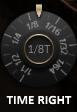
I'm addicted to it right now
Hello.
I have a question regarding Audio Waveform component, connected to the jdsp.Convolution in Script FX module.
Is there a possibility to control the start/end points of this panel using a knob? I wanted to implement the "Decay" for convo reverb, but not to force the user to grab the end point of the waveform, I want to manipulate it with the knob. How can I do this?
Thanks!
Edit:
I think this is impossible. However, I found out how to create a real Decay on any effect, using limiter as a detection/gaining module on the chain.
@David-Healey
It’s a script from „CustomSampleImport” template. I think Christopher is the author, but I am not sure.
Okay I saved the preset and noticed this. Is it supposed to be 0.0 in value?
<Control type="ScriptAudioWaveform" id="AudioWaveform4" value="0.0" data="C:\Users\studi\Desktop\Samples\808Samples\808 Samples\bass (3).WAV"
         rangeStart="0" rangeEnd="22051"/>
EDIT:
Found the solution! The Migration.js file was the problem. I just don't know why. Can I remove it from the project completely?
@David-Healey
I have the Saveinpreset enabled on every waveform. Still doesn’t work.
Hello.
I have a problem with Audio Loop Players. I have two of them, and one audio waveform from DSP module.
The problem is, that after saving the project in DAW, and reopening it, the loaded samples disappear. I don’t know if it’s relevant, but I also have Sampler in the same project, but it’s okay with it, because it was from the template „CustomSampleImport”.
I have the Pooled Resource script in onInit. Do I have to save the path to audio files in combo box, like it’s saving the map for Sampler in this template?
Thanks.
@David-Healey
Yeah, thank you David. I did it manually tho, without Git, it works too.
Oh my God, after like 10 hours, I finally managed to go back to my old version… with working compilation (i think so, it’s already generating the code). To do that, I had to place the Juce standalone app into JUCE folder, then remove the modules folder, and then copy the modules folder from another HISE version. And if you opened the Projuicer before copying new modules folder, you have to also replace the HISE app for Juce, cause somehow it remembers bad modules without saving it.
Edit:
Okay it worked. If you already compiled the new version, you have to remove HISE files from Roaming folder.
If you compiled with VS 2026 and want to go back to 2022, you need to set the default project file to be opened in VS 2022, because Juce will automatically open it in 2026 and still cause an error.
And remove all your new HISE version folders.
So, basically take the standalone Projucer, but replace it with HISE modules from older version. Don’t copy-paste, but remove the folder and place the new one.
I’m glad I worked it out, I don’t know why it’s been so complicated.
Edit2:
I am so lucky and unlucky at the same time, because in the same day when Christof released a version with bugged filters on Mac, I bought a new macBook and compiled it… lol. And now it’s another bug when I try to update on Windows 
@Sifres
Aww so that’s the major bug. So I’m coming back to my older version, but somehow HISE stopped seeing the JUCE there, when I installed a new version. Any ideas how to fix this?
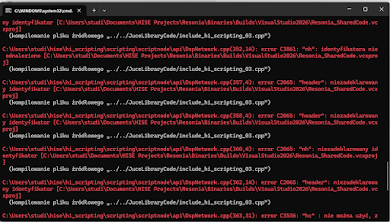
C:\Users\studi\hise\hi_scripting\scripting\scriptnode\api\DspNetwork.cpp(352,14): error C3861: "nh": identyfikatora nie odnaleziono [C:\Users\studi\Documents\HISE Projects\Resonia\Binaries\Builds\VisualStudio2026\Resonia_SharedCode.vcxproj]
(kompilowanie pliku źródłowego "../../JuceLibraryCode/include_hi_scripting_03.cpp")
C:\Users\studi\hise\hi_scripting\scripting\scriptnode\api\DspNetwork.cpp(357,4): error C2065: "header": niezadeklarowany identyfikator [C:\Users\studi\Documents\HISE Projects\Resonia\Binaries\Builds\VisualStudio2026\Resonia_SharedCode.vcxproj]
(kompilowanie pliku źródłowego "../../JuceLibraryCode/include_hi_scripting_03.cpp")
C:\Users\studi\hise\hi_scripting\scripting\scriptnode\api\DspNetwork.cpp(358,4): error C2065: "header": niezadeklarowany identyfikator [C:\Users\studi\Documents\HISE Projects\Resonia\Binaries\Builds\VisualStudio2026\Resonia_SharedCode.vcxproj]
(kompilowanie pliku źródłowego "../../JuceLibraryCode/include_hi_scripting_03.cpp")
C:\Users\studi\hise\hi_scripting\scripting\scriptnode\api\DspNetwork.cpp(360,4): error C2065: "nh": niezadeklarowany identyfikator [C:\Users\studi\Documents\HISE Projects\Resonia\Binaries\Builds\VisualStudio2026\Resonia_SharedCode.vcxproj]
(kompilowanie pliku źródłowego "../../JuceLibraryCode/include_hi_scripting_03.cpp")
C:\Users\studi\hise\hi_scripting\scripting\scriptnode\api\DspNetwork.cpp(362,14): error C2065: "header": niezadeklarowany identyfikator [C:\Users\studi\Documents\HISE Projects\Resonia\Binaries\Builds\VisualStudio2026\Resonia_SharedCode.vcxproj]
(kompilowanie pliku źródłowego "../../JuceLibraryCode/include_hi_scripting_03.cpp")
C:\Users\studi\hise\hi_scripting\scripting\scriptnode\api\DspNetwork.cpp(363,31): error C3536: "hc": nie można użyć, zanim nie zostanie zainicjowany
Hello. I wanted to update HISE to the newest version, the HISE itself compiled fine, but when I try to export any project, I’ve got this error. What is the issue?