Show value on knob, but not editable
-
@David-Healey what about the custom textbox, like for example in the corner? I mean, when I change the volume, it shows: "Volume: 70%", when I'm changing the reverb, it says "ReverbMix: 30%" etc etc. Is it possible?
-
@svkpowa It just shows the value I think.
-
@David-Healey Displaying just the value is fine compromise, is there a script for floating tile to do this?
-
@svkpowa said in Show value on knob, but not editable:
Displaying just the value is fine compromise, is there a script for floating tile to do this?
I thought it's already displaying the value, isn't that what you showed in your image? There is no control over the text box through scripting. If you can't achieve what you need with the property editor then you need to use custom look and feel.
-
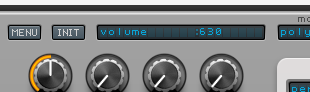
You misunderstood me. I meant something like this, for example in Spire:
-
@svkpowa For that you'd need to draw the value in a panel using a paint routine. For multiple knobs a broadcaster would be the best method for updating the panel - but it's not the easiest for beginners.
-
@svkpowa You could use a label control then set the text value of the label with the value of the knob in the knob's callback. Then you can place the label where you want in the UI.
Something like this...
Label1.set("text", knob1.getValue());
This code would be in the knob1 callback. -
Okay, Gemini helped me, but it can't solve a problem. Only components named Volume and Balance are giving the text, the rest is not reacing:
// 1. Pobieramy okienko wyświetlacza const var Label1 = Content.getComponent("Label1"); // 2. Definiujemy jedną, wspólną funkcję dla wszystkich knobów inline function onKnobUpdate(component, value) { // Pobieramy nazwę z pola "text" komponentu i wartość z 1 miejscem po przecinku local name = component.get("text"); local val = Engine.doubleToString(value, 1); Label1.set("text", name + ": " + val); } // 3. Ręczna lista Twoich knobów (wpisz tutaj ich ID) // To jest najpewniejsza metoda w HISE const var knobList = [ Content.getComponent("Volume"), Content.getComponent("Gain"), Content.getComponent("Balance"), Content.getComponent("ReverbMix1") ]; // 4. Przypisujemy funkcję do każdego knoba z listy powyżej for(k in knobList) { if(k) // Sprawdzamy czy knob w ogóle istnieje { k.setControlCallback(onKnobUpdate); } } -
@svkpowa said in Show value on knob, but not editable:
if(k)
This is not needed.
@svkpowa said in Show value on knob, but not editable:
Only components named Volume and Balance are giving the text, the rest is not reacing:
Components can either use a control callback or they can be connected by processor/parameter ID - the knobs that aren't responding are connected via the latter so the callback will never trigger.
Either you need to do it all through the callback or use broadcasters.
-
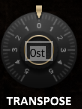
@David-Healey needed some time to figure it out

-
@svkpowa Noice, what was the secret?
-
@David-Healey i created a second "knob" with the scale of 0.001 to make it invisible and scaled the tile to fit into the real knob, then - linked to it. one knob makes as a controller, the second one as display. had to make it with every knob, but hey - it's just 10 minutes
-
-
@David-Healey hope it won't cause the gpu eating, there are twice as many knobs

-
@svkpowa It's not the best way of doing it, but have fun, if you hit problems you'll learn something new.
-
@David-Healey today I learned how to edit knobs in knobman. knob jumping through actual values is much better looking than a normal 0-10 scale like in the original
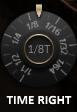
I'm addicted to it right now
-
A little update.
I plotted 16 VSTs with all 23 (46) knobs, with automation on every channel, playing like 50+ sounds at the same time, and nothing happened - for three hours of work I didn't even have a single RAM glitch, which is sometimes happening on a single channel with Serum, for example...
HISE is wonderful and perfectly optimized, so my way on displaying values is doing great. Editing knob's value is also very comfortable, you don't need to try hard to twist on the exact number you want.
Thanks for your help David!
-
@svkpowa That was a major hack job tho tbh. You can do it a lot easier with script and a label. End user would never know the difference but just for your own sanity a simple script would have worked. There are enough posts about it floating around the forum to help you figure it out.
-
@Chazrox said in Show value on knob, but not editable:
You can do it a lot easier with script and a label.
If you're going to add a label for each knob might as well add a knob for each knob. There's no real benefit.
-
@David-Healey @svkpowa I was referring to this Spire example you posted which only needs one label no? js.


