Forum
    • Categories
    • Register
    • Login

    Latency compensation not being triggered in daw

    Scheduled Pinned Locked Moved General Questions
    16 Posts 4 Posters 164 Views
    Loading More Posts
    • Oldest to Newest
    • Newest to Oldest
    • Most Votes
    Reply
    • Reply as topic
    Log in to reply
    This topic has been deleted. Only users with topic management privileges can see it.
    • David HealeyD
      David Healey @pcs800
      last edited by

      @pcs800 That looks like it's in ms.

      Free HISE Bootcamp Full Course for beginners.
      YouTube Channel - Public HISE tutorials
      My Patreon - HISE tutorials

      dannytaurusD 1 Reply Last reply Reply Quote 1
      • resonantR
        resonant @pcs800
        last edited by

        @pcs800 If this is Hise's stock Pitch Shift node, AFAIK, this node doesn't have a fixed delay compensation value. The delay amount changes depending on the pitch change.

        1 Reply Last reply Reply Quote 0
        • dannytaurusD
          dannytaurus @pcs800
          last edited by dannytaurus

          @pcs800 Try getting a value from Engine.getLatencySamples()

          EDIT: don't do that. Looks like that call just returns the value set by Engine.setLatencySamples().

          Use Tools > Check latency of signal chain to give you a real value.
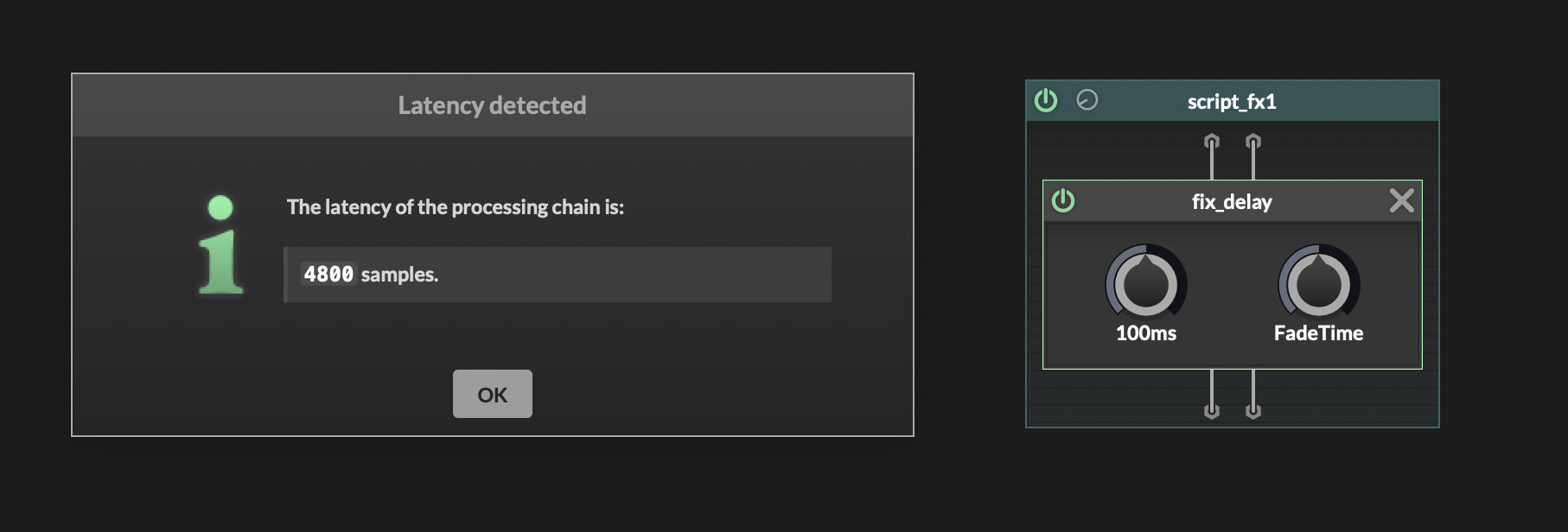
          CleanShot 2026-01-04 at 21.59.20@2x.png

          Meat Beats: https://meatbeats.com
          Klippr Video: https://klippr.video

          pcs800P 1 Reply Last reply Reply Quote 0
          • dannytaurusD
            dannytaurus @David Healey
            last edited by dannytaurus

            @David-Healey Yeah, good call. It should probably be the smp value, not the ms value.

            EDIT: see above 👆

            Meat Beats: https://meatbeats.com
            Klippr Video: https://klippr.video

            1 Reply Last reply Reply Quote 0
            • pcs800P
              pcs800 @dannytaurus
              last edited by pcs800

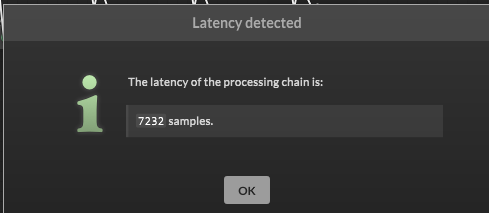
              @dannytaurus Ok, so put 7232 in instead of 164?
              c7066aff-6ba6-4dfc-828f-4a97014d0153-image.png

              dannytaurusD 1 Reply Last reply Reply Quote 0
              • dannytaurusD
                dannytaurus @pcs800
                last edited by dannytaurus

                @pcs800 Yep, see if it sounds right.

                Sanity check: 7232 samples at 44.1kHz = 163.9909297052ms

                Meat Beats: https://meatbeats.com
                Klippr Video: https://klippr.video

                pcs800P 1 Reply Last reply Reply Quote 0
                • pcs800P
                  pcs800 @dannytaurus
                  last edited by

                  @dannytaurus After adding it, this is what I get with the plugin in a daw.

                  https://drive.google.com/file/d/1ZrUZcTNQj-GVh9GH7mndqMQTyzoaA_FO/view?usp=sharing

                  resonantR dannytaurusD 2 Replies Last reply Reply Quote 0
                  • resonantR
                    resonant @pcs800
                    last edited by

                    @pcs800 As I previously mentioned, the delay is not a fixed value, it depends how much pitch change applied

                    1 Reply Last reply Reply Quote 1
                    • dannytaurusD
                      dannytaurus @pcs800
                      last edited by

                      @pcs800 Yep, it's probably like @resonant said - each pitch shift will cause a different latency value. The lower octaves must have less latency and the higher octaves are giving the max 7232 latency. Therefore the lower octaves will come in too early.

                      Just an idea...

                      Find the latency of each one by putting it alone in a project. Then when you have all 4 latency values you can compensate.

                      Example numbers:

                      Pitch -2 = 4000
                      Pitch -1 = 5000
                      Pitch +1 = 6000
                      Pitch +2 = 7000

                      So the max latency is 7000 samples. Now you know how much fixed delay to add after each pitch node

                      Pitch -2 needs 3000 delay
                      Pitch -1 needs 2000 delay
                      Pitch +1 needs 1000 delay
                      Pitch +2 needs zero delay
                      Original needs 7000 delay

                      That should align all the outputs and as long as you report 7000 (or whatever) to the host, everything should be in time.

                      That might be all nonsense, but it's worth a try.

                      Meat Beats: https://meatbeats.com
                      Klippr Video: https://klippr.video

                      pcs800P 3 Replies Last reply Reply Quote 0
                      • pcs800P
                        pcs800 @dannytaurus
                        last edited by

                        @dannytaurus Hmm, this is going to be tricky, but I will try. Thanks :-)

                        1 Reply Last reply Reply Quote 0
                        • pcs800P
                          pcs800 @dannytaurus
                          last edited by

                          @dannytaurus This is what I came up with

                          Original signal only: 7232
                          -1oct:3068
                          -2oct:2659
                          +1oct:6143
                          +2oct:7232

                          Max: 7232

                          -1oct: Needs 4164
                          -2oct: Needs 4573
                          +1oct: Needs 1089
                          +2oct: Needs none
                          Original Sig: Needs none

                          I'll try it

                          1 Reply Last reply Reply Quote 1
                          • pcs800P
                            pcs800 @dannytaurus
                            last edited by

                            @dannytaurus Worked like a charm!
                            Thanks for your input.

                            dannytaurusD 1 Reply Last reply Reply Quote 2
                            • dannytaurusD
                              dannytaurus @pcs800
                              last edited by

                              @pcs800 Awesome! 🙌

                              Meat Beats: https://meatbeats.com
                              Klippr Video: https://klippr.video

                              1 Reply Last reply Reply Quote 0
                              • First post
                                Last post

                              4

                              Online

                              2.1k

                              Users

                              13.2k

                              Topics

                              114.3k

                              Posts