How to use KeySwitch to trigger sampling?
-
@d-healey Yes, I mean when I switch to the second articulation, the sample of the second articulation does not start playing from the beginning
//I am a new student at HISE._
//Windows11 & MacOS Ventura 13.6.7_ -
@d-healey Yes, I want each articulation to start from 0
-
@CatABC said in How to use KeySwitch to trigger sampling?:
the sample of the second articulation does not start playing from the beginning
@CatABC said in How to use KeySwitch to trigger sampling?:
@d-healey Yes, I want each articulation to start from 0
lol make up your mind.
Free HISE Bootcamp Full Course for beginners.
YouTube Channel - HISE tutorials
My Patreon - More HISE tutorials -
@d-healey
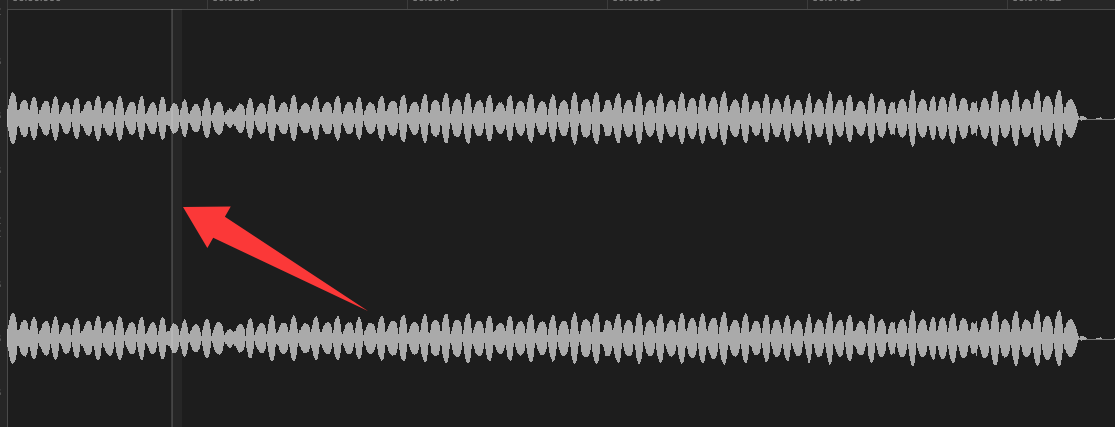
Can I set it, set it to 0 in onNoteOn, but I don't know how
-
@CatABC When they press the keyswitch you need to turn off the old note and play a new note. The stuff I said about changing volume doesn't apply if you want the samples to start from the beginning.
-
@d-healey said in How to use KeySwitch to trigger sampling?:
@CatABC said in How to use KeySwitch to trigger sampling?:
the sample of the second articulation does not start playing from the beginning
@CatABC said in How to use KeySwitch to trigger sampling?:
@d-healey Yes, I want each articulation to start from 0
lol make up your mind.
@d-healey You may have misunderstood. I think these are 2 separate things. The first is what happens when the OP tried your method, which is not what they're after. The second is the result he's actually trying to get.
-
Your requirements aren't very clear.
I understand you want the original sample to play when the note is played, then when the key switch is activated you want the second sample to play from the beginning.
But what do you want to happen when the key switch is released?
Do you want the original sample to
[1] no longer play (meaning the second sample cuts it off)(I just read in your original post you want "continue to play the sound of the original key position"), [2] the original sample continues to play form wherever it would be without the key switch interaction, or [3] the original sample plays again from the start?HISE dev latest / herdr + Claude Code / Figma + Affinity
Meat Beats: https://meatbeats.com
Klippr Video: https://klippr.video -
@dannytaurus Thanks for paying attention to my question. I am still working on it. I will break down my logic:
- I mapped KeySwitch to C0-B0, default key position (such as C0 Sustain)
- Write a note C3 in the MIDI track
- Start playing C3 of Sustain
- The C3 note continues, and I write a KeySwitch on D0 (D0 is Tremolo)
- The sample of Sustain fades out, and the sample of Tremolo enters
- All MIDI ends, and the KeySwitch stays at Tremolo of D0. When there is no new KeySwitch trigger, the notes written afterwards are all "Tremolo"
-
@CatABC if I understand you right, you want to fade between several sound sources.
This snippet will show you one way to do it, however keeping several sound sources activated will produce 3 voices when pressing just 1 key (one is sounding, the other 2 has a gain of -100dB)
I don't know if it will give you any problem doing that, I suppose it depends on how demanding you project is on the cpu?HiseSnippet 2419.3oc6a01aSjjDdljLrXytHX0dZWcepk08AmEiW+Rdc41EGRbfHHIdwA3PHDamYZa2Ji6dtYZmPNDRmteY7o6y2Og6mv9OfqptmwdlDmPHh2OGgbltppqt5ppt5mZhoUnzkEEICsryuygALK6u1o8gBUuU6Q4BqMVyx9pN2kcXzAbkaORGpGKx5VGFPihXdV11SeaTL6byXo+4Ot4sn9TgKaDIKqGJ4tr6w6yUin1pwc499qCpaGd+TROWiMbkhUk9xAfIMsSEq.p6dztrsnnXS4XcGZTOK6ezY9Z0cmyaQuZ0le4EboKvVtCsSmp08latEVZ4p0WlN2RKvpLuk8EZ5wUxv1JpBLd6Ytkz6v18jGHLKvC4Q7c8Y3fpVsgU1PdcouGtEQpVq1i660JwWEYYY6zZjmaZim66b1j6wGRejG7JZFjQyHsCzdprl2zYLupoMuJoLuwXR1oLoYLlzUcZ6FxCTi3f1ykb1PnXgcnPbJsoXj0x9UNqJAADpx8o6wVODFLbBEWnRkRjZUpL6M5LP3p3RAQJ1RpXaKJNa9WjOW9WlmbTVc5LVd3xDJ88YgikMlZDdZSrnXP+cYgkH6S8GvFJHr8y5ScNYeZ5PtqYWmRPoXCAWsc.SbRIBVwtJ3oGrwZTEECDwz.4BXgJNZB1qw1GNFXBK4bViEsmRF.YzqJ6GHEnFryqzb+l3f18n6x7s3Pn4xooT054oOccX5AGv8T8FR3U+qF8X7t8Rct6wMTrmCi2xY8UVqI4VM24QMatEoNo81OXq0vOu+pMaSN0eFDwEcIPQARacUAX60A1vs4+iTGj+0F8G3q39bAPzdJFDOnZWt8zVo1xesJ9niYCttujp.suCGDE24+owv3Dc.M98FuIGv+72ZDGbLQh7XwsckzPOqc6lT1I2E777dMJNWw5Oh5qe8q+yYoVKlrVXzyNR3DySmSL0SscdQdBo.rZOBMwB+Lo5bkqTBosFOJvmd31tJ59rszYz.6NT+Hll+8jG.SCHsrd3c3lQUqsnd7pChTx92NjFzi6FkYlqw5PgnvJAALZHVVF3pBGXXdKenxJnp6CNVIvnR4EVV+yRKUYwkqrXUsT6H610msozikQyXAMn.mPv7QSQS6AQrGxbgicorkgqFvbcepps5P+inoVMSBAGkNb7MTMZUpkPuovK0ZuP9WB2mbrRePQWo2.XIyVIFuuJlATJIS4OrFmHhqNL88YuyJOeVMwq5zBOTMdabpwXiPAm2G1X7kZeiSyNcfn5HCbFm0+auetAK8xewS.MxO3zVNP3AeDBhRvCy.KV36BPIAmYPI1S+9.SwW8YLlhqXhKQ53B4tsGGvho92ekC3HiTj.g+yT3s6jegjf0f540hBmoKVXH2BkH.XC.pQ9gjJGwTEKruYC.70EL.Ax+S+TNEbUDiPCYD3IhaB3BORWvqEk2rzXtQDrrOQmXUtKSYRvKVnMuefOSKP0ByVJetb4fa6NMwpc1DqdgYepwB2KAIMKpj1H6vCAahGQn.zl8AiWQhvpdFklOj0krGZsun.NUnb2SlaoRj4Aux70dZIRAyzP55Jsw0OM+5ouDVz7cjgjhbPEUtAgS9ql8eYelnqpGP4ZWSCah2gTbunxF08D9SmE1VZIgmQW9JJUHe2AJVwgTwGLAmbLX0NqS35UQri.LMzeD.jTZGArKwcnwqD6L.2ROJ3ZHdLF.jBhn3Iv7bAhpXDbPsRvdTLPEO5FF1VnlytkykqonKnEzTgoZNaWLVTvXKQLjhJCgqdq3GziVLgRHyqDIsyhbS3xyEI3Un0m0r2RYSCyMIlLdUOHHqajhrKSc.iIRumivSQDkTSS.HJxvH64.M93Uo996B2jWLweX7B6SCIBYXevOrIExL6DJ6WYGY0hpd7nxd.njxtfFUkfTq9bAjAgAFHipO84E9Y8CbOOeVKIbaCnUTfkdIFrGo.ucSzN.tnKqHpAx0HE0q6ORv.coX0pSSxGmgLRCRwXSVxJfIuoHnmqmdsm855tPFiR6z4MoUTBiZynQHToOIbDeD4W+ER0xUvrFMG.uUPbuI3LNpzWCR8JWCRChC8XrVWBZXJ6wRgQQzFYQvzJAM3nigixwPCF705i02HCCARGO6q8uiROR1m.W3yabbVBji33LL6A7zSZV5hRl8bcsSOSBNjvCEZFe6f9RWpOQfK2lv0EPq7XURTBCT2hlLCvOAUEc2i.9+fPFdyAVPPWZT+P7afPho0pgErzmrcMf.hJJDyBAIXQykrT7tPxHq49vELEQuDtXwlDVhHQCbgG64a2AU.J.7uiUPDsvz1Vj1z7CYTuCiOiVhDxTCBE3UBlmhUFVeDmO9airv8xwmvO.TENgQo.CW1glk1xKQ3nw8xI8W+1zescplMcx1esFsgtKyK4LLSG6szwNtuRyC6mraLCmzqwWZ8ZbYyxeIm1PQYMPN8he4zsZT8TZv3+7tuACyKCXG3d0n.YTFE2l0muCjQGklH1dcH6uq6kOM8Ug9pGKq+3lqCa1wNm1TnzkNcXk93kAYB+mZiOUOmM9LymbM97Yvg7L8lkKwFMsczTrOyGJNpswu0I98.kPMat7lRgLnmTvcSGnuOC.O0sKKLssO1MD.yBfeNhx2039LeFMcR6eow8fjMZH9ZjNm9hpu08oN130O3XLWBd.j74aw4o+ht3blv4n2DjN091IK+kcR2v9oTd1xZMlOMii5QYdMwVOtwXJfuAbZIT0R5SCOpad52UosyblyEvszm14qXYFvM+otQpC8eZajWwAfl9QxDuub.92YA5pOjiPgglzL.fhei6HZe6oPjElwURfE2lI7zCv+bHwLqhisiYVMg4Gj03sDdWsIv6z4QSf284O7tZSf2MAd2WVv6NsxyO9USf2MAd2D3c++J7tuOAd2i.HUm.7t5eTg2Ucr36xP8Hyn1XmQsr8zpFHxpZCoLRg9j0kg8SI2EajPrVZhPNYFkAiynoM4o9VW8euYSA904pMC14daG4BNFLIOcRaqA9QL8wwpom3Hx0RS9NzPOH3499+kMdgInQ+PhFs9DznSPi9kEZz5SPiNAM5DznedfF8L6F..NeZGo9dG.nUMhtPM4iSk5uTZe3CwZzm5FJeV72BUr96E0T.eqP++kobNahiIUsze6ZRGv5CfNelqaVUcrIV67Nw5m2IN24chyedm3Bm2It34chK8lmH1SvJCTx9lyePuQsZp+pIYaaZKReTz5+ATu7FKBHise Develop branch
MacOs 15.6.1, Xcode 16.2
http://musikboden.se -
@ulrik said in How to use KeySwitch to trigger sampling?:
if I understand you right, you want to fade between several sound sources.
https://forum.hise.audio/topic/13012/make-the-gain-knob-smooth-the-gain
-
@ulrik Thanks for the help. I implemented this function using a timer loop, but I think the CPU pressure will be very high.

-
@CatABC I fiddled some more, this is a better solution, using eventData envelopes, it's easier to set the smoothing in the fades
And I don't think it will consume much cpu, it's only the extra voices
HiseSnippet 2368.3oc6a0uaajaDeW6r4hT9n45kC28mDF8Oj6YnSe4OTSSshskuXj3OpkSRKBRSo2kRhvqHWrjxItAAsnuH8UIOB8QnOB4MncH4tRbkj84X3fbNUBAQZGx4CNyvY9MRI6Ey8IBAO1wM+AmDQbbukWqSXxtq2ESYNasgi6238XxIhWSk9cQswADAphyZmDgEBRfiq6r+jZit4tli90GVcMbHl4SFRxw4YbpO4IzdT4Pp603wzvvMAAd.sm0tq0XKeNacdHuOXTy5UxIB6eDtCYGrZay347Hrnqi6u0awJU8qErbPkJKVeIe7Rj5swsaWtZPsZKsR8xUqiqsxRjRK53d8lATIOtkDKIBG2qsFO3jVc4ulYTvynB5ggD0CkcZAZ1PdSdXf5Hpn5rdWZXvdodKgiiq2dC8cyZ7c2yaaZ.c.8g9v6pW.MjCaGn6LYMuYyXdksMuRVl2DLIWKS5ZFS5q8Z4GSijCWQYO2zaKljD2FCwIaSwrWG226sNG1.SVrG9HxlwvCCXnvRkJs.pRoRye+18Y9RJmg3rc3RxtrBym+s4yk+c4QitT61SbMkZh4ggj3ItrJ0H9rXr.qeuCIwKfNFG1mLXivwOqO06z8o1gbeyo1Zib1VLpb2HB6zRDbRbUJ+ehUAaUp892Iw62JjFPhcnfSNu2fbdsMOHyuweugyS2ZCrDmJIPnfhhHwRp5L3tA4X3djItlyaCh3HIOBz057dQblxDbyaz6sSz6SvGRB0p8N1TJ67F6qmmX+vqoAxtCH79+YitDZmtVWb+yMjj2.Oui2lObiln0Zdvya1bGTUTqce5Nan968WuYKzY9pufx5ff5JnV5BKvwqMbfaQ+aVUB9CM50OTRCorj3DABo3A2DbrN12Rlb+ybH2LjikfFNfBaVc5+1Irvo5DZ7Wa7y4D9G+wFIAHSzHupF4gbbbfygcRqccKuZUVo1xKUu5JkbnRRuzEtoWsEqTekZqTsrE8JFNpWq9RKWo9hNJurcYPclwLuz06s4Qn4.88bkQN2uCUtVwRKnnsAUDEhOYWeI9XxN5KFvxswgBhd8mveMvFPpt9wGQMOUtxx5mWuuPx68Sw3ntTeQFN2fzFCwhGFEQvwpp6vpx39lEWKDJPChZev0xgEJUbo55WqrRokqWZ4x5cc.uSmPx17.RFIqpKB0IYLRnxTzzdpf7LhOb60xVFnMXwMCwxVxSBGQR60LMHLJcnJPrbnVpjRuIKvR2Kk+cYRpt844N7ojCAIHYygb9KicQZqF8.uAzcxSKod3gxpw+pgPRhxde3CqJ52tME1kmGpmvoGMHHjrGWPU0DsufFkVdZq.UumV79r.AjH4SPOtEzOMFZkBUyUq9q7Z0iykc0WJ.qvY7VHPyKdPevmmsilpuexBJ0a2FQ0qfAl0I1F+kVatyqI90d6opsLYablIXiPc2OE1XB3fa60rcaHsdnAdMuM+SeZPBXq9abJ359dSdQKcdg.opmAKQhuL.2EctA24N6mBrYe0UXrYicecB.zl43q68i+XNxwPgJT.zX.0KM+WjG7vBIp4FMeBEd+AHcbuXGhbq.EkBy0TwlpcBpI6XRHfvXt4u+P1D.Ou3k2Oe917XTABhxRE174UKWLpunagARcvMuBj4AwjGrKQZIEjDB+nCIxWSHLjrKwLAQhtxT4ATZJlSbPviY7CKLWlML2BH.2YIkJxPunfH2Gy5PJTpnAXp98xEUacrcVXNSQTPZyAEQUG77TlBigM5xLrkB0zOs0fMZSsORj3iDymOWNgRMOTJioG1WRJHJlQXo7de.l53VWhpVGGFdHzTsvjsDkMqbyGkNWFQrfw4RiA2JUfvvA4XBBKQBUqub4xAftxGS5fNREce6bJVgddun1JKfVD7VKV4kfCwvlhttcaRSTyau7clXaDbuQp0FHJkXLpNQift6hA8iBHD.3JxWeUeLOrVHpwJKLzIRACqz8QTzuGjbQkjKFRXcjcAZ+vOn7rMYc.on7S.qlhHER15Knf8aHIJB9jtOLLpKtPJkXRvBJoZrRXynUAXJKiTfUpNuIXXYSlS5Cx9BA5M8XNxROXrCnJEPu0BTV.4Mm1ozHtQOmYLzGfzR.TIvzpZbPnD3MfYlKiUmSc6JofdAyoZTCKyNljUougOpiGnA1R1D6ThIXCelJsdLmbYkK1XIiXamxrigbebHhw.CZanlHL2upFiZGF.s5iY9bP3AR68OBQaihhIpxipjQctu9CIegEvgiwk4yAaKMUonuoSmn.iMOb5.klKUUzNLdLQWerfxSqTVhIobQoRPGQ1ssR.pM.+IQ9CN5yqrPaaSnMsvXBN3jjrnEPwDY+XFvdNymRDFAhsJhVIQJ87toyUeFyUOJP1KogqmwZf.urCWuGlkLb8M8hXguR0qK9Llr9XarB1CZ7Um6CkB6uahfMeXzoFxLgvjlgXJ.+uz.3+cF0eSumCi8qgkoU9crw2W9LP0+uu7Q0a9JHNHFyDQbAncKI2hzid.j4KxPcDNpLQNxPcCnjIyVz268FRV65dMT9jM4w8r12MFPrhMQ35bFKBdNi91lZc09+rZSl5qhpEAN4A6J7AGiJ4z99vd8g535ujlx1LNjbEaxOBGG.AO+LYqm4vQkufCGc8ewMbzUfZRtyXYi4RswVzdQgjzonz13u1KAPTJ0rW81ly3Qc4LZl.89D.UUmNjL4OS7.A3ufACryv2mDRvBqqi+lFOAf7gi2V+sKcg7Ek+nmkchwqu2yXtH8.de16kjD19FuAC.mIx8sdiOX7EL343LwSUqPtbKE1wr0wFheNSUuLc9s.xboEGuT5yN6+2zm8rqLAsGP+hFsz24AsopfzgRzmmX4979pe8kswvEFEHUXjNC7jjuEd0.Etynf9adtTJJ2VDVf9g+K7JYwxpmcSVrb5her.ipLEXz.h2cR.it6TfQSAF8IAXTko.it5BLpxTfQSAFMEXzWt.ipd0EXDTO47ALJkTlcMAfQeX0I.LBvwLEXzTfQeB.FUcJvnqt.ip94BXDr4o.ilBLZJvnOVfQeonidX+X9q7M+T4pht2PSA7sL8+0Ix4ss5YT4Q9swU+JxPK6W46mUTiwXkKJiUunLV6hx3hWTFW5hx3xWTFW4mmQEhpG1Wx6Yt+AHK2qo9eKCttFPk5qhN+O.G6L2qAHise Develop branch
MacOs 15.6.1, Xcode 16.2
http://musikboden.se -
@ulrik Ah~~~, the result of this solution is pleasantly surprised. The Xfade of this solution is smoother than I thought. I combined the code of my first snippet, and this is exactly what I want to achieve. If I have a chance, I will treat you to a seafood feast!

-
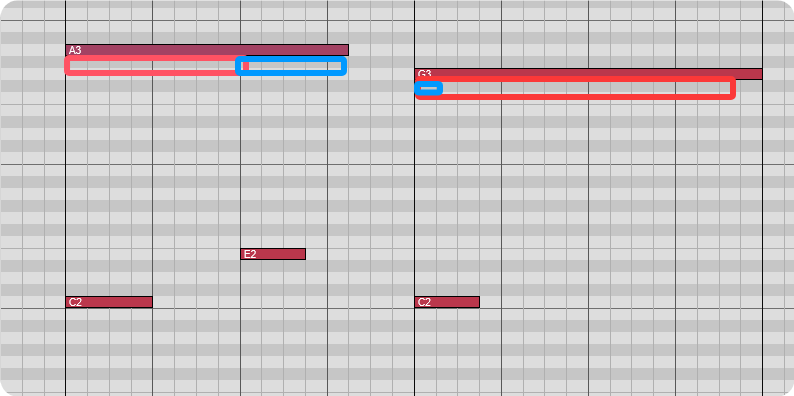
@ulrik I found a bug during testing. For example, if the last KS is on E2 after the note is played, the next note head will have the sound of E2.
-
@CatABC I guess that's how the eventData Envelopes work, if you trigger a key switch the fade will not be applied until you play next key
It seems to work flawlessly when playing legato but as soon as you release a playing key, and the fade has not worked its way through, it will continue the fade as soon as you start playing a key again.
It would be nice if the smoothing time will elapse even if no playing key is pressedHise Develop branch
MacOs 15.6.1, Xcode 16.2
http://musikboden.se -
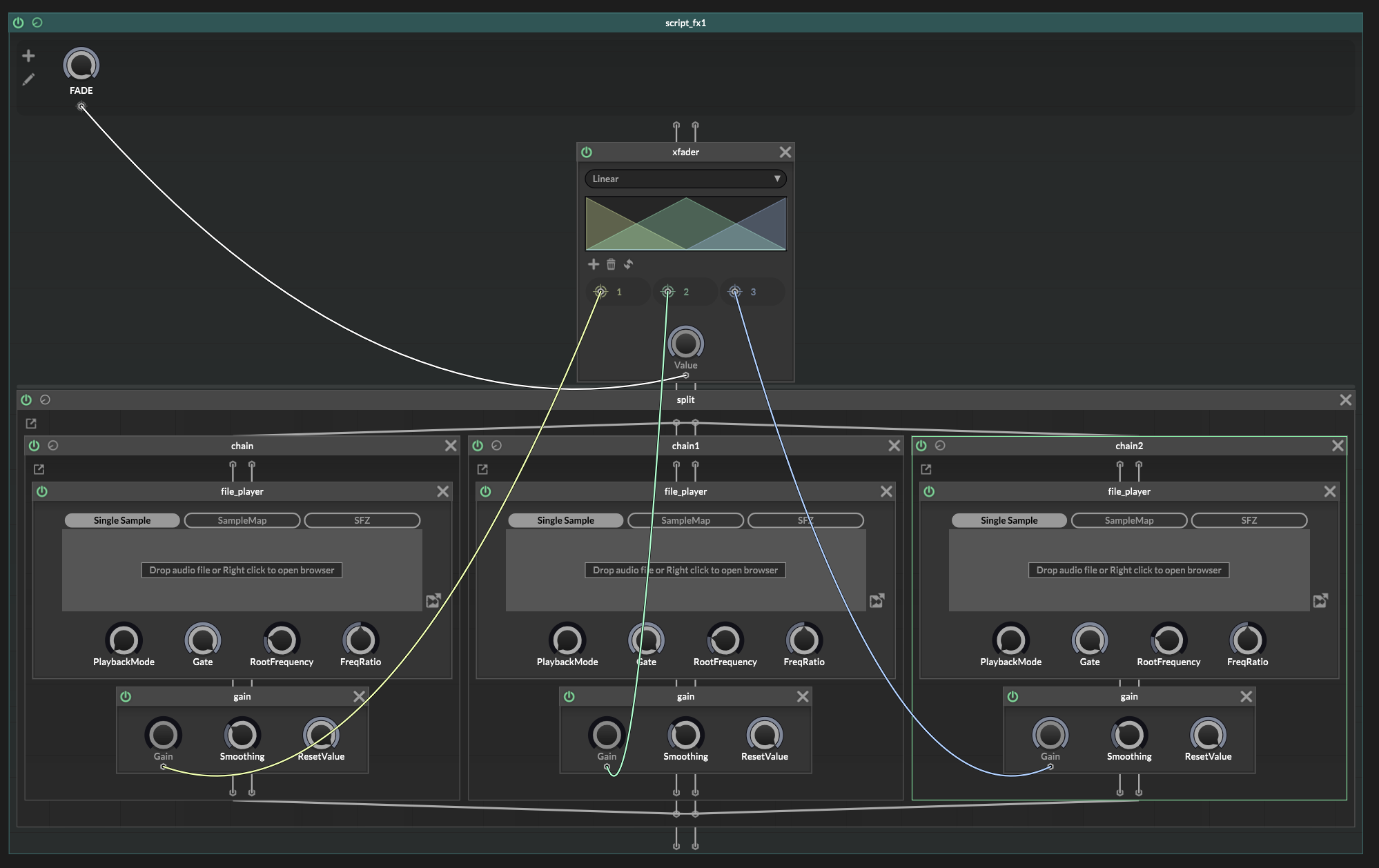
@CatABC @ulrik I played with the snippet. If you're not against scriptFX I think this is still a smooth way to avoid complex scripting and all you need to do is fading volume from one sample to another. I also suggested adding a ramp node with some smoothing in between the gain cables to give it the x-fade vibes.
 https://forum.hise.audio/post/106218
change the xFader node to Switch.
Benefits, you can add more sources easily. Pictured are fileplayers but you can easily put a oscillator there if you need. -
@Chazrox I'm not against scriptFX, but I don't know how to get started. It's a bit difficult for me. If possible, can you give me a small example?
-
@Chazrox Can this fade between sources 1 and 3? Or do the fades only work in the order of 1 fade into 2 and then 2 fade into 3?
HISE dev latest / herdr + Claude Code / Figma + Affinity
Meat Beats: https://meatbeats.com
Klippr Video: https://klippr.video -
@dannytaurus This set up (above) actually works in succession (didnt think about that case) but you could easily take the fader out and just smooth/ramp a gain knob for each sound source. It would be a 3-Channel Mixer with a smoothing node in between gain changes pretty much.
Somthing like this...
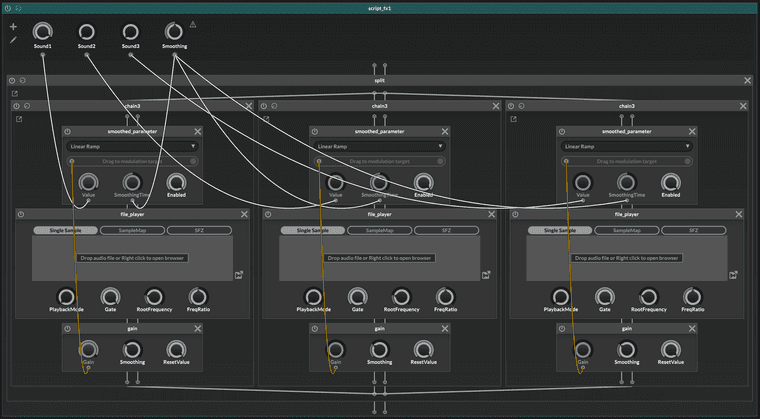
This with your KS code you have going already I imagine this would work. Send 0-1 value to the 3 sounrd source knobs like a radio group. The Linear ramp node with fade the gain change. One smoothing parameter knob to control them all. If you need more individual gain control per sound source, just drop another gain node at the end of each chain.
I only suggest this way because I imagine its less stress dealing with fade times and eventIds. I think this would work.
Just suggestions from my perspective.
 Bless!
 -
@ulrik said in How to use KeySwitch to trigger sampling?:
@CatABC I guess that's how the eventData Envelopes work, if you trigger a key switch the fade will not be applied until you play next key
It seems to work flawlessly when playing legato but as soon as you release a playing key, and the fade has not worked its way through, it will continue the fade as soon as you start playing a key again.
It would be nice if the smoothing time will elapse even if no playing key is pressed@d-healey I set the Smooth value of the EventData Envelope of the current Articulation to 1 when triggering other KS to avoid the Xfade at the beginning, but when switching the third KS on the same note, I can't set the second EventData Envelope back to its original value, or do you have any idea to solve this problem?