@Chazrox Hey everyone, I am currently running into the same issue with this setup. HISE crashes on Index 1 or 2, but works fine on Index 0. Even on a fresh project.
Did you anyone of you get this running the with other options? Would love to incorporate an oscilloscope into my plugin :)
Posts
-
RE: I am unable to get an AudioAnalyser to display in a floating tileposted in General Questions
-
RE: Remove Sample Install Dialogposted in General Questions
@dannytaurus I mean I'm removing the .vst3 from the VST3 folder and copy the new version into it - usually the DAW should detect the new version if the plugin has the same name... thats at least what it used to do
-
RE: Remove Sample Install Dialogposted in General Questions
@David-Healey Oh, thats a good hint - but it still didn't remove the dialog after recompilation..
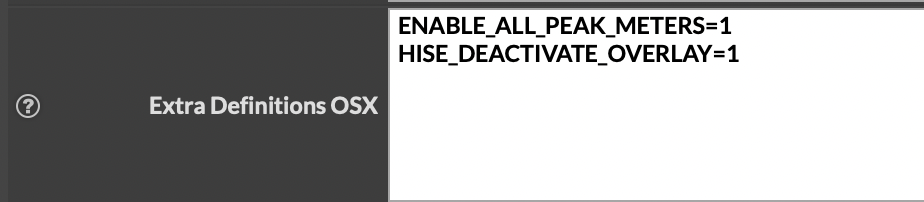
This is the right place to put the definitions, isn't it?

-
RE: Remove Sample Install Dialogposted in General Questions
@David-Healey Do I need to remove the entire build folder? I just used to go into the Release folder and delete the .lib and .vst3 before recompiling
-
Remove Sample Install Dialogposted in General Questions
Hello everyone,
I want to remove the install samples dialog on startup of the plugin, as I'm implementing my own initialisation flow using Expansions.
I researched the forum and found some posts regarding removal of the dialog and tried adding these preprocessors to my project:
HISE_DEACTIVATE_OVERLAY=1
HISE_SAMPLE_DIALOG_SHOW_INSTALL_BUTTON=0
HISE_SAMPLE_DIALOG_SHOW_LOCATE_BUTTON=0Option 1 seemed to the latest approach to this problem, but I also saw some people using Option 2+3 for this. Unfortunately none of these options seem to work as my compiled plugin still prompts me to install the samples on the first startup...
What am I missing here?
Would really appreciate some input on this :)
-
RE: callWithPOST change content typeposted in General Questions
@Daanyoo I just tried to reproduce it on a empty project on WIN, it worked there and all of the sudden it worked in the regular project as well... I am so confused haha
But at least its fixed, thank you guys for your help!!
-
RE: callWithPOST change content typeposted in General Questions
As already mentioned, the request using the same function with the JSON string is delivered perfectly fine on OSX:

I cant figure out why it wouldn't work on WIN, even though the code is identical.
-
RE: callWithPOST change content typeposted in General Questions
@David-Healey I already did:
Server.setBaseURL(MOONBASE_API); Server.setHttpHeader("Content-Type: application/json\nAuthorization: Bearer " + currentAccessToken); -
RE: callWithPOST change content typeposted in General Questions
@Christoph-Hart I use trace(data) and it works perfectly fine on OSX.
local jsonData = trace(data); Server.callWithPOST(endpoint, jsonData, function(status, response) { if (status == 200) { currentHttpCallback(true, response); } else { currentHttpCallback(false, {"error": "HTTP " + status}); }However when executing the same function on my Windows HISE build the typecheck fails and String is rejected:
Interface:! LicenseManager.js (767): Illegal type: string, expected: JSON
The json content type is also being correctly passed, as the request is successful on OSX.
-
RE: callWithPOST change content typeposted in General Questions
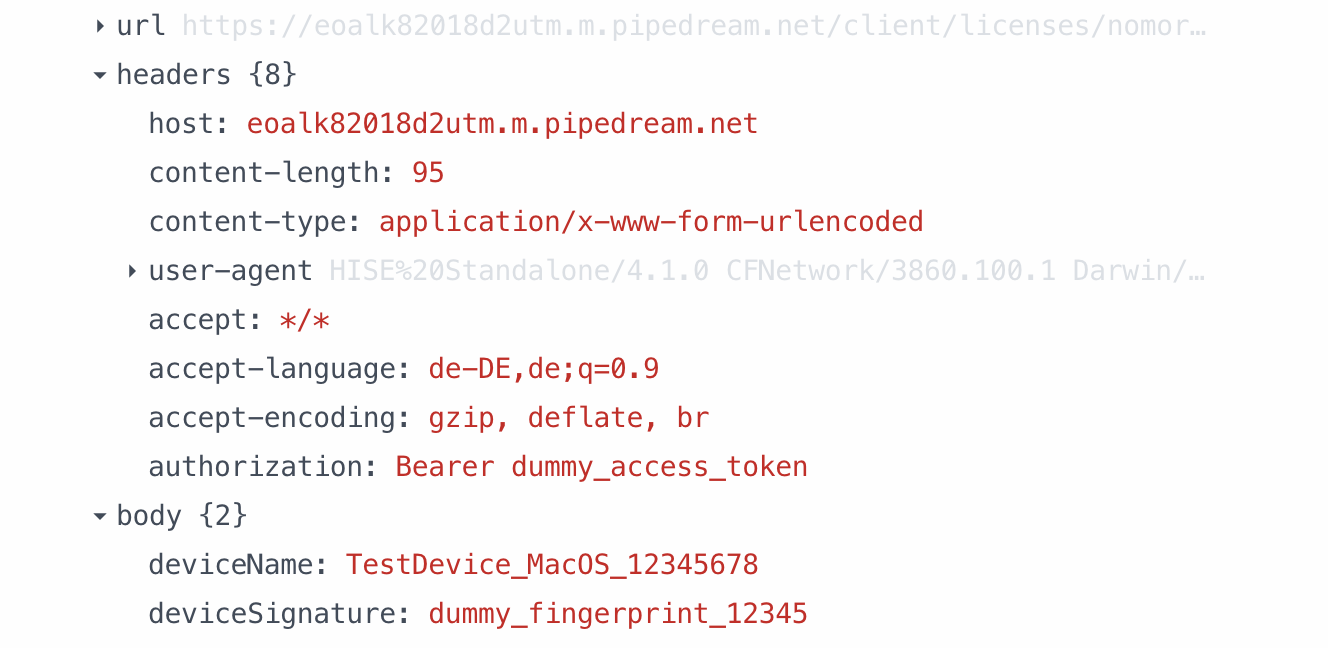
No Matter how I try passing the JSON object into the callwithPOST function, it always arrives in this URL-encoded format, which makes my request for the license activation fail.
One for Christoph I guess...
-
RE: callWithPOST change content typeposted in General Questions
@David-Healey Yes, both are running on the latest version of HISE - I also didn't expect any OS specific differences here..
-
RE: callWithPOST change content typeposted in General Questions
@David-Healey @Christoph-Hart As I've just started building out the Installer of the plugin on a Windows VM I'm strangely running into a error again....
As discussed the Server.callWithPOST function worked perfectly fine passing the JSON via trace() as stringified data - however, when trying to execute the same function on Windows the parsed string into the request is rejected due to the type check:
local jsonData = trace(data); Server.callWithPOST(endpoint, jsonData, function(status, response)Error: Illegal type: string, expected: JSON
Is there any other type check embedded here which will only trigger while on Windows?
Not sure how I could create a workaround for that.. -
Unlocker - How to use?posted in General Questions
Hi everyone,
as I'm currently working on the last few steps of implementing a Moonbase license system into our HISE Plugin, I stumbled upon the native Unlocker, which is available via the HISE API.
Initialising the Unlocker inside the script automatically seems to block the audio processing of the Plugin and the CPU is at 0%, regardless of what Preset I choose. Looking at the documentation I couldn't really figure out the workflow behind the Unlocker. I'm receiving a JWT license token by Moonbase, which then should be written into the KeyFile on the users device, but I can't manage to get this running.
I know that the Unlocker itself is part of HISE Activate - does that mean it can only be used within this setup? Or is the third party use of the Unlocker without HISE Activate still possible?
-
RE: callWithPOST change content typeposted in General Questions
@Christoph-Hart I found the mistake - I had accidently reset the Server.HttpHeader() of the request when passing it into the makeHttpRequest function. Therefore only the the Auth Bearer Token was passed and the Content-Type was automatically set by HISE. Now I correctly appended the Bearer Token within the request and everything works perfectly fine :)
Thank you guys so much for your help, I really appreciate it!!
-
RE: callWithPOST change content typeposted in General Questions
@Christoph-Hart this is how im passing the JSON data:
inline function requestDirectLicenseActivation(deviceName, deviceSignature, accessToken) { local requestData = { "deviceName": deviceName, "deviceSignature": deviceSignature }; currentAccessToken = accessToken; makeHttpRequest("POST", "/client/licenses/" + PRODUCT_ID + "/request", trace(requestData), handleDirectLicenseResponse); }Even when converting the JSON object using trace, I'm getting the 415 error due to an unsupported media type, as the endpoint will not receive the content as application/json, as its converted to x-www-form-urlencoded data.

-
RE: callWithPOST change content typeposted in General Questions
@Christoph-Hart Another problem im still facing is the JSON encoding issue that was also mentioned in the linked thread.
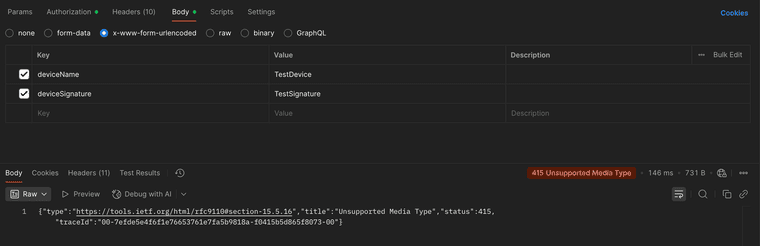
Im struggling to send a POST with regular application/json Data, as HISE seems to package the data into x-www-form-urlencoded when using Server.callWithPOST. Everytime I'm trying to send out a POST request to receive a license token I'm getting a 415 error.
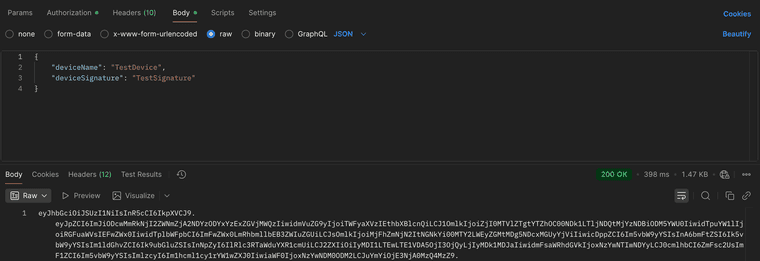
Do you have any idea how to change the format of the request in a way that the regular JSON dictionary will be transferred?
Checked the request and its format with Postman:
Using the x-www-form-urlencoded (same as HISE probably uses)

Using the JSON dictionary to receive a license token:

-
RE: callWithPOST change content typeposted in General Questions
@Christoph-Hart That was the solution! Thank you so much!!!
-
RE: callWithPOST change content typeposted in General Questions
@Christoph-Hart Okay great, this fix already allowed me to pass the plain string into the function.
Another problem, that also was mentioned in the referenced thread is that data is not being processed as text/plain or plain JSON as it looks like HISE is sending the data as URL-encoded form data (like a web form submission)
This leads to problems in calling the sign-in API endpoint of Moonbase - this is how Moonbase expects to receive sign-in data:
POST https://demo.moonbase.sh/api/customer/identity/sign-in?email=test@example.com Content-Type: text/plain Password1234!I need to embed the mail into the URL endpoint and pass on the password as plain text. This is how I implemented it within HISE:
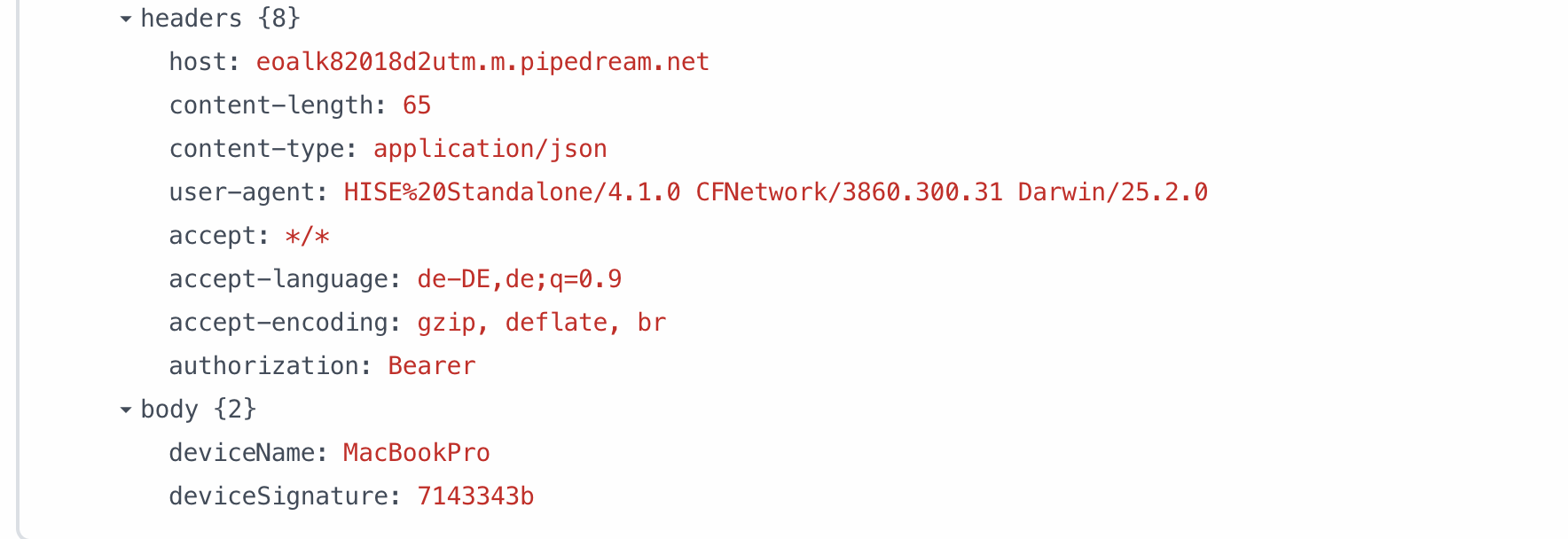
makeHttpRequest("POST", "/customer/identity/sign-in?email=" + email, password, function(success, response)Due to the faulty URL encoding the data is being received in the format shown below:
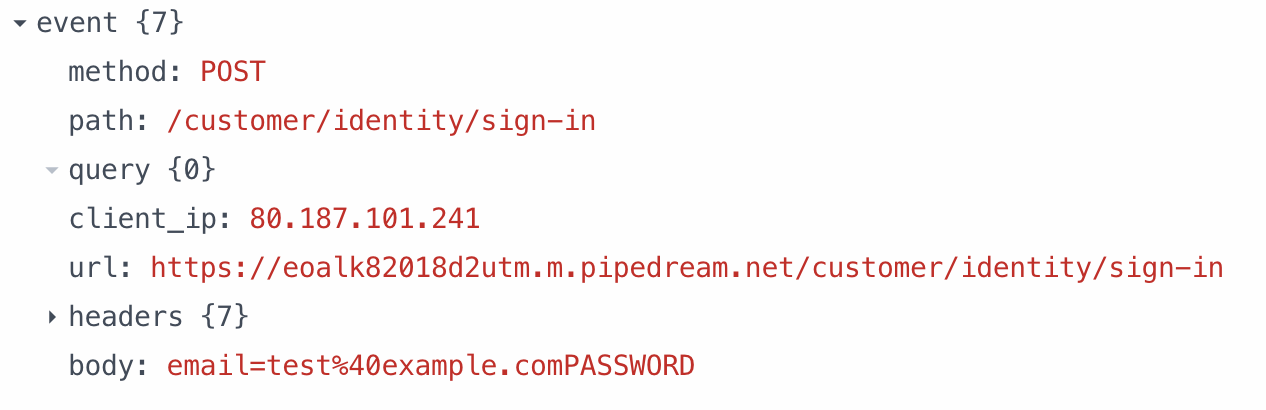
I am not sure how to create a workaround for this..
-
callWithPOST change content typeposted in General Questions
Re: Server.callWithPost content type
Hello everyone,
I'm currently working on implementing a licensing system using Moonbase within HISE. One issue I recently faced regarding user sign-in was working with the callWithPOST function. As the Moonbase API requires me to pass text/plain instead of a json object, I can't get the sign-in to properly work. Is there any way to just pass a simple string via the callWithPOST function? anyone else, who faced a similar issue and found an workaround?
Moonbase Docs Sign-In: https://moonbase.sh/docs/licensing/api/#sign-in-a-customer
inline function makeHttpRequest(method, endpoint, data, callback) { // Set base URL Server.setBaseURL(MOONBASE_API); Server.setHttpHeader("Content-Type: text/plain"); currentHttpCallback = callback; if (method == "POST") { Server.callWithPOST(endpoint, data, function(status, response) { if (status == Server.StatusOK) { Console.print("LicenseManager: Request successful"); currentHttpCallback(true, response); } else { Console.print("LicenseManager: Request failed with status: " + status); currentHttpCallback(false, {"error": "HTTP " + status}); } }); } else { Server.callWithGET(endpoint, data, function(status, response) { if (status == Server.StatusOK) { Console.print("LicenseManager: Request successful"); currentHttpCallback(true, response); } else { Console.print("LicenseManager: Request failed with status: " + status); currentHttpCallback(false, {"error": "HTTP " + status}); } }); } } /** * Sign in customer to get access token */ inline function signInCustomer(email, password, callback) { // Store callback in global variable for nested function access currentSignInCallback = callback; // Make sign-in request makeHttpRequest("POST", "/customer/identity/sign-in?email=" + email, password, function(success, response) { if (success) { Console.print("LicenseManager: Sign-in response received"); // Parse JSON response directly without storing in variable if (isDefined(parseSimpleJSON(response).accessToken)) { Console.print("LicenseManager: Access token received"); currentSignInCallback(true, parseSimpleJSON(response)); } else { Console.print("LicenseManager: No access token in response"); currentSignInCallback(false, "No access token received"); } } else { Console.print("LicenseManager: Sign-in request failed"); currentSignInCallback(false, "Sign-in request failed"); } }); }@tobbentm any recommendation from your side on implementation? why cant we just pass json with the sign-in function? would have loved to use the JUCE module from you, but as you already pointed out, this is only compatible with JUCE 7.
Any help is greatly appreciated!
-
RE: Compile error macOS Tahoe: error Cycle inside a single targetposted in General Questions
@Christoph-Hart haha, absolute madness from Apple, no one could have expected such an unnecessary change
thank you for the quick fix, that was indeed the solution - now the export runs just fine! you saved me from downgrading my OS again^^Lets see when I will encounter my next bug with this new macOS update...