@David-Healey yes this is where I am arriving at. RNBO scriptnode with the xwax Timecode as the extra node.
B
Posts
-
RE: Xwax Timecode integration possible?posted in C++ Development
-
RE: Xwax Timecode integration possible?posted in C++ Development
a. external control input (midi/OSC), to audio buffer^ signal
b. buffer^ with Timecoded audio
c. Timecode-Decode ( code like Xwax as above ) (hise network?)
d. signal from Timecode-Decode to Audio Track buffer* (playback) -
RE: Xwax Timecode integration possible?posted in C++ Development
@David-Healey Hise would not need to transmit any data.
Hise would translate the data from the Timecoded signal.
If possible the Timecode signal is also in a buffer being controlled by the external turntable. -
RE: Xwax Timecode integration possible?posted in C++ Development
@David-Healey at the moment through midi pitchbend from arduino boards. The extra Ipad controller is over OSC.
-
RE: Xwax Timecode integration possible?posted in C++ Development
@David-Healey Motorised controllers is the goal, only without max/msp.
-
Xwax Timecode integration possible?posted in C++ Development
I am searching for a workaround for vinyl control within Hise.
Is it possible to compile part of xwax into Hise?
I know it is possible within max/msp and puredata.
I have no experience with compiling C code into the DSP network. :(I am sure would only need the code below:
https://github.com/xwax/xwax/blob/master/timecoder.h
https://github.com/xwax/xwax/blob/master/pitch.h
https://github.com/xwax/xwax/blob/master/lut.h -
RE: Hise Application wont open, after build in Visual Studio 2022, Windows 10posted in General Questions
@David-Healey My apologies, was my bad.. I was pointing to the wrong HISE path. Everything is looking good now im sure. :)
-
RE: Hise Application wont open, after build in Visual Studio 2022, Windows 10posted in General Questions
@David-Healey Yes HISE is working for me now on Windows 10
With these issues.
Compiled DSP networks dont seem to work at all. In both ScriptFX and HardcodedFX.
HardcodedFX says either ERROR: No DLL Loaded. or DLL Version Missmatch.. Reeexport your nodes. I do this and end up in a loop.
I am using RNBO in scriptFX or HardcodedFX in OSX with no issues at all.
Any info on this would be lovely.
-
Hise Application wont open, after build in Visual Studio 2022, Windows 10posted in General Questions
Everything looks good, few warnings but no errors at all. Then clicking on the .exe nothing happens.. Anyone had similar experience?
-
RE: Possible to receive CC control data from ScriptFX midichain to --> Knob ?posted in ScriptNode
@ustk I am testing whether rnbo in scriptFX can output midi to Hise to use for the UI display and modulation. At the moment Rnbo in Hise only allows one dedicated modulation output..
The patch above is Hise controller script sending cc messages to Rnbo Script FX, but then its being picked up by the Global Cable again, back to the Ui. -
RE: Possible to receive CC control data from ScriptFX midichain to --> Knob ?posted in ScriptNode
@ustk I am sure when using rnbo in Script FX there is no midi output, only input.
I was just getting a loop from the midi cc's setup in the interface..Thanks again for all your help here :)
-
RE: Possible to receive CC control data from ScriptFX midichain to --> Knob ?posted in ScriptNode
@ustk Thanks for your time on this :)
would think there was a way to set the receiving midi channel somewhere, either in script FX or the Interface. I will keep digging -
RE: Possible to receive CC control data from ScriptFX midichain to --> Knob ?posted in ScriptNode
@ustk This is working if I create all these nodes for each CC.
There does not seem to be any node for setting the receive channel..
so that the incoming CC's on channel 2 will not effect the other CC's on the UI on channel 1.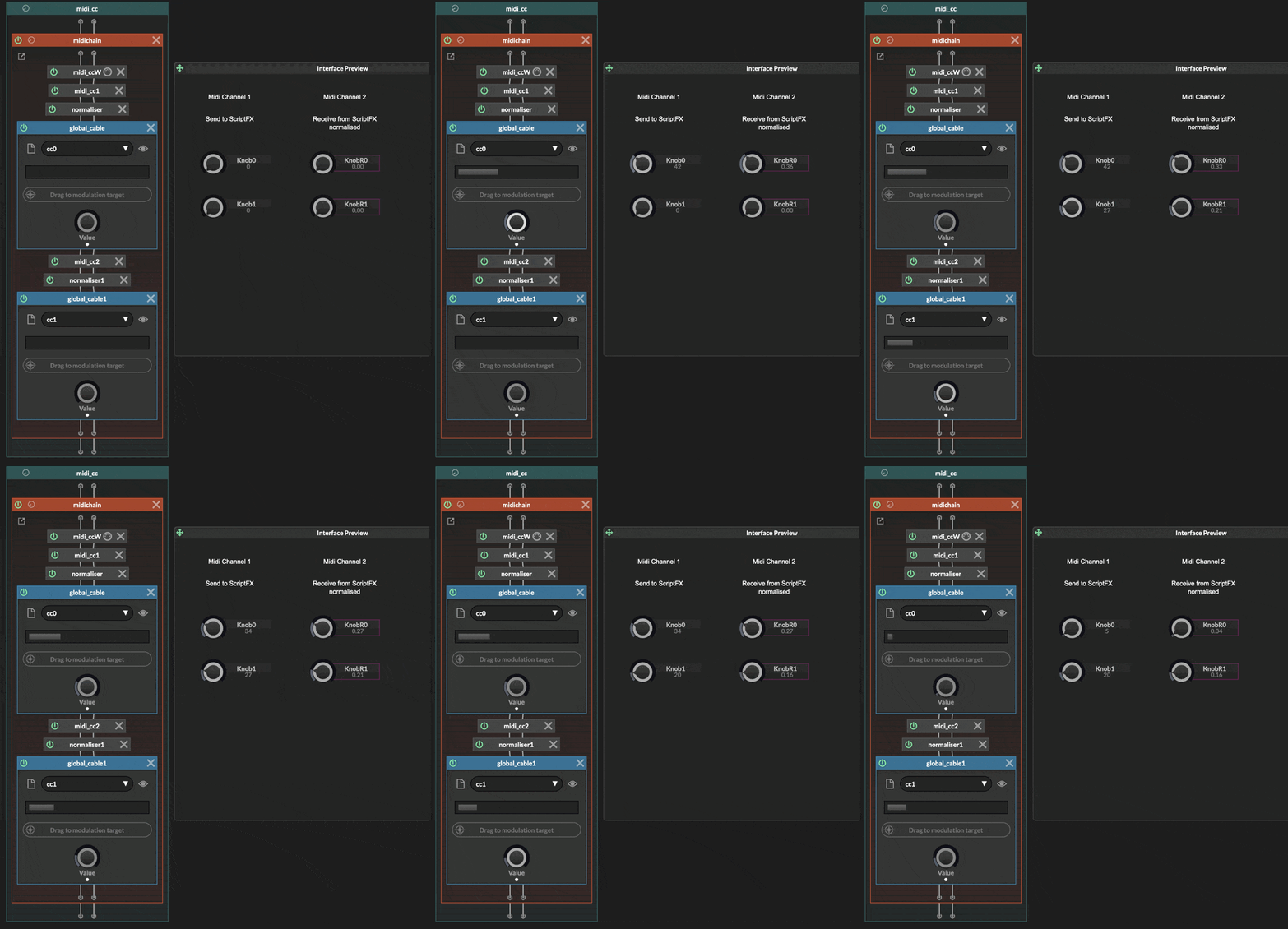
-
RE: Possible to receive CC control data from ScriptFX midichain to --> Knob ?posted in ScriptNode
@ustk Thanks for the info!
This seems to work for only one CC control? I am looking for up to 32 CC controls to Ui or more. -
Possible to receive CC control data from ScriptFX midichain to --> Knob ?posted in ScriptNode
I can send midi CC control data to ScriptFX midichain, but can not seem to work out the opposite.. :(
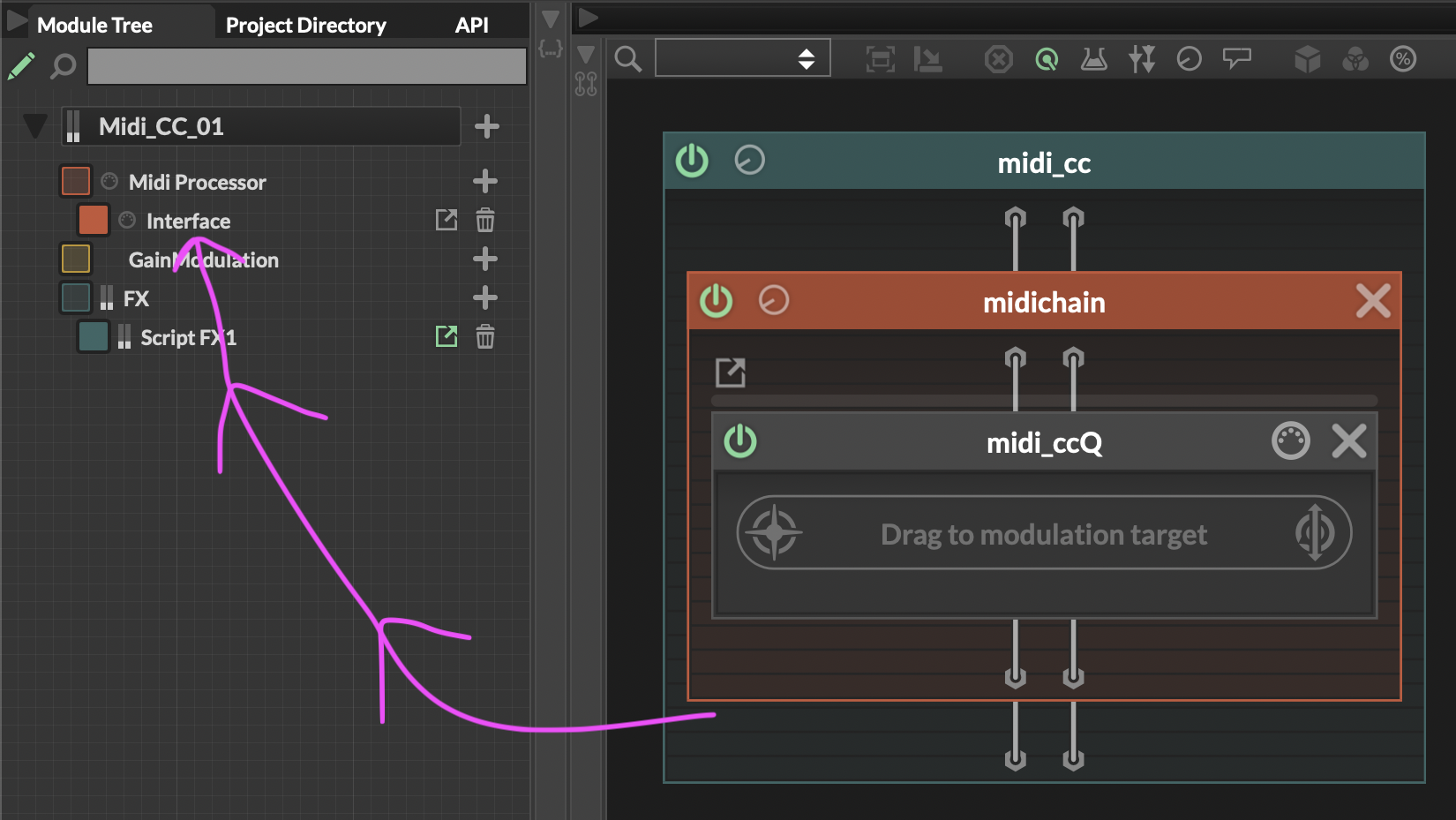
Hope you can help
-
RE: Control velocity from each incoming midi note with a Knob / Slider?posted in Scripting
@d-healey I am currently using this code for buttons to midi. Is there any way to insert this velocity function or would I also need to put this code on the second Midi Processor? Little confused but I am sure it can work.
onInt
const Buttons = Content.getAllComponents("Button");

//	this list will save the played note eventIds
reg eventIds = Engine.createMidiList();

//	this played keys will trigger the buttons
reg keysThatTrigger = [48, 49, 50, 51];

//	this notes will sound
reg triggeredNotes = [48, 49, 50, 51];

inline function onButtonsControl(component, value)
{
	local index = Buttons.indexOf(component);

	if (value)
		eventIds.setValue(triggeredNotes[index], Synth.playNote(triggeredNotes[index], 60));
	else
		Synth.noteOffByEventId(eventIds.getValue(triggeredNotes[index]));
};

for (b in Buttons)
	b.setControlCallback(onButtonsControl);
onNoteOn
function onNoteOn()
{
	Message.ignoreEvent(true);

	if (keysThatTrigger.contains(Message.getNoteNumber()))
	{
		local index = keysThatTrigger.indexOf(Message.getNoteNumber());
		Buttons[index].setValue(true);
		Buttons[index].changed();
	}
}
onNoteOff
function onNoteOff() { if (keysThatTrigger.contains(Message.getNoteNumber())) { local index = keysThatTrigger.indexOf(Message.getNoteNumber()); Buttons[index].setValue(false); Buttons[index].changed(); } } -
RE: Control velocity from each incoming midi note with a Knob / Slider?posted in Scripting
@d-healey Ok thanks for all this info, I will have a blast and see what comes out :)
-
RE: Control velocity from each incoming midi note with a Knob / Slider?posted in Scripting
@d-healey Ahh, the Knob to control the Velocity
-
Control velocity from each incoming midi note with a Knob / Slider?posted in Scripting
I know it is possible to link a button to incoming each midi note.
Can the same be accomplished with a Knob for each note?
( controlling the velocity while the note is being pressed )
I often do this in Max/Msp, PureData.Thanks I hope :)
-
RE: random float 0. - 1. how to?posted in Scripting
@iamlamprey yes I got it thanks again for your time :) Still learning and enjoying HISE.
This is working for me*
inline function onButton6Control(component, value)
{
	  if (value)
    {
        local Knob1_value = Math.randInt(20, 20000);
        local Knob3_value = Math.range(Math.random(), 0.0, 1.0);
        Knob1.setValue(Knob1_value);
        Knob1.changed();
        Knob3.setValue(Knob3_value);
        Knob3.changed();

        SimpleGain1.setAttribute(SimpleGain1.Gain, Knob1_value);
        SimpleGain2.setAttribute(SimpleGain2.Gain, Knob3_value);
    }
};

Content.getComponent("Button6").setControlCallback(onButton6Control);