letter spacing / kerning on ScriptLabel
-
We need ScriptLabels to support the same kerning factor Graphics already has via setFontWithSpacing (PERCENT value / 100, e.g. 1% → 0.01), because labels can be dynamic. Painting with g.setFontWithSpacing only works for static chrome.
Today (verified in source):
ScriptLabel has fontName, fontSize, fontStyle, alignment, etc. — no spacing property
LabelWrapper::updateFont only uses withHeight / setFont
Graphics.setFontWithSpacing already applies Font.setExtraKerningFactor(spacing)Add a ScriptLabel property, e.g. letterSpacing (float, same meaning as setFontWithSpacing’s spacing argument).
In LabelWrapper::updateFont, apply font.setExtraKerningFactor(letterSpacing) before setFont.
Keep that kerning when the label draws text (including editable/dynamic).Having an issue with this, would be nice to have so one can design freely.
-
@lalalandsynth said in letter spacing / kerning on ScriptLabel:
g.setFontWithSpacing only works for static chrome
This can be dynamic too, what are you trying to achieve? I pretty much never use labels.
Free HISE Bootcamp Full Course for beginners.
YouTube Channel - HISE tutorials
My Patreon - More HISE tutorials -
@lalalandsynth Is this what you're looking for?
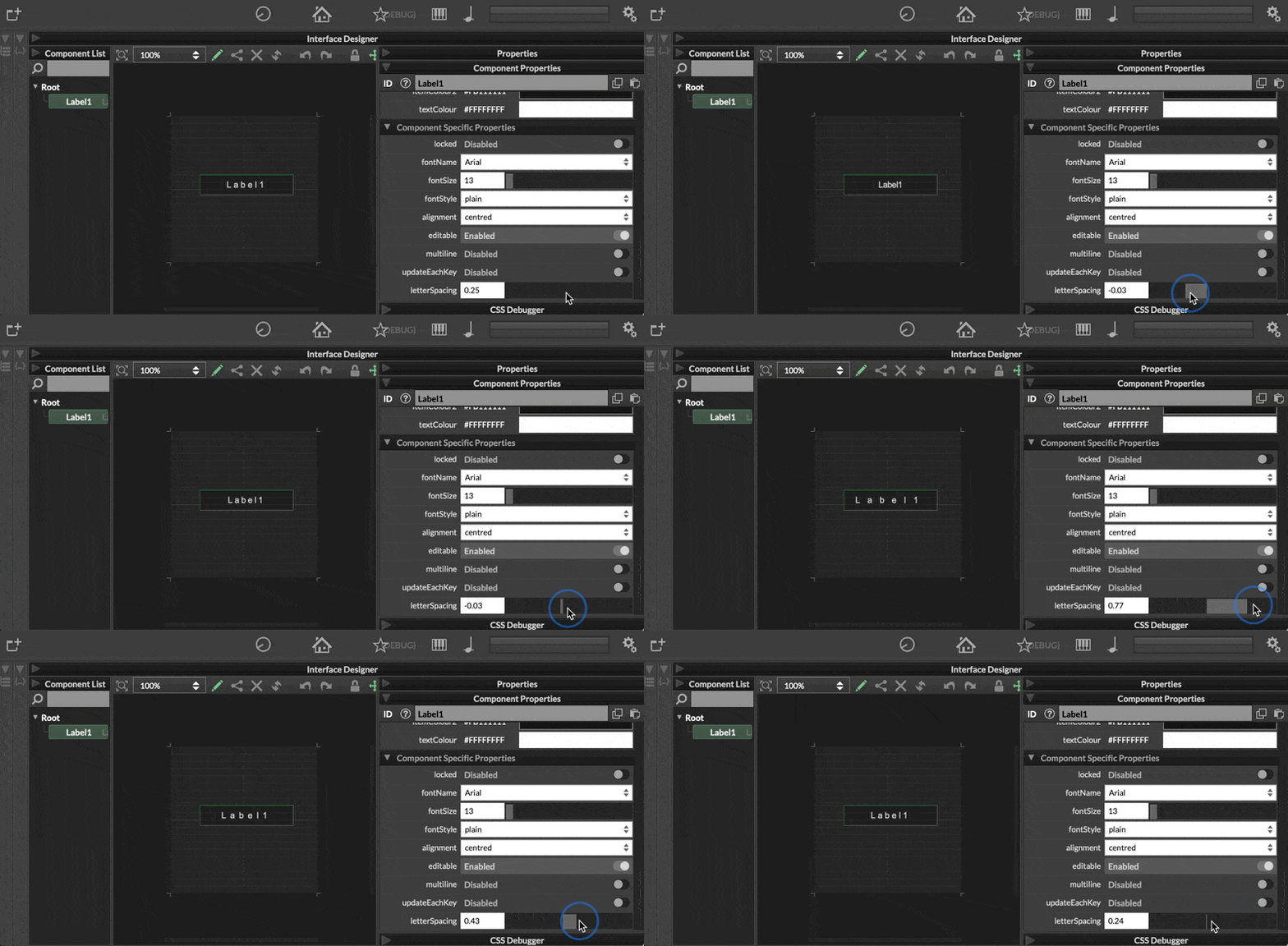
HISE dev latest / herdr + Claude Code / Figma + Affinity
Meat Beats: https://meatbeats.com
Klippr Video: https://klippr.video -
@dannytaurus Hey I need that! lol
-
@lalalandsynth Here's a PR, see if it fits your needs.
https://github.com/christophhart/HISE/pull/1006
Full disclosure: this is 100% Fable. I don't know a lot about text rendering in HISE, so take it with a grain of salt.
-
@David-Healey YEs, I can do it if i paint it , but ok, do you always just paint text ?
Wondering what would be more suitable for Ui delivery , a text box or just painted , also dynamic text.I guess both methods should be available, depending on dev requirements.?
-
@dannytaurus Exactly that
-
@lalalandsynth said in letter spacing / kerning on ScriptLabel:
YEs, I can do it if i paint it , but ok, do you always just paint text ?
Yes pretty much. I tend to have a lot of stuff automated so I don't really think about it. All my knobs use one look and feel which paints the label and value. All my panels use one paint routine which paints labels or headers, etc.
Free HISE Bootcamp Full Course for beginners.
YouTube Channel - HISE tutorials
My Patreon - More HISE tutorials -
@David-Healey I wonder if there is a consensus on this or a mix of methods, probably a mix and personal preference ?
-
@lalalandsynth It depends on the specifics of what you're doing. If you already have a paint routine or look and feel for the component then it's probably better to include the value/label in that rather than add another component to the UI. But if you're using filmstrips a label might be easier - although you probably still have to add scripting anyway.
-
@David-Healey quick question, for static fonts do you use a font , or do you just print as vector ? I assume fonts is lighter , but a bit unsure what methods are solid and tested.
-
@lalalandsynth I use a font unless I need to manipulate in some way that is easier outside of HISE. For example my company logo I use a vector.