Forum
    • Categories
    • Register
    • Login

    audio files not embed (Engine.loadAudioFilesIntoPool) added

    Scheduled Pinned Locked Moved General Questions
    24 Posts 2 Posters 194 Views
    Loading More Posts
    • Oldest to Newest
    • Newest to Oldest
    • Most Votes
    Reply
    • Reply as topic
    Log in to reply
    This topic has been deleted. Only users with topic management privileges can see it.
    • David HealeyD
      David Healey @Yannrog
      last edited by

      @Yannrog said in audio files not embed (Engine.loadAudioFilesIntoPool) added:

      Is that good?

      Does it work?

      Free HISE Bootcamp Full Course for beginners.
      YouTube Channel - Public HISE tutorials
      My Patreon - HISE tutorials

      Y 2 Replies Last reply Reply Quote 0
      • Y
        Yannrog @David Healey
        last edited by

        @David-Healey it does compile,

        I didn't test in plugin, I will test it

        1 Reply Last reply Reply Quote 1
        • Y
          Yannrog @David Healey
          last edited by Yannrog

          @David-Healey
          It compiles, but in plugin it does not work. and a script processor doesn't work. 🤔

          David HealeyD 1 Reply Last reply Reply Quote 0
          • David HealeyD
            David Healey @Yannrog
            last edited by

            @Yannrog said in audio files not embed (Engine.loadAudioFilesIntoPool) added:

            and a script processor doesn't work

            You need to give more information

            Free HISE Bootcamp Full Course for beginners.
            YouTube Channel - Public HISE tutorials
            My Patreon - HISE tutorials

            Y 1 Reply Last reply Reply Quote 0
            • Y
              Yannrog @David Healey
              last edited by Yannrog

              @David-Healey I have IR Reverbs working in Hise,

              I have code lines for reverbs
              const var audiofiles = Engine.loadAudioFilesIntoPool();
              const var reverbfile1 = Synth.getAudioSampleProcessor("//reverbname");

              const var reverbfile2 = Synth.getAudioSampleProcessor("//reverbname");

              Works fine Hise. But doesn't work in plugin

              I have too a midi script processor on a sampler working on Hise.
              But doesn't work in plugin

              David HealeyD 1 Reply Last reply Reply Quote 0
              • David HealeyD
                David Healey @Yannrog
                last edited by

                @Yannrog said in audio files not embed (Engine.loadAudioFilesIntoPool) added:

                "//reverbname"

                Is this a placeholder? Where are you calling .setFile()?

                Free HISE Bootcamp Full Course for beginners.
                YouTube Channel - Public HISE tutorials
                My Patreon - HISE tutorials

                Y 1 Reply Last reply Reply Quote 0
                • Y
                  Yannrog @David Healey
                  last edited by

                  @David-Healey
                  I placed in the code lines the name of the reverbs instead of “//reverbname“

                  I thought it was targeting for the file in the folder. Sorry for the beginner questions.

                  David HealeyD 1 Reply Last reply Reply Quote 0
                  • David HealeyD
                    David Healey @Yannrog
                    last edited by

                    @Yannrog getAudioSampleProcessor this is used to get a reference to the effect in the module tree. Once you have that you use .setFile to tell it which IR to use. You need to use the project_folder wildcard too, check the documentation link I posted above.

                    Free HISE Bootcamp Full Course for beginners.
                    YouTube Channel - Public HISE tutorials
                    My Patreon - HISE tutorials

                    Y 2 Replies Last reply Reply Quote 0
                    • Y
                      Yannrog @David Healey
                      last edited by Yannrog

                      @David-Healey oh, ok. I'll try thanx

                      1 Reply Last reply Reply Quote 0
                      • Y
                        Yannrog @David Healey
                        last edited by

                        @David-Healey
                        const var reverb1 = Synth.getAudioSampleProcessor("Convolution Reverb1");

                        reverb1.setFile("Reverb 4");

                        I have a message “const var must be on global level“, what does it mean?

                        David HealeyD 1 Reply Last reply Reply Quote 0
                        • David HealeyD
                          David Healey @Yannrog
                          last edited by

                          @Yannrog said in audio files not embed (Engine.loadAudioFilesIntoPool) added:

                          I have a message “const var must be on global level“, what does it mean?

                          That means the variable need to be declared in on init.

                          For set file you need to use the project folder wildcard like I mentioned, so it knows where to look for the IR. Check the docs.

                          Free HISE Bootcamp Full Course for beginners.
                          YouTube Channel - Public HISE tutorials
                          My Patreon - HISE tutorials

                          Y 1 Reply Last reply Reply Quote 0
                          • Y
                            Yannrog @David Healey
                            last edited by

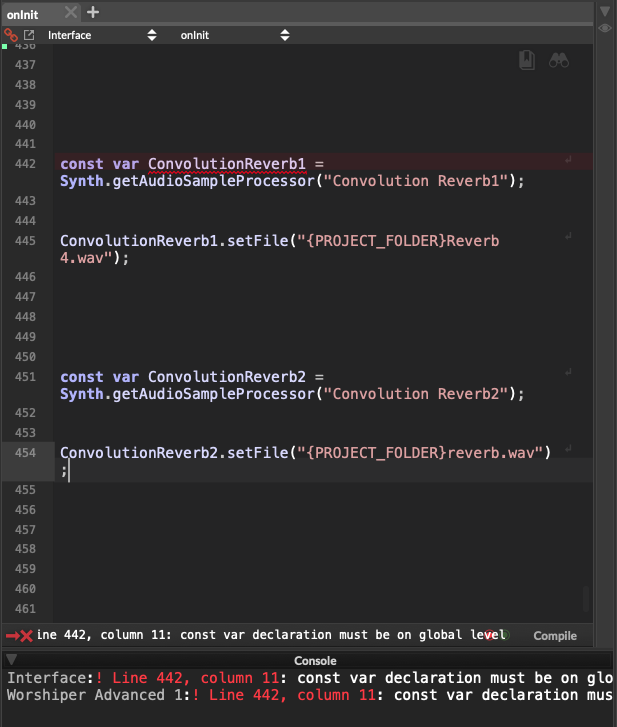
                            @David-Healey It's better

                            I am on oninit, why is it saying again? 🤔

                            exemple :

                            const var ConvolutionReverb1 = Synth.getAudioSampleProcessor("Convolution Reverb1");

                            ConvolutionReverb1.setFile("{PROJECT_FOLDER}Reverb 4.wav");*

                            const var ConvolutionReverb2 = Synth.getAudioSampleProcessor("Convolution Reverb2");

                            ConvolutionReverb2.setFile("{PROJECT_FOLDER}reverb.wav");*

                            David HealeyD 1 Reply Last reply Reply Quote 0
                            • David HealeyD
                              David Healey @Yannrog
                              last edited by

                              @Yannrog That looks good, but why the * at the end of the lines?

                              Free HISE Bootcamp Full Course for beginners.
                              YouTube Channel - Public HISE tutorials
                              My Patreon - HISE tutorials

                              1 Reply Last reply Reply Quote 0
                              • First post
                                Last post

                              7

                              Online

                              2.4k

                              Users

                              13.7k

                              Topics

                              119.4k

                              Posts