Forum
    • Categories
    • Register
    • Login

    audio files not embed (Engine.loadAudioFilesIntoPool) added

    Scheduled Pinned Locked Moved General Questions
    29 Posts 3 Posters 1.1k Views
    Loading More Posts
    • Oldest to Newest
    • Newest to Oldest
    • Most Votes
    Reply
    • Reply as topic
    Log in to reply
    This topic has been deleted. Only users with topic management privileges can see it.
    • David HealeyD
      David Healey @Yannrog
      last edited by

      @Yannrog That loads the files into HISE to make them available, it doesn't load them into the reverb.

      You need to get a reference to the effect Synth.getAudioSampleProcessor() and then you need to use .setFile to load in the impulse.

      https://docs.hise.audio/scripting/scripting-api/audiosampleprocessor/index.html#setfile

      Another method is to have a hidden waveform control on your UI connected to the convolution. Make sure it's set to saveInPreset and load your impulse through that control. Then the IR should be saved with the preset.

      Free HISE Bootcamp Full Course for beginners.
      YouTube Channel - HISE tutorials
      My Patreon - More HISE tutorials

      Y 1 Reply Last reply Reply Quote 0
      • Y
        Yannrog @David Healey
        last edited by

        @David-Healey

        Is that good?

        const var audiofiles = Engine.loadAudioFilesIntoPool();
        const var reverbfile1 = Synth.getAudioSampleProcessor("//reverbname");

        const var reverbfile2 = Synth.getAudioSampleProcessor("//reverbname");

        David HealeyD 1 Reply Last reply Reply Quote 0
        • David HealeyD
          David Healey @Yannrog
          last edited by

          @Yannrog said in audio files not embed (Engine.loadAudioFilesIntoPool) added:

          Is that good?

          Does it work?

          Free HISE Bootcamp Full Course for beginners.
          YouTube Channel - HISE tutorials
          My Patreon - More HISE tutorials

          Y 2 Replies Last reply Reply Quote 0
          • Y
            Yannrog @David Healey
            last edited by

            @David-Healey it does compile,

            I didn't test in plugin, I will test it

            1 Reply Last reply Reply Quote 1
            • Y
              Yannrog @David Healey
              last edited by Yannrog

              @David-Healey
              It compiles, but in plugin it does not work. and a script processor doesn't work. 🤔

              David HealeyD 1 Reply Last reply Reply Quote 0
              • David HealeyD
                David Healey @Yannrog
                last edited by

                @Yannrog said in audio files not embed (Engine.loadAudioFilesIntoPool) added:

                and a script processor doesn't work

                You need to give more information

                Free HISE Bootcamp Full Course for beginners.
                YouTube Channel - HISE tutorials
                My Patreon - More HISE tutorials

                Y 1 Reply Last reply Reply Quote 0
                • Y
                  Yannrog @David Healey
                  last edited by Yannrog

                  @David-Healey I have IR Reverbs working in Hise,

                  I have code lines for reverbs
                  const var audiofiles = Engine.loadAudioFilesIntoPool();
                  const var reverbfile1 = Synth.getAudioSampleProcessor("//reverbname");

                  const var reverbfile2 = Synth.getAudioSampleProcessor("//reverbname");

                  Works fine Hise. But doesn't work in plugin

                  I have too a midi script processor on a sampler working on Hise.
                  But doesn't work in plugin

                  David HealeyD 1 Reply Last reply Reply Quote 0
                  • David HealeyD
                    David Healey @Yannrog
                    last edited by

                    @Yannrog said in audio files not embed (Engine.loadAudioFilesIntoPool) added:

                    "//reverbname"

                    Is this a placeholder? Where are you calling .setFile()?

                    Free HISE Bootcamp Full Course for beginners.
                    YouTube Channel - HISE tutorials
                    My Patreon - More HISE tutorials

                    Y 1 Reply Last reply Reply Quote 0
                    • Y
                      Yannrog @David Healey
                      last edited by

                      @David-Healey
                      I placed in the code lines the name of the reverbs instead of “//reverbname“

                      I thought it was targeting for the file in the folder. Sorry for the beginner questions.

                      David HealeyD 1 Reply Last reply Reply Quote 0
                      • David HealeyD
                        David Healey @Yannrog
                        last edited by

                        @Yannrog getAudioSampleProcessor this is used to get a reference to the effect in the module tree. Once you have that you use .setFile to tell it which IR to use. You need to use the project_folder wildcard too, check the documentation link I posted above.

                        Free HISE Bootcamp Full Course for beginners.
                        YouTube Channel - HISE tutorials
                        My Patreon - More HISE tutorials

                        Y 2 Replies Last reply Reply Quote 0
                        • Y
                          Yannrog @David Healey
                          last edited by Yannrog

                          @David-Healey oh, ok. I'll try thanx

                          1 Reply Last reply Reply Quote 0
                          • Y
                            Yannrog @David Healey
                            last edited by

                            @David-Healey
                            const var reverb1 = Synth.getAudioSampleProcessor("Convolution Reverb1");

                            reverb1.setFile("Reverb 4");

                            I have a message “const var must be on global level“, what does it mean?

                            David HealeyD 1 Reply Last reply Reply Quote 0
                            • David HealeyD
                              David Healey @Yannrog
                              last edited by

                              @Yannrog said in audio files not embed (Engine.loadAudioFilesIntoPool) added:

                              I have a message “const var must be on global level“, what does it mean?

                              That means the variable need to be declared in on init.

                              For set file you need to use the project folder wildcard like I mentioned, so it knows where to look for the IR. Check the docs.

                              Free HISE Bootcamp Full Course for beginners.
                              YouTube Channel - HISE tutorials
                              My Patreon - More HISE tutorials

                              Y 1 Reply Last reply Reply Quote 0
                              • Y
                                Yannrog @David Healey
                                last edited by

                                @David-Healey It's better

                                I am on oninit, why is it saying again? 🤔

                                exemple :

                                const var ConvolutionReverb1 = Synth.getAudioSampleProcessor("Convolution Reverb1");

                                ConvolutionReverb1.setFile("{PROJECT_FOLDER}Reverb 4.wav");*

                                const var ConvolutionReverb2 = Synth.getAudioSampleProcessor("Convolution Reverb2");

                                ConvolutionReverb2.setFile("{PROJECT_FOLDER}reverb.wav");*

                                David HealeyD 1 Reply Last reply Reply Quote 0
                                • David HealeyD
                                  David Healey @Yannrog
                                  last edited by

                                  @Yannrog That looks good, but why the * at the end of the lines?

                                  Free HISE Bootcamp Full Course for beginners.
                                  YouTube Channel - HISE tutorials
                                  My Patreon - More HISE tutorials

                                  Y 1 Reply Last reply Reply Quote 0
                                  • Y
                                    Yannrog @David Healey
                                    last edited by

                                    @David-Healey Yes, I have deleted them. I found help in the forum about how to include the line “PROJECT_FOLDER“, I forgot to delete it.

                                    It asks again for global level. It's on oninit 🤔
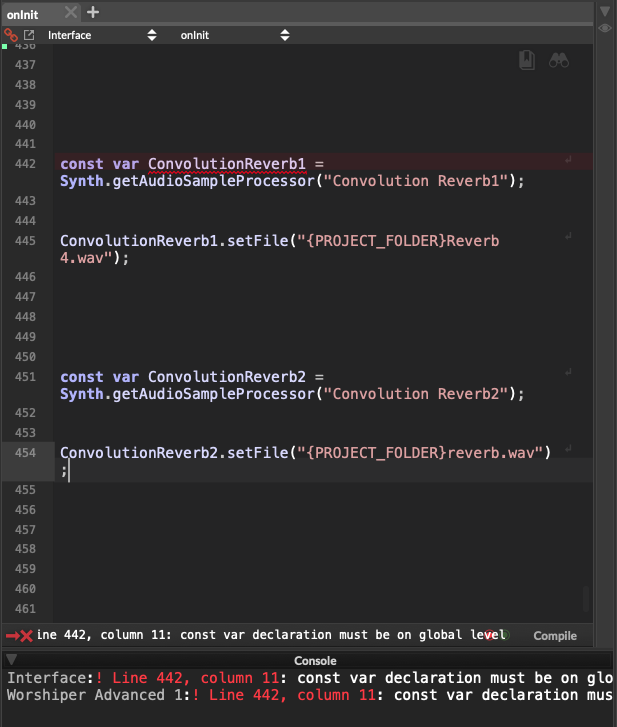
                                    Capture d’écran 2026-06-01 à 10.24.56.png

                                    David HealeyD 1 Reply Last reply Reply Quote 0
                                    • David HealeyD
                                      David Healey @Yannrog
                                      last edited by

                                      @Yannrog are you sure you haven't put that code inside a function by mistake?

                                      Free HISE Bootcamp Full Course for beginners.
                                      YouTube Channel - HISE tutorials
                                      My Patreon - More HISE tutorials

                                      dannytaurusD Y 2 Replies Last reply Reply Quote 0
                                      • dannytaurusD
                                        dannytaurus @David Healey
                                        last edited by

                                        @David-Healey There might be an open function, or some other error, earlier in the oninit script.

                                        Those error messages aren't the most helpful.

                                        Meat Beats: https://meatbeats.com
                                        Klippr Video: https://klippr.video

                                        Y 1 Reply Last reply Reply Quote 0
                                        • Y
                                          Yannrog @David Healey
                                          last edited by

                                          @David-Healey Hi, thanks God, It's working soooooo fine. I had to put the engine.loadaudiofilesintopool ealier.

                                          1 Reply Last reply Reply Quote 0
                                          • Y
                                            Yannrog @dannytaurus
                                            last edited by

                                            @dannytaurus It working soo fine, I had to put engine.loadaudiofilesintopool earlier

                                            1 Reply Last reply Reply Quote 1
                                            • First post
                                              Last post

                                            8

                                            Online

                                            2.4k

                                            Users

                                            13.8k

                                            Topics

                                            120.0k

                                            Posts
