Timestretch Artifacts
-
@dannycouture Yes with that PR you still set the time stretch options, but instead of using NumQuarters, you use SourceBPM and set it to the BPM of your samples. The only settings I'm aware of are those available through the time stretch options.
Free HISE Bootcamp Full Course for beginners.
YouTube Channel - HISE tutorials
My Patreon - More HISE tutorials -
You can try to use the signalsmith CLI tool (or whatever they ship as a binary) to check your exact audio material. AFAIK I've not changed the internals of that engine too much instead of just wiring in IPP / VDSP and a few other small performance additions.
You can't expect parity with the sound quality of Elastique though. Rubberband sounds worse in my experience than signalsmith - v2 as well as v3.
There is also another timestretch library on the block - Bungee which has a pro version that claims to be on par with Elastique et al, so maybe that would be a contender.
-
@David-Healey so we have working tempo synched time stretch with this PR? or i should add..this wasnt working before if i remember correctly
-
@jeffd We already did, but now it's a little more user friendly and a glitch has been fixed.
-
@David-Healey i think last time i tried it it always crashed.
but that was awhile ago.
-
@jeffd Yes there was a crashing issue that the PR fixes
-
@David-Healey yeah, thats what happened when i tried it.
this is great that its fixed now!
-
@David-Healey What unit is SampleStart/SampleEnd displayed in inside the sample editor? Is it raw samples, or something else?
-
@dannycouture Yes, samples
-
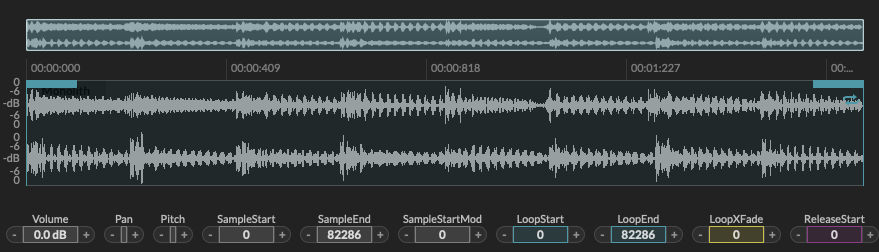
wav file is 75600 samples (140BPM) confirmed in Audacity, HISE sample editor showing 82286 as SampleEnd. Is HISE adding padding on import? or maybe a bug?
EDIT:
Thinking this is the issue as to why I am hearing smearing even at 100% stretch. I set the SourceBPM to 140 and engine host to 140 and I still hear smearing like its slowing down 1BPM or so too with Timesync Mode activated. -
@dannycouture Send me the sample
-
-
-
It was caused by having different sample rates in 2 different samplers. I had to convert all to 41.1khz which is what I started my project at.