Sampler: Preload Size question
-
Ok so I want to be able to change the preload size for my samplers, easy enough but....
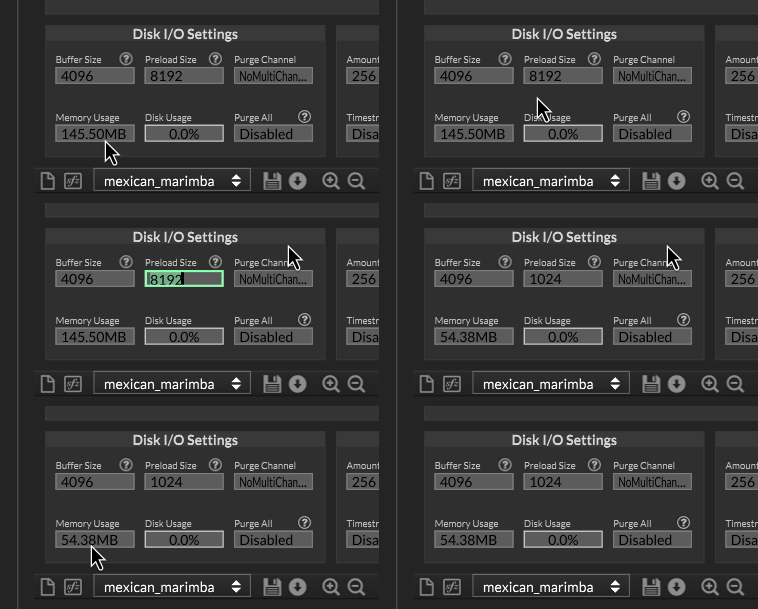
Lets say I do this, changing from 8192 to (say) 1024....
do this get applied immediately? so the sample map is reloaded, or do I have to reload the sample map myself to get it to work???
Cant find any documentation to say one way or the other...
HISE Development for hire.
www.channelrobot.com -
@Lindon It's immediate, the change is shown in the sampler. Also if you change between ssd to hdd mode it will double the memory usage. I use this in my settings panel to give the user control.
Free HISE Bootcamp Full Course for beginners.
YouTube Channel - HISE tutorials
My Patreon - More HISE tutorials -
@David-Healey duh...didnt even look, silly me... Ok great thanks.
HISE Development for hire.
www.channelrobot.com -
@David-Healey so follow up question....
how is this new setup saved? part of a preset?
HISE Development for hire.
www.channelrobot.com -
@Lindon just like any other attribute. If you save it in a preset it will be restored in a preset.
AFAIK the sample loading is deferred until the plugin is initialised, so if you load a DAW project, it will not load the default preload size, then reload them again, but wait until everything is setup and then load the samples with the one preload size you set it to.
You probably might want to put that in a non-preset setting file somewhere.
-
@Christoph-Hart said in Sampler: Preload Size question:
You probably might want to put that in a non-preset setting file somewhere.
exactly what im doing....
with the complication that the Preload size is actually being set in another executable, the "player", so now when the Full instrument Expansion gets loaded I say this in the init:
      for(i = 0; i < NUM_SAMPLERS; i++)
	{
		if((instrumentMetadata.instrumentSettings.PreloadBuffer * 1024) != TheSamplers[i].getAttribute(TheSamplers[i].PreloadSize))
		{
			TheSamplers[i].setAttribute(TheSamplers[i].PreloadSize, instrumentMetadata.instrumentSettings.PreloadBuffer * 1024);
		}
	}
only question is -- do I need to wait for everything to load before checking this?


