Matrix modulation connection is broken in exported plugin
-
So I have:
- UI sliders connected to Matrix Modulators via
matrixTargetId - networks using
extra_modnodes andExternalModulationfor their parameters - and of course because it is necessary, a Global Modulation Container.
Everything works fine within Hise.
But once exported, the sound does not change, neither from UI sliders nor from preset load.
- I tried to connect the UI sliders to the Value parameter of the Matrix Modulator for direct control, but it does not help.
- The same issue applies for interpreted networks (ScriptFX) and compiled DLL (hardcoded master FX)
so the connection is broken somewhere in exported plugin, but AI seems to be lost with it...
Should anything be taken care of in the script? Like a connection initialisation of some sort?
- UI sliders connected to Matrix Modulators via
-
@ustk
Do you have this in your script:Engine.addModuleStateToUserPreset(“Your Global Modulator Container Name”)I don't remember 100% for sure, but I think I had the same issues as you. Adding the Global Modulator Container to the preset solved all the problems.
-
Are you exporting a FX plugin?
-
@Oli-Ullmann I have seen this! Testing...
@Christoph-Hart Yes
-
@Oli-Ullmann So in the end it's not this. I have it noted in my project check list like so:
/*
In the case the modulation is deleted when loading a DAW project, do this:
Engine.addModuleStateToUserPreset("Global Modulator Container");
https://forum.hise.audio/topic/14137/modulation-is-deleted-when-loading-a-daw-project/5
*/
Thanks anyway!
-
@ustk
Okay, here’s something else that comes to mind regarding an FX plug-in:
You need to check theEnable Sound Generators FXbox in the settings for it to work in the compiled plug-in.Additionally, I have the following in the extra definitions:
HISE_ENABLE_MIDI_LEARN=1
Otherwise, you won’t be able to access the context menu for the buttons. And just to be safe, I also checked the box forEnable Midi Input FXin the settings.I think that might solve your problem.
-
@Oli-Ullmann Mmmm... I have them all already...
Do you mean you actually have an FX plugin working with the matrix modulation system? (extra_mod nodes, UI matrixTargetId, etc...)
-
@Oli-Ullmann @Christoph-Hart Alright I got something!
When setting the hardcoded DLL to "" then back to the original one, the connection is made.
So why it's not connecting at init I don't know...@Oli-Ullmann Do you set your networks/DLL from script or are they just set in the module tree like I do?
Perhaps I should also add those module states to the presets?
-
@ustk
Okay, I have a working FX plug-in with modulation. However, I control the parameters usingHardcodedFx.setAttribute(parameter, value)because I’m controlling multiple parameters simultaneously with a single UI element. So I’m not usingextra_modnodes. Since modulation in an FX plug-in is usually monophonic and I don’t need sample-accurate modulation, this works for me.The UI element has a
matrixTargetId, and I’m using HISE’s modulation system.I load the HardcodedFX dynamically via script. I haven’t added the module states to the preset. Just the Global Modulator Container.
So it’s possible that it works for me because I control the parameters via
setAttributeand the UI elements aren’t directly linked to the effect parameters. But that’s just a guess.If it helps and you're really stuck, I'd be happy to send you my project without the effects DLLs and C++ files....
-
@Oli-Ullmann Thanks a lot for the detailed explanation!
This confirms what I see, so the main difference is that you load your hardcoded DLLs dynamically.
I doubt the setAttribute is the origin of the problem because when I force the DLL it then works.
I need sample accuracy so the targetId is what I want.Now, when you say "I load the HardcodedFX dynamically via script", do you mean once at init or on preset load CB? (or other behaviour to swap them on the fly)
-
@ustk
I load the effects via the ControlCallback of my UI elements usingSlotFX.setEffect(String effectName). The UI elements aresaveInPreset.I can also swap the effects on the fly.
What do you mean by “when I force the DLL”?
Here’s some additional information that might be important:
I created the basic effects in Max and then imported them into HISE via RNBO. I then combined these effects further in a ScriptNode network. I compiled this network and loaded it into a HardcodedFX. -
@Oli-Ullmann By force the DLL I mean
setEffect("")thensetEffect("myFxDLL")to force a refresh at initconst var DLLNames = ["Tube_ClassA_DspNetwork", "Noise_DspNetwork", "EQ_DspNetwork", "Exciter_DspNetwork", "Tube_ClassB_DspNetwork", "Transformer_DspNetwork"]; const var HCModuleNames = ["Tube Input HCFX", "Noise HCFX", "EQ HCFX", "Exciter HCFX", "Tube Output HCFX", "Transformer HCFX"] const var HCModules = []; for (name in HCModuleNames) HCModules.push(Synth.getSlotFX(name)); const var initTimer = Engine.createTimerObject(); initTimer.setTimerCallback(forceReloadHardcodedDLL); inline function forceReloadHardcodedDLL() { this.stopTimer(); for (fxSlot in HCModules) { fxSlot.setEffect(""); fxSlot.setEffect(DLLNames[HCModules.indexOf(fxSlot)]); } } initTimer.startTimer(500);The way the effect are built doesn't matter (I have a mix of networks, C++ and Faust as well...)
Now I narrowed it down, the main difference is that I am usingmatrixTargetIdfor full matrix mod control of the parameters. This is where the connection breaks after init.
I tried with Claude different patches but nothing does better than this "force refresh timer" thingy@Christoph-Hart Is this production safe enough?
There might be a broadcaster that fires after init, that would be a better pal for the situation I think... -
nah, looks hacky, let's solve that properly. can you or your pet robot give me a handoff describing the exact problem? There's some order-of initialisation problem that should be pretty easy to fix once I can reproduce it here.
-
@Christoph-Hart here you go (all the fixes my pet and I tried until today haven't worked so my hacky solution... Using a processingSpecs BC works too, because the root problem as I understand it is the samplerate not being set before the module are constructed/connected)
HISE bug: extra_mod runtime targets broken in exported plugins
Setup
NUM_HARDCODED_FX_MODS > 0, hardcoded FX modules with networks containingcore::extra_modnodes driven by Matrix Modulators in the FX's modulator chains.
Works in HISE backend, broken in exported plugin (compiled DLL and interpreted both).Symptoms
Network parameters don't respond to UI changes or preset recalls.
Matrix modulator'sValueupdates correctly but its output never reaches theextra_modnode.Root cause
Order-of-operations bug between project-state restore and
prepareToPlay:-
Host loads project state →
restoreHardcodedData→setEffect(name)→connectToRuntimeTargets(*newNode, true). -
ExtraModulatorRuntimeTargetSource::addConnection(ModulatorChain.cpp:2155) builds a SignalSource withsampleRate_cr/numSamples_crfromgetSampleRate()— which is0because the host hasn't calledprepareToPlayyet. -
target->onValue(signal)stores that zero-rate signal in everyextra_modnode. -
When
prepareToPlayfinally runs,extra_mod::prepare()reads the stored signal,checkSignalRatio()sees rate0, and the node ends up in a non-functional state — modulation values never reach the parameters.
In the HISE backend the engine is already prepared when networks are loaded, so step 2 captures a valid rate.
The early-return in
HardcodedSwappableEffect::setEffect(if (factoryId == currentEffect) return true;) makes the broken signal sticky — no later preset load triggers a reconnect.Confirmed workaround
After init delay (so
prepareToPlayhas run), force-reload each FX:fxSlot.setEffect(""); fxSlot.setEffect(originalDLLName);This forces a full disconnect + recreate with a valid sample rate.
Related
Same class of bug as the recent
GlobalModulator::prepareToPlayreorder fix ("Fix SmoothedValue assertion when sample rate is uninitialised"), but on a different code path (setEffect→connectToRuntimeTargets, notprepareToPlay).Suggested fix
In
HardcodedSwappableEffect::setEffect, skipconnectToRuntimeTargets(*newNode, true)whengetSampleRate() <= 0, and call it instead fromprepareToPlayonce the rate is valid. The scriptnode FX (JavascriptMasterEffect/JavascriptPolyphonicEffect) andHardcodedSynthesiservariants need the same treatment. -
-
@Christoph-Hart I've noticed you attempted to fix this in https://github.com/christophhart/HISE/commit/dc5bb89e68c917505e4a5fa70ff6db8d8a490c22
It behaves better but still not working. we need to cycle bypass/unbypass the modules at least once after init for the effects to work. After that, they are working nicely when loading presets.
-
@ustk hmm, you sure? bypassing / unbypassing just calls reset() which shouldn't change the connections...
-
@Christoph-Hart Pretty sure... But I'm checking with the real develop instead of my custom branch before confirmation...
-
@Christoph-Hart Ok so due to other another issue that causes an instant DAW crash, I need to stay on my custom branch.
The fix I've made is:
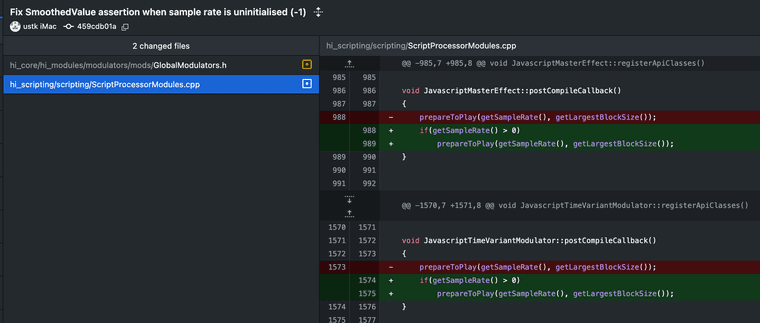
Don't bother the GlobalModulators.h, I reverted it...
But I confirm it's only working when cycling bypass once after init. If it's related to my fix I don't know, because I can't remove it without seeing the plugin crashing the DAW...
-
@ustk but that's not the hardcoded master FX - just tried again with a simple dsp network that modulates an osc with an extramod - it initialises the connection correctly. We're talking about loading the project fresh in HISE, right?
But your fix look good, no reason to call this with a samplerate of zero.
-
@Christoph-Hart said in Matrix modulation connection is broken in exported plugin:
We're talking about loading the project fresh in HISE, right?
No, it was always working in Hise, the issue is with the exported binary.


